# 任务并发库
**Repository Path**: LTSKF/task-concurrency-library
## Basic Information
- **Project Name**: 任务并发库
- **Description**: 一个仅带头的 C++ 任务并发库
- **Primary Language**: Unknown
- **License**: MIT
- **Default Branch**: master
- **Homepage**: None
- **GVP Project**: No
## Statistics
- **Stars**: 0
- **Forks**: 0
- **Created**: 2026-01-10
- **Last Updated**: 2026-01-10
## Categories & Tags
**Categories**: Uncategorized
**Tags**: None
## README
# transwarp
[](https://github.com/bloomen/transwarp/actions/workflows/transwarp-tests.yml?query=branch%3Amaster)
Doxygen documentation
transwarp is a header-only C++ library for task concurrency. It
allows you to easily create a graph of tasks where every task can be executed
asynchronously. transwarp is written in C++17 and only depends on the standard
library. Just copy `include/transwarp.h` to your project and off you go!
Tested with GCC, Clang, ICC, and Visual Studio.
C++11 support can be enabled by defining `TRANSWARP_CPP11` at compile time.
**Important:** Only use tagged releases of transwarp in production code!
**Table of contents**
* [Example](#example)
* [API doc](#api-doc)
* [Creating tasks](#creating-tasks)
* [Scheduling tasks](#scheduling-tasks)
* [Executors](#executors)
* [Range functions](#range-functions)
* [Canceling tasks](#canceling-tasks)
* [Event system](#event-system)
* [Task pool](#task-pool)
* [Timing tasks](#timing-tasks)
* [Optimizing efficiency](#optimizing-efficiency)
* [Feedback](#feedback)
* [Contributors](#contributors)
## Example
This example creates three tasks and connects them with each other to form
a two-level graph. The tasks are then scheduled twice for computation
while using 4 threads.
```cpp
#include
#include
#include "transwarp.h"
namespace tw = transwarp;
int main() {
double x = 0;
int y = 0;
// Building the task graph
auto parent1 = tw::make_task(tw::root, [&x]{ return 13.3 + x; })->named("something");
auto parent2 = tw::make_task(tw::root, [&y]{ return 42 + y; })->named("something else");
auto child = tw::make_task(tw::consume, [](double a, int b) { return a + b;
}, parent1, parent2)->named("adder");
tw::parallel executor{4}; // Parallel execution with 4 threads
child->schedule_all(executor); // Schedules all tasks for execution
std::cout << "result = " << child->get() << std::endl; // result = 55.3
// Modifying data input
x += 2.5;
y += 1;
child->schedule_all(executor); // Re-schedules all tasks for execution
std::cout << "result = " << child->get() << std::endl; // result = 58.8
// Creating a dot-style graph for visualization
std::ofstream{"basic_with_three_tasks.dot"} << tw::to_string(child->edges());
}
```
The resulting graph of this example looks like this:
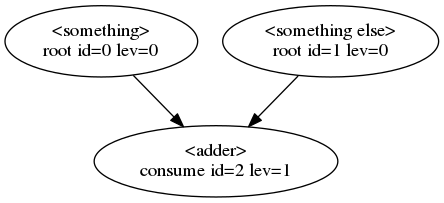
Every bubble represents a task and every arrow an edge between two tasks.
The first line within a bubble is the task name. The second line denotes the task
type followed by the task id and the task level in the graph.
## API doc
This is a brief API doc of transwarp.
For more details check out the doxygen documentation
and the transwarp examples.
In the following we will use `tw` as a namespace alias for `transwarp`.
### Creating tasks
transwarp supports seven different task types:
```cpp
root, // The task has no parents
accept, // The task's functor accepts all parent futures
accept_any, // The task's functor accepts the first parent future that becomes ready
consume, // The task's functor consumes all parent results
consume_any, // The task's functor consumes the first parent result that becomes ready
wait, // The task's functor takes no arguments but waits for all parents to finish
wait_any, // The task's functor takes no arguments but waits for the first parent to finish
```
The task type is passed as the first parameter to `make_task`, e.g., to create
a `consume` task simply do this:
```cpp
auto task = tw::make_task(tw::consume, functor, parent1, parent2);
```
where `functor` denotes some callable and `parent1/2` the parent tasks.
The functor as passed to `make_task` needs to fulfill certain requirements based
on the task type and the given parents:
**_root_**: A task at the root (top) of the graph. This task gets executed first.
A functor to a `root` task cannot have any parameters since this task does not
have parent tasks, e.g.:
```cpp
auto task = tw::make_task(tw::root, []{ return 42; });
```
Another way of defining a`root` task is a _value task_ which can be created as:
```cpp
auto task = tw::make_value_task(42);
```
A value task doesn't require scheduling and always returns the same value or exception.
**_accept_**: This task is required to have at least one parent. It _accepts_
the resulting parent futures as they are without unwrapping. Hence, the child
can decide how to proceed since a call to `get()` can potentially throw an
exception. Here's an example:
```cpp
auto task = tw::make_task(tw::accept, [](auto f1, auto f2) { return f1.get() + f2.get(); }, parent1, parent2);
```
**_accept_any_**: This task is required to have at least one parent but its
functor takes exactly one future, namely the future of the parent that
first finishes. All other parents are abandoned and canceled. Here's an example:
```cpp
auto task = tw::make_task(tw::accept_any, [](auto f1) { return f1.get(); }, parent1, parent2);
```
Note that canceling only works for already running tasks when the functor is
sub-classed from `transwarp::functor`.
**_consume_**: This task follows the same rules as `accept` with the difference
that the resulting parent futures are unwrapped (have `get()` called on them).
The results are then passed to the child, hence, consumed by the child task.
The child task will not be invoked if any parent throws an exception.
For example:
```cpp
auto task = tw::make_task(tw::consume, [](int x, int y) { return x + y; }, parent1, parent2);
```
**_consume_any_**: This task follows the same rules as `accept_any` with the difference
that the resulting parent futures are unwrapped (have `get()` called on them).
For example:
```cpp
auto task = tw::make_task(tw::consume_any, [](int x) { return x; }, parent1, parent2);
```
**_wait_**: This task's functor does not take any parameters but the task
must have at least one parent. It simply waits for completion of all parents
while unwrapping futures before calling the child's functor. For example:
```cpp
auto task = tw::make_task(tw::wait, []{ return 42; }, parent1, parent2);
```
**_wait_any_**: This task works similar to the `wait` task but calls its functor
as soon as the first parent completes. It abandons and cancels all remaining
parent tasks. For example:
```cpp
auto task = tw::make_task(tw::wait_any, []{ return 42; }, parent1, parent2);
```
Generally, tasks are created using `make_task` which allows for any number
of parents. However, it is a common use case for a child to only have one parent.
For this, `then()` can be directly called on the parent object to create a _continuation_:
```cpp
auto child = tw::make_task(tw::root, []{ return 42; })->then(tw::consume, functor);
```
`child` is now a single-parent task whose functor consumes an integer.
### Scheduling tasks
Once a task is created it can be scheduled just by itself:
```cpp
auto task = tw::make_task(tw::root, functor);
task->schedule();
```
which, if nothing else is specified, will run the task on the current thread.
However, using the built-in `parallel` executor the task can be pushed into a
thread pool and executed asynchronously:
```cpp
tw::parallel executor{4}; // Thread pool with 4 threads
auto task = tw::make_task(tw::root, functor);
task->schedule(executor);
```
Regardless of how you schedule, the task result can be retrieved through:
```cpp
std::cout << task->get() << std::endl;
```
When chaining multiple tasks together a directed acyclic graph is built in which
every task can be scheduled individually. Though, in many scenarios it is useful
to compute all tasks in the right order with a single call:
```cpp
auto parent1 = tw::make_task(tw::root, foo); // foo is a functor
auto parent2 = tw::make_task(tw::root, bar); // bar is a functor
auto task = tw::make_task(tw::consume, functor, parent1, parent2);
task->schedule_all(); // Schedules all parents and itself
```
which can also be scheduled using an executor, for instance:
```cpp
tw::parallel executor{4};
task->schedule_all(executor);
```
which will run those tasks in parallel that do not depend on each other.
### Executors
We have seen that we can pass executors to `schedule()` and `schedule_all()`.
Additionally, they can be assigned to a task directly:
```cpp
auto exec1 = std::make_shared(2);
task->set_executor(exec1);
tw::sequential exec2;
task->schedule(exec2); // exec1 will be used to schedule the task
```
The task-specific executor will always be preferred over other executors when
scheduling tasks.
transwarp defines an executor interface which can be implemented to perform custom
behavior when scheduling tasks. The interface looks like this:
```cpp
class executor {
public:
virtual ~executor() = default;
// The name of the executor
virtual std::string name() const = 0;
// Only ever called on the thread of the caller to schedule()
virtual void execute(const std::function& functor, tw::itask& task) = 0;
};
```
where `functor` denotes the function to be run and `task` the task the functor belongs to.
### Range functions
There are convenience functions that can be applied to an iterator range:
* `tw::for_each`
* `tw::transform`
These are very similar to their standard library counterparts except that they
return a task for deferred, possibly asynchronous execution. Here's an example:
```cpp
std::vector vec = {1, 2, 3, 4, 5, 6, 7};
tw::parallel exec{4};
auto task = tw::for_each(exec, vec.begin(), vec.end(), [](int& x){ x *= 2; });
task->wait(); // all values in vec will have doubled
```
### Canceling tasks
A task can be canceled by calling `task->cancel(true)` which will, by default,
only affect tasks that are not currently running yet. However, if you create a functor
that inherits from `transwarp::functor` you can terminate tasks while they're
running. `transwarp::functor` looks like this:
```cpp
class functor {
public:
virtual ~functor() = default;
protected:
// The associated task (only to be called after the task was constructed)
const tw::itask& transwarp_task() const noexcept;
// The associated task (only to be called after the task was constructed)
tw::itask& transwarp_task() noexcept;
// If the associated task is canceled then this will throw transwarp::task_canceled
// which will stop the task while it's running (only to be called after the task was constructed)
void transwarp_cancel_point() const;
private:
...
};
```
By placing calls to `transwarp_cancel_point()` in strategic places of your functor
you can denote well defined points where the functor will exit when the associated task is canceled.
A task can also be canceled by throwing `transwarp::task_canceled` directly.
As mentioned above, tasks can be explicitly canceled on client request. In addition,
all tasks considered abandoned by `accept_any`, `consume_any`, or `wait_any`
operations are also canceled in order to terminate them as soon as their computations
become superfluous.
### Event system
Transwarp provides an event system that allows you to subscribe to all or specific
events of a task, such as, before started or after finished events. The task events
are enumerated in the `event_type` enum:
```cpp
enum class event_type {
before_scheduled, // Just before a task is scheduled
after_future_changed, // Just after the task's future was changed
before_started, // Just before a task starts running
before_invoked, // Just before a task's functor is invoked
after_finished, // Just after a task has finished running
after_canceled, // Just after a task was canceled
after_satisfied, ///< Just after a task has satisfied all its children with results
after_custom_data_set, // Just after custom data was assigned
}
```
Listeners are created by sub-classing from the `listener` interface:
```cpp
class listener {
public:
virtual ~listener() = default;
// This may be called from arbitrary threads depending on the event type
virtual void handle_event(tw::event_type event, tw::itask& task) = 0;
};
```
A listener can then be passed to the `add_listener` functions of a task
to add a new listener or to the `remove_listener` functions to remove
an existing listener.
### Task pool
A task pool is useful when one wants to run the same graph in parallel. For this purpose,
transwarp provides a `task_pool` which manages a pool of tasks from which
one can request an idle task for parallel graph execution. For example:
```cpp
tw::parallel exec{4};
auto my_task = make_graph();
tw::task_pool pool{my_task};
for (;;) {
auto task = pool.next_task(); // task may be null if the pool size is exhausted
if (task) {
task->schedule_all(exec);
}
}
```
### Timing tasks
In order to identify bottlenecks it's often useful to know how much time is spent
in which task. transwarp provides a `timer` listener that will automatically
time the tasks it listens to:
```cpp
auto task = make_graph();
task->add_listener_all(std::make_shared()); // assigns the timer listener to all tasks
task->schedule_all();
std::ofstream{"graph.dot"} << tw::to_string(task->edges()); // the dot file now contains timing info
```
### Optimizing efficiency
**Compile time switches**
By default, transwarp provides its full functionality to its client. However,
in many cases not all of that is actually required and so transwarp provides
a few compile time switches to reduce the task size.
These switches are:
```
TRANSWARP_DISABLE_TASK_CUSTOM_DATA
TRANSWARP_DISABLE_TASK_NAME
TRANSWARP_DISABLE_TASK_PRIORITY
TRANSWARP_DISABLE_TASK_REFCOUNT
TRANSWARP_DISABLE_TASK_TIME
```
To get the minimal task size with a single switch one can define
```
TRANSWARP_MINIMUM_TASK_SIZE
```
at build time.
**Releasing unused memory**
By default, every task in a graph will keep its result until rescheduling or
a manual task reset. The `releaser` listener allows you to automatically
release a task result after that task's children have consumed the result.
For example:
```cpp
auto task = make_graph();
task->add_listener_all(std::make_shared()); // assigns the releaser listener to all tasks
task->schedule_all();
// All intermediate task results are now released (i.e. futures are invalid)
auto result = task->get(); // The final task's result remains valid
```
The `releaser` also accepts an executor that gives control over _where_ a task's
result is released.
## Using transwarp with tipi.build
`transwarp` can be easily used in [tipi.build](https://tipi.build) projects simply by adding the following entry to your `.tipi/deps`:
```json
{
"bloomen/transwarp": { }
}
```
## Feedback
Get in touch if you have any questions or suggestions to make this a better library!
You can post on [gitter](https://gitter.im/bloomen/transwarp), submit a pull request,
create a Github issue, or simply email one of the contributors.
If you're serious about contributing code to transwarp (which would be awesome!) then
please submit a pull request and keep in mind that:
- unit tests should be added for all new code by extending the existing unit test suite
- C++ code uses spaces throughout