# codepen-io
**Repository Path**: MagicWingMI/codepen-io
## Basic Information
- **Project Name**: codepen-io
- **Description**: codepen.io网站的代码,以及学习CodingStartup的代码
- **Primary Language**: Unknown
- **License**: Not specified
- **Default Branch**: master
- **Homepage**: None
- **GVP Project**: No
## Statistics
- **Stars**: 0
- **Forks**: 0
- **Created**: 2021-05-16
- **Last Updated**: 2021-06-24
## Categories & Tags
**Categories**: Uncategorized
**Tags**: None
## README
# 常用DOM操作
## 获取节点
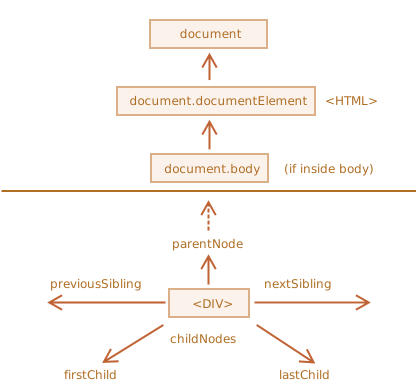
## 获取元素节点
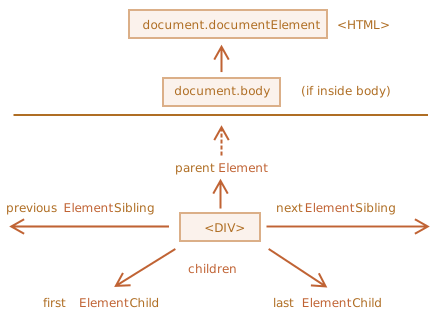
## 创建节点
- `document.createElement(tag)` — 用给定的标签创建一个元素节点,
- `document.createTextNode(value)` — 创建一个文本节点(很少使用),
- `elem.cloneNode(deep)` — 克隆元素,如果 `deep==true` 则与其后代一起克隆。
## 插入节点
> 插入节点或者文本字符串,不是`html`
```javascript
// 最终结果
<p>Hello</p>
```
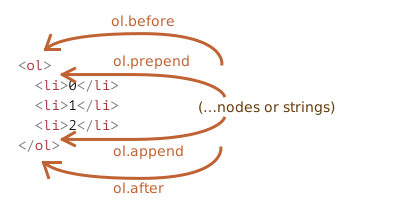
- `node.append(...nodes or strings)` — 在 `node` 末尾插入,
- `node.prepend(...nodes or strings)` — 在 `node` 开头插入,
- `node.before(...nodes or strings)` — 在 `node` 之前插入,
- `node.after(...nodes or strings)` — 在 `node` 之后插入,
- `node.replaceWith(...nodes or strings)` — 替换 `node`。
- `node.remove()` — 移除 `node`。
请注意:如果我们要将一个元素 **移动** 到另一个地方,则无需将其从原来的位置中删除。
**所有插入方法都会自动从旧位置删除该节点。**
```javascript
First
Second
// 结果
Second
First
```
## 插入HTML
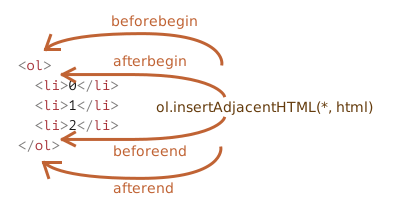
为此,我们可以使用另一个非常通用的方法:`elem.insertAdjacentHTML(where, html)`。
该方法的第一个参数是代码字(code word),指定相对于 `elem` 的插入位置。必须为以下之一:
- `"beforebegin"` — 将 `html` 插入到 `elem` 前插入,
- `"afterbegin"` — 将 `html` 插入到 `elem` 开头,
- `"beforeend"` — 将 `html` 插入到 `elem` 末尾,
- `"afterend"` — 将 `html` 插入到 `elem` 后。
## document滚动
```javascript
document.documentElement.scrollTop
document.documentElement.scrollHeight
```
## 宽高
+ 获取`element`可视化宽度/宽度
`document.documentElement.clientWidth`

+ 获取`element`元素宽高
`HTMLElement.offsetWidth`

+ 获取浏览器的宽高
+ `window.innerHeight`和`window.outerHeight `

+ `window.innerWidth`和`window.outerWidth`参照上面的横向
## 定位的左右
+ 获取定位`element`元素左右
`HTMLElement.offsetLeft`
> **`HTMLElement.offsetLeft`** 是一个只读属性,返回当前元素*左上角*相对于 [`HTMLElement.offsetParent`](https://developer.mozilla.org/zh-CN/docs/Web/API/HTMLElement/offsetParent) 节点的左边界偏移的像素值。
>
> 对块级元素来说,`offsetTop`、`offsetLeft`、`offsetWidth` 及 `offsetHeight` 描述了元素相对于 `offsetParent` 的边界框。
## `classList`对类名的操作
- `elem.classList.add/remove(class)` — 添加/移除类。
- `elem.classList.toggle(class)` — 如果类不存在就添加类,存在就移除它。
- `elem.classList.contains(class)` — 检查给定类,返回 `true/false`。
```javascript
const div = document.createElement('div');
div.className = 'foo';
// 初始状态:
console.log(div.outerHTML);
// 使用 classList API 移除、添加类值
div.classList.remove("foo");
div.classList.add("anotherclass");
//
console.log(div.outerHTML);
// 如果 visible 类值已存在,则移除它,否则添加它
div.classList.toggle("visible");
// add/remove visible, depending on test conditional, i less than 10
div.classList.toggle("visible", i < 10 );
console.log(div.classList.contains("foo"));
// 添加或移除多个类值
div.classList.add("foo", "bar", "baz");
div.classList.remove("foo", "bar", "baz");
// 使用展开语法添加或移除多个类值
const cls = ["foo", "bar"];
div.classList.add(...cls);
div.classList.remove(...cls);
// 将类值 "foo" 替换成 "bar"
div.classList.replace("foo", "bar");
```
## 可见阈值
```javascript
h2 {
font-size: 72px;
font-family: Helvetica;
/* letter-spacing: -0.12em; */
width: 290px;
font-weight: normal;
/* position: relative; */
left: 50%;
position: sticky;
top: -1px;
margin: 100px 0;
padding: 0;
}
Only 11.5mm. Now that's thin.
```
## `getComputedStyle`获取样式
`https://www.runoob.com/w3cnote/window-getcomputedstyle-method.html`
**getComputedStyle** 和 **element.style** 的相同点就是二者返回的都是 CSSStyleDeclaration 对象,取相应属性值得时候都是采用的 CSS 驼峰式写法,均需要注意 float 属性。
**而不同点就是:**
- `element.style` 读取的只是元素的**内联样式**,即写在元素的 style 属性上的样式;而 `getComputedStyle` 读取的样式是最终样式,包括了**内联样式**、**嵌入样式**和**外部样式**。
- `element.style` 既支持读也支持写,我们通过 `element.style` 即可改写元素的样式。而 `getComputedStyle` 仅支持读并不支持写入。我们可以通过使用 `getComputedStyle` 读取样式,通过 `element.style` 修改样式
**我们可以通过使用 \**getComputedStyle\** 读取样式,通过 \**element.style\** 修改样式。**
+ `getComputedStyle(h2).getPropertyValue('margin-top')`拿到的值带`px`
+ `h2.style.setProperty('--scale', (1 - scrolled))`
```javascript
```
```javascript
let marginTop = parseInt(getComputedStyle(h2).getPropertyValue('margin-top'))
// 已经滚到顶了,然后拿到已经滚的距离,先把上面的marginTop减去,再跟height算滚动比例
let scrolled = (html.scrollTo - marginTop) / height
h2.style.setProperty('--scale', )
```
## `style`
### 修改样式
+ `style.setProperty(propertyName, value, priority)`
`h2.style.setProperty('--scale', (1 - scrolled))`
+ `style.cssPropertyName = 'value'`
```javascript
var declaration = document.styleSheets[0].rules[0].style;
declaration.setProperty('margin', '1px 2px');
// Equivalent to:
declaration.margin = '1px 2px';
```
### 前缀属性
**前缀属性**
像 `-moz-border-radius` 和 `-webkit-border-radius` 这样的浏览器前缀属性,也遵循同样的规则:连字符 `-` 表示大写。
```javascript
button.style.MozBorderRadius = '5px';
button.style.WebkitBorderRadius = '5px';
```
### 重置样式属性
有时我们想要分配一个样式属性,稍后移除它。
例如,为了隐藏一个元素,我们可以设置 `elem.style.display = "none"`。
然后,稍后我们可能想要移除 `style.display`,就像它没有被设置一样。这里不应该使用 `delete elem.style.display`,而应该使用 `elem.style.display = ""` 将其赋值为空。
### `style.cssText`
通常,我们使用 `style.*` 来对各个样式属性进行赋值。我们不能像这样的 `div.style="color: red; width: 100px"` 设置完整的属性,因为 `div.style` 是一个对象,并且它是只读的。
想要以字符串的形式设置完整的样式,可以使用特殊属性 `style.cssText`:
可以通过设置一个特性(attribute)来实现同样的效果:`div.setAttribute('style', 'color: red...')`。
## 特性操作
> 操作特性,HTML标签上的属性`attribute`
>
> HTML 特性有以下几个特征:
>
> - 它们的名字是大小写不敏感的(`id` 与 `ID` 相同)。
> - 它们的值总是字符串类型的。
\+ `elem.hasAttribute(name)` — 检查特性是否存在。
\+ `elem.getAttribute(name)` — 获取这个特性值。
\+ `elem.setAttribute(name, value)` — 设置这个特性值。
\+ `elem.removeAttribute(name)` — 移除这个特性。
\+ `elem.attributes` — 读取所有特性:属于内建 Attr 类的对象的集合,具有 name 和 value 属性。
### 非标准的特性-`dataset`
所有以 “data-” 开头的特性均被保留供程序员使用。它们可在 dataset 属性中使用。
```javascript
// 读取
alert(order.dataset.orderState); // new
// 修改
order.dataset.orderState = "pending"; // (*)
```