# EdgeGPT
**Repository Path**: RapidAI/EdgeGPT
## Basic Information
- **Project Name**: EdgeGPT
- **Description**: No description available
- **Primary Language**: Unknown
- **License**: Unlicense
- **Default Branch**: master
- **Homepage**: None
- **GVP Project**: No
## Statistics
- **Stars**: 0
- **Forks**: 0
- **Created**: 2023-05-11
- **Last Updated**: 2023-05-11
## Categories & Tags
**Categories**: Uncategorized
**Tags**: None
## README


---
## 设置
### 安装模块
```bash
python3 -m pip install EdgeGPT --upgrade
```
### 要求
- python 3.8+
- 一个已经通过候补名单的微软账户 (必填)
- 需要在 New Bing 支持的国家(中国大陆需使用VPN)
### 检查访问权限 (必需)
- 安装最新版本的 Microsoft Edge
- 或者, 您可以使用任何浏览器并将用户代理设置为Edge的用户代理 (例如`Mozilla/5.0 (Windows NT 10.0; Win64; x64) AppleWebKit/537.36 (KHTML, like Gecko) Chrome/111.0.0.0 Safari/537.36 Edg/111.0.1661.51`). 您可以使用像 "User-Agent Switcher and Manager" [Chrome](https://chrome.google.com/webstore/detail/user-agent-switcher-and-m/bhchdcejhohfmigjafbampogmaanbfkg) 和 [Firefox](https://addons.mozilla.org/en-US/firefox/addon/user-agent-string-switcher/) 这样的扩展轻松完成此操作.
- 打开 [bing.com/chat](https://bing.com/chat)
- 如果您看到聊天功能,就准备就绪
### 获取身份验证 (必需)
- 安装 [Chrome](https://chrome.google.com/webstore/detail/cookie-editor/hlkenndednhfkekhgcdicdfddnkalmdm) 或 [Firefox](https://addons.mozilla.org/en-US/firefox/addon/cookie-editor/) 的 cookie editor 扩展
- 移步到 `bing.com`
- 打开扩展程序
- 点击右下角的"导出" (将会把内容保存到你的剪贴板上)
- 把你剪贴板上的内容粘贴到 `cookies.json` 文件中
## Chatbot
## 使用方法
### 快速开始
```
$ python3 -m EdgeGPT -h
EdgeGPT - A demo of reverse engineering the Bing GPT chatbot
Repo: github.com/acheong08/EdgeGPT
By: Antonio Cheong
!help for help
Type !exit to exit
Enter twice to send message or set --enter-once to send one line message
usage: EdgeGPT.py [-h] [--enter-once] [--no-stream] [--rich] [--proxy PROXY] [--wss-link WSS_LINK] [--style {creative,balanced,precise}]
[--cookie-file COOKIE_FILE]
options:
-h, --help show this help message and exit
--enter-once
--no-stream
--rich
--proxy PROXY Proxy URL (e.g. socks5://127.0.0.1:1080)
--wss-link WSS_LINK WSS URL(e.g. wss://sydney.bing.com/sydney/ChatHub)
--style {creative,balanced,precise}
--cookie-file COOKIE_FILE
needed if environment variable COOKIE_FILE is not set
```
---
### 开发演示
传入 cookie 的三种方式:
- 设置环境变量: `export COOKIE_FILE=/path/to/cookies.json`.
- 像这样把 `cookies.json` 的路径传入 `cookie_path` 参数中:
```python
bot = Chatbot(cookie_path='./cookies.json')
```
- 通过参数 `cookie` 传入 cookie,如下所示:
```python
with open('./cookies.json', 'r') as f:
cookies = json.load(f)
bot = Chatbot(cookies=cookies)
```
使用 aysnc 获得最佳体验
更高级用法示例的参考代码:
```python
import asyncio
from EdgeGPT import Chatbot, ConversationStyle
async def main():
bot = await Chatbot.create()
print(await bot.ask(prompt="Hello world", conversation_style=ConversationStyle.creative,wss_link="wss://sydney.bing.com/sydney/ChatHub"))
await bot.close()
if __name__ == "__main__":
asyncio.run(main())
```
## 图片生成
```bash
$ python3 -m ImageGen -h
usage: ImageGen.py [-h] [-U U] [--cookie-file COOKIE_FILE] --prompt PROMPT [--output-dir OUTPUT_DIR] [--quiet] [--asyncio]
optional arguments:
-h, --help show this help message and exit
-U U Auth cookie from browser
--cookie-file COOKIE_FILE
File containing auth cookie
--prompt PROMPT Prompt to generate images for
--output-dir OUTPUT_DIR
Output directory
--quiet Disable pipeline messages
--asyncio Run ImageGen using asyncio
```
### 开发演示
```python
from ImageGen import ImageGen
import argparse
import json
async def async_image_gen(args) -> None:
async with ImageGenAsync(args.U, args.quiet) as image_generator:
images = await image_generator.get_images(args.prompt)
await image_generator.save_images(images, output_dir=args.output_dir)
if __name__ == "__main__":
parser = argparse.ArgumentParser()
parser.add_argument("-U", help="Auth cookie from browser", type=str)
parser.add_argument("--cookie-file", help="File containing auth cookie", type=str)
parser.add_argument(
"--prompt",
help="Prompt to generate images for",
type=str,
required=True,
)
parser.add_argument(
"--output-dir",
help="Output directory",
type=str,
default="./output",
)
args = parser.parse_args()
# Load auth cookie
with open(args.cookie_file, encoding="utf-8") as file:
cookie_json = json.load(file)
for cookie in cookie_json:
if cookie.get("name") == "_U":
args.U = cookie.get("value")
break
if args.U is None:
raise Exception("Could not find auth cookie")
if not args.asyncio:
# Create image generator
image_generator = ImageGen(args.U, args.quiet)
image_generator.save_images(
image_generator.get_images(args.prompt),
output_dir=args.output_dir,
)
else:
asyncio.run(async_image_gen(args))
```
## Star历史
[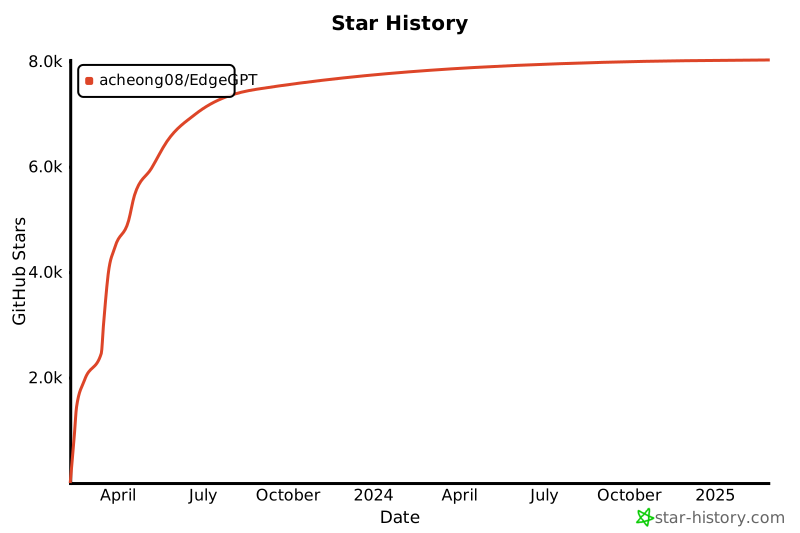](https://star-history.com/#acheong08/EdgeGPT&Date)
## 贡献者
这个项目的存在要归功于所有做出贡献的人。
 # Edge GPT
_新必应的逆向工程_
English -
简体中文 -
繁體中文 (中國臺灣) -
Español -
日本語
# Edge GPT
_新必应的逆向工程_
English -
简体中文 -
繁體中文 (中國臺灣) -
Español -
日本語