# boost_searcher
**Repository Path**: Tang-CMer/boost_searcher
## Basic Information
- **Project Name**: boost_searcher
- **Description**: Boost库站内搜索引擎
- **Primary Language**: C++
- **License**: MulanPSL-2.0
- **Default Branch**: master
- **Homepage**: None
- **GVP Project**: No
## Statistics
- **Stars**: 1
- **Forks**: 0
- **Created**: 2023-03-13
- **Last Updated**: 2025-10-23
## Categories & Tags
**Categories**: Uncategorized
**Tags**: None
## README
# Boost_Searcher
## 介绍
### 什么是搜索引擎
搜索引擎是指根据一定的策略、运用特定的计算机[程序](https://baike.baidu.com/item/程序/13831935?fromModule=lemma_inlink)从互联网上采集信息,在对信息进行组织和处理后,为用户提供[检索服务](https://baike.baidu.com/item/检索服务/2267469?fromModule=lemma_inlink),将检索的相关信息展示给用户的系统
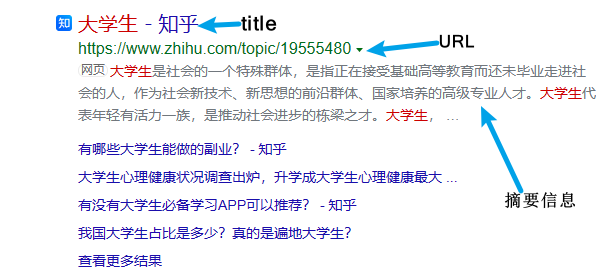
网页搜索结果展现的三要素:标题、摘要、网页链接
项目准备
```
boost 官网: https://www.boost.org/
```
在boost官网下载所需版本的库,然后解压,只保留doc目录下的html文件
## 软件架构
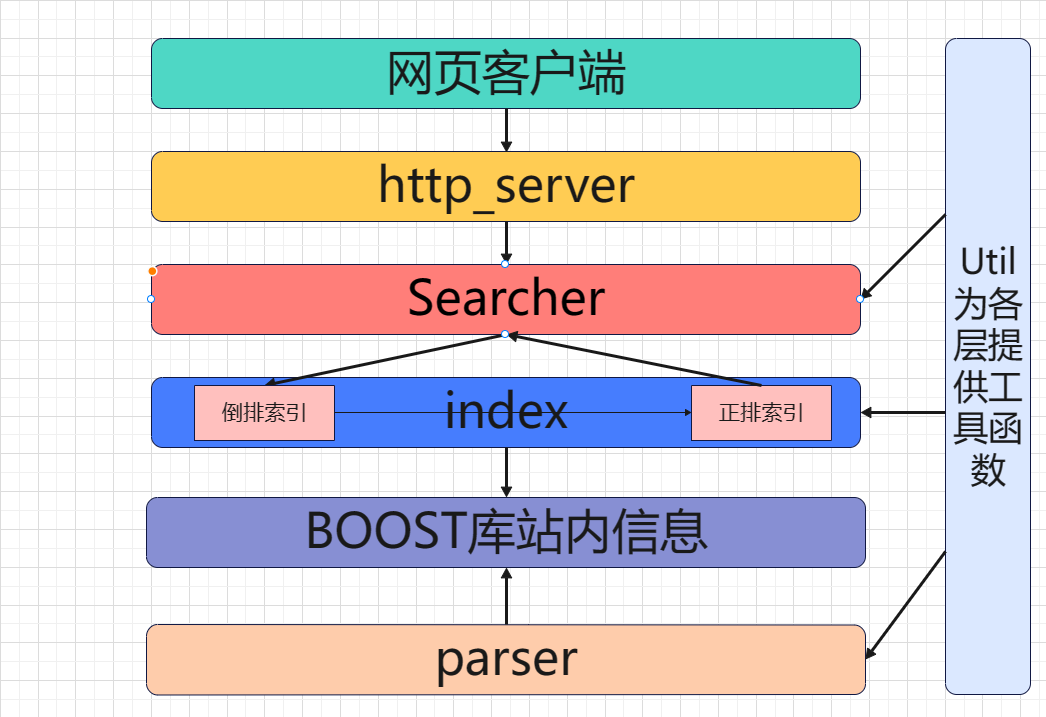
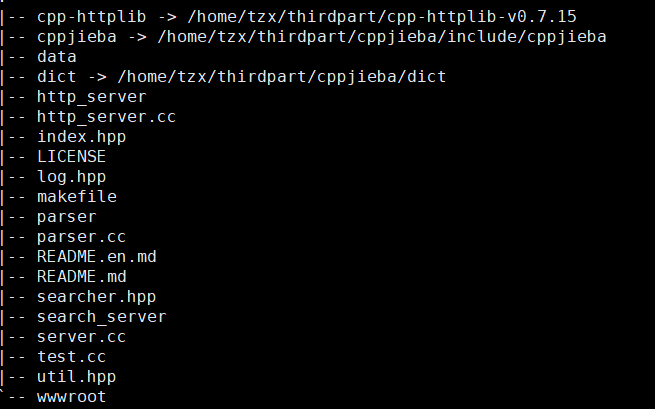
## 各模块代码详细说明
### parser.cc
此层主要执行数据清洗及去标签功能
标签:HTML的标签,如 |
采用如下方式对解析好的数据进行保存:
```
title\3content\3url \n title\3content\3url \n title\3content\3url \n ...
```
#### 主要功能函数:
```c++
//读取文件内容
bool EnumFile(const std::string &src_path, std::vector *files_list);
//解析文件
bool ParseHtml(const std::vector &files_list,
std::vector *results);
//保存文件
bool SaveHtml(const std::vector &results, const std::string &output);
```
### index.cc
此层主要建立文档的正排索引和倒排索引
#### 正排索引
```c++
DocInfo *BuildForwardIndex(const std::string &line)
//解析line,字符串切分
//将字符串填充到DocInfo
//插入到正排索引的vecotr
```
#### 倒排索引
```c++
bool BuildInvertedIndex(const DocInfo &doc)
//倒排拉链:[关键字和倒排拉链的映射关系]
//对标题进行分词
//对标题进行词频统计
//对正文进行分词
//对正文进行词频统计
```
### searcher.cc
```c++
void InitSearcher(const std::string &input)
//1. 获取或者创建index对象
//2. 根据index对象建立索引
void Search(const std::string &query, std::string *json_string)
//1.[分词]:对我们的query进行按照searcher的要求进行分词
//2.[触发]:就是根据分词的各个"词",进行index查找,建立index是忽略大小写,所以搜索,关键字也需要
//3.去重,由于内容可能出现多个相同关键字,但建立的索引是一样的,所以要进行去重
//4.[合并排序]:汇总查找结果,按照相关性(weight)降序排序
//5.[构建]:根据查找出来的结果,构建json串
std::string GetDesc(const std::string &html_content, const std::string &word)
//1. 找到首次出现
//2. 获取start,end , std::size_t 无符号整数
//3. 截取子串,return
```
http_server
1. 建立server对象
2. get网页信息并调用search
3. 监听端口
### index.html
1. 建立搜索框
2. 建立搜索按钮
3. 用CSS进行简单排版
4. 用js发起http请求
5. 用js动态建立搜索
### log.hpp
建立项目的日志,便于排查
```c++
#pragma once
#include
#include
#include
#define NORMAL 1
#define WARNING 2
#define DEBUG 3
#define FATAL 4
#define LOG(LEVEL, MESSAGE) log(#LEVEL, MESSAGE, __FILE__, __LINE__)
void log(std::string level, std::string message, std::string file, int line)
{
std::cout << "[" << level << "]" << "[" << time(nullptr) << "]" << "["
<< message << "]" << "[" << file << " : " << line << "]" << std::endl;
}
```
## 可改进的地方
1. 建立整站搜索
2. 设计一个在线更新的方案,信号,爬虫,完成整个服务器的设计
3. 不使用组件,设计一下对应的各种方案
4. 在我们的搜索引擎中,添加竞价排名
5. 热次统计,智能显示搜索关键词(字典树,优先级队列)
6. 使用redis频繁搜索的内容进行缓存
7. 使用消息队列kafka统一管理消息
## 项目所需环境
安装boost库
```
sudo yum install -y boost-devel
```
安装cppjieba
```
git clone https://gitcode.net/mirrors/yanyiwu/cppjieba.git
//还需执行下面的命令,否则编译不通过
cd cppjieba; cp -rf deps/limonp include/cppjieba/
```
安装jsoncpp
```
sudo yum install -y jsoncpp-devel
```
安装cpp-httplib
建议cpp-httplib 0.7.15 ,新版httlib可能会和非最新的gcc有不兼容问题
```
git clone https://gitee.com/zhangkt1995/cpp-httplib?_from=gitee_search
```
需要升级gcc到7.0以上,否则无法使用cpp-httplib
```
//安装scl
sudo yum install centos-release-scl scl-utils-build
//安装gcc
sudo yum install -y devtoolset-7-gcc devtoolset-7-gccc++
//将启动命令编写到~/.bash_profile
scl enable devtoolset-7 bash
```
## 项目运行
Makefile
```
PARSER=parser
SSVR=search_server
HTTP_SERVER=http_server
cc = g++
.PHONY:all
all:$(PARSER) $(SSVR) $(HTTP_SERVER)
$(PARSER):parser.cc
$(cc) -o $@ $^ -lboost_system -lboost_filesystem -std=c++11
$(SSVR):server.cc
$(cc) -o $@ $^ -ljsoncpp -std=c++11
$(HTTP_SERVER):http_server.cc
$(cc) -o $@ $^ -ljsoncpp -lpthread -std=c++11
.PHONY:clean
clean:
rm -f $(PARSER) $(SSVR) $(HTTP_SERVER)
```
在终端执行make命令后,
```
./http_server
```
之后访问http//:主机号:绑定的端口号,即可使用搜索引擎
#### 参与贡献
1. Fork 本仓库
2. 新建 Feat_xxx 分支
3. 提交代码
4. 新建 Pull Request
#### 特技
1. 使用 Readme\_XXX.md 来支持不同的语言,例如 Readme\_en.md, Readme\_zh.md
2. Gitee 官方博客 [blog.gitee.com](https://blog.gitee.com)
3. 你可以 [https://gitee.com/explore](https://gitee.com/explore) 这个地址来了解 Gitee 上的优秀开源项目
4. [GVP](https://gitee.com/gvp) 全称是 Gitee 最有价值开源项目,是综合评定出的优秀开源项目
5. Gitee 官方提供的使用手册 [https://gitee.com/help](https://gitee.com/help)
6. Gitee 封面人物是一档用来展示 Gitee 会员风采的栏目 [https://gitee.com/gitee-stars/](https://gitee.com/gitee-stars/)