# TailfLog
**Repository Path**: amoyx/TailfLog
## Basic Information
- **Project Name**: TailfLog
- **Description**: websocket读取实时日志
- **Primary Language**: Go
- **License**: Not specified
- **Default Branch**: master
- **Homepage**: None
- **GVP Project**: No
## Statistics
- **Stars**: 0
- **Forks**: 0
- **Created**: 2023-08-30
- **Last Updated**: 2023-08-30
## Categories & Tags
**Categories**: Uncategorized
**Tags**: None
## README
# TailfLog
> 有了tailflog, 再也不用登录服务器查看日志了...
项目地址:https://gitee.com/amoyx/TailfLog
### 项目背景
> 猿A:我去: 线上业务又出问题了,去看看日志到底是哪里错了
猿B:好好好,我马上登陆服务器看看
猿B:对啦,服务器密码是啥来着....
猿A:我想想: 好像是 &#¥&*@*~
猿B:额,日志文件在哪呢
猿A:...................
猿C:要不项目集成tailflog,集成后直接打开浏览器就能看日志了
### 项目介绍
* 与golang项目集成、提供浏览器实时查看日志的功能,类似 [tail -f xxx.log](https://www.cnblogs.com/fps2tao/p/7698224.html)
* 支持监控多个日志文件
* 支持多浏览器同时访问
* 支持浏览器 websocket 断线重连
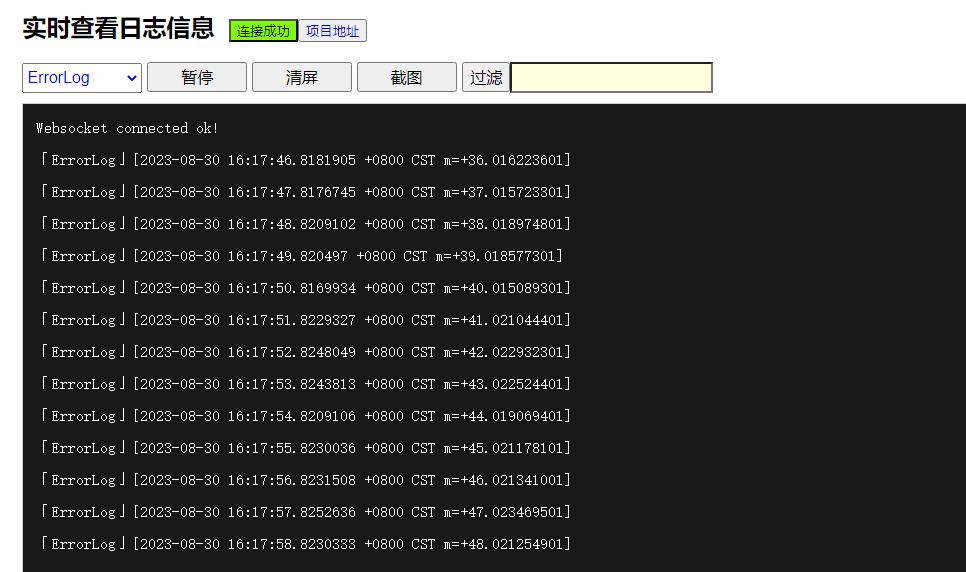
* 支持暂停、清屏、截图、过滤功能
* 查找功能可直接使用浏览器 `Ctrl+F` 来完成
### 集成方式
* 在项目中引入tailflog, **go get gitee.com/amoyx/TailfLog**
* 在代码中引用
```
tailflog.See("错误日志","error.log") // 检测 error.log
tailflog.See("调试日志","debug.log") // 检测 debug.log
tailflog.Serve(9999,"seelog")
```
* 在浏览器中访问 *http://host:port/{yourpath}*
### 项目展示