# MaterialDesignInXamlToolkit
**Repository Path**: beyond-the-universe/MaterialDesignInXamlToolkit
## Basic Information
- **Project Name**: MaterialDesignInXamlToolkit
- **Description**: Google's Material Design in XAML & WPF, for C# & VB.Net.
- **Primary Language**: C#
- **License**: MS-PL
- **Default Branch**: master
- **Homepage**: None
- **GVP Project**: No
## Statistics
- **Stars**: 0
- **Forks**: 2
- **Created**: 2020-11-25
- **Last Updated**: 2020-12-19
## Categories & Tags
**Categories**: Uncategorized
**Tags**: None
## README
#  Material Design In XAML Toolkit
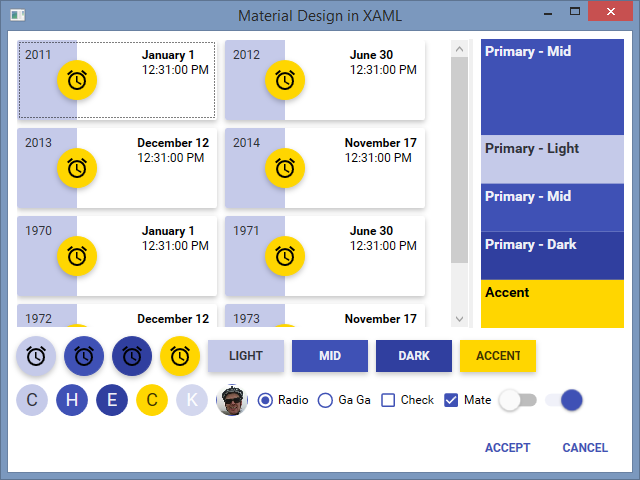
Comphrehensive and easy to use Material Design theme and control library for the Windows desktop.

###### [More pics below](#MorePics)
#  Summary
* Material Design styles for all major WPF Framework controls
* Additional controls to support the theme, including Multi Action Button, Cards, Dialogs
* Easy configuration of palette (at design _and_ runtime), according to [Google's guidelines](http://www.google.co.uk/design/spec/style/color.html#color-ui-color-application)
* Full [Material Design Icons](https://materialdesignicons.com/) icon pack
* Compatible with [Dragablz](https://github.com/ButchersBoy/Dragablz), [MahApps](https://github.com/MahApps/MahApps.Metro)
* Demo applications included in the source project
[](https://gitter.im/ButchersBoy/MaterialDesignInXamlToolkit)
[](https://ci.appveyor.com/project/ButchersBoy/materialdesigninxamltoolkit)
[](https://www.nuget.org/packages/MaterialDesignThemes/)
[](https://www.nuget.org/packages/MaterialDesignColors/)
[](https://github.com/ButchersBoy/MaterialDesignInXamlToolkit/issues)
[](https://twitter.com/James_Willock)
#  Source Code
To load the source project you will need Visual Studio 2015. Don't worry if you have an earlier version, you can still use the compiled assemblies from NuGet (see below). There are two demo projects in the solution, restore the NuGet packages and fire them both up. One is a "pure" Material Design project, the other illustrates how to combine with Dragablz & MahApps.
#  How Can I Use The Themes?
* Install [NuGet package](https://www.nuget.org/packages/MaterialDesignThemes/) ```Install-Package MaterialDesignThemes```
* Configure App.xaml according to the [example](MainDemo.Wpf/App.xaml)
* For more information see the [Get Started guide](http://materialdesigninxaml.net/#getStarted)
* Check out the [wiki](https://github.com/ButchersBoy/MaterialDesignInXamlToolkit/wiki)
* Watch the [introduction video](https://youtu.be/-n5yeEOsbCk)
#  Contribution Guidelines
* Before contributing code read the [Contribution Guidelines](CONTRIBUTING.md)
* Want to say thanks?
* Hit the :star: Star :star: button
*  #  Mentions
* Logo courtesy of GitHub user [Snalty](https://github.com/snalty), and you can see more of him;
* on his [blog](http://holothere.tumblr.com/)
* and on [Twitter](https://twitter.com/snalty)
* Marc Angers - I pulled some of his shadows straight in from this [blog post](http://marcangers.com/material-design-shadows-in-wpf/)
* Icon pack sourced from [Material Design Icons](https://materialdesignicons.com/)
* Utilises [ControlzEx](https://github.com/ControlzEx/ControlzEx)
* Ignace Maes, whose [Material Skin](https://github.com/IgnaceMaes/MaterialSkin) project inspired the original material design theme for [Dragablz](https://github.com/ButchersBoy/Dragablz), which in turn led to me starting this project
* **[Contributors!](https://github.com/ButchersBoy/MaterialDesignInXamlToolkit/graphs/contributors)** Thanks for the PRs which have helped add some extra polish.
#  More Pics


#  Mentions
* Logo courtesy of GitHub user [Snalty](https://github.com/snalty), and you can see more of him;
* on his [blog](http://holothere.tumblr.com/)
* and on [Twitter](https://twitter.com/snalty)
* Marc Angers - I pulled some of his shadows straight in from this [blog post](http://marcangers.com/material-design-shadows-in-wpf/)
* Icon pack sourced from [Material Design Icons](https://materialdesignicons.com/)
* Utilises [ControlzEx](https://github.com/ControlzEx/ControlzEx)
* Ignace Maes, whose [Material Skin](https://github.com/IgnaceMaes/MaterialSkin) project inspired the original material design theme for [Dragablz](https://github.com/ButchersBoy/Dragablz), which in turn led to me starting this project
* **[Contributors!](https://github.com/ButchersBoy/MaterialDesignInXamlToolkit/graphs/contributors)** Thanks for the PRs which have helped add some extra polish.
#  More Pics


