# okayNav
**Repository Path**: ck/okayNav
## Basic Information
- **Project Name**: okayNav
- **Description**: The world's okayest responsive navigation
- **Primary Language**: Unknown
- **License**: Not specified
- **Default Branch**: master
- **Homepage**: None
- **GVP Project**: No
## Statistics
- **Stars**: 1
- **Forks**: 0
- **Created**: 2016-03-18
- **Last Updated**: 2024-11-30
## Categories & Tags
**Categories**: Uncategorized
**Tags**: None
## README
#okayNav jQuery Plugin
[](https://gitter.im/VPenkov/okayNav?utm_source=badge&utm_medium=badge&utm_campaign=pr-badge&utm_content=badge)
You know how navigations have only a desktop and a mobile state, right? I thought, "this might cost people money because it requires additional click for users to reach even the most important pages."
This navigation aims at progressively collapsing navigation links into an off-screen navigation instead of doing it for all the links at the same time. Check out this example:
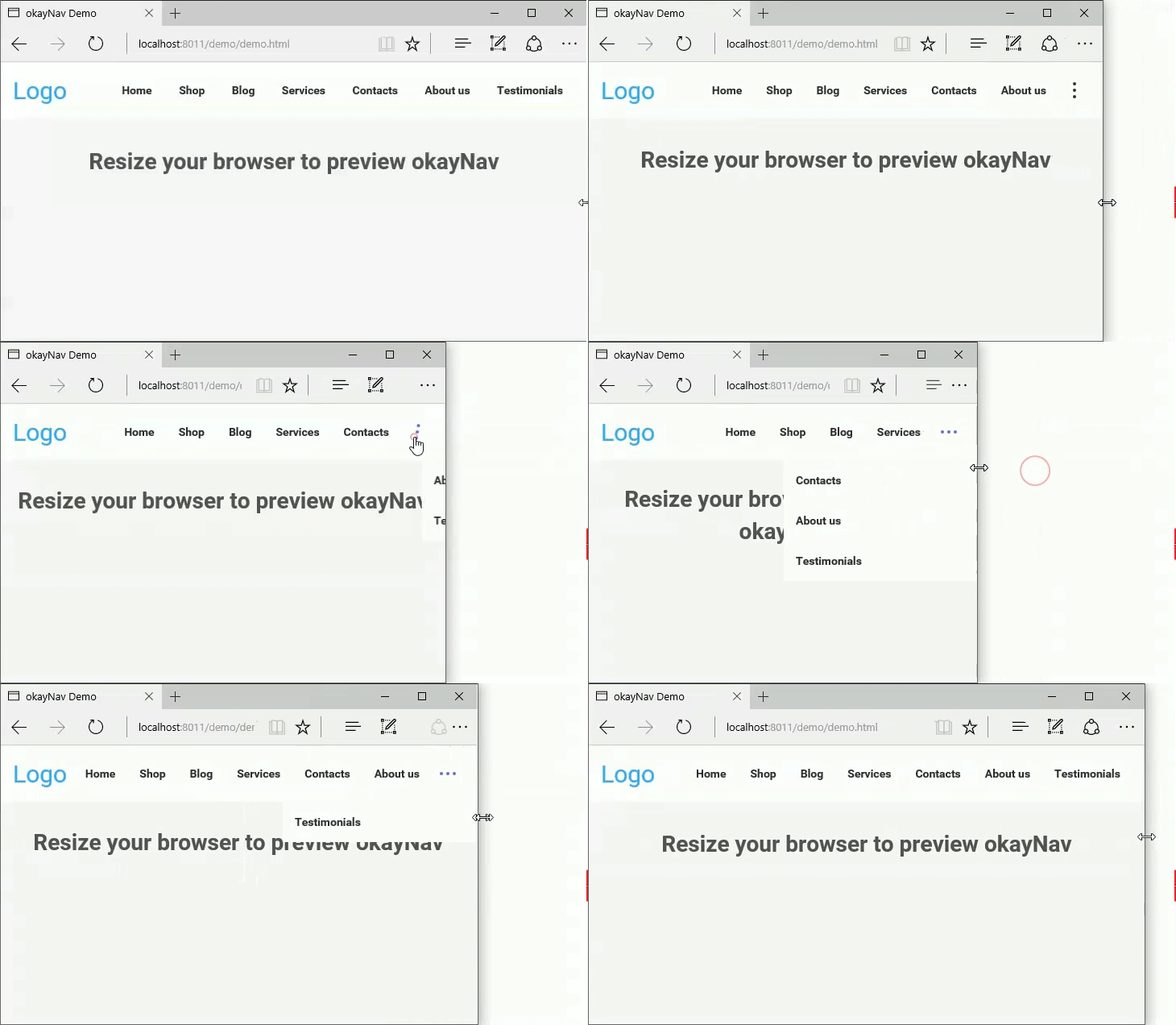
Or play with it on [CodePen](http://codepen.io/VPenkov/pen/wMZBOg).
## How to Use
This is the code used in the example:
```html
Logo
```
Include the CSS:
```html
```
Include the library:
```html
```
And here's the JS to initialize it:
```javascript
var navigation = $('#nav-main').okayNav();
```
## Dependencies
okayNav depends on jQuery. Tested with jQuery 1.10+ but should work with lower versions.
The stylization of okayNav comes in a commented LESS and CSS.
## Browser Support
okayNav supports IE9+, Firefox, Chrome. Transitions work in IE10+.
## Default options
```javascript
var navigation = $('#nav-main').okayNav({
parent : '', // will call nav's parent() by default
toggle_icon_class : 'okayNav__menu-toggle',
toggle_icon_content: '',
align_right: true, // If false, the menu and the kebab icon will be on the left
swipe_enabled: true, // If true, you'll be able to swipe left/right to open the navigation
threshold: 50, // Nav will auto open/close if swiped >= this many percent
beforeOpen : function() {}, // Will trigger before the nav gets opened
afterOpen : function() {}, // Will trigger after the nav gets opened
beforeClose : function() {}, // Will trigger before the nav gets closed
afterClose : function() {}, // Will trigger after the nav gets closed
itemHidden: function() {}, // Will trigger after an item moves to the hidden navigation
itemDisplayed: function() {} // Will trigger after an item moves to the visible navigation
});
```
## Methods
Open the off-screen part: ``navigation.okayNav('openInvisibleNav');``
Close the off-screen part``navigation.okayNav('closeInvisibleNav');``
Toggle the off-screen part``navigation.okayNav('toggleInvisibleNav');``
Recalculate what should be visible and what shouldn't: ``navigation.okayNav('recalcNav');``
Get the nav's parent element: ``navigation.okayNav('getParent');``
Get the nav's visible part: ``navigation.okayNav('getVisibleNav');``
Get the nav's off-screen part: ``navigation.okayNav('getInvisibleNav');``
Get the nav's toggle icon: ``navigation.okayNav('getNavToggleIcon');``
Get the nav children's total width: ``navigation.okayNav('getChildrenWidth');``
Destroy the nav, make everything visible, disable all events: ``navigation.okayNav('destroy');``
## Roadmap
The following features will be implemented at the next versions:
- AMD/CommonJS support
- Multi-level navigation
- Option to prioritize certain nav items
- Option to hide or show all nav items instead of doing it progressively
Pull requests are appreciated.
## License
Licensed under the [MIT License](https://opensource.org/licenses/MIT).
## Support
Please use the GitHub issues for support requests. If you need someone to implement okayNav for you, hit me up at [vergil@moongrab.com](vergil@moongrab.com).
## Changelog
**2.0.2**
Reintroduced throttling on window resize.
**2.0.1**
- Flexbox is now optional; nav will work with floats too;
- Resolved a bug when maximizing the browser.
**2.0.0**
- Swipe actions are now available;
- Swipe can be enabled or disabled;
- You can adjust the threshold after which the swipe action will trigger;
- Added extra callbacks;
- Callbacks are now camelCased;
- The beforeOpen/beforeClose callbacks now only trigger if swipe is disabled (for obvious reasons).
[Scroll up](#default-options) to see the defaults for more information!
**1.0.2**
Resize events are now a lot more efficient
**1.0.1**
First public version
## Tell me what you've created
Ping me on [Facebook](http://fb.com/vergil.penkov) or [Twitter](http://twitter.com/vergilpenkov). I'd definitely love to see what you've done with okayNav!
## Contributors
Many thanks to [@Bloodb0ne](https://github.com/bloodb0ne) for the enormous help with swipe actions!
## Buy me a beer
I appreciate good beer and good coffee. If you find this plugin useful and want to say thanks, there's no better way to do it. My PayPal is available below.
[](https://www.paypal.com/cgi-bin/webscr?cmd=_s-xclick&hosted_button_id=9CVK8L6CKVY2Y)