# dux-lite
**Repository Path**: duxphp/dux-lite
## Basic Information
- **Project Name**: dux-lite
- **Description**: ☀ This is an out-of-the-box php framework based on slim. 基于 sliphp 的轻量级 php 框架
- **Primary Language**: PHP
- **License**: MIT
- **Default Branch**: v2
- **Homepage**: None
- **GVP Project**: No
## Statistics
- **Stars**: 0
- **Forks**: 0
- **Created**: 2026-02-04
- **Last Updated**: 2026-02-10
## Categories & Tags
**Categories**: Uncategorized
**Tags**: None
## README
DuxLite v2
🚀 基于 SlimPHP 的现代化 PHP Web 框架
一个轻量级、高性能的 PHP 框架,专注于快速开发和企业级应用
📖 中文文档 |
🏠 GitHub |
🌐 官网


---
## ✨ 核心特性
* 🚀 **高性能架构** - 基于 SlimPHP 和 Eloquent ORM,轻量级高性能设计
* 🎯 **模块化设计** - 灵活的模块化架构,支持插件式开发和独立部署
* 🛡️ **PSR 标准兼容** - 完全遵循 PSR-7、PSR-11、PSR-15 等现代 PHP 标准
* 📦 **丰富的内置组件** - 缓存、队列、事件、认证、存储等企业级组件开箱即用
* 🔧 **强大的 CLI 工具** - 完善的命令行工具,支持数据库迁移、代码生成、任务调度
* 🎨 **现代化开发体验** - 属性注解、依赖注入、中间件、资源管理等现代特性
* 📝 **完整的中文文档** - 详细的使用指南、API 参考和最佳实践
* 🔒 **企业级安全** - 内置安全防护、异常处理和权限管理机制
## 🏗️ 架构设计
```mermaid
flowchart TD
subgraph 应用层["🏢 应用层(模块化)"]
Web模块["🌐 Web 模块"]
API模块["📡 API 模块"]
命令行模块["⌨️ 命令行模块"]
其他模块["🔧 其他模块"]
end
subgraph 框架核心["⚡ DuxLite 框架核心"]
路由系统["🧭 路由系统"]
数据库层["💾 数据库层"]
缓存系统["🗄️ 缓存系统"]
队列系统["📋 队列系统"]
事件系统["📡 事件系统"]
认证授权["🔐 认证授权"]
存储系统["💿 存储系统"]
日志系统["📊 日志系统"]
end
subgraph 基础设施["🔧 基础设施层"]
SlimPHP["SlimPHP"]
Eloquent["Eloquent ORM"]
Monolog["Monolog"]
PHPRedis["PHP-Redis"]
其他依赖["其他依赖"]
end
应用层 --> 框架核心
框架核心 --> 基础设施
style 应用层 fill:#e1f5fe
style 框架核心 fill:#f3e5f5
style 基础设施 fill:#e8f5e8
```
## 📦 核心组件
| 组件模块 | 功能描述 | 访问方式 |
|---------|---------|---------|
| 🧭 **路由系统** | 基于 SlimPHP 的路由管理,支持属性注解和传统定义 | `App::route()` |
| 💾 **数据库层** | 基于 Eloquent ORM 的数据库操作,支持多数据库 | `App::db()` |
| 🗄️ **缓存系统** | 多驱动缓存系统,支持 Redis、文件、内存等 | `App::cache()` |
| 📋 **队列系统** | 异步任务处理,支持数据库、Redis 等驱动 | `App::queue()` |
| 📡 **事件系统** | 事件驱动编程,支持同步和异步事件处理 | `App::event()` |
| 🔐 **认证授权** | 完整的用户认证和权限管理系统 | `App::auth()` |
| 💿 **存储系统** | 统一的文件存储接口,支持本地和云存储 | `App::storage()` |
| 📊 **日志系统** | 基于 Monolog 的日志记录系统 | `App::log()` |
## 🚀 快速开始
### 环境要求
- **PHP**: 8.2 或更高版本
- **扩展**: PDO、JSON、OpenSSL、Fileinfo、Mbstring
- **数据库**: MySQL 5.7+、SQLite 3.8+
- **Web服务器**: Nginx(推荐)、Apache
### 安装
#### 方式一:快速开始模板(推荐)
```bash
# 使用项目模板快速创建新项目
composer create-project duxweb/dux-lite-starter my-app
# 进入项目目录
cd my-app
```
#### 方式二:手动安装框架
```bash
# 使用 Composer 创建新项目
composer create-project duxweb/dux-lite my-app
# 或者在现有项目中安装
composer require duxweb/dux-lite:^2.0
```
### 启动开发服务器
```bash
# 使用 PHP 内置服务器
cd public
php -S localhost:8000
# 访问 http://localhost:8000
```
## 💻 使用示例
### 创建模块
```php
get('/users', [UserController::class, 'index']);
App::route()->post('/users', [UserController::class, 'store']);
App::route()->get('/users/{id}', [UserController::class, 'show']);
// 属性注解路由
#[Route('/api/users', methods: ['GET'])]
#[Route('/api/users', methods: ['POST'], name: 'users.store')]
class UserController
{
public function index(ServerRequestInterface $request, ResponseInterface $response): ResponseInterface
{
$users = User::paginate(15);
return response()->json($users);
}
public function store(ServerRequestInterface $request, ResponseInterface $response): ResponseInterface
{
$data = $request->getParsedBody();
$user = User::create($data);
return response()->json($user, 201);
}
}
```
### 数据库操作
```php
table('users')
->where('status', 1)
->orderBy('created_at', 'desc')
->paginate(15);
// Eloquent 模型
class User extends Model
{
protected $fillable = ['name', 'email', 'password'];
protected $hidden = ['password'];
public function posts()
{
return $this->hasMany(Post::class);
}
}
// 模型操作
$user = User::create([
'name' => '张三',
'email' => 'zhang@example.com',
'password' => password_hash('123456', PASSWORD_DEFAULT)
]);
$users = User::with('posts')->where('status', 1)->get();
```
### 缓存使用
```php
set('user:1', $userData, 3600);
// 获取缓存
$userData = $cache->get('user:1');
// 缓存闭包
$users = $cache->remember('users:active', 3600, function() {
return User::where('status', 1)->get();
});
// Redis 缓存
$redis = App::cache('redis');
$redis->set('session:' . $sessionId, $sessionData, 1800);
```
### 队列任务
```php
get('mailer');
$mailer->send($this->to, $this->subject, $this->content);
}
public function failed(\Throwable $exception): void
{
// 任务失败处理
App::log()->error('邮件发送失败', [
'to' => $this->to,
'error' => $exception->getMessage()
]);
}
}
// 分发任务
App::queue()->push(new SendEmailJob(
'user@example.com',
'欢迎注册',
'欢迎使用 DuxLite 框架!'
));
// 延迟分发
App::queue()->later(300, new SendEmailJob(...));
```
### 事件系统
```php
push(new SendWelcomeEmailJob($user->email));
// 记录日志
App::log()->info('新用户注册', ['user_id' => $user->id]);
}
}
// 触发事件
App::event()->dispatch('user.created', ['user' => $user]);
```
## 🔧 CLI 工具
DuxLite 提供了强大的命令行工具来提升开发效率:
```bash
# 查看所有可用命令
php dux
# 数据库相关命令
php dux db:sync # 同步数据库结构
php dux db:list # 查看数据库列表
php dux db:backup # 备份数据库
php dux db:restore # 恢复数据库
# 队列处理命令
php dux queue:work # 处理队列任务
php dux queue:work --queue=emails # 处理指定队列
# 路由管理命令
php dux route:list # 查看所有路由
# 权限管理命令
php dux permission:sync # 同步权限数据
# 计划任务命令
php dux schedule:run # 运行计划任务
```
## 🚀 部署指南
### 本地开发环境
推荐使用 [FlyEnv](https://flyenv.com/) 作为本地开发环境:
1. 下载并安装 FlyEnv
2. 启动 Nginx 和 MySQL 服务
3. 配置虚拟主机指向项目 `public` 目录
### 生产环境部署
#### Docker 部署(推荐)
```yaml
# docker-compose.yml
version: '3.8'
services:
app:
build: .
ports:
- "80:80"
volumes:
- ./data:/var/www/html/data
environment:
- APP_ENV=production
depends_on:
- db
- redis
db:
image: mysql:8.0
environment:
MYSQL_ROOT_PASSWORD: ${DB_PASSWORD}
MYSQL_DATABASE: ${DB_NAME}
volumes:
- mysql_data:/var/lib/mysql
redis:
image: redis:7-alpine
volumes:
- redis_data:/data
volumes:
mysql_data:
redis_data:
```
#### 宝塔面板部署
1. 安装宝塔面板:访问 [https://www.bt.cn/](https://www.bt.cn/) 获取最新安装脚本
2. 安装 LNMP 环境(Nginx + MySQL + PHP 8.2+)
3. 创建网站,设置运行目录为 `public`
4. 配置 Nginx 伪静态规则
详细部署说明请参考:[部署指南](https://lite2.docs.dux.plusguide/deployment.html)
## 📚 学习资源
### 📖 官方文档
- **[完整文档](https://lite2.docs.dux.plus)** - 详细的使用指南和 API 参考
- **[快速入门](https://lite2.docs.dux.plusguide/getting-started.html)** - 5分钟上手指南
- **[架构设计](https://lite2.docs.dux.plusguide/overview.html)** - 了解框架设计理念
- **[API 参考](https://lite2.docs.dux.plusapi/)** - 完整的 API 文档
- **[最佳实践](https://lite2.docs.dux.plusguide/best-practices.html)** - 开发最佳实践
### 🎯 示例项目
| 项目类型 | 描述 | 链接 |
|---------|------|------|
| **基础应用** | 展示框架基本功能的示例项目 | [查看示例](https://github.com/duxweb/dux-lite-example) |
| **API 应用** | RESTful API 开发示例 | [查看示例](https://github.com/duxweb/dux-lite-api-example) |
| **企业应用** | 完整的企业级应用示例 | [查看示例](https://github.com/duxweb/dux-lite-enterprise-example) |
## 🤝 参与贡献
我们欢迎所有形式的贡献!请查看 [贡献指南](CONTRIBUTING.md) 了解如何开始。
### 贡献方式
1. Fork 本仓库
2. 创建特性分支 (`git checkout -b feature/AmazingFeature`)
3. 提交更改 (`git commit -m 'Add some AmazingFeature'`)
4. 推送到分支 (`git push origin feature/AmazingFeature`)
5. 创建 Pull Request
### 贡献要求
在提交代码前,请确保:
- 代码符合 PSR-12 编码规范
- 添加了必要的测试用例
- 更新了相关文档
- 通过了所有测试
## 📊 项目数据
### 🌟 Star 趋势
[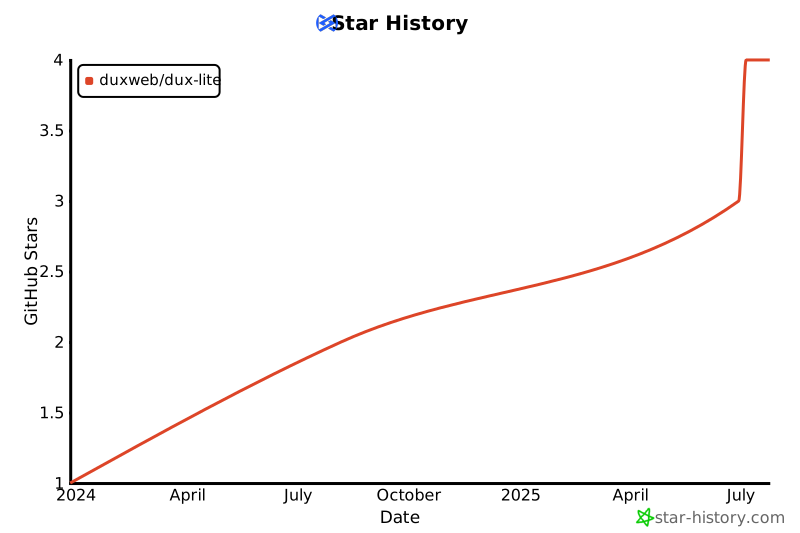](https://star-history.com/#duxweb/dux-lite&Date)
### 💻 贡献者
感谢所有为 DuxLite 做出贡献的开发者们!
[](https://github.com/duxweb/dux-lite/graphs/contributors)
### 其他联系方式
- 📧 **邮箱**: admin@dux.cn
- 🌐 **官网**: [https://www.dux.cn](https://www.dux.cn)
- 🐛 **问题反馈**: [GitHub Issues](https://github.com/duxweb/dux-lite/issues)
- 💡 **功能建议**: [GitHub Discussions](https://github.com/duxweb/dux-lite/discussions)
## 📄 开源协议
本项目基于 [MIT](LICENSE) 协议开源,您可以自由使用、修改和分发。
## 👥 作者
**DuxWeb 团队**
- 🌐 官网: [https://www.dux.cn](https://www.dux.cn)
- 📧 邮箱: admin@dux.cn
- 🐙 GitHub: [@duxweb](https://github.com/duxweb)
## ⭐ 支持项目
如果这个项目对您有帮助,请给我们一个 ⭐️!
您的支持是我们持续改进的动力。
---
🎉 感谢使用 DuxLite!
📖 文档 •
🐛 报告问题 •
💡 功能建议