# md-to-html-plugin
**Repository Path**: gaotengjun/md-to-html-plugin
## Basic Information
- **Project Name**: md-to-html-plugin
- **Description**: 简易markdown转换html webpack 插件plugins
- **Primary Language**: Unknown
- **License**: Not specified
- **Default Branch**: master
- **Homepage**: None
- **GVP Project**: No
## Statistics
- **Stars**: 1
- **Forks**: 0
- **Created**: 2022-04-27
- **Last Updated**: 2024-12-04
## Categories & Tags
**Categories**: Uncategorized
**Tags**: JavaScript
## README
## 1. 项目初始化
```json
{
"name": "md-to-html-plugin",
"version": "1.0.0",
"description": "",
"main": "index.js",
"scripts": {
"build": "webpack"
},
"keywords": [],
"author": "",
"license": "ISC",
"devDependencies": {
"webpack": "^4.30.0",
"webpack-cli": "^3.3.0",
"webpack-dev-server": "^3.7.2"
}
}
```
## 2. webpack配置文件
- 使用自定义plugin
- 解析根目录下的test.md文件
- 在打包完后生成test.html文件,并替换模板中的注释
```json
const { resolve } = require('path');
const MdToHtmlPlugin = require('./plugins/md-to-html-plugin');
module.exports = {
mode: 'development',
entry: resolve(__dirname, 'src/app.js'),
output: {
path: resolve(__dirname, 'dist'),
filename: 'app.js',
},
plugins: [
new MdToHtmlPlugin({
template: resolve(__dirname, './test.md'), // 要转换的markdown文件
filename: 'test.html',
})
]
}
```
## 3. 插件目录
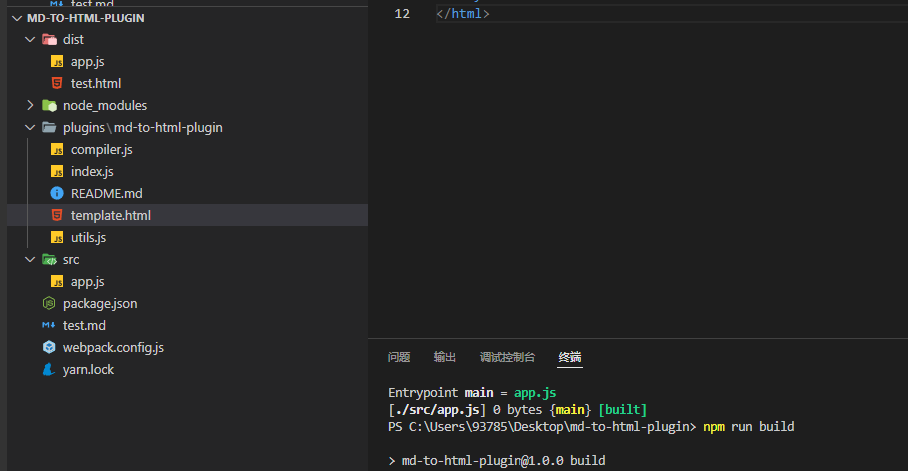
### 1. utils.js
- 随机数生成函数
```javascript
function randomNum() {
return new Date().getTime() + parseInt(Math.random() * 10000);
}
module.exports = {
randomNum
}
```
### 2. template.html
- 解析markdown文件转换为html字符串
- 替换``
```html
Document
```
### 3. compiler.js
- 创建树形结构方法
- 拼接html字符串
```javascript
const { randomNum } = require('./utils');
const reg_mark = /^(.+?)\s/; // 以空字符串开头 以空格结尾
const reg_sharp = /^\#/; // 以#号开头
const reg_crossbar = /^\-/; // 以-开头
const reg_number = /^\d/; // 以数字开头的
// 创建树形结构
function createTree(mdArr) {
let _htmlPool = {};
let _lastMark = '';
let _key = 0;
mdArr.forEach((mdFragment) => {
const matched = mdFragment.match(reg_mark);
// 因为存在null,所以真才处理
if(matched) {
const mark = matched[1],
input = matched['input'];
// 以#号开头
if(reg_sharp.test(mark)) {
// 有几个#号就是h几
const tag = `h${mark.length}`;
// 获取内容
const tagContent = input.replace(reg_mark, '');
if(_lastMark == mark) {
_htmlPool[`${tag}-${_key}`].tags = [..._htmlPool[`${tag}-${_key}`].tags, `<${tag}>${tagContent}`]
} else {
_lastMark = mark;
_key = randomNum();
_htmlPool[`${tag}-${_key}`] = {
type: 'single',
tags: [`<${tag}>${tagContent}`]
}
}
}
// 以-开头
if(reg_crossbar.test(mark)) {
const tagContent = input.replace(reg_mark, '');
const tag = `li`;
// 判断当前上一次的mark是否匹配正则
if(reg_crossbar.test(_lastMark)) {
// 合并当前分类下的数据
_htmlPool[`ul-${_key}`].tags = [..._htmlPool[`ul-${_key}`].tags, `<${tag}>${tagContent}`]
} else {
_lastMark = mark;
_key = randomNum();
_htmlPool[`ul-${_key}`] = {
type: 'wrap',
tags: [`<${tag}>${tagContent}`]
}
}
}
// 以数字开头
if(reg_number.test(mark)) {
// 替换掉前面的内容 以空字符串开头中间至少有一位,以空格结尾的匹配出来,替换成空
const tagContent = input.replace(reg_mark, '');
const tag = `li`;
// 判断
if(reg_number.test(_lastMark)) {
_htmlPool[`ol-${_key}`].tags = [..._htmlPool[`ol-${_key}`].tags, `<${tag}>${tagContent}`]
} else {
_lastMark = mark;
_key = randomNum();
_htmlPool[`ol-${_key}`] = {
type: 'wrap',
tags: [`<${tag}>${tagContent}`]
}
}
}
}
});
return _htmlPool;
}
function compileHTML(_mdArr) {
const _htmlPool = createTree(_mdArr);
let _htmlStr = '';
let item;
// console.log(_htmlPool);
for(var k in _htmlPool) {
// console.log(k, _htmlPool[k]);
item = _htmlPool[k];
// console.log(item);
if(item.type === 'single') {
// 遍历拼接type 为single的html字符串
item.tags.map(tag => {
console.log(tag);
_htmlStr += tag;
})
}
else if(item.type === 'wrap') {
let _list = `<${k.split('-')[0]}>`;
item.tags.forEach(tag => {
_list += tag;
});
_list += ``;
_htmlStr += _list;
}
}
// console.log(_htmlStr);
return _htmlStr;
}
module.exports = {
compileHTML
}
/**
* {
* h1: {
* type: 'single',
* tags: [这是一个h1的标题
]
* },
* ul: {
* type: 'wrap'
* tags: [
* '这是UL列表的第1项',
* '这是UL列表的第1项',
* '这是UL列表的第1项',
* '这是UL列表的第1项',
* ]
* }
* }
*/
```
### 4. index.js
- 主要插件代码
- 插件一般都是new使用
- 所以是一个类
1. 用户需要传入两个参数
1. 要解析的markdown文件路径
1. 打包后生成的html文件名
2. 用户没有指定编译模板需要抛出错误,默认生成文件名`md.html`
2. webpack为每个plugins插件提供了一个方法apply并传入一个编译器参数
1. 编译器下边有一个hooks在下边存在emit中有个一tap方法
1. 第一个参数插件名
1. 第二个汇编结果
4. 默认打包后的汇编文件只有一个app.js
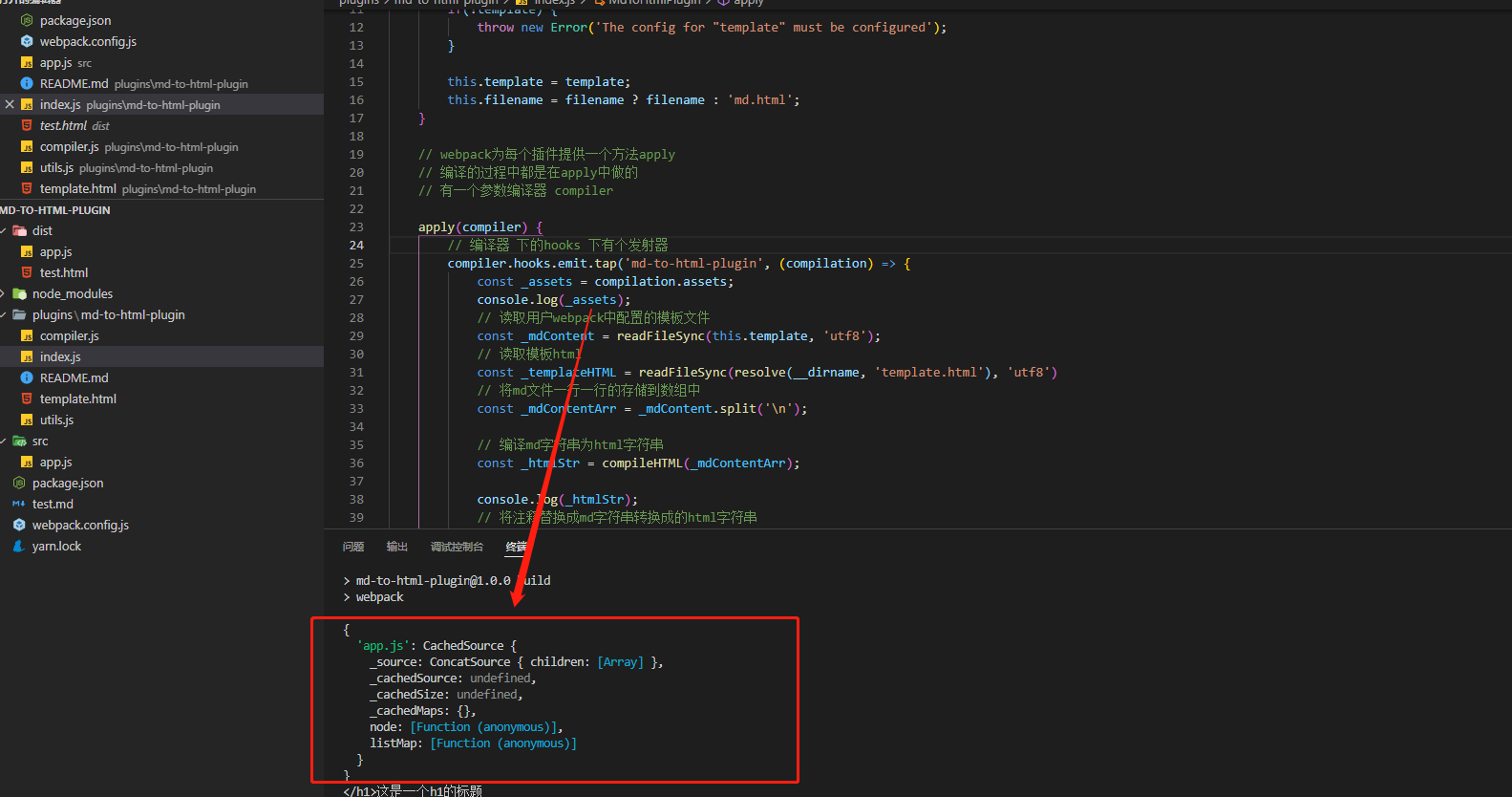
5. 获取markdown文件内容
5. 获取当前模板文件内容
5. 将markdown文件中的内容按照一行一行存储到数组中
5. 调用编译方法将markdown字符编译成html字符串
1. 需要先将数组数据转换成树形结构数据
1. 利用正则匹配出每种markdown语法类型
1. 为每种语法对应每种html标签
1. 相同的markdown为同一分组下的
1. 还需要使用随机数,区分相同的标签
2. 遍历数据,按照树中type的不同拼接html字符串
2. 最后将拼接完成的html字符串返回
9. 将html文件中的注释替换成markdown转换后的html字符串
9. 在汇编文件上添加用户配置的文件名
1. 打包后会生成新文件
```javascript
const { readFileSync } = require('fs');
const { resolve } = require('path');
const { compileHTML } = require('./compiler');
const INNER_MARK = '';
class MdToHtmlPlugin {
constructor({ template, filename }) {
// 用户没有传入模板 抛出错误
if(!template) {
throw new Error('The config for "template" must be configured');
}
this.template = template;
this.filename = filename ? filename : 'md.html';
}
// webpack为每个插件提供一个方法apply
// 编译的过程中都是在apply中做的
// 有一个参数编译器 compiler
apply(compiler) {
// 编译器 下的hooks 下有个发射器
compiler.hooks.emit.tap('md-to-html-plugin', (compilation) => {
const _assets = compilation.assets;
// 读取用户webpack中配置的模板文件
const _mdContent = readFileSync(this.template, 'utf8');
// 读取模板html
const _templateHTML = readFileSync(resolve(__dirname, 'template.html'), 'utf8')
// 将md文件一行一行的存储到数组中
const _mdContentArr = _mdContent.split('\n');
// 编译md字符串为html字符串
const _htmlStr = compileHTML(_mdContentArr);
console.log(_htmlStr);
// 将注释替换成md字符串转换成的html字符串
const _finalHTML = _templateHTML.replace(INNER_MARK, _htmlStr);
// 在_assets上增加资源
_assets[this.filename] = {
source() { // 方法返回一个资源
return _finalHTML;
},
size() { // 一般return 资源的长度
return _finalHTML.length;
}
}
// console.log(_assets);
})
}
}
module.exports = MdToHtmlPlugin;
```