
🚀⭐ Spaceship ZSH
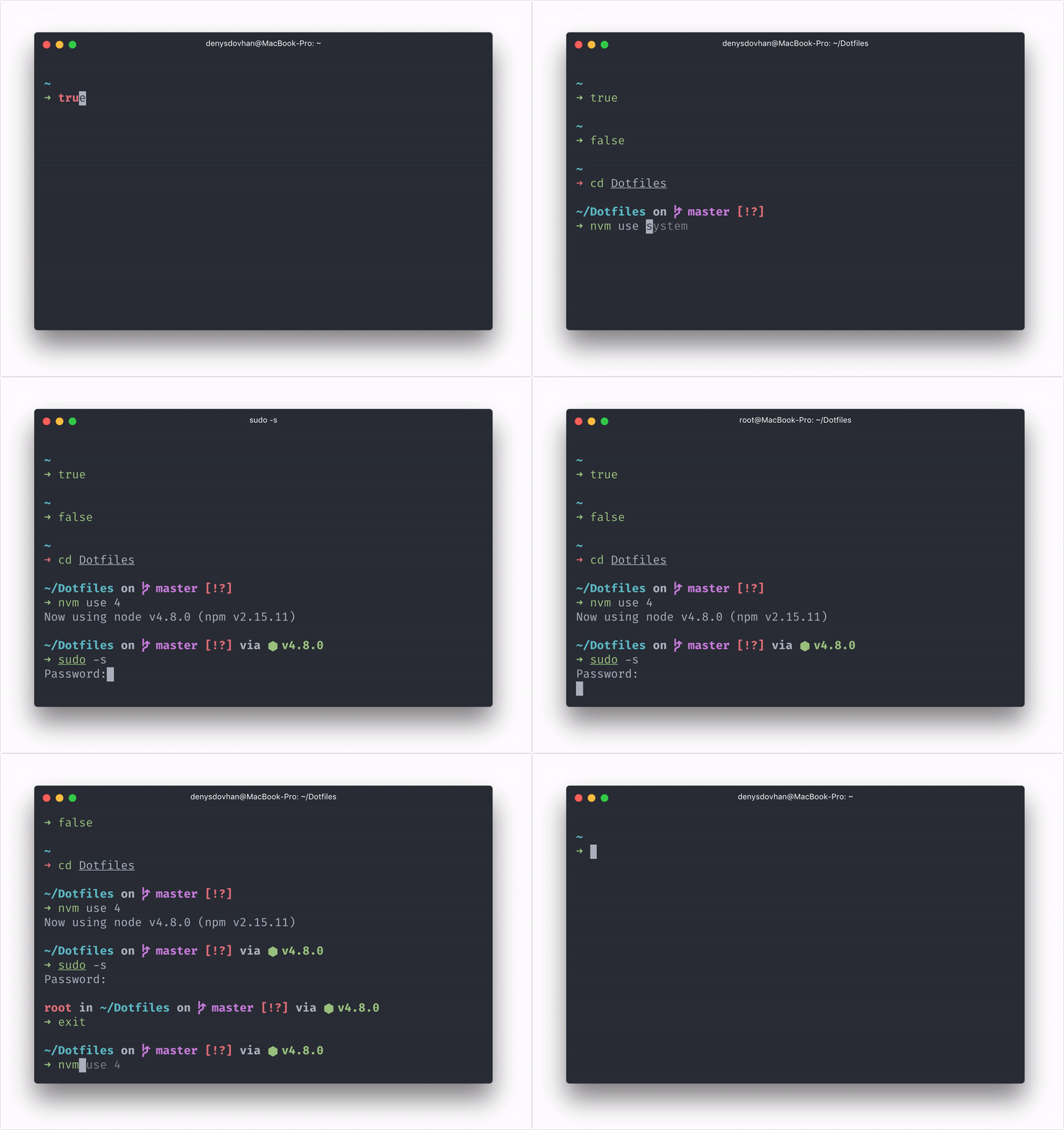
Zsh prompt for Astronauts.





 ### [npm]
```
npm install -g spaceship-prompt
```
Done. This command should link `spaceship.zsh` as `prompt_spaceship_setup` to your `$fpath` and set `prompt spaceship` in `.zshrc`. Just reload your terminal.
**💡 Tip:** Update Spaceship to new versions as you would any other package.
### [oh-my-zsh]
Clone this repo:
```zsh
git clone https://github.com/denysdovhan/spaceship-prompt.git "$ZSH_CUSTOM/themes/spaceship-prompt"
```
Symlink `spaceship.zsh-theme` to your oh-my-zsh custom themes directory:
```zsh
ln -s "$ZSH_CUSTOM/themes/spaceship-prompt/spaceship.zsh-theme" "$ZSH_CUSTOM/themes/spaceship.zsh-theme"
```
Set `ZSH_THEME="spaceship"` in your `.zshrc`.
### [prezto]
- Follow [prezto-contrib#usage](https://github.com/belak/prezto-contrib#usage) to clone `prezto-contrib` to the proper location.
- Enable the `contrib-prompt` module (before the `prompt` module).
- Set `zstyle ':prezto:module:prompt' theme 'spaceship'` in your `.zpreztorc`.
### [zim]
Add `zmodule denysdovhan/spaceship-prompt --name spaceship` to your `.zimrc` and run `zimfw install`.
### [antigen]
Add the following snippet in your `~/.zshrc`:
```
antigen theme denysdovhan/spaceship-prompt
```
### [antibody]
Update your `.zshrc` file with the following line:
```
antibody bundle denysdovhan/spaceship-prompt
```
### [zinit]
Add the following line to your `~/.zshrc` where you're adding your other Zsh plugins:
```
zinit light denysdovhan/spaceship-prompt
```
### [zgen]
Add the following line to your `~/.zshrc` where you're adding your other Zsh plugins:
```
zgen load denysdovhan/spaceship-prompt spaceship
```
### [zplug]
Use this command in your `.zshrc` to load Spaceship as prompt theme:
```
zplug "denysdovhan/spaceship-prompt", use:spaceship.zsh, from:github, as:theme
```
### Linux package manager
#### Arch Linux
Install the latest master from the AUR package [`spaceship-prompt-git`](https://aur.archlinux.org/packages/spaceship-prompt-git/):
```
git clone https://aur.archlinux.org/spaceship-prompt-git.git
cd spaceship-prompt-git
makepkg -si
```
### Manual
If you have problems with approaches above, follow these instructions:
- Clone this repo `git clone https://github.com/denysdovhan/spaceship-prompt.git`
- Symlink `spaceship.zsh` to somewhere in [`$fpath`](http://www.refining-linux.org/archives/46/ZSH-Gem-12-Autoloading-functions/) as `prompt_spaceship_setup`.
- Initialize prompt system and choose `spaceship`.
#### Example
Run `echo $fpath` to see possible location and link `spaceship.zsh` there, like:
```zsh
$ ln -sf "$PWD/spaceship.zsh" "/usr/local/share/zsh/site-functions/prompt_spaceship_setup"
```
For a user-specific installation, simply add a directory to `$fpath` for that user in `.zshrc`:
```zsh
fpath=( "$HOME/.zfunctions" $fpath )
```
Then install the theme like this:
```zsh
$ ln -sf "$PWD/spaceship.zsh" "$HOME/.zfunctions/prompt_spaceship_setup"
```
For initializing prompt system add this to your `.zshrc`:
```zsh
# .zshrc
autoload -U promptinit; promptinit
prompt spaceship
```
## Customization
Spaceship works well out of the box, but you can customize almost everything if you want.
- [**Options**](./docs/Options.md) — Tweak section's behavior with tons of options.
- [**API**](./docs/API.md) — Define a custom section that will do exactly what you want.
You have ability to customize or disable specific elements of Spaceship. All options must be overridden in your `.zshrc` file **after** the theme.
**💡 Tip:** Take a look at popular option presets or share your own configuration on [Presets](https://github.com/denysdovhan/spaceship-prompt/wiki/Presets) wiki page.
## Troubleshooting
Having trouble? Take a look at out [Troubleshooting](./docs/Troubleshooting.md) page.
Still struggling? Please, [file an issue](https://github.com/denysdovhan/spaceship-prompt/issues/new/choose), describe your problem and we will gladly help you.
## Related Projects
Here's a list of related projects that have been inspired by Spaceship ZSH.
- [**matchai/spacefish**](https://github.com/matchai/spacefish) - A port of Spaceship ZSH for fish shell intending to achieve complete feature parity.
- [**starship/starship**](https://github.com/starship/starship) - A blazing-fast, cross-shell prompt written in Rust, heavily inspired by Spaceship ZSH.
## Team
| [](http://denysdovhan.com) | [](https://github.com/salmanulfarzy) | [](https://github.com/maximbaz) | [](https://github.com/Runrioter) |
| :------------------------------------------------------------------------------------: | :--------------------------------------------------------------------------------------------------: | :-----------------------------------------------------------------------------------: | :-----------------------------------------------------------------------------------: |
| [Denys Dovhan](https://github.com/denysdovhan) | [Salmanul Farzy](https://github.com/salmanulfarzy) | [Maxim Baz](https://github.com/maximbaz) | [Runrioter Wung](https://github.com/Runrioter) |
## Donate
Hi! I work on this project in my spare time, in addition to my primary job. I hope you enjoy using Spaceship ZSH. If you do, please, [become my patron 🤝][patreon-url].
| Patreon | Bitcoin | Ethereum |
| :--------------------------------------------------------------------------------------------------------------------------------------------: | :----------------------------------------------------------------------------------------------------------------------------: | :----------------------------------------------------------------------------------------------------------------------------: |
| [Become a patron][patreon-url] | `1FrPrQb6ACTkbSBAz9PduJWrDFfq41Ggb4` | `0x6aF39C917359897ae6969Ad682C14110afe1a0a1` |
| |
### [npm]
```
npm install -g spaceship-prompt
```
Done. This command should link `spaceship.zsh` as `prompt_spaceship_setup` to your `$fpath` and set `prompt spaceship` in `.zshrc`. Just reload your terminal.
**💡 Tip:** Update Spaceship to new versions as you would any other package.
### [oh-my-zsh]
Clone this repo:
```zsh
git clone https://github.com/denysdovhan/spaceship-prompt.git "$ZSH_CUSTOM/themes/spaceship-prompt"
```
Symlink `spaceship.zsh-theme` to your oh-my-zsh custom themes directory:
```zsh
ln -s "$ZSH_CUSTOM/themes/spaceship-prompt/spaceship.zsh-theme" "$ZSH_CUSTOM/themes/spaceship.zsh-theme"
```
Set `ZSH_THEME="spaceship"` in your `.zshrc`.
### [prezto]
- Follow [prezto-contrib#usage](https://github.com/belak/prezto-contrib#usage) to clone `prezto-contrib` to the proper location.
- Enable the `contrib-prompt` module (before the `prompt` module).
- Set `zstyle ':prezto:module:prompt' theme 'spaceship'` in your `.zpreztorc`.
### [zim]
Add `zmodule denysdovhan/spaceship-prompt --name spaceship` to your `.zimrc` and run `zimfw install`.
### [antigen]
Add the following snippet in your `~/.zshrc`:
```
antigen theme denysdovhan/spaceship-prompt
```
### [antibody]
Update your `.zshrc` file with the following line:
```
antibody bundle denysdovhan/spaceship-prompt
```
### [zinit]
Add the following line to your `~/.zshrc` where you're adding your other Zsh plugins:
```
zinit light denysdovhan/spaceship-prompt
```
### [zgen]
Add the following line to your `~/.zshrc` where you're adding your other Zsh plugins:
```
zgen load denysdovhan/spaceship-prompt spaceship
```
### [zplug]
Use this command in your `.zshrc` to load Spaceship as prompt theme:
```
zplug "denysdovhan/spaceship-prompt", use:spaceship.zsh, from:github, as:theme
```
### Linux package manager
#### Arch Linux
Install the latest master from the AUR package [`spaceship-prompt-git`](https://aur.archlinux.org/packages/spaceship-prompt-git/):
```
git clone https://aur.archlinux.org/spaceship-prompt-git.git
cd spaceship-prompt-git
makepkg -si
```
### Manual
If you have problems with approaches above, follow these instructions:
- Clone this repo `git clone https://github.com/denysdovhan/spaceship-prompt.git`
- Symlink `spaceship.zsh` to somewhere in [`$fpath`](http://www.refining-linux.org/archives/46/ZSH-Gem-12-Autoloading-functions/) as `prompt_spaceship_setup`.
- Initialize prompt system and choose `spaceship`.
#### Example
Run `echo $fpath` to see possible location and link `spaceship.zsh` there, like:
```zsh
$ ln -sf "$PWD/spaceship.zsh" "/usr/local/share/zsh/site-functions/prompt_spaceship_setup"
```
For a user-specific installation, simply add a directory to `$fpath` for that user in `.zshrc`:
```zsh
fpath=( "$HOME/.zfunctions" $fpath )
```
Then install the theme like this:
```zsh
$ ln -sf "$PWD/spaceship.zsh" "$HOME/.zfunctions/prompt_spaceship_setup"
```
For initializing prompt system add this to your `.zshrc`:
```zsh
# .zshrc
autoload -U promptinit; promptinit
prompt spaceship
```
## Customization
Spaceship works well out of the box, but you can customize almost everything if you want.
- [**Options**](./docs/Options.md) — Tweak section's behavior with tons of options.
- [**API**](./docs/API.md) — Define a custom section that will do exactly what you want.
You have ability to customize or disable specific elements of Spaceship. All options must be overridden in your `.zshrc` file **after** the theme.
**💡 Tip:** Take a look at popular option presets or share your own configuration on [Presets](https://github.com/denysdovhan/spaceship-prompt/wiki/Presets) wiki page.
## Troubleshooting
Having trouble? Take a look at out [Troubleshooting](./docs/Troubleshooting.md) page.
Still struggling? Please, [file an issue](https://github.com/denysdovhan/spaceship-prompt/issues/new/choose), describe your problem and we will gladly help you.
## Related Projects
Here's a list of related projects that have been inspired by Spaceship ZSH.
- [**matchai/spacefish**](https://github.com/matchai/spacefish) - A port of Spaceship ZSH for fish shell intending to achieve complete feature parity.
- [**starship/starship**](https://github.com/starship/starship) - A blazing-fast, cross-shell prompt written in Rust, heavily inspired by Spaceship ZSH.
## Team
| [](http://denysdovhan.com) | [](https://github.com/salmanulfarzy) | [](https://github.com/maximbaz) | [](https://github.com/Runrioter) |
| :------------------------------------------------------------------------------------: | :--------------------------------------------------------------------------------------------------: | :-----------------------------------------------------------------------------------: | :-----------------------------------------------------------------------------------: |
| [Denys Dovhan](https://github.com/denysdovhan) | [Salmanul Farzy](https://github.com/salmanulfarzy) | [Maxim Baz](https://github.com/maximbaz) | [Runrioter Wung](https://github.com/Runrioter) |
## Donate
Hi! I work on this project in my spare time, in addition to my primary job. I hope you enjoy using Spaceship ZSH. If you do, please, [become my patron 🤝][patreon-url].
| Patreon | Bitcoin | Ethereum |
| :--------------------------------------------------------------------------------------------------------------------------------------------: | :----------------------------------------------------------------------------------------------------------------------------: | :----------------------------------------------------------------------------------------------------------------------------: |
| [Become a patron][patreon-url] | `1FrPrQb6ACTkbSBAz9PduJWrDFfq41Ggb4` | `0x6aF39C917359897ae6969Ad682C14110afe1a0a1` |
| |  |
|  |
This is your way make a clear statement: **My work is valued.**
I would appreciate your support! _Thank you!_
## License
MIT © [Denys Dovhan](http://denysdovhan.com)
[npm-url]: https://npmjs.org/package/spaceship-prompt
[npm-image]: https://img.shields.io/npm/v/spaceship-prompt.svg?style=flat-square
[ci-url]: https://travis-ci.org/denysdovhan/spaceship-prompt
[ci-image]: https://img.shields.io/travis/denysdovhan/spaceship-prompt.svg?style=flat-square
[zsh-url]: http://zsh.org/
[zsh-image]: https://img.shields.io/badge/zsh-%3E%3Dv5.2-777777.svg?style=flat-square
[patreon-url]: https://www.patreon.com/denysdovhan
[patreon-image]: https://img.shields.io/badge/zsh-%3E%3Dv5.2-777777.svg?style=flat-square
[oh-my-zsh]: http://ohmyz.sh/
[prezto]: https://github.com/sorin-ionescu/prezto
[zim]: https://github.com/zimfw/zimfw
[antigen]: http://antigen.sharats.me/
[zgen]: https://github.com/tarjoilija/zgen
[npm]: https://www.npmjs.com/
[antibody]: https://github.com/getantibody/antibody
[zplug]: https://github.com/zplug/zplug
[n]: https://github.com/tj/n
[xcenv]: http://xcenv.org/
[swiftenv]: https://github.com/kylef/swiftenv
[powerline]: https://github.com/powerline/fonts
[zinit]: https://github.com/zdharma/zinit
|
This is your way make a clear statement: **My work is valued.**
I would appreciate your support! _Thank you!_
## License
MIT © [Denys Dovhan](http://denysdovhan.com)
[npm-url]: https://npmjs.org/package/spaceship-prompt
[npm-image]: https://img.shields.io/npm/v/spaceship-prompt.svg?style=flat-square
[ci-url]: https://travis-ci.org/denysdovhan/spaceship-prompt
[ci-image]: https://img.shields.io/travis/denysdovhan/spaceship-prompt.svg?style=flat-square
[zsh-url]: http://zsh.org/
[zsh-image]: https://img.shields.io/badge/zsh-%3E%3Dv5.2-777777.svg?style=flat-square
[patreon-url]: https://www.patreon.com/denysdovhan
[patreon-image]: https://img.shields.io/badge/zsh-%3E%3Dv5.2-777777.svg?style=flat-square
[oh-my-zsh]: http://ohmyz.sh/
[prezto]: https://github.com/sorin-ionescu/prezto
[zim]: https://github.com/zimfw/zimfw
[antigen]: http://antigen.sharats.me/
[zgen]: https://github.com/tarjoilija/zgen
[npm]: https://www.npmjs.com/
[antibody]: https://github.com/getantibody/antibody
[zplug]: https://github.com/zplug/zplug
[n]: https://github.com/tj/n
[xcenv]: http://xcenv.org/
[swiftenv]: https://github.com/kylef/swiftenv
[powerline]: https://github.com/powerline/fonts
[zinit]: https://github.com/zdharma/zinit