# d3js_doc
**Repository Path**: klosszhu/d3js_doc
## Basic Information
- **Project Name**: d3js_doc
- **Description**: No description available
- **Primary Language**: Unknown
- **License**: Not specified
- **Default Branch**: master
- **Homepage**: None
- **GVP Project**: No
## Statistics
- **Stars**: 2
- **Forks**: 0
- **Created**: 2020-11-16
- **Last Updated**: 2026-01-16
## Categories & Tags
**Categories**: Uncategorized
**Tags**: None
## README
[](https://github.com/xswei/d3js_doc/stargazers)
[](https://github.com/xswei/d3js_doc/issues)
[](https://github.com/xswei/d3js_doc/network)
[](https://github.com/xswei/d3js_doc)
# D3: Data-Driven Documents
 **D3** (或者叫 **D3.js** )是一个基于 `web` 标准的 **JavaScript** 可视化库。 `D3` 可以借助 `SVG`, `Canvas` 以及 `HTML` 将你的数据生动的展现出来。 `D3` 结合了强大的可视化交互技术以及数据驱动 `DOM` 的技术,让你可以借助于现代浏览器的强大功能自由的对数据进行可视化。
## 资源
* [最新发行版](https://github.com/d3/d3/releases)
#### 文档
* [API 文档 ( 中文版 )](https://github.com/xswei/d3js_doc/tree/master/API_Reference/API.md?_blank)
* [API 文档 ( 英文版 )](https://github.com/d3/d3/blob/master/API.md?_blank)
* [d3-queue(v5.x.x中被移除)](https://github.com/xswei/d3js_doc/blob/master/API_Reference/V4.md)
* [d3-request(v5.x.x中被移除)](https://github.com/xswei/d3js_doc/blob/master/API_Reference/V4.md)
* [v3 与 v4](https://github.com/xswei/d3js_doc/tree/master/API_Reference/CHANGES.md)
#### 示例
* [官方画廊](https://github.com/d3/d3/wiki/Gallery?_blank)
* [搜索示例](http://blockbuilder.org/search#)
* [Mike Bostock 的示例](https://bl.ocks.org/mbostock?_blank)
#### 社区
* [d3.js on Stack Overflow](https://stackoverflow.com/questions/tagged/d3.js?_blank)
* [d3.js Google Group](http://groups.google.com/group/d3-js?_blank)
* [插件](https://github.com/d3/d3/wiki/Plugins?_blank)
* [图说数据](http://www.graphvis.cn/)
* [GraphVis](https://gitee.com/baopengdu/GraphVis)
#### 教程
* [教程](https://github.com/d3/d3/wiki/Tutorials?_blank)
* [基于 d3js 的图论](https://mrpandey.github.io/d3graphTheory/index.html)
* [理解数据绑定](https://bost.ocks.org/mike/join/?_blank)
* [数据绑定示例](https://bl.ocks.org/mbostock/3808218?_blank)
* [D3 in Depth](https://www.d3indepth.com/)
## 安装
如果使用 `npm`,则可以通过 `npm install d3` 来安装。 此外还可以下载 [最新版](https://unpkg.com/d3/build/), 最新版支持 `AMD`、`CommonJS` 以及基础标签引入形式。 你也可以直接从 [d3js.org](https://d3js.org), [CDNJS](https://cdnjs.com/libraries/d3), 或者 [unpkg](https://unpkg.com/d3/) 加载. 比如:
```js
```
压缩版:
```js
```
你也可以单独使用 `d3` 中的某个模块, 比如单独使用 [d3-selection](https://github.com/d3/d3-selection):
```js
```
D3基于 [ES2015 modules](http://www.2ality.com/2014/09/es6-modules-final.html) 开发。 可以使用 `Rollup`, `webpack` 或者其他你偏爱的打包工具进行构建。 在一个符合 ES2015 的应用中导入 `d3` 或者 `d3` 的某些模块:
```js
import { scaleLinear } from "d3-scale";
```
或者导入 `d3` 的全部功能并且设置命名空间 (这里是 `d3`):
```js
import * as d3 from "d3";
```
在 `Nodejs` 环境中:
```js
var d3 = require("d3");
```
你也可以导入多个模块然后将这些模块集合到 `d3` 对象中, 此时使用 [Object.assign](https://developer.mozilla.org/en-US/docs/Web/JavaScript/Reference/Global_Objects/Object/assign):
```js
var d3 = Object.assign({}, require("d3-format"), require("d3-geo"), require("d3-geo-projection"));
```
## 支持环境
`D3 5.0` 支持最新浏览器,比如 `Chrome`,`Edge`,`Firefox` 以及 `Safari`。`D3 v4` 以及之前的版本支持 `IE 9` 以上的版本。`D3` 的一部分功能能在旧版的浏览器中运行,因为 `D3` 的核心功能对浏览器的要求比较低。例如 `d3-selection` 使用 `Level 1` 级 [Selectors API](http://www.w3.org/TR/selectors-api/),但是可以通过预先加载 [Sizzle](http://sizzlejs.com/) 来实现兼容。现代浏览器对 [SVG](http://www.w3.org/TR/SVG/) 和 [CSS3 Transition](http://www.w3.org/TR/css3-transitions/) 的支持比较好。所以 `D3` 不支持更低级别的浏览器,如果你的浏览器不支持这些标准,那么对不起了,大兄弟。
`D3` 也可以运行在 [Node](http://nodejs.org/) 和 [Web workers](http://www.whatwg.org/specs/web-apps/current-work/multipage/workers.html) 中. 在 `Node` 环境中使用 `DOM` 的时候,必须要提供自己的 `DOM` 实现。推荐使用 [JSDOM](https://github.com/tmpvar/jsdom),为了避免定义全局 `document`,建议将 `DOM` 传递给 `d3.select` 或者将 `NodeList` 传递给 `d3.selectAll`,如下:
```js
var d3 = require("d3"),
jsdom = require("jsdom");
var document = jsdom.jsdom(),
svg = d3.select(document.body).append("svg");
```
在支持 [ES 模块化](http://exploringjs.com/es6/ch_modules.html) 的环境中,你可以将 `d3` 作为一个命名空间来导入 `D3` 的全部功能:
```js
import * as d3 from "d3";
```
如果你不想导入全部模块,则分配命名空间的时候要和 `d3` 进行区分:
```js
import * as d3 from "d3";
import * as d3GeoProjection from "d3-geo-projection";
```
出于这个原因,应该优先考虑 `D3` 模块中的原有变量名,可以按需导入:
```js
import {select, selectAll} from "d3-selection";
import {geoPath} from "d3-geo";
import {geoPatterson} from "d3-geo-projection";
```
如果你使用打包工具,则确保已经配置好正确的入口,可以参考 [resolve.mainFields](https://webpack.js.org/configuration/resolve/#resolve-mainfields)
## Changes in D3 6.0
[2020.08.26发布](https://github.com/d3/d3/releases/tag/v6.0.0)
*这个文档只包含主要更新。 次要更新以及修订请参阅 [发布记录](https://github.com/d3/d3/releases).*
D3 现在 **采用原生集合** (Map 和 Set) 并且 **接受迭代**。[d3.group 和 d3.rollup](https://observablehq.com/@d3/d3-group) 是强大的用来替代 d3.nest 的聚合函数,并且能与 [d3-hierarchy](https://observablehq.com/d/9a453665f405eebf) 以及 d3-selection 很好的结合。在 d3-array 中也新增了很多辅助工具,比如 [d3.greatest](https://observablehq.com/@d3/d3-least),[d3.quickselect](https://observablehq.com/@d3/d3-quickselect),以及 [d3.fsum](https://observablehq.com/@d3/d3-fsum).
D3 现在 **直接将事件传递给监听器**,替代了全局 d3.event 并将 D3 与普通 JavaScript 和大多数其他框架内联。
**d3-delaunay** (基于 Vladimir Agafonkin 的 [Delaunator](https://github.com/mapbox/delaunator)) 替代了 d3-voronoi, 获得了极大的性能提升,鲁棒性以及 [搜索](https://observablehq.com/@d3/delaunay-find)。新的 [d3-geo-voronoi](https://github.com/Fil/d3-geo-voronoi) 可以用于球面地理数据计算! **d3-random** 进行了 [极大的扩展](https://github.com/d3/d3-random/blob/master/README.md) 并且包含了快速 [线性同余生成器](https://observablehq.com/@d3/d3-randomlcg) 用于随机性。 **d3-chord** 包含了新的布局以用于 [有向](https://observablehq.com/@d3/directed-chord-diagram) 和转置弦图。 **d3-scale** 新增了[径向缩放](https://observablehq.com/@d3/radial-stacked-bar-chart-ii) 类型。
… 以及其他各种小的改进。 [超过 450 个例子](https://observablehq.com/@d3/gallery) 已经升级到 D3 6.0!
### d3-array
* 接受迭代.
* 新增 [d3.group](https://github.com/d3/d3-array/blob/master/README.md#group).
* 新增 [d3.groups](https://github.com/d3/d3-array/blob/master/README.md#groups).
* 新增 [d3.index](https://github.com/d3/d3-array/blob/master/README.md#index).
* 新增 [d3.indexes](https://github.com/d3/d3-array/blob/master/README.md#indexes).
* 新增 [d3.rollup](https://github.com/d3/d3-array/blob/master/README.md#rollup).
* 新增 [d3.rollups](https://github.com/d3/d3-array/blob/master/README.md#rollups).
* 新增 [d3.maxIndex](https://github.com/d3/d3-array/blob/master/README.md#maxIndex).
* 新增 [d3.minIndex](https://github.com/d3/d3-array/blob/master/README.md#minIndex).
* 新增 [d3.greatest](https://github.com/d3/d3-array/blob/master/README.md#greatest).
* 新增 [d3.greatestIndex](https://github.com/d3/d3-array/blob/master/README.md#greatestIndex).
* 新增 [d3.least](https://github.com/d3/d3-array/blob/master/README.md#least).
* 新增 [d3.leastIndex](https://github.com/d3/d3-array/blob/master/README.md#leastIndex).
* 新增 [d3.bin](https://github.com/d3/d3-array/blob/master/README.md#bin).
* 新增 [d3.count](https://github.com/d3/d3-array/blob/master/README.md#count).
* 新增 [d3.cumsum](https://github.com/d3/d3-array/blob/master/README.md#cumsum).
* 新增 [d3.fsum](https://github.com/d3/d3-array/blob/master/README.md#fsum).
* 新增 [d3.Adder](https://github.com/d3/d3-array/blob/master/README.md#Adder).
* 新增 [d3.quantileSorted](https://github.com/d3/d3-array/blob/master/README.md#quantileSorted).
* 新增 [d3.quickselect](https://github.com/d3/d3-array/blob/master/README.md#quickselect).
* 新增 [*bisector*.center](https://github.com/d3/d3-array/blob/master/README.md#bisector_center).
* [d3.cross](https://github.com/d3/d3-array/blob/master/README.md#cross) 允许两个以上的迭代.
* [d3.quantile](https://github.com/d3/d3-array/blob/master/README.md#quantile) 接受未排序的输入.
* 修复了 *array*.sort 在 Safari 上的缺陷.
* 修复了直方图分箱阈值忽略 `NaN` 输入的缺陷.
* 修复了 [d3.ticks](https://github.com/d3/d3-array/blob/master/README.md#ticks) 不返回域外的刻度的缺陷.
* 提高 [d3.median](https://github.com/d3/d3-array/blob/master/README.md#median) 的性能.
参考 https://observablehq.com/@d3/d3-array-2-0 获取更多详情.
### d3-brush
* 新增 [*event*.mode](https://github.com/d3/d3-brush/blob/master/README.md#brush-events).
* [*brush*.on](https://github.com/d3/d3-brush/blob/master/README.md#brush_on) 直接传递 *event* 给监听器.
* 改进多点触控交互.
### d3-chord
* 新增 [d3.chordDirected](https://github.com/d3/d3-chord/blob/master/README.md#chordDirected).
* 新增 [d3.chordTranspose](https://github.com/d3/d3-chord/blob/master/README.md#chordTranspose).
* 新增 [d3.ribbonArrow](https://github.com/d3/d3-chord/blob/master/README.md#ribbonArrow).
* 新增 [*ribbon*.padAngle](https://github.com/d3/d3-chord/blob/master/README.md#ribbon_padAngle).
* 新增 [*ribbon*.sourceRadius](https://github.com/d3/d3-chord/blob/master/README.md#ribbon_sourceRadius).
* 新增 [*ribbon*.targetRadius](https://github.com/d3/d3-chord/blob/master/README.md#ribbon_targetRadius).
### d3-delaunay
* 新增 [d3.Delaunay](https://github.com/d3/d3-delaunay/blob/master/README.md).
### d3-drag
* [*drag*.on](https://github.com/d3/d3-drag/blob/master/README.md#drag_on) 直接传递 *event* 给监听器.
### d3-force
* [*simulation*.tick](https://github.com/d3/d3-force/blob/master/README.md#simulation_tick) 新增 *iterations* 参数.
* 新增 [*forceCenter*.strength](https://github.com/d3/d3-force/blob/master/README.md#center_strength).
* 新增 [*forceSimulation*.randomSource](https://github.com/d3/d3-force/blob/master/README.md#simulation_randomSource).
* 所有内置的力模型现在都是完全确定的 (包括“抖动的”重合节点).
* 通过半径的偏移来改进默认的 phyllotaxis 布局.
* 改进边引用未知节点时的错误消息.
* [*force*.initialize](https://github.com/d3/d3-force/blob/master/README.md#force_initialize) 被改为传递一个随机的源.
* 修复初始化位置固定的节点的缺陷.
### d3-format
* 将默认的负号改为负号 (−) 而不是连字减号 (-).
* 修正大于或等于 1e21 的数字的十进制格式 `d`.
### d3-geo
* 修复一些退化多边形的裁剪.
### d3-hierarchy
* 接受迭代.
* 新增 [*node*[Symbol.iterator]](https://github.com/d3/d3-hierarchy/blob/master/README.md#node_iterator); 层次结构现在是可迭代的.
* 新增 [*node*.find](https://github.com/d3/d3-hierarchy/blob/master/README.md#node_find).
* [*node*.each](https://github.com/d3/d3-hierarchy/blob/master/README.md#node_each) 修改为传递遍历的索引.
* [*node*.eachAfter](https://github.com/d3/d3-hierarchy/blob/master/README.md#node_eachAfter) 修改为传递遍历的索引.
* [*node*.eachBefore](https://github.com/d3/d3-hierarchy/blob/master/README.md#node_eachBefore) 修改为传递遍历的索引.
* 修复 [d3.packSiblings](https://github.com/d3/d3-hierarchy/blob/master/README.md#packSiblings).
* 修复 [d3.treemapBinary](https://github.com/d3/d3-hierarchy/blob/master/README.md#treemapBinary) 被零除的缺陷.
* 修复 [d3.treemapResquarify](https://github.com/d3/d3-hierarchy/blob/master/README.md#treemapResquarify) 被零除的缺陷.
### d3-interpolate
* 新增 [*interpolateZoom*.rho](https://github.com/d3/d3-interpolate/blob/master/README.md#interpolateZoom_rho). (#25)
* 允许 [d3.piecewise](https://github.com/d3/d3-interpolate/blob/master/README.md#piecewise) 默认使用 d3.interpolate. #90
* [d3.interpolateTransformCss](https://github.com/d3/d3-interpolate/blob/master/README.md#interpolateTransformCss) 被修改为使用 DOMMatrix 并需要绝对单位. #83
### d3-quadtree
* 修正了坐标偏离到巨大值时的无限循环.
### d3-random
* 新增 [d3.randomLcg](https://github.com/d3/d3-random/blob/master/README.md#randomLcg).
* 新增 [d3.randomGamma](https://github.com/d3/d3-random/blob/master/README.md#randomGamma).
* 新增 [d3.randomBeta](https://github.com/d3/d3-random/blob/master/README.md#randomBeta).
* 新增 [d3.randomWeibull](https://github.com/d3/d3-random/blob/master/README.md#randomWeibull).
* 新增 [d3.randomCauchy](https://github.com/d3/d3-random/blob/master/README.md#randomCauchy).
* 新增 [d3.randomLogistic](https://github.com/d3/d3-random/blob/master/README.md#randomLogistic).
* 新增 [d3.randomPoisson](https://github.com/d3/d3-random/blob/master/README.md#randomPoisson).
* 新增 [d3.randomInt](https://github.com/d3/d3-random/blob/master/README.md#randomInt).
* 新增 [d3.randomBinomial](https://github.com/d3/d3-random/blob/master/README.md#randomBinomial).
* 新增 [d3.randomGeometric](https://github.com/d3/d3-random/blob/master/README.md#randomGeometric).
* 新增 [d3.randomPareto](https://github.com/d3/d3-random/blob/master/README.md#randomPareto).
* 新增 [d3.randomBernoulli](https://github.com/d3/d3-random/blob/master/README.md#randomBernoulli).
* 允许 [d3.randomBates](https://github.com/d3/d3-random/blob/master/README.md#randomBates) 取小数 *n*.
* 允许 [d3.randomIrwinHall](https://github.com/d3/d3-random/blob/master/README.md#randomIrwinHall) 取小数 *n*.
* 默认的源中不再包含 Math.random.
感谢 @Lange, @p-v-d-Veeken, @svanschooten, @Parcly-Taxel 和 @jrus 的贡献s!
### d3-scale
* 接受迭代.
* 新增 [*diverging*.rangeRound](https://github.com/d3/d3-scale/blob/master/README.md#diverging_rangeRound).
* 新增 [*sequential*.range](https://github.com/d3/d3-scale/blob/master/README.md#sequential_range) (为了与 d3-axis 兼容).
* 新增 [*sequential*.rangeRound](https://github.com/d3/d3-scale/blob/master/README.md#sequential_rangeRound).
* 新增 [*sequentialQuantile*.quantiles](https://github.com/d3/d3-scale/blob/master/README.md#sequentialQuantile_quantiles).
* 新增 [d3.scaleRadial](https://github.com/d3/d3-scale/blob/master/README.md#radial-scales).
* [*diverging*.range](https://github.com/d3/d3-scale/blob/master/README.md#diverging_range) 现在可以用来设置插值.
* [*sequential*.range](https://github.com/d3/d3-scale/blob/master/README.md#sequential_range) 现在可以用来设置插值.
* [d3.scaleDiverging](https://github.com/d3/d3-scale/blob/master/README.md#diverging-scales) 现在可以接受一个范围数组代替一个插值器.
* [d3.scaleSequential](https://github.com/d3/d3-scale/blob/master/README.md#sequential-scales) 现在可以接受一个范围数组代替一个插值器.
* 修复了 [*continuous*.nice](https://github.com/d3/d3-scale/blob/master/README.md#continuous_nice).
* 修复了 [*log*.ticks](https://github.com/d3/d3-scale/blob/master/README.md#log_ticks).
* 修复了 [*log*.ticks](https://github.com/d3/d3-scale/blob/master/README.md#log_ticks). #44
* 修复了 [*scale*.clamp](https://github.com/d3/d3-scale/blob/master/README.md#continuous_clamp) 在 [sequential quantile scales](https://github.com/d3/d3-scale/blob/master/README.md#scaleSequentialQuantile) 的问题. 多谢, @Fil!
* 修复了 [*scale*.clamp](https://github.com/d3/d3-scale/blob/master/README.md#continuous_clamp) 用于域值大于范围值的连续缩放.
* 修复了 [diverging scales](https://github.com/d3/d3-scale/blob/master/README.md#diverging-scales) 在降序时的问题.
* 从 [*time*.ticks](https://github.com/d3/d3-scale/blob/master/README.md#time_ticks) 和 [*time*.nice](https://github.com/d3/d3-scale/blob/master/README.md#time_nice) 中移除 *step* 参数.
### d3-selection
* 新增 [*selection*.selectChild](https://github.com/d3/d3-selection/blob/master/README.md#selection_selectChild).
* 新增 [*selection*.selectChildren](https://github.com/d3/d3-selection/blob/master/README.md#selection_selectChildren).
* 新增 [d3.pointer](https://github.com/d3/d3-selection/blob/master/README.md#pointer).
* 新增 [d3.pointers](https://github.com/d3/d3-selection/blob/master/README.md#pointers).
* 新增 *selection*[Symbol.iterator]; selections are now iterable!
* [*selection*.data](https://github.com/d3/d3-selection/blob/master/README.md#selection_data) 接受迭代.
* [d3.selectAll](https://github.com/d3/d3-selection/blob/master/README.md#selectAll) 接受迭代.
* [*selection*.on](https://github.com/d3/d3-selection/blob/master/README.md#selection_on) 被修改为直接传递 *event* 给监听器.
* 从 *selection*.on 监听器中移除索引和组!
* 移除 d3.event!
* 移除 d3.mouse.
* 移除 d3.touch.
* 移除 d3.touches.
* 移除 d3.customEvent.
* 移除 d3.clientPoint.
* 移除 d3.sourceEvent.
* 修复了 *selection*.merge(*transition*) 报错问题.
所有的修改请参考 https://observablehq.com/@d3/d3-selection-2-0.
### d3-shape
* 接受迭代.
* 新增 [d3.line](https://github.com/d3/d3-shape/blob/master/README.md#line)(*x*, *y*) 速写.
* 新增 [d3.area](https://github.com/d3/d3-shape/blob/master/README.md#area)(*x*, *y0*, *y1*) 速写.
* 新增 [d3.symbol](https://github.com/d3/d3-shape/blob/master/README.md#symbol)(*type*, *size*) 速写.
### d3-time-format
* 新增 ISO 8601 “week year” (`%G` and `%g`).
### d3-timer
* 修复了 [*interval*.restart](https://github.com/d3/d3-timer/blob/master/README.md#timer_restart) 作为间隔重新启动的问题.
### d3-transition
* 新增 [*transition*.easeVarying](https://github.com/d3/d3-transition/blob/master/README.md#transition_easeVarying).
* 新增 *transition*[Symbol.iterator]; transitions are now iterable.
* 修复了 [*selection*.transition](https://github.com/d3/d3-transition/blob/master/README.md#selection_transition) 未找到时的错误.
* 修复了 [*transition*.end](https://github.com/d3/d3-transition/blob/master/README.md#transition_end) 选择集为空时候的解析问题.
### d3-zoom
* 新增 [*zoom*.tapDistance](https://github.com/d3/d3-zoom/blob/master/README.md#zoom_tapDistance).
* [*zoom*.on](https://github.com/d3/d3-zoom/blob/master/README.md#zoom_on) 直接传递 *event* 给监听器.
* 修改默认的 [*zoom*.filter](https://github.com/d3/d3-zoom/blob/master/README.md#zoom_filter) 如果按下控制键,过滤器观察 *wheel* 事件.
* 修改默认的 [*zoom*.wheelDelta](ttps://github.com/d3/d3-zoom/blob/master/README.md#zoom_wheelDelta) 如果按下控制键,缩放更快.
* 不要设置触控动作:无.
* 升级到 [d3-selection 2](https://observablehq.com/@d3/d3-selection-2-0).
### Breaking Changes
D3 6.0 包含了一些非向后兼容的改变.
* 移除了 [d3.event](https://observablehq.com/d/f91cccf0cad5e9cb#events).
* 修改 [*selection*.on](https://observablehq.com/d/f91cccf0cad5e9cb#events) 直接将 *event* 传递给监听器.
* 修改 [*transition*.on](https://observablehq.com/d/f91cccf0cad5e9cb#events) 直接将 *event* 传递给监听器.
* 修改 [*brush*.on](https://observablehq.com/d/f91cccf0cad5e9cb#event_brush) 直接将 *event* 传递给监听器.
* 修改 [*drag*.on](https://observablehq.com/d/f91cccf0cad5e9cb#event_drag) 直接将 *event* 传递给监听器.
* 修改 [*zoom*.on](https://observablehq.com/d/f91cccf0cad5e9cb#event_zoom) 直接将 *event* 传递给监听器.
* 移除了 d3.mouse; 使用 [d3.pointer](https://observablehq.com/d/f91cccf0cad5e9cb#pointer).
* 移除了 d3.touch; 使用 [d3.pointer](https://observablehq.com/d/f91cccf0cad5e9cb#pointer).
* 移除了 d3.touches; 使用 [d3.pointers](https://observablehq.com/d/f91cccf0cad5e9cb#pointer).
* 移除了 d3.clientPoint; 使用 [d3.pointer](https://observablehq.com/d/f91cccf0cad5e9cb#pointer).
* 移除了 d3.voronoi; 使用 [d3.Delaunay](https://observablehq.com/d/f91cccf0cad5e9cb#delaunay).
* 移除了 d3.nest; 使用 [d3.group](https://observablehq.com/d/f91cccf0cad5e9cb#group) and [d3.rollup](https://observablehq.com/d/f91cccf0cad5e9cb#group).
* 移除了 d3.map; 使用 [Map](https://observablehq.com/d/f91cccf0cad5e9cb#collection).
* 移除了 d3.set; 使用 [Set](https://observablehq.com/d/f91cccf0cad5e9cb#collection).
* 移除了 d3.keys; 使用 [Object.keys](https://observablehq.com/d/f91cccf0cad5e9cb#collection).
* 移除了 d3.values; 使用 [Object.values](https://observablehq.com/d/f91cccf0cad5e9cb#collection).
* 移除了 d3.entries; 使用 [Object.entries](https://observablehq.com/d/f91cccf0cad5e9cb#collection).
* 重命名 d3.histogram 为 [d3.bin](https://observablehq.com/d/f91cccf0cad5e9cb#bin).
* 重命名 d3.scan 为 [d3.leastIndex](https://observablehq.com/d/f91cccf0cad5e9cb#leastIndex).
* 修改 [d3.interpolateTransformCss](https://observablehq.com/d/f91cccf0cad5e9cb#interpolateTransformCss), 需要绝对单位.
* 修改 [d3.format](https://observablehq.com/d/f91cccf0cad5e9cb#minus) 负数, 默认设置为减号而不是连字符减号.
D3 现在需要运行在支持 [ES2015](http://www.ecma-international.org/ecma-262/6.0/) 的浏览器上. 对于不支持的浏览器,你需要自己做转义.
最后, 对 [Bower](https://bower.io) 的支持被取消了; D3 现在只在 npm 和 GitHub 上发布.
参考我们的 [升级指南](https://observablehq.com/d/f91cccf0cad5e9cb) 获取升级帮助.
#### 5.x.x 大版本改动
`D3 5.0` 引入了很少的非向后兼容的改变。
`D3 5.0` 现在采用的是 [Promises](https://developer.mozilla.org/docs/Web/JavaScript/Guide/Using_promises) 来替代异步回调加载数据。 `Promises` 简化了异步代码结构,尤其是现代浏览器支持 [async 和 await](https://javascript.info/async-await) 操作。(在 [Observable](https://beta.observablehq.com) 中参考 [promises 介绍](https://beta.observablehq.com/@mbostock/introduction-to-promises))。例如在 `V4` 中使用如下方式加载 `CSV` 文件:
```js
d3.csv("file.csv", function(error, data) {
if (error) throw error;
console.log(data);
});
```
在 `V5` 中基于 `Promises` 实现:
```js
d3.csv("file.csv").then(function(data) {
console.log(data);
});
```
要注意的是不需要重新抛出错误,因为 `Promise` 会自动 `reject`,并且需要的话可以使用 *promise*.catch。使用 `await` 的话代码会更简单:
```js
const data = await d3.csv("file.csv");
console.log(data);
```
由于采用了 `promises`,`D3 5.0` 使用 [Fetch API](https://fetch.spec.whatwg.org/) 来代替 [XMLHttpRequest](https://developer.mozilla.org/docs/Web/API/XMLHttpRequest):[d3-request](https://github.com/d3/d3-request) 模块由 [d3-fetch](https://github.com/d3/d3-fetch) 替代。`Fetch` 支持许多强大的特性,比如 [响应流](https://beta.observablehq.com/@mbostock/streaming-shapefiles)。`D3 5.0` 也不再使用 [d3-queue](https://github.com/d3/d3-queue),取而代之推荐 [Promise.all](https://developer.mozilla.org/docs/Web/JavaScript/Reference/Global_Objects/Promise/all) 来处理批量异步任务,或者使用辅助库比如 [p-queue](https://github.com/sindresorhus/p-queue) 来 [控制并发](https://beta.observablehq.com/@mbostock/hello-p-queue)。
`D3 5.0` 不再提供 `d3.schemeCategory20*` 颜色方案。因为这些颜色有缺陷,可能会错误的暗示数据中的关系:色调相近的可能被认为是一个分组,而亮度可能被错认为是排序。作为替换,`D3 5.0` 使用 [d3-scale-chromatic](https://github.com/d3/d3-scale-chromatic),它实现了 `ColorBrewer` 的方案设计,包括 [categorical](https://github.com/d3/d3-scale-chromatic/blob/master/README.md#categorical), [diverging](https://github.com/d3/d3-scale-chromatic/blob/master/README.md#diverging),[sequential single-hue](https://github.com/d3/d3-scale-chromatic/blob/master/README.md#sequential-single-hue) 和 [sequential multi-hue](https://github.com/d3/d3-scale-chromatic/blob/master/README.md#sequential-multi-hue) 方案。这些颜色方案在连续式和分散式都是可用的。
`D3 5.0` 提供了通过 [d3-contour](https://github.com/d3/d3-contour) 实现的 [marching squares(生成二维轮廓的算法)](https://beta.observablehq.com/@mbostock/d3-contour-plot) 和 [density estimation(密度估计)](https://beta.observablehq.com/@mbostock/d3-density-contours). 并且添加了两个新的 [d3-selection](https://github.com/d3/d3-selection) 方法:[*selection*.clone](https://github.com/d3/d3-selection/blob/master/README.md#selection_clone) 用来克隆已选择的节点,[d3.create](https://github.com/d3/d3-selection/blob/master/README.md#create) 用来创建分离的元素。 [Geographic projections](https://github.com/d3/d3-geo) 也支持 [*projection*.angle](https://github.com/d3/d3-geo/blob/master/README.md#projection_angle),一种由 **Philippe Rivière** 提出的梦幻般的新的多面体投影。
最后,`D3 5.0` 的 [package.json](https://github.com/d3/d3/blob/master/package.json) 不再引用依赖的精确版本,解决了重复安装 `D3` 模块的问题。
## 本地开发
由于浏览器的安全策略,不能直接读取本地文件。在本地开发的时候,必须要运行一个服务器环境而不是使用 `file://`, 推荐使用 `Nodejs` 的[http-server](https://www.npmjs.com/package/http-server),安装方法:
```js
npm install -g http-server
```
运行:
```js
http-server &
```
然后会在当前目录启动一个 http://localhost:8080 的服务。
### 营养跟不上了快给我来瓶冰阔乐
 ### 翻译说明
每个子仓库中包含三个 `.md` 文件:
- *README.md* 文件是翻译后的中文版
- *README_EN.md* 文件是翻译时参照的英文版
- *README_ORIGIN.md* 文件是源仓库文档
更新时,首先将 *README_ORIGIN.md* 与官网文档进行同步,然后将 *README_EN.md* 和 *README_ORIGIN.md* 进行比对, 将 `diff` 更新至 *README.md*,同时将 *README_EN.md* 与 *README_ORIGIN.md* 进行同步。
### 版权说明
### 翻译说明
每个子仓库中包含三个 `.md` 文件:
- *README.md* 文件是翻译后的中文版
- *README_EN.md* 文件是翻译时参照的英文版
- *README_ORIGIN.md* 文件是源仓库文档
更新时,首先将 *README_ORIGIN.md* 与官网文档进行同步,然后将 *README_EN.md* 和 *README_ORIGIN.md* 进行比对, 将 `diff` 更新至 *README.md*,同时将 *README_EN.md* 与 *README_ORIGIN.md* 进行同步。
### 版权说明
 ### star 趋势
[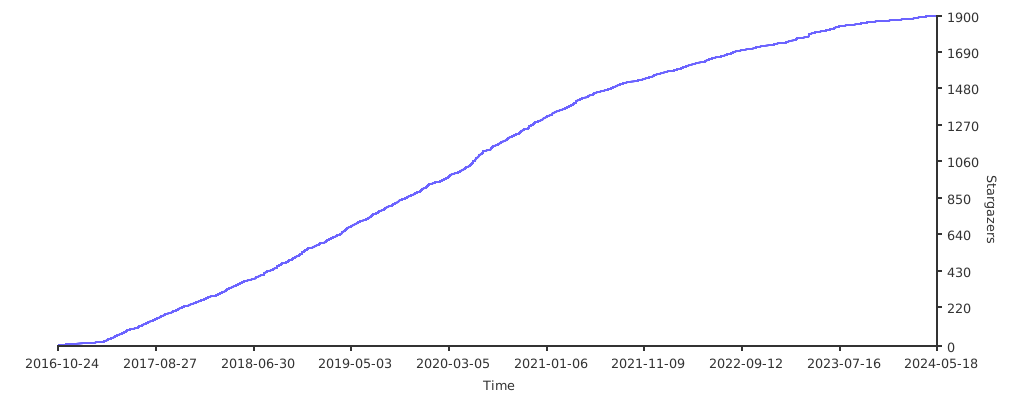](https://starchart.cc/xswei/d3js_doc)
### star 趋势
[](https://starchart.cc/xswei/d3js_doc)