This pure Chat SDK do not contain UI components, you can choose our UI and business logic library tim_ui_kit if you tend to integrate quickly.
## Experience DEMO
You can experience our Chat and Voice/Video Call modules via the following demo apps.
**Those versions of demo has been build by the same Flutter project with our SDKs and extensions.**
Mobile APP
WEB - H5
[Recommend] iOS/Android APP
Scan for the Web DEMO
## Environment Requirements
| | Version |
|---------|---------|
| Flutter | Flutter 2.2.0 or later for the Chat SDK; Flutter 2.10.0 or later for the [TUIKit](https://pub.dev/packages/tim_ui_kit) integration component library. |
| Android | Android Studio 3.5 or later; devices with Android 4.1 or later for apps |
| iOS | Xcode 11.0 or later. Ensure that your project has a valid developer signature. |
## Supported Platforms
We are aiming to build a Chat SDK and [TUIKit](https://pub.dev/packages/tim_ui_kit) that supports all platforms of Flutter, helping you to develop once and deploy it on all platforms.
| Platform | non-UI Chat SDK (this package) | UI components library ([TUIKit](https://pub.dev/packages/tim_ui_kit)) |
|---------|---------|---------|
| iOS | Supports | Supports |
| Android | Supports | Supports |
| Web | Supports since 4.1.1+2 version | Supports since 0.1.5 version |
| macOS | Supports since 4.1.9 version | Coming soon |
| Windows | Supports since 4.1.9 version | Coming soon |
> Some extra steps are needed for Web/macOS/Windows, you can refer to "Flutter for Web support" and "Flutter for Desktop support" in this tutorial.
## Preparation
1. You have [signed up](https://www.tencentcloud.com/document/product/378/17985) for a Tencent Cloud account and completed [identity verification](https://www.tencentcloud.com/document/product/378/3629).
2. You have created an application as instructed in [Creating and Upgrading an Application](https://www.tencentcloud.com/document/product/1047/34577) and recorded the `SDKAppID`.
## Part 1. Creating a Test Account
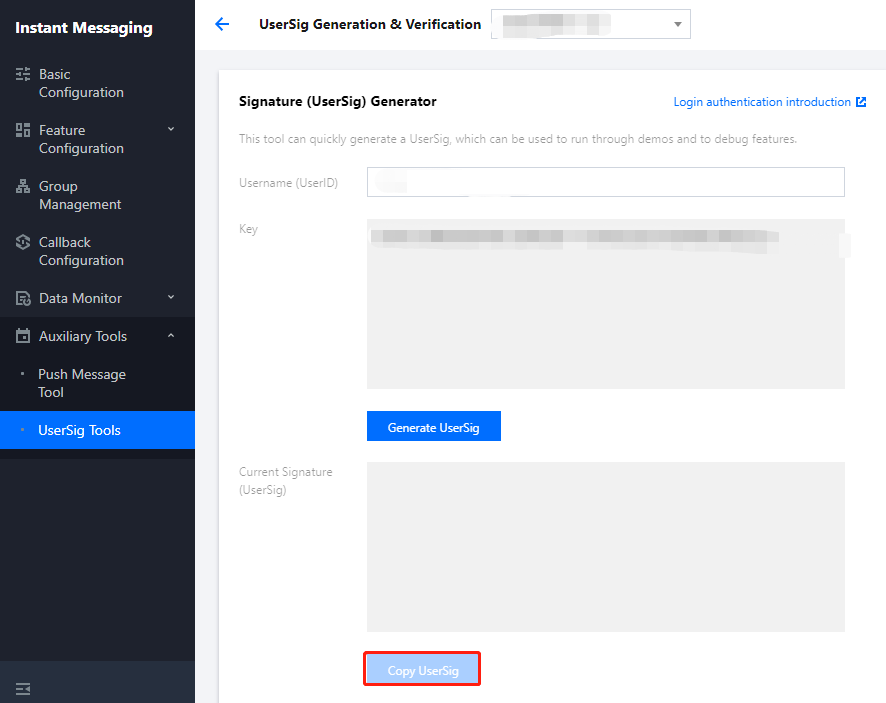
In the [IM console](https://console.cloud.tencent.com/im), select your application and click **Auxiliary Tools** > **UserSig Generation & Verification** on the left sidebar. Create two `UserID` and their corresponding `UserSig`, and copy the `UserID`, `Key`, and `UserSig` for subsequent logins.
>? The account is for development and testing only. Before the application release, the correct `UserSig` distribution method is to generate `UserSig` on the server and provide an application-oriented API. When `UserSig` is needed, your application can send a request to the business server for a dynamic `UserSig`. For more information, see [Generating UserSig](https://www.tencentcloud.com/document/product/1047/34385).
## Part 2. Selecting a Proper Scheme to Integrate the SDK for Flutter
Tencent Cloud Chat offers three integration schemes:
| | Use Case |
|---------|---------|
| Using the demo | Our demo is a complete chat application with open-source code. If you need to implement chat scenarios, you can use the demo for secondary development. Try it out [here](https://www.tencentcloud.com/document/product/1047/34279). |
| [Using UI library](https://pub.dev/packages/tim_ui_kit) | The Chat UI components library [TUIKit](https://pub.dev/packages/tim_ui_kit) provides common UI components, such as conversation list, chat page, and contact list. You can use those components to build an In-APP chat module to your Flutter APP quickly. **This solution is recommended**. |
| Self-implementing with this package | Use this solution if [TUIKit](https://pub.dev/packages/tim_ui_kit) cannot meet your needs. |
> To better understand Chat SDK APIs, see API examples [here](https://github.com/TencentCloud/TIMSDK/tree/master/Flutter/IMSDK/im-flutter-plugin/tencent_im_sdk_plugin/example), which shows how to call APIs and trigger listeners.
## Part 3. Using the Demo
### Running the demo
1. Download the source code and install dependencies:
```shell
# Clone the code
git clone https://github.com/TencentCloud/TIMSDK.git
# Enter the demo directory of Flutter
cd TIMSDK/Flutter/Demo/im-flutter-uikit
# Install dependencies
flutter pub get
```
2. Run the demo:
```shell
# Start the demo. Replace `SDK_APPID` and `KEY`
flutter run --dart-define=SDK_APPID={YOUR_SDKAPPID} --dart-define=ISPRODUCT_ENV=false --dart-define=KEY={YOUR_KEY}
```
>- `--dart-define=SDK_APPID={YOUR_SDKAPPID}`. Here, `{YOUR_SDKAPPID}` needs to be replaced with the `SDKAppID` of your application.
>- `--dart-define=ISPRODUCT_ENV=false`. Set it to `false` for a development environment.
>- `--dart-define=KEY={YOUR_KEY}`. Here, `{YOUR_KEY}` needs to be replaced with the `Key` recorded in [Part 1. Creating a Test User](#part1).
### Demo code structure
> The [TUIKit](https://pub.dev/packages/tim_ui_kit) for Flutter is used for build the UI and business logic of the demo. The demo layer itself is only used to build the application, process navigation redirects, and call instantiated [TUIKit](https://pub.dev/packages/tim_ui_kit) components.
| Folder | Description |
|---------|---------|
| lib | Core application directory |
| lib/i18n | Internationalization code, excluding the internationalization capabilities and strings of [TUIKit](https://pub.dev/packages/tim_ui_kit), which can be imported as needed. |
| lib/src | Main application directory |
| lib/src/pages | Important navigation pages of the demo. After the application is initialized, `app.dart` displays the loading animation, judges the login status, and redirects the user to `login.dart` or `home_page.dart`. After the user logs in, the login information will be stored locally through the `shared_preference` plugin and used for automatic login upon future application launch. If there is no such information or the login fails, the user will be redirected to the login page. During automatic login, the user is still on `app.dart` and can see the loading animation. `home_page.dart` has a bottom tab to switch between the four main feature pages of the demo. |
| lib/utils | Some tool function classes. |
Basically, a [TUIKit](https://pub.dev/packages/tim_ui_kit) component is imported into each `dart` file in `lib/src`. After the component is instantiated in the file, the page can be rendered.
Below are main files:
| Main File in `lib/src` | Description |
|---------|---------|
| add_friend.dart | Friend request page that uses the `TIMUIKitAddFriend` component. |
| add_group.dart | Group joining request page that uses the `TIMUIKitAddGroup` component.|
| blacklist.dart| Blocklist page that uses the `TIMUIKitBlackList` component. |
| chat.dart | Main chat page that uses all the chat capabilities of [TUIKit](https://pub.dev/packages/tim_ui_kit) and the `TIMUIKitChat` component. |
| chatv2.dart | Main chat page that uses atomic capabilities and the `TIMUIKitChat` component. |
| contact.dart | Contacts page that uses the `TIMUIKitContact` component. |
| conversation.dart | Conversation list page that uses the `TIMUIKitConversation` component. |
| create_group.dart | Group chat page that is implemented in the demo with no component used. |
| group_application_list.dart | Group application list page that uses the `TIMUIKitGroupApplicationList` component. |
| group_list.dart | Group list page that uses the `TIMUIKitGroup` component. |
| group_profile.dart | Group profile and management page that uses the `TIMUIKitGroupProfile` component. |
| newContact.dart | New contact request page that uses the `TIMUIKitNewContact` component. |
| routes.dart | Demo route that navigates users to the login page `login.dart` or homepage `home_page.dart`. |
| search.dart | Global search and in-conversation search page that uses the `TIMUIKitSearch` (global search) and `TIMUIKitSearchMsgDetail` (in-conversation search) components. |
| user_profile.dart | User information and relationship chain maintenance page that uses the `TIMUIKitProfile` component. |
You can modify the above demo for secondary development or implement your business needs based on it.
## Part 4. Using [TUIKit](https://pub.dev/packages/tim_ui_kit) Component Library to implement In-App Chat module in Half a Day
[TUIKit](https://pub.dev/packages/tim_ui_kit) is a UI components library for Tencent Cloud Chat SDK. It provides common UI components, such as conversation list, chat page, and contact list.
It's suggested to use those components to build an In-APP chat module to your Flutter APP quickly.
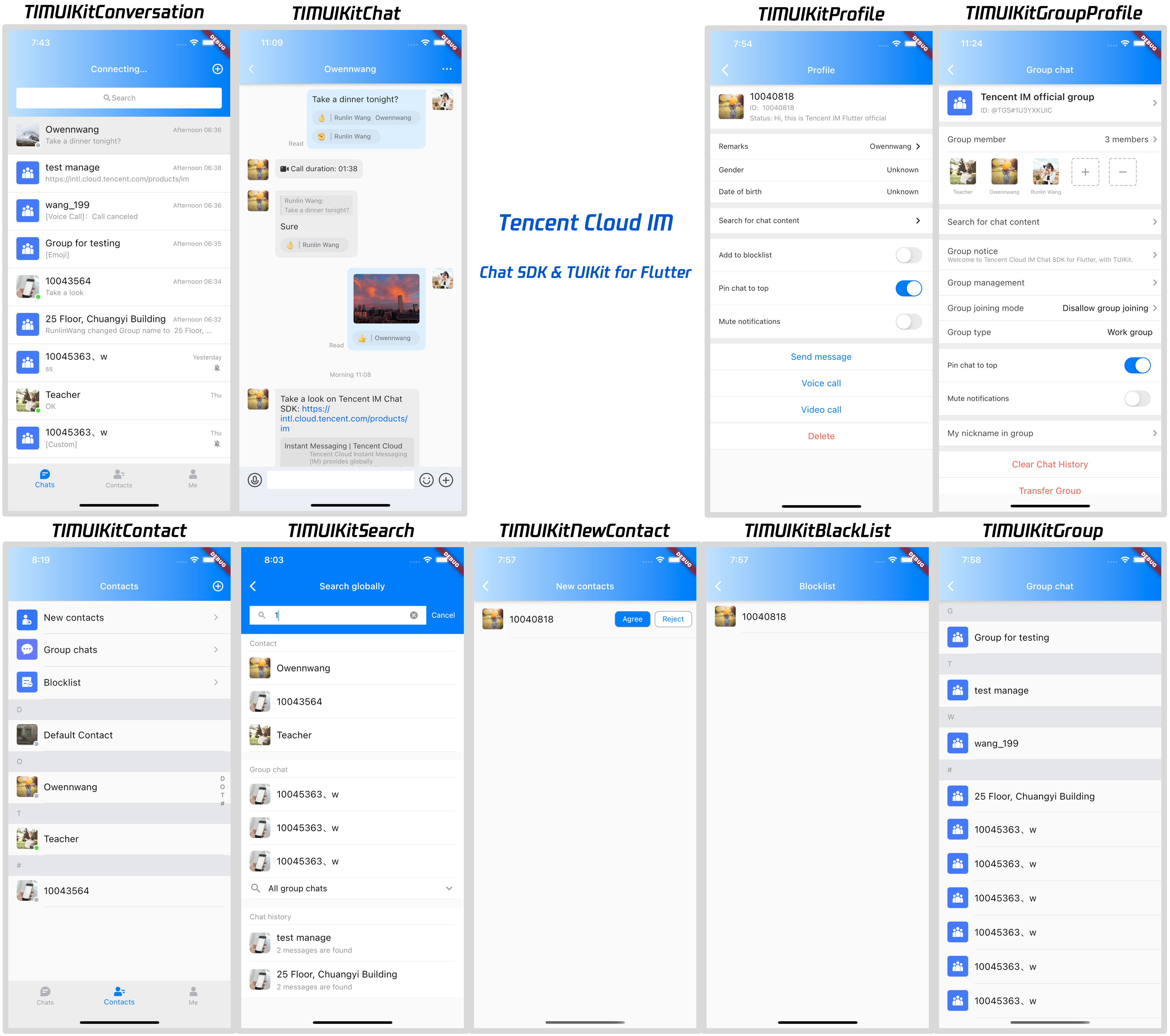
**For more details and tutorial, see [TUIKit Quick Integration and get started](https://pub.dev/packages/tim_ui_kit).**
## Part 5. Self-Implementing Integration with this Chat SDK
### Prerequisites
You have created a Flutter application or have an application that can be based on Flutter.
### Directions
#### Installing the Chat SDK
For detailed directions involved in this section, see [SDK Integration (Flutter)](https://www.tencentcloud.com/document/product/1047/46264).
Run the following command to install the latest Chat SDK for Flutter.
Run the following command:
```shell
flutter pub add tencent_im_sdk_plugin
```
**Some extra steps are needed for Web/macOS/Windows, you can refer to "Flutter for Web support" and "Flutter for Desktop support" in this tutorial.**
#### Initializing the SDK
For detailed directions involved in this section, see [here](https://www.tencentcloud.com/document/product/1047/47966).
Call `initSDK` to initialize the SDK.
Pass in your `sdkAppID`.
```Dart
import 'package:tencent_im_sdk_plugin/enum/V2TimSDKListener.dart';
import 'package:tencent_im_sdk_plugin/enum/log_level_enum.dart';
import 'package:tencent_im_sdk_plugin/tencent_im_sdk_plugin.dart';
TencentImSDKPlugin.v2TIMManager.initSDK(
sdkAppID: 0, // Replace `0` with the `SDKAppID` of your IM application during integration
loglevel: LogLevelEnum.V2TIM_LOG_DEBUG, // Log
listener: V2TimSDKListener(),
);
```
In this step, you can mount some listeners to the Chat SDK, mainly including those for network status and user information change. For more information, see [V2TimSDKListener class](https://pub.dev/documentation/tencent_im_sdk_plugin_platform_interface/latest/enum_V2TimSDKListener/V2TimSDKListener-class.html).
#### Logging in with the test account
For detailed directions involved in this section, see [Flutter](https://cloud.tencent.com/document/product/269/75296).
Complete login verification using the test account created at the beginning.
Call the `TencentImSDKPlugin.v2TIMManager.login` method to log in with the test account.
If the returned `res.code` is `0`, the login is successful.
```dart
import 'package:tencent_im_sdk_plugin/tencent_im_sdk_plugin.dart';
V2TimCallback res = await TencentImSDKPlugin.v2TIMManager.login (
userID: userID,
userSig: userSig,
);
```
>? The account is for development and testing only. Before the application release, the correct `UserSig` distribution method is to integrate the `UserSig` calculation code into the server and provide an application-oriented API. When `UserSig` is needed, your application can send a request to the business server for a dynamic `UserSig`. For more information, see [Generating UserSig](https://www.tencentcloud.com/document/product/1047/34385).
#### Sending a message
For detailed directions involved in this section, see [here](https://www.tencentcloud.com/document/product/1047/47992).
The following shows how to send a text message:
1. Call `createTextMessage(String)` to create a text message.
2. Get the message ID from the returned value.
3. Call `sendMessage()` to send the message with the ID. `receiver` can be the ID of the other test account created earlier. `groupID` doesn't need to be entered for sending one-to-one messages.
Sample code:
```dart
import 'package:tencent_im_sdk_plugin/tencent_im_sdk_plugin.dart';
V2TimValueCallback createMessage =
await TencentImSDKPlugin.v2TIMManager
.getMessageManager()
.createTextMessage(text: "The text to create");
String id = createMessage.data!.id!; // The message creation ID
V2TimValueCallback res = await TencentImSDKPlugin.v2TIMManager
.getMessageManager()
.sendMessage(
id: id, // Pass in the message creation ID to
receiver: "The userID of the destination user",
groupID: "The groupID of the destination group",
);
```
> If sending failed, it may be that your `sdkAppID` doesn't support sending messages to strangers. In this case, enable the feature in the console for test.
>
> Disable the friend relationship chain check [here](https://console.cloud.tencent.com/im/login-message) .
#### Getting the conversation list
For detailed directions involved in this section, see [here](https://www.tencentcloud.com/document/product/1047/48321).
After sending the test message in the previous step, log in with the other test account to load the conversation list.
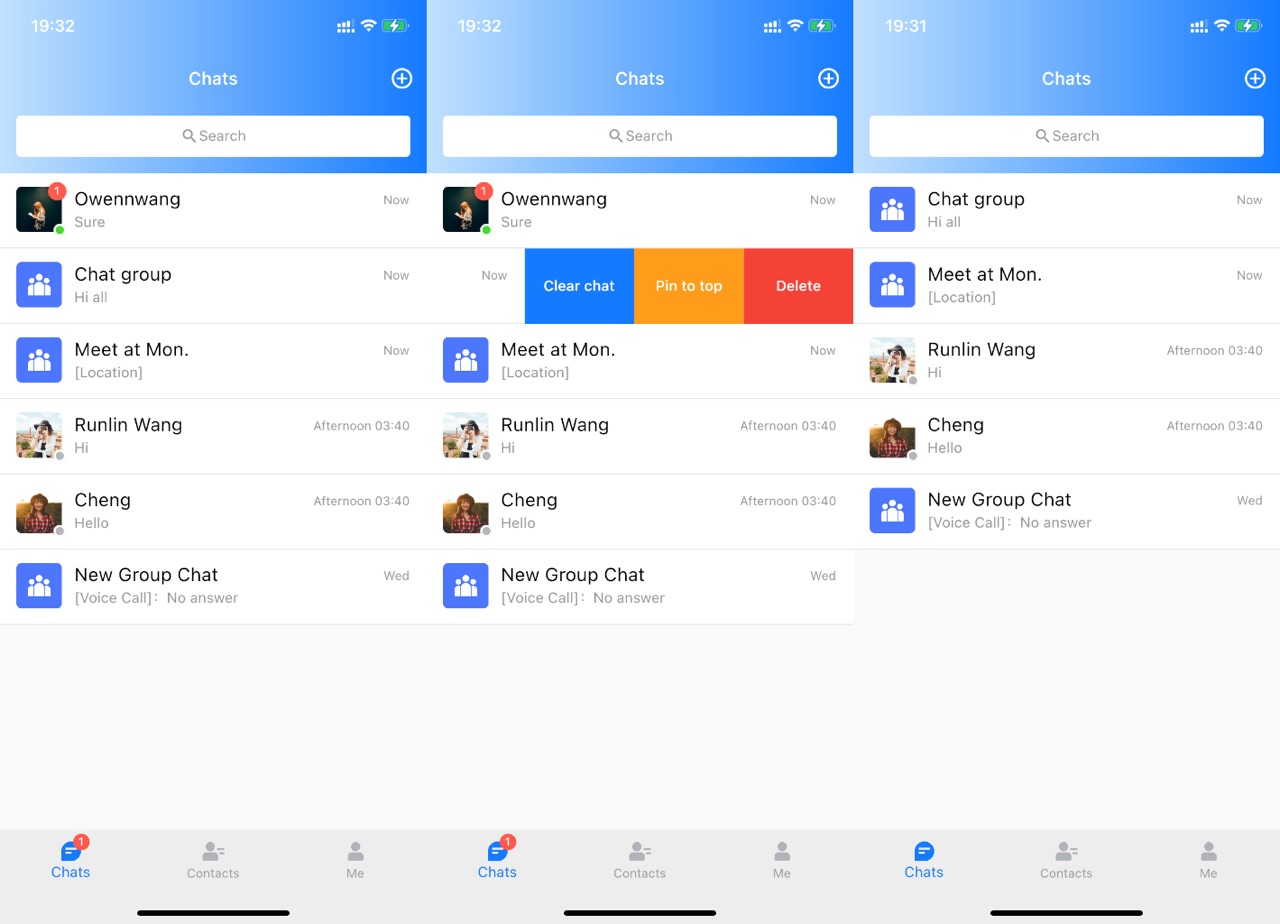
There are two methods to load the conversation list:
1. Listen on the persistent connection callback to update the conversation list in real time.
2. Send a request through an API to get the paginated conversation list at one time.
Common use cases:
Get the conversation list upon application launch and listen on the persistent connection to update the conversation list in real time.
##### Requesting the conversation list at one time
To get the conversation list, you need to maintain `nextSeq` and record its current position.
```dart
import 'package:tencent_im_sdk_plugin/tencent_im_sdk_plugin.dart';
String nextSeq = "0";
getConversationList() async {
V2TimValueCallback res = await TencentImSDKPlugin
.v2TIMManager
.getConversationManager()
.getConversationList(nextSeq: nextSeq, count: 10);
nextSeq = res.data?.nextSeq ?? "0";
}
```
At this point, you can see the message sent by the other test account in the previous step.
##### Listening on the persistent connection to get the real-time conversation list
Mount listeners to the SDK, process the callback event, and update the UI.
1. Mount listeners.
```dart
await TencentImSDKPlugin.v2TIMManager
.getConversationManager()
.setConversationListener(
listener: new V2TimConversationListener(
onConversationChanged: (List list){
_onConversationListChanged(list);
},
onNewConversation:(List list){
_onConversationListChanged(list);
},
```
2. Process the callback event to display the latest conversation list on the UI.
```dart
import 'package:tencent_im_sdk_plugin/tencent_im_sdk_plugin.dart';
List _conversationList = [];
_onConversationListChanged(List list) {
for (int element = 0; element < list.length; element++) {
int index = _conversationList.indexWhere(
(item) => item!.conversationID == list[element].conversationID);
if (index > -1) {
_conversationList.setAll(index, [list[element]]);
} else {
_conversationList.add(list[element]);
}
}
```
#### Receiving a message
For detailed directions involved in this section, see [here](https://www.tencentcloud.com/document/product/1047/47997).
There are two methods to receive messages in the Chat SDK for Flutter:
1. Listen on the persistent connection callback to get message changes and update and render the historical message list in real time.
2. Send a request through an API to get paginated message history at one time.
Common use cases:
1. When entering a new conversation, request a certain number of historical messages at one time to display the historical message list.
2. Listen on the persistent connection to receive messages in real time and add them to the historical message list.
##### Requesting the historical message list at one time
We recommend you limit the number of messages loaded per page to 20 to avoid affecting the speed.
Dynamically record the current number of pages for the next request.
The sample code is as follows:
```dart
import 'package:tencent_im_sdk_plugin/tencent_im_sdk_plugin.dart';
V2TimValueCallback> res = await TencentImSDKPlugin
.v2TIMManager
.getMessageManager()
.getGroupHistoryMessageList(
groupID: "groupID",
count: 20,
lastMsgID: "",
);
List msgList = res.data ?? [];
// here you can use msgList to render your message list
}
```
##### Listening on the persistent connection to get new messages in real time
After the historical message list is initialized, new messages are from the persistent connection `V2TimAdvancedMsgListener.onRecvNewMessage`.
After the `onRecvNewMessage` callback is triggered, add new messages to the historical message list as needed.
Below is the sample code for binding a listener:
```dart
import 'package:tencent_im_sdk_plugin/tencent_im_sdk_plugin.dart';
final adVancesMsgListener = V2TimAdvancedMsgListener(
onRecvNewMessage: (V2TimMessage newMsg) {
_onReceiveNewMsg(newMsg);
},
/// ... other listeners related to message
);
TencentImSDKPlugin.v2TIMManager
.getMessageManager()
.addAdvancedMsgListener(listener: adVancesMsgListener);
```
At this point, you have completed the Chat module development. You can send and receive messages and enter different conversations.
You can develop more features, such as [group](https://www.tencentcloud.com/document/product/1047/48169?from=pub), [user profile](https://www.tencentcloud.com/document/product/1047/48160?from=pub), [relationship chain](https://www.tencentcloud.com/document/product/1047/48157?from=pub), [offline push](https://www.tencentcloud.com/document/product/1047/50032?from=pub), and [local search](https://www.tencentcloud.com/document/product/1047/48135?from=pub).
## Flutter for Web support
Web is supported since version of 4.1.1+2.
Some extra steps, as following, are needed for Web support.
### Upgrade to Flutter 3.x
We strongly recommend you to upgrade to Flutter 3.x, as numerous optimizations for Web, since Flutter 3.0.
### Install Flutter for Web Chat SDK
```dart
flutter pub add tencent_im_sdk_plugin_web
```
### Import JS
> Please execute `flutter create .` to add Web support to your project.
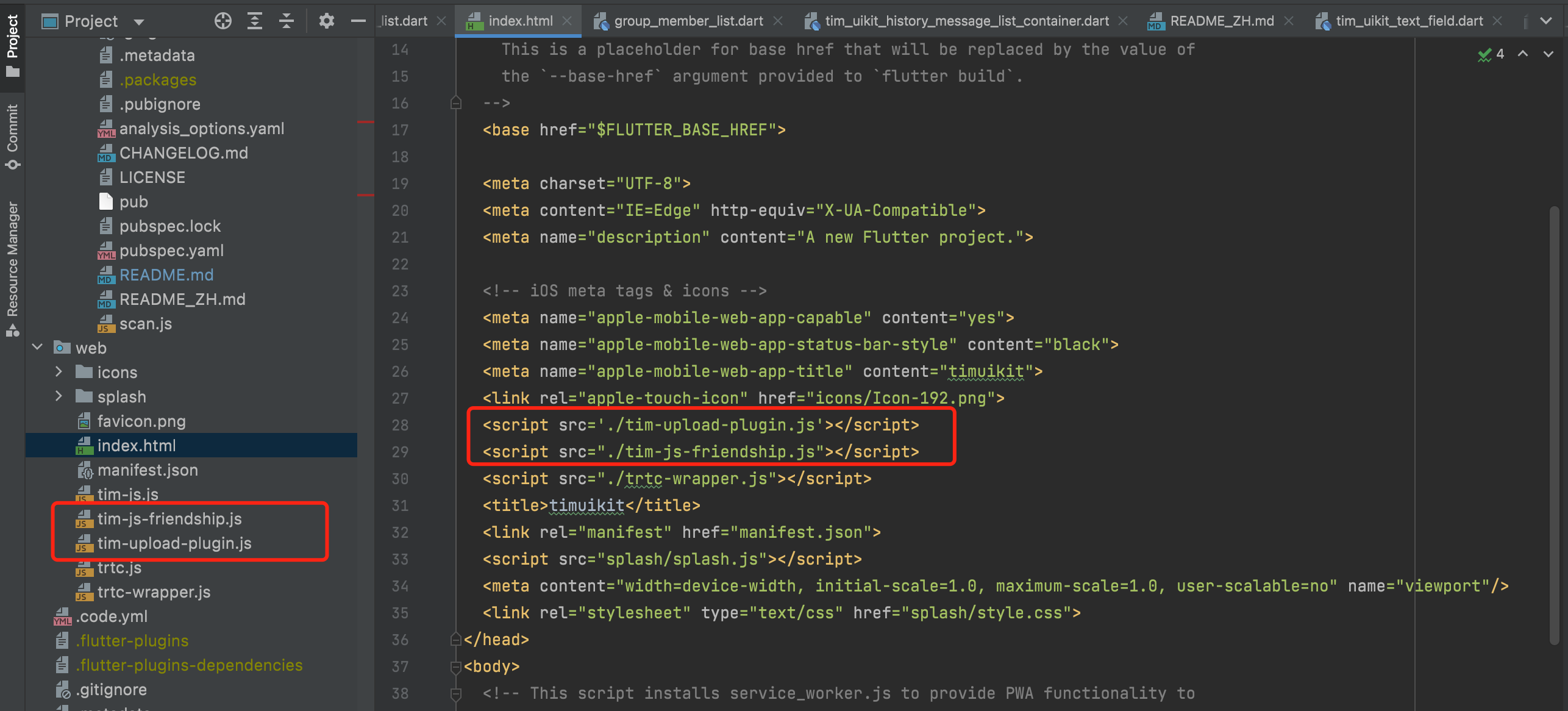
Download these two JS files from the following GitHub link, and placed them to `web` folder.
- [tim-js-friendship.js](https://github.com/TencentCloud/TIMSDK/blob/master/Web/IMSDK/tim-js-friendship.js)
- [Rename to tim-upload-plugin.js](https://github.com/TencentCloud/TIMSDK/blob/master/Web/IMSDK/tim-upload-plugin/index.js)
Add these lines to `web/index.html` between ` `.
```html
```
## Flutter for Desktop support
Desktop platforms, including Windows and macOS, are supported since version of 4.1.9.
Some extra steps, as following, are needed for Desktop support.
### Upgrade to Flutter 3.x
Desktop platforms are only available since Flutter 3.0, thus you are supposed to upgrade first.
### Install Flutter for Desktop Chat SDK
```dart
flutter pub add tencent_im_sdk_plugin_desktop
```
## FAQs
### What should I do if clicking **Build And Run** for an Android device triggers an error, stating no available device is found?
Check that the device is not occupied by other resources. Alternatively, click **Build** to generate an APK package, drag it to the simulator, and run it.
### What should I do if an error occurs during the first run for an iOS device?
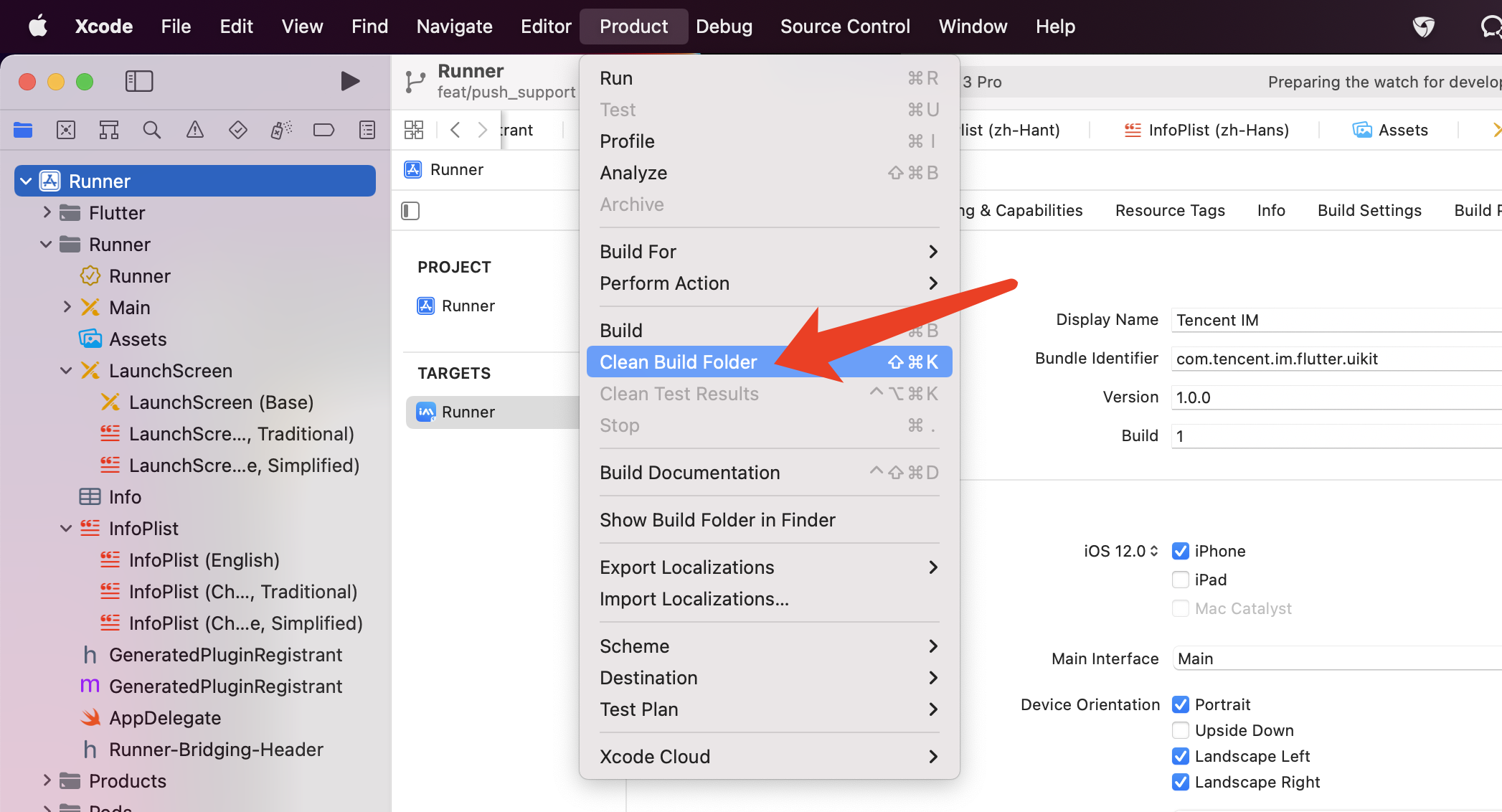
If an error occurs after the configuration, click **Product** > **Clean Build Folder**, clean the product, and run `pod install` or `flutter run` again.
### What should I do if an error occurs during debugging on a real iOS device when I am wearing an Apple Watch?

Turn on Airplane Mode on your Apple Watch, and go to **Settings > Bluetooth** on your iPhone to turn off Bluetooth.
Restart Xcode (if opened) and run `flutter run` again.
### What should I do when an error occurs on an Android device after [TUIKit](https://pub.dev/packages/tim_ui_kit) is imported into the application automatically generated by Flutter?

1. Open `android\app\src\main\AndroidManifest.xml` and complete `xmlns:tools="http://schemas.android.com/tools"` / `android:label="@string/android_label"` / `tools:replace="android:label"` as follows.
```xml
```
2. Open `android\app\build.gradle` and complete `minSdkVersion` and `targetSdkVersion` in `defaultConfig`.
```gradle
defaultConfig {
applicationId "" // Replace it with your Android package name
minSdkVersion 21
targetSdkVersion 30
}
```
## What's more
In addition to Flutter SDK, we have numerous SDKs that covering all platforms. The following platforms can communicate with each other and provide services across devices and platforms.
| Platform | Introduction | Demo | Download | UI Components library |
| --- | --- | --- | --- | --- |
| Android | Compatible with JDK 1.6 and Android SDK version 14 and later | [Get](https://www.tencentcloud.com/document/product/1047/34279) | [Get](https://github.com/TencentCloud/TIMSDK/tree/master/Android/IMSDK) | [Get](https://www.tencentcloud.com/document/product/1047/50062) |
| iOS | Compatible with iOS 8.0 and later | [Get](https://www.tencentcloud.com/document/product/1047/34279) | [Get](https://github.com/TencentCloud/TIMSDK/tree/master/iOS/IMSDK) | [Get](https://www.tencentcloud.com/document/product/1047/50062) |
| Mac | Compatible with OS X 10.10 and later | - | [Get](https://github.com/TencentCloud/TIMSDK/tree/master/Mac/IMSDK) | - |
| Windows | C and C++ are included. Compatible with Windows 7, Windows 8 and 8.1, and Windows 10. Both 32-bit and 64-bit programs can be connected | - | [Get](https://github.com/TencentCloud/TIMSDK/tree/master/Windows/IMSDK) | - |
| Web | Supports Internet Explorer 11+, Chrome 7+, Firefox 3.6+, Opera 12+ and Safari 6+ | [Get](https://www.tencentcloud.com/document/product/1047/34279) | [Get](https://www.npmjs.com/package/tim-js-sdk) | [Get](https://www.tencentcloud.com/document/product/1047/50061) |
| Unity | Supports 2020.2.7f1c1 or later | - | [Get](https://www.tencentcloud.com/document/product/1047/46263) | - |
| Flutter | Supports Flutter 2 & dart 2.12 and later, deploying to Android, iOS, Web, macOS and Windows. | [Get](https://www.tencentcloud.com/document/product/1047/34279) | Here | [Get](https://pub.dev/packages/tim_ui_kit) |
| Electron | Electron SDK | - | [Get](https://github.com/tencentyun/im_electron_demo) | - |
## Contact Us
Please do not hesitate to contact us in the following place, if you have any further questions or tend to learn more about the use cases.
- Telegram Group:
- WhatsApp Group:
- QQ Group: 788910197, chat in Chinese
Our Website: