# che-theia
**Repository Path**: mirrors_eclipse/che-theia
## Basic Information
- **Project Name**: che-theia
- **Description**: No description available
- **Primary Language**: Unknown
- **License**: EPL-2.0
- **Default Branch**: main
- **Homepage**: None
- **GVP Project**: No
## Statistics
- **Stars**: 0
- **Forks**: 0
- **Created**: 2020-08-22
- **Last Updated**: 2026-03-21
## Categories & Tags
**Categories**: Uncategorized
**Tags**: None
## README


# Che-Theia
[](https://github.com/eclipse-che/che-theia/actions?query=workflow%3A%22Build+%26+Publish+%60next%60%22)
[](https://codecov.io/gh/eclipse-che/che-theia)
[](https://mattermost.eclipse.org/eclipse/channels/eclipse-che)
[](https://github.com/eclipse/che/issues?utf8=%E2%9C%93&q=is%3Aopen+label%3Aarea%2Feditor%2Fche-theia+label%3Akind%2Fquestion+)
[](https://github.com/eclipse/che/issues?utf8=%E2%9C%93&q=is%3Aopen+label%3Aarea%2Feditor%2Fche-theia+label%3Akind%2Fbug+)
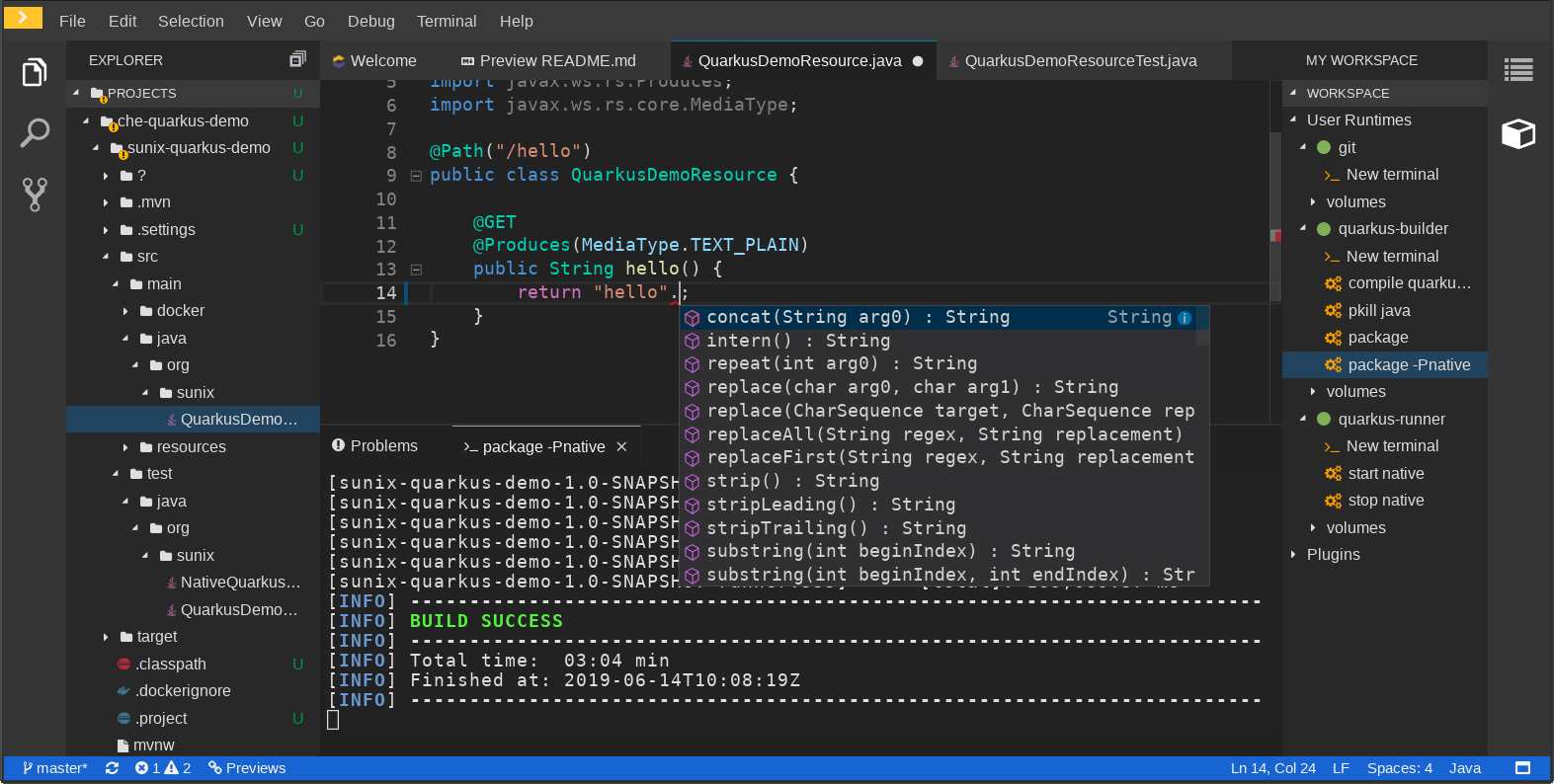
## What is Che-theia ?
[Eclipse Che](https://eclipse.org/che/) provides a default web IDE for the workspaces which is based on the [Theia](https://github.com/eclipse-theia/theia) project. It’s a subtle different version than a plain Theia(https://github.com/eclipse-theia/theia) as there are functionalities that have been added based on the nature of the Eclipse Che workspaces. We are calling this version of Eclipse Theia for Che: Che-Theia.
So, Che-Theia is the default `Che editor` provided with developer workspaces created in [Eclipse Che 7](https://eclipse.org/che/)([Github](https://github.com/eclipse/che)).
Che-Theia contains additional extensions and plugins which have been added based on the nature of Eclipse Che workspaces and to provide the best IDE experience of Theia within Che.
- A VSCode-like IDE experience. Che-Theia is based on the Monaco
editor and includes features like the command palette.
- VSCode extension compatibility. Che-Theia supports VSCode
extensions. In Che-theia, these extensions could come with a side-car
containers with all the dependencies required by the extension.
No need to install the JDK or Maven when you install our VSCode Java plugin.
- Nice views to interact with your user containers or production runtime containers.
(Terminal access, execute Che-commands in specific containers, etc...)
## Che-Theia capabilities
In Che-Theia, you’ll find the following capabilities:
| Plug-in | Description |
|-----------------------|-------------|
| Che Extended Tasks | Handles the Che commands and provides the ability to start those into a specific container of the workspace. |
| Che Extended Terminal | Allows to provide terminal for any of the containers of the workspace. |
| Che Factory | Handles the Eclipse Che Factories [TODO: LINK] |
| Che Container | Provides a container view that shows all the containers that are running in the workspace and allows to interact with them. |
| Che Dashboard | Allows to integrate the IDE with Che Dashboard and facilitate the navigation. |
| Che Welcome Page | Display a welcome page with handy links when opening the IDE. |
| Che Ports | Allows to detect when services are running inside of the workspace and expose them. |
| Che APIs | Extends the IDE APIs, to allow interacting with the Che specific components (workspaces, preferences, etc.). |
## Project structure
- [dockerfiles](./dockerfiles) contains Dockerfiles for plugin sidecars, theia-editor and theia builder,
- [extensions](./extensions) contains Che-Theia specific extensions,
- [plugins](./plugins) contains Che-Theia plugins.
- [generator](./generator) contains Che-Theia [generator](./generator/README.md)
Che-theia editor is a container image which contains the Che-theia IDE web application.
The che-plugin of this editor is defined in the plugin registry https://github.com/eclipse/che-plugin-registry/blob/master/v3/plugins/eclipse/che-theia/next/meta.yaml
[dockerfiles/theia](./dockerfiles/theia) folder contains the container image sources of `eclipse/che-theia`:
- Using a Docker multistage build and [dockerfiles/theia-dev](./dockerfiles/theia-dev) as builder.
- Cloning [Theia](https://github.com/eclipse-theia/theia)
- Using `che-theia init` command to decorate Theia with Che-theia plugins and extensions. All plugins and extensions are defined in [che-theia-init-sources.yml](./che-theia-init-sources.yml)
- Using `yarn` to build theia + che-theia extensions + che-theia plugins
- Assembling everything and using `che-theia production` to make the che-theia webapp.
- Copying the che-theia webapp into the runtime container and creating the Che-theia image.
# Contributing
## Contribute to Che-theia
Contributing to che-theia section is cover in [CONTRIBUTING.md](https://github.com/eclipse-che/che-theia/blob/main/CONTRIBUTING.md)
## Build container images
Building images is required only if you make some changes on `Dockerfile`s inside `dockerfiles` folder.
If it is about testing che-theia extensions or plugins, please refer to [CONTRIBUTING.md](https://github.com/eclipse-che/che-theia/blob/main/CONTRIBUTING.md).
To build che-theia docker images, please follow [dockerfiles/theia/README.md](https://github.com/eclipse-che/che-theia/blob/main/dockerfiles/theia/README.md) instructions.
# License
- [Eclipse Public License 2.0](LICENSE)
# Join the community
The Eclipse Che community is globally reachable through public chat rooms, mailing list and weekly calls.
See https://www.eclipse.org/che/docs/che-7/overview/introduction-to-eclipse-che/#_joining_the_community
## Report issues
Issues are tracked on the main Eclipse Che Repository: https://github.com/eclipse/che/issues