# react-beautiful-dnd
**Repository Path**: mirrors_fkhadra/react-beautiful-dnd
## Basic Information
- **Project Name**: react-beautiful-dnd
- **Description**: Beautiful, accessible drag and drop for lists with React.js
- **Primary Language**: Unknown
- **License**: Apache-2.0
- **Default Branch**: master
- **Homepage**: None
- **GVP Project**: No
## Statistics
- **Stars**: 0
- **Forks**: 0
- **Created**: 2020-08-08
- **Last Updated**: 2026-07-04
## Categories & Tags
**Categories**: Uncategorized
**Tags**: None
## README

# react-beautiful-dnd
Beautiful, accessible drag and drop for lists with [`React.js`](https://facebook.github.io/react/)
[](https://circleci.com/gh/atlassian/react-beautiful-dnd/tree/master)
[](https://www.npmjs.com/package/react-beautiful-dnd) [](https://david-dm.org/atlassian/react-beautiful-dnd) [](https://greenkeeper.io/) [](http://semver.org/spec/v2.0.0.html)
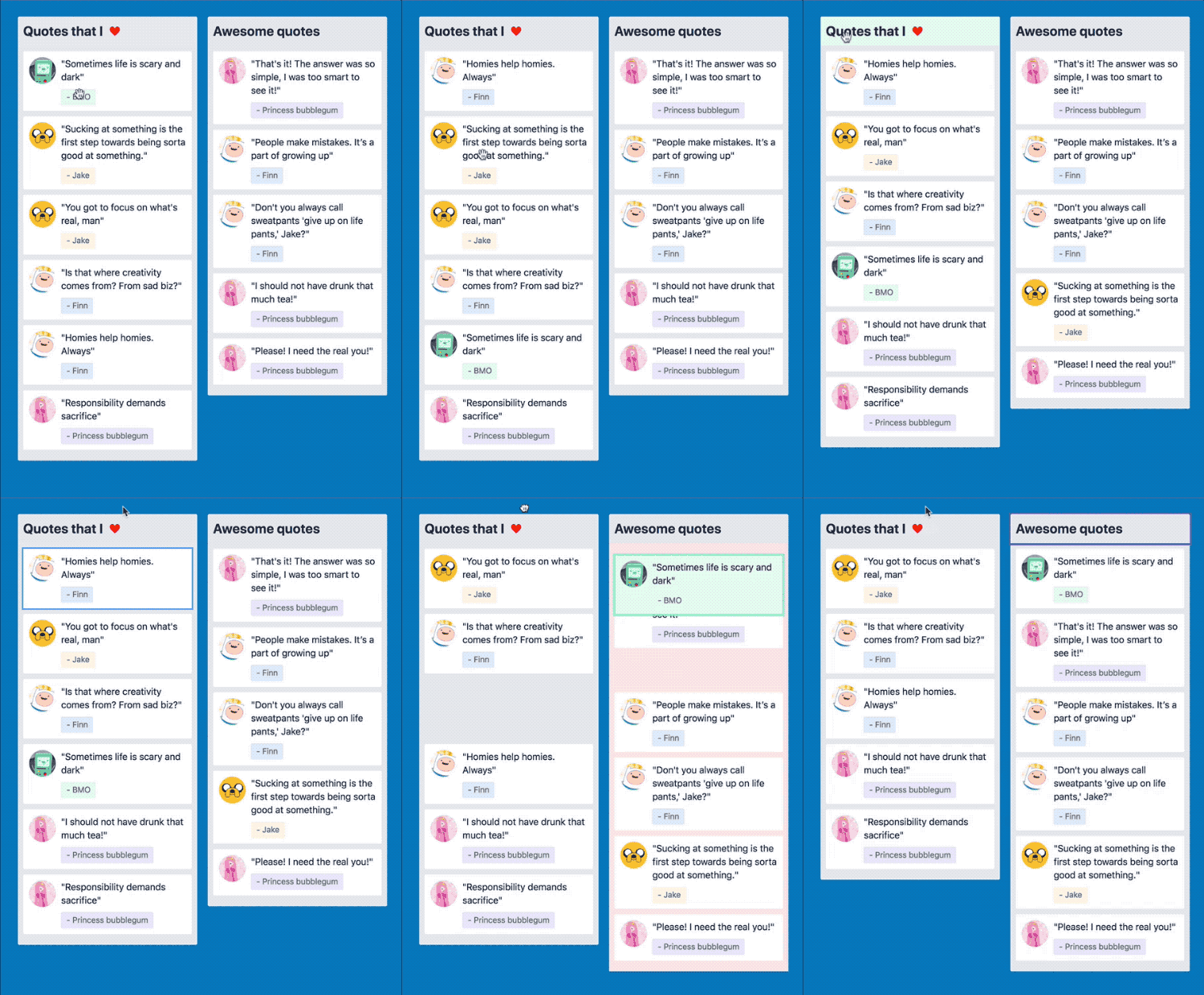
## Examples 🎉
See how beautiful it is for yourself!
### Viewing on a desktop
[All the examples!](https://react-beautiful-dnd.netlify.com)
### Viewing on a mobile or tablet
- [Simple list](https://react-beautiful-dnd.netlify.com/iframe.html)
- [Board](https://react-beautiful-dnd.netlify.com/iframe.html?selectedKind=board&selectedStory=simple) - best viewed in landscape
> We provide different links for touch devices as currently [storybook](https://github.com/storybooks/storybook) does not have a good mobile menu experience [more information](https://github.com/storybooks/storybook/issues/124)
## Basic usage examples
We have created some basic examples on `codesandbox` for you to play with directly:
- [Simple vertical list](https://codesandbox.io/s/k260nyxq9v)
- [Simple horizontal list](https://codesandbox.io/s/mmrp44okvj)
- [Simple DnD between two lists](https://codesandbox.io/s/ql08j35j3q)
## Core characteristics
- Beautiful, natural movement of items
- Clean and powerful api which is simple to get started with
- Plays extremely well with standard browser interactions
- Unopinionated styling
- No creation of additional wrapper dom nodes - flexbox and focus management friendly!
- Accessible
## Get started 🤩
We have created [a free course on `egghead.io`](https://egghead.io/courses/beautiful-and-accessible-drag-and-drop-with-react-beautiful-dnd) to help people get started with `react-beautiful-dnd` as quickly as possible

## Read this in other languages
- [ **한글/Korean**](https://github.com/LeeHyungGeun/react-beautiful-dnd-kr)
- [ **中文/Chinese**](https://github.com/chinanf-boy/react-beautiful-dnd-zh)
## Currently supported feature set
- Vertical lists ↕
- Horizontal lists ↔
- Movement between lists (▤ ↔ ▤)
- Mouse 🐭, keyboard 🎹 and touch 👉📱 (mobile, tablet and so on) support
- Auto scrolling - automatically scroll containers and the window as required during a drag (even with keyboard 🔥)
- [Multi drag support](/docs/patterns/multi-drag.md)
- Incredible screen reader support - we provide an amazing experience for english screen readers out of the box 📦. We also provide complete customisation control and internationalisation support for those who need it 💖
- Conditional [dragging](https://github.com/atlassian/react-beautiful-dnd#props-1) and [dropping](https://github.com/atlassian/react-beautiful-dnd#conditionally-dropping)
- Multiple independent lists on the one page
- Flexible item sizes - the draggable items can have different heights (vertical lists) or widths (horizontal lists)
- Compatible with semantic table reordering - [table pattern](/docs/patterns/tables.md)
- Compatible with [`React.Portal`](https://reactjs.org/docs/portals.html) - [portal pattern](/docs/patterns/using-a-portal.md)
- Custom drag handles - you can drag a whole item by just a part of it
- A `Droppable` list can be a scroll container (without a scrollable parent) or be the child of a scroll container (that also does not have a scrollable parent)
- Independent nested lists - a list can be a child of another list, but you cannot drag items from the parent list into a child list
- Server side rendering compatible
- Plays well with [nested interactive elements](https://github.com/atlassian/react-beautiful-dnd#interactive-child-elements-within-a-draggable) by default
### Lots more coming soon
You can check out all the features that will be landing soon [on our issue page](https://github.com/atlassian/react-beautiful-dnd/issues).
## Upgrading
We have created upgrade instructions in our release notes to help you upgrade to the latest version!
- [Upgrading from `7.x` to `8.x`](https://github.com/atlassian/react-beautiful-dnd/releases/tag/v8.0.0)
- [Upgrading from `6.x` to `7.x`](https://github.com/atlassian/react-beautiful-dnd/releases/tag/v7.0.0)
- [Upgrading from `5.x` to `6.x`](https://github.com/atlassian/react-beautiful-dnd/releases/tag/v6.0.0)
- [Upgrading from `4.x` to `5.x`](https://github.com/atlassian/react-beautiful-dnd/releases/tag/v5.0.0)
- [Upgrading from `3.x` to `4.x`](https://github.com/atlassian/react-beautiful-dnd/releases/tag/v4.0.0)
## Not for everyone
There are a lot of libraries out there that allow for drag and drop interactions within React. Most notable of these is the amazing [`react-dnd`](https://github.com/react-dnd/react-dnd). It does an incredible job at providing a great set of drag and drop primitives which work especially well with the [wildly inconsistent](https://www.quirksmode.org/blog/archives/2009/09/the_html5_drag.html) html5 drag and drop feature. **`react-beautiful-dnd` is a higher level abstraction specifically built for vertical and horizontal lists**. Within that subset of functionality `react-beautiful-dnd` offers a powerful, natural and beautiful drag and drop experience. However, it does not provide the breadth of functionality offered by react-dnd. So this library might not be for you depending on what your use case is.
## Driving philosophy: physicality
The core design idea of `react-beautiful-dnd` is physicality: we want users to feel like they are moving physical objects around
### Application 1: no instant movement
It is a fairly standard drag and drop pattern for things to disappear and reappear in response to the users drag. For a more natural drag we animate the movement of items as they need to move out of the way while dragging to more clearly show a drags effect. We also animate the drop of an item so that it animates into its new home position. At no point is an item instantly moved anywhere — regardless of whether it is dragging or not.
### Application 2: knowing when to move
It is quite common for drag and drop interactions to be based on the position that user started the drag from.
In `react-beautiful-dnd` a dragging items impact is based on its centre of gravity — regardless of where a user grabs an item from. A dragging items impact follows similar rules to a set of scales ⚖️. Here are some rules that are followed to allow for a natural drag experience even with items of flexible height:
- A list is _dragged over_ when the centre position of a dragging item goes over one of the boundaries of the list
- A resting drag item will move out of the way of a dragging item when the centre position of the dragging item goes over the edge of the resting item. Put another way: once the centre position of an item (A) goes over the edge of another item (B), B moves out of the way.
### Application 3: no drop shadows
Drop shadows are useful in an environment where items and their destinations snap around. However, with `react-beautiful-dnd` it should be obvious where things will be dropping based on the movement of items. This might be changed in the future - but the experiment is to see how far we can get without any of these affordances.
### Application 4: maximise interactivity
`react-beautiful-dnd` works really hard to avoid as many periods of non-interactivity as possible. The user should feel like they are in control of the interface and not waiting for an animation to finish before they can continue to interact with the interface. However, there is a balance that needs to be made between correctness and power in order to make everybody's lives more sane. Here are the only situations where some things are not interactive:
1. From when a user cancels a drag to when the drop animation completes. On cancel there are lots of things moving back to where they should be. If you grab an item in a location that is not its true home then the following drag will be incorrect.
2. Starting a drag on an item that is animating its own drop. For simplicity this is the case - it is actually quite hard to grab something while it is animating home. It could be coded around - but it seems like an edge case that would add a lot of complexity.
Keep in mind that these periods of inactivity may not always exist.
### Application 5: no drag axis locking
For now, the library does not support drag axis locking (aka drag rails). This is where the user is restricted to only dragging along one axis. The current thinking is this breaks the physical metaphor we are going for and sends a message to the user that they are interacting with a piece of software rather than moving physical objects around. It is possible to ensure that a user can only drop in a single list by using props `type` and `isDropDisabled`. You can also do some visual treatment to the list `onDragStart` to show the user that this is the only place they can interact with.
### Application 6: natural cross list movement
Rather than using an index based approach for keyboard movement between lists, `react-beautiful-dnd` performs cross list movement based on **inertia, gravity and collisions**. You can find out more about how this works by reading the blog ["Natural keyboard movement between lists"](https://medium.com/@alexandereardon/friction-gravity-and-collisions-3adac3a94e19).
## Carefully designed animations
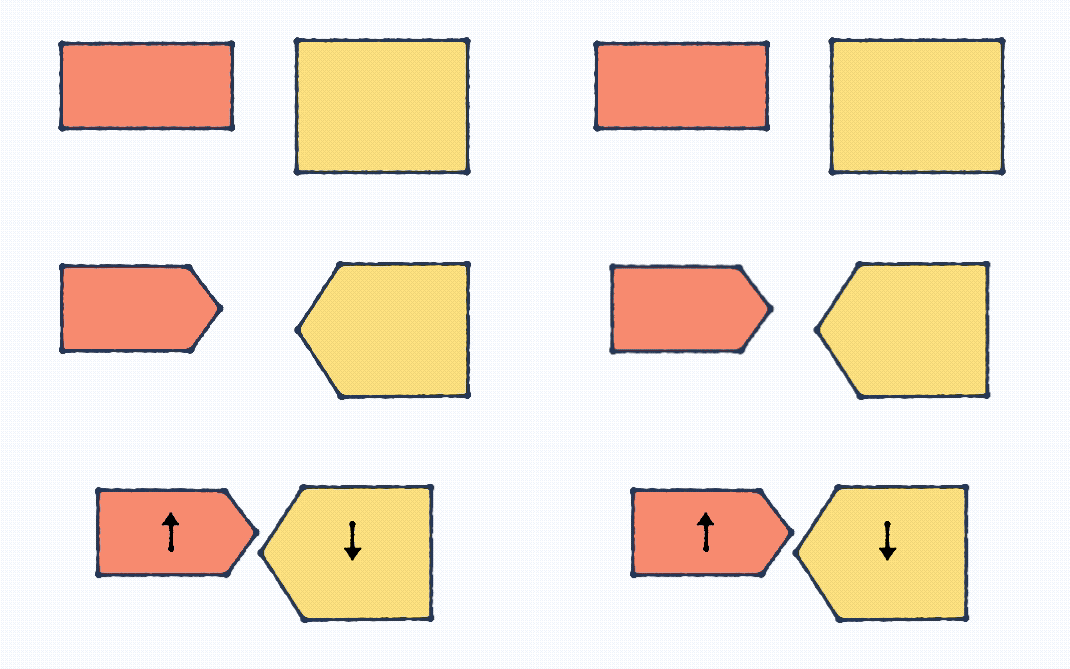
With things moving a lot it would be easy for the user to become distracted by the animations or for them to get in the way. We have tweaked the various animations to ensure the right balance of guidance, performance and interactivity.
### Dropping
When you drop a dragging item its movement is based on physics (thanks [`react-motion`](https://github.com/chenglou/react-motion)). This results in the drop feeling more weighted and physical.
### Moving out of the way
Items that are moving out of the way of a dragging item do so with a CSS transition rather than physics. This is to maximise performance by allowing the GPU to handle the movement. The CSS animation curve has been designed to communicate getting out of the way.
How it is composed:
1. A warm up period to mimic a natural response time
2. A small phase to quickly move out of the way
3. A long tail so that people can read any text that is being animated in the second half of the animation
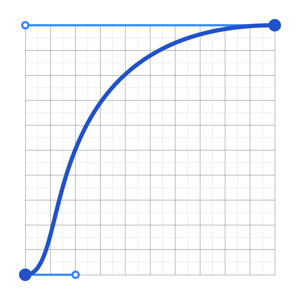
> animation curve used when moving out of the way
## Caring about the interaction details
### Focus management
`react-beautiful-dnd` does not create any wrapper elements. This means that it will not impact the usual tab flow of a document. For example, if you are wrapping an _anchor_ tag then the user will tab to the anchor directly and not an element surrounding the _anchor_. Whatever element you wrap will be given a `tab-index` to ensure that users can tab to the element to perform keyboard dragging.
### Auto scrolling
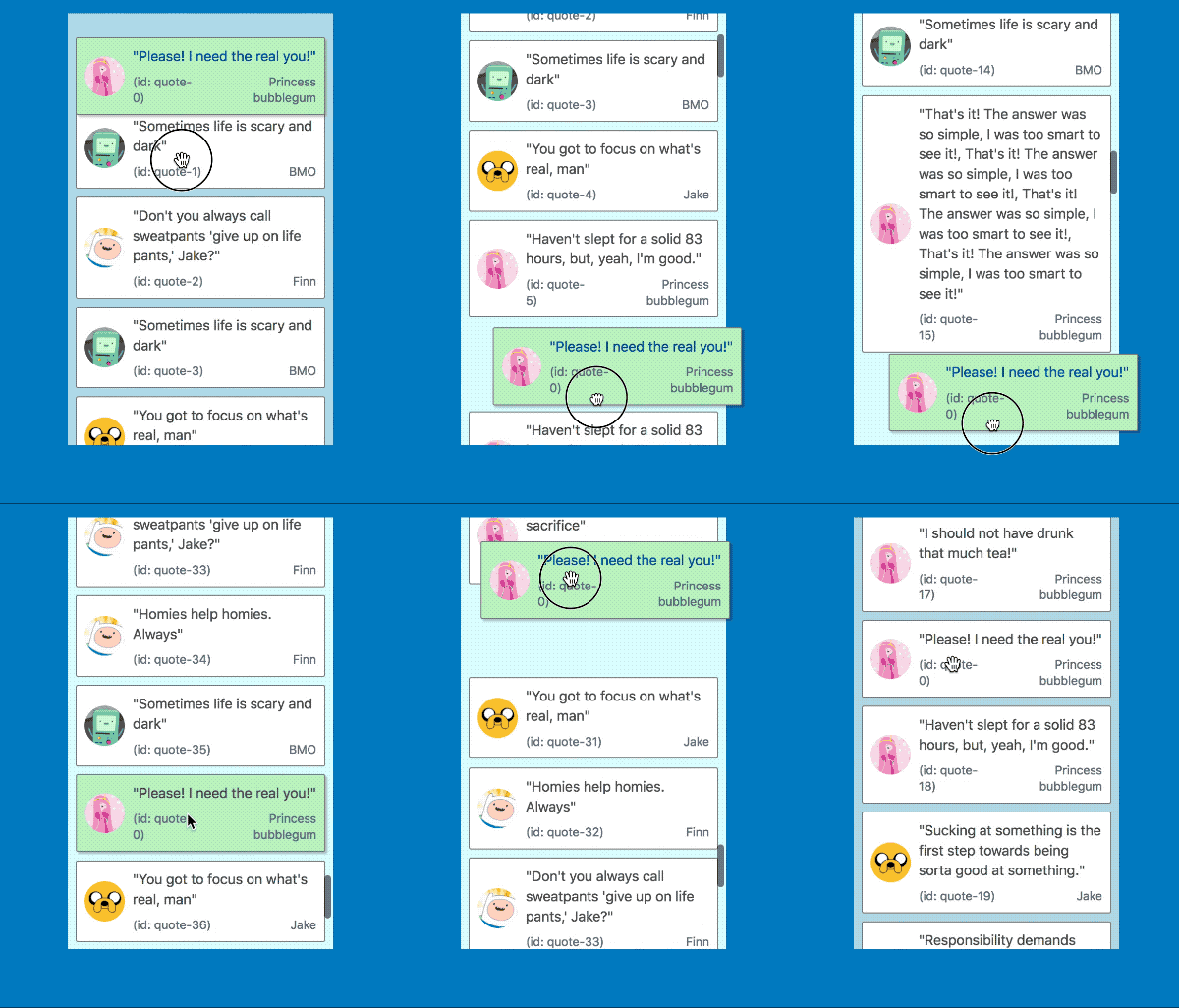
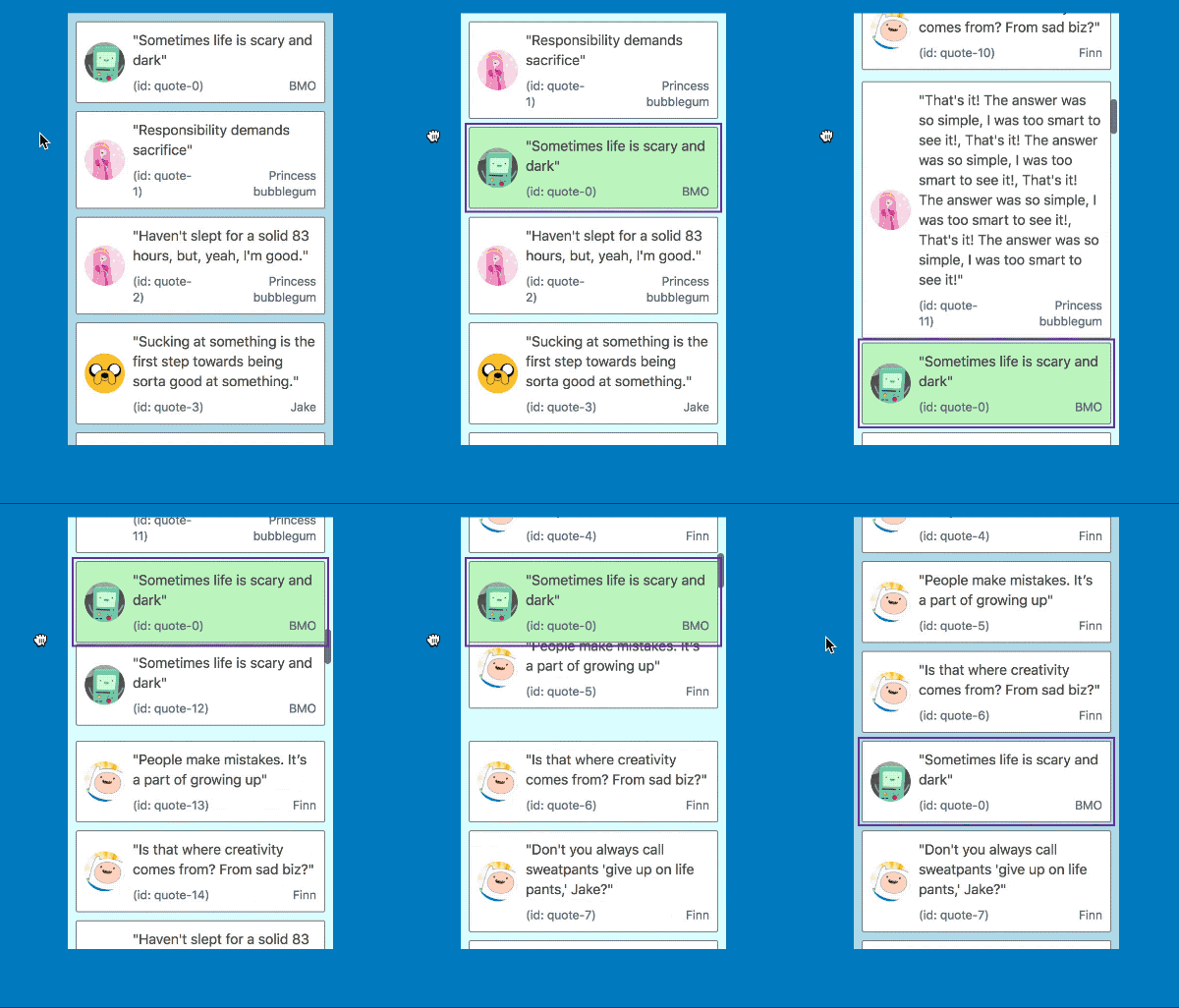
When a user drags a `Draggable` near the edge of a _container_ we automatically scroll the container as we are able to in order make room for the `Draggable`.
> A _container_ is either a `Droppable` that is scrollable or has a scroll parent - or the `window`.
| Mouse and touch | Keyboard |
| ------------------------------------------------------------------------------------------------------------------------- | ---------------------------------------------------------------------------------------------------------------------------- |
|  |  |
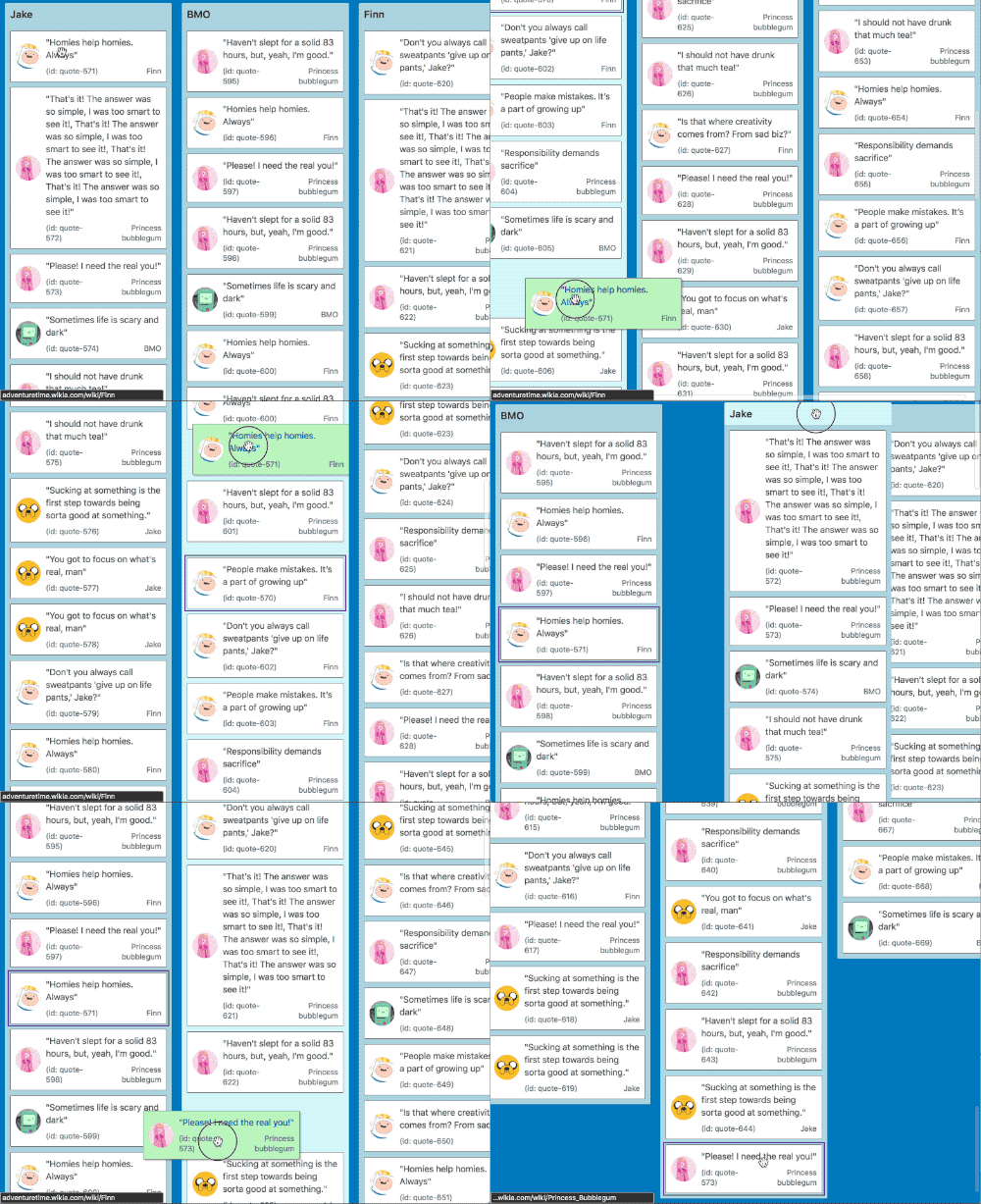
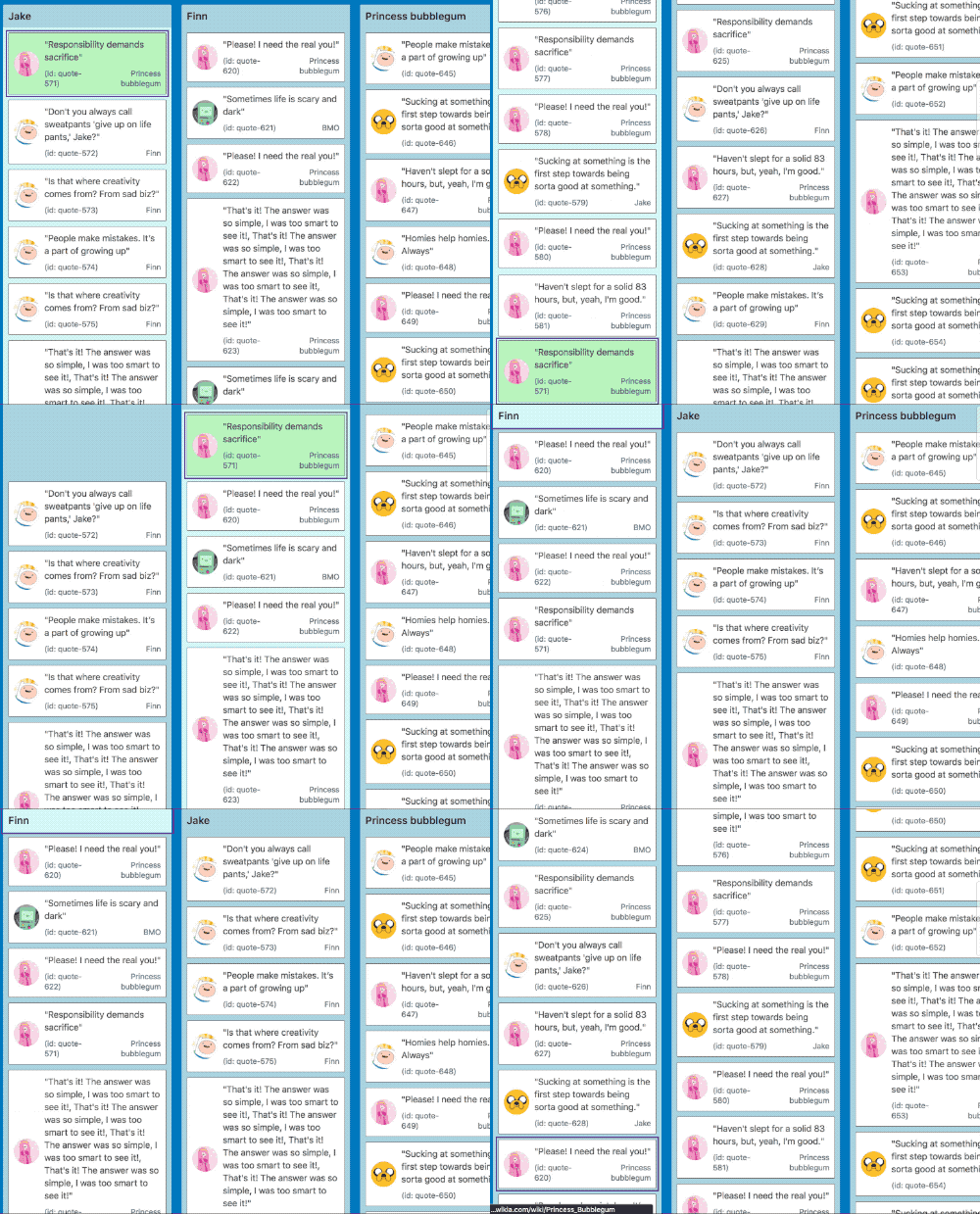
It also works in multi list configurations with all input types
| Mouse and touch | Keyboard |
| ------------------------------------------------------------------------------------------------------------------------------- | ---------------------------------------------------------------------------------------------------------------------------------- |
|  |  |
#### For mouse and touch inputs 🐭📱
When the center of a `Draggable` gets within a small distance from the edge of a container we start auto scrolling. As the user gets closer to the edge of the container we increase the speed of the auto scroll. This acceleration uses an easing function to exponentially increase the rate of acceleration the closer we move towards the edge. We reach a maximum rate of acceleration a small distance from the true edge of a container so that the user does not need to be extremely precise to obtain the maximum scroll speed. This logic applies for any edge that is scrollable.
The distances required for auto scrolling are based on a percentage of the height or width of the container for vertical and horizontal scrolling respectively. By using percentages rather than raw pixel values we are able to have a great experience regardless of the size and shape of your containers.
##### Mouse wheel and trackpads
In addition to auto scrolling we also allow users to scroll the window or a `Droppable` manually using their _mouse wheel_ or _trackpad_ 👌
##### A note about big `Draggable`s
If the `Draggable` is bigger than a container on the axis you are trying to scroll - we will not permit scrolling on that axis. For example, if you have a `Draggable` that is longer than the height of the window we will not auto scroll vertically. However, we will still permit scrolling to occur horizontally.
##### iOS auto scroll shake 📱🤕
When auto scrolling on an iOS browser (webkit) the `Draggable` noticeably shakes. This is due to a [bug with webkit](https://bugs.webkit.org/show_bug.cgi?id=181954) that has no known work around. We tried for a long time to work around the issue! If you are interesting in seeing this improved please engage with the [webkit issue](https://bugs.webkit.org/show_bug.cgi?id=181954).
#### For keyboard dragging 🎹
We also correctly update the scroll position as required when keyboard dragging. In order to move a `Draggable` into the correct position we can do a combination of a `Droppable` scroll, `window` scroll and manual movements to ensure the `Draggable` ends up in the correct position in response to user movement instructions. This is boss 🔥.
This is amazing for users with visual impairments as they can correctly move items around in big lists without needing to use mouse positioning.
### Accessibility
Traditionally drag and drop interactions have been exclusively a mouse or touch interaction. This library ships with support for drag and drop interactions **using only a keyboard**. This enables power users to drive their experience entirely from the keyboard. As well as opening up these experiences to users who would have been excluded previously.
We provide **fantastic support for screen readers** to assist users with visual (or other) impairments. We ship with english messaging out of the box 📦. However, you are welcome to override these messages by using the `announce` function that it provided to all of the `DragDropContext > hook` functions.
See our [screen reader guide](docs/guides/screen-reader.md) for a guide on crafting useful screen reader messaging.
#### Example screen reader behaviour

## Mouse dragging
### Sloppy clicks and click prevention 🐱🎁
When a user presses the mouse down on an element, we cannot determine if the user was clicking or dragging. Also, sometimes when a user clicks they can move the cursor slightly — a sloppy click. So we only start a drag once the user has moved beyond a certain distance with the mouse down (the drag threshold) — more than they would if they were just making a sloppy click. If the drag threshold is not exceeded then the user interaction behaves just like a regular click. If the drag threshold is exceeded then the interaction will be classified as a drag and the standard click behaviour will not occur.
This allows consumers to wrap interactive elements such as an anchor and have it be both a standard anchor as well as a draggable item in a natural way.
(🐱🎁 is a [schrodinger's cat](https://www.youtube.com/watch?v=IOYyCHGWJq4) joke)
> To see more indepth information about how we impact standard browser events see our [how we use DOM events guide](docs/guides/how-we-use-dom-events.md)
### Keyboard shortcuts: mouse dragging
When a drag **is not occurring** `react-beautiful-dnd` does not impact any of the standard keyboard interactions (it has no listeners bound).
When a drag **is occurring** with a _mouse_ the user is able to execute the following keyboard shortcuts:
- **escape** esc - cancel the drag
During a mouse drag the following standard keyboard events are prevented to prevent a bad experience:
- **tab** tab ↹ - preventing tabbing
- **enter** ⏎ - preventing submission
Other than these explicitly prevented keyboard events all standard keyboard events should work as expected.
## Keyboard dragging
`react-beautiful-dnd` supports dragging with only a keyboard. We have audited how our keyboard shortcuts interact with standard browser keyboard interactions. When the user is not dragging they can use their keyboard as they normally would. While dragging we override and disable certain browser shortcuts (such as `tab`) to ensure a fluid experience for the user.
> To see more indepth information about how we impact standard browser events see our [how we use DOM events guide](docs/guides/how-we-use-dom-events.md)
### Keyboard shortcuts: keyboard dragging
When a drag is not occurring, the user will be able to navigate through the `Draggable`'s on a page using the standard **tab** tab ↹ key to move forward through the tabbable elements and (**shift** + **tab**) (shift + )tab ↹) to move backwards. We achieve this by adding a `tab-index` to the `Draggable`. When a `Draggable` has focus the **spacebar** space will **lift** a `Draggable`. This will start the drag.
Once a drag is started the following keyboard shortcuts can be used:
- **spacebar** space - drop the `Draggable`
- **escape** esc - cancel the drag
The following commands are also available but they depend on the `type` of `Droppable` that the `Draggable` is _currently_ in:
#### Within a vertical list
- **Up arrow** ↑ - move a `Draggable` upwards in a `Droppable`
- **Down arrow** ↓ - move a `Draggable` downwards in a `Droppable`
- **Right arrow** → - move a `Draggable` to a `Droppable` to the _right_ of the current `Droppable` (move to new list)
- **Left arrow** ← - move a `Draggable` to a `Droppable` to the _left_ of the current `Droppable` (move to new list)
#### Within a horizontal list
- **Up arrow** ↑ - move a `Draggable` to a `Droppable` to _above_ the current `Droppable` (move to new list)
- **Down arrow** ↓ - move a `Draggable` to a `Droppable` to _below_ the current `Droppable` (move to new list)
- **Right arrow** → - move a `Draggable` to the _right_ in the current `Droppable`
- **Left arrow** ← - move a `Draggable` to the _left_ in the current `Droppable`
During a drag the following standard keyboard events have their default behaviour prevented (through `event.preventDefault()`) to avoid a bad experience:
- **tab** tab ↹ - preventing tabbing
- **enter** ⏎ - preventing submission
## Touch dragging
`react-beautiful-dnd` supports dragging on touch devices such as mobiles and tablets.
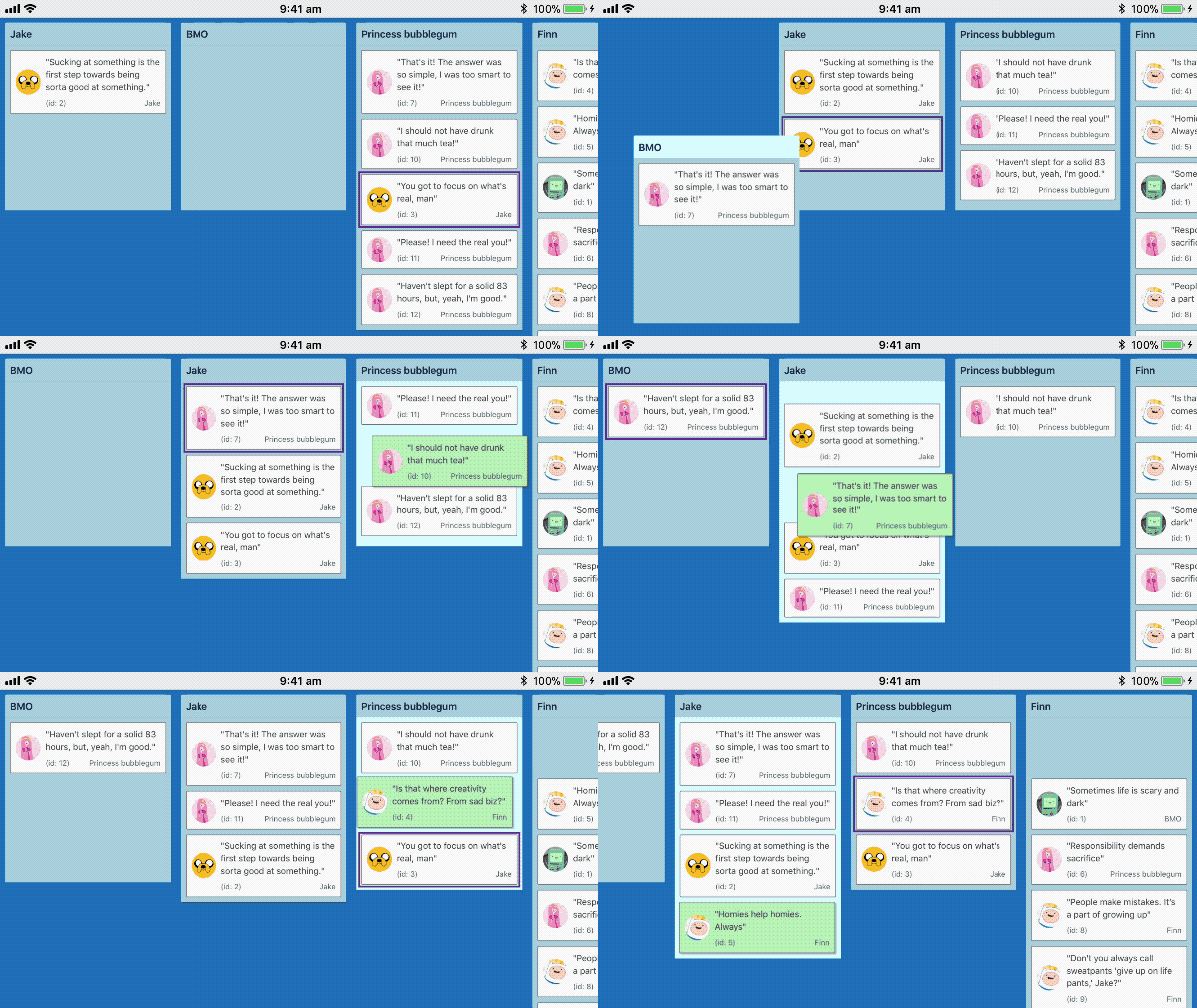
> Recorded on iPhone 6s
### Understanding intention: tap, force press, scroll and drag
When a user presses their finger (or other input) on a `Draggable` we are not sure if they where intending to _tap_, _force press_, _scroll the container_ or _drag_. **As much as possible `react-beautiful-dnd` aims to ensure that a users default interaction experience remains unaffected**.
> To see more indepth information about how we impact standard browser events see our [how we use DOM events guide](docs/guides/how-we-use-dom-events.md)
### Starting a drag: long press
A user can start a drag by holding their finger 👇 on an element for a small period of time 🕑 (long press)
### Tap support
If the user lifts their finger before the timer is finished then we release the event to the browser for it to determine whether to perform the standard tap / click action. This allows you to have a `Draggable` that is both clickable such as a anchor as well as draggable. If the item was dragged then we block the tap action from occurring.
### Native scrolling support
If we detect a `touchmove` before the long press timer expires we cancel the pending drag and allow the user to scroll normally. This means that the user needs to be fairly intentional and precise with their grabbing. Once the first `touchmove` occurs we have to either opt in or out of native scrolling.
- If the long press timer **has not** expired: _allow native scrolling and prevent dragging_
- If the long press timer **has** expired: _a drag has started and we prevent native scrolling_
### Force press support
> Safari only
If the user force presses on the element before they have moved the element (even if a drag has already started) then the drag is cancelled and the standard force press action occurs. For an anchor this is a website preview.
### Vibration
> This is merely an idea - it is up to you to add this if you want this behavior.
If you like you could also trigger a [vibration event](https://developer.mozilla.org/en-US/docs/Web/API/Vibration_API) when the user picks up a `Draggable`. This can provide tactile feedback that the user is doing something. It currently is only supported in Chrome on Android.
```js
class App extends React.Component {
onDragStart = () => {
// good times
if (window.navigator.vibrate) {
window.navigator.vibrate(100);
}
};
/*...*/
}
```
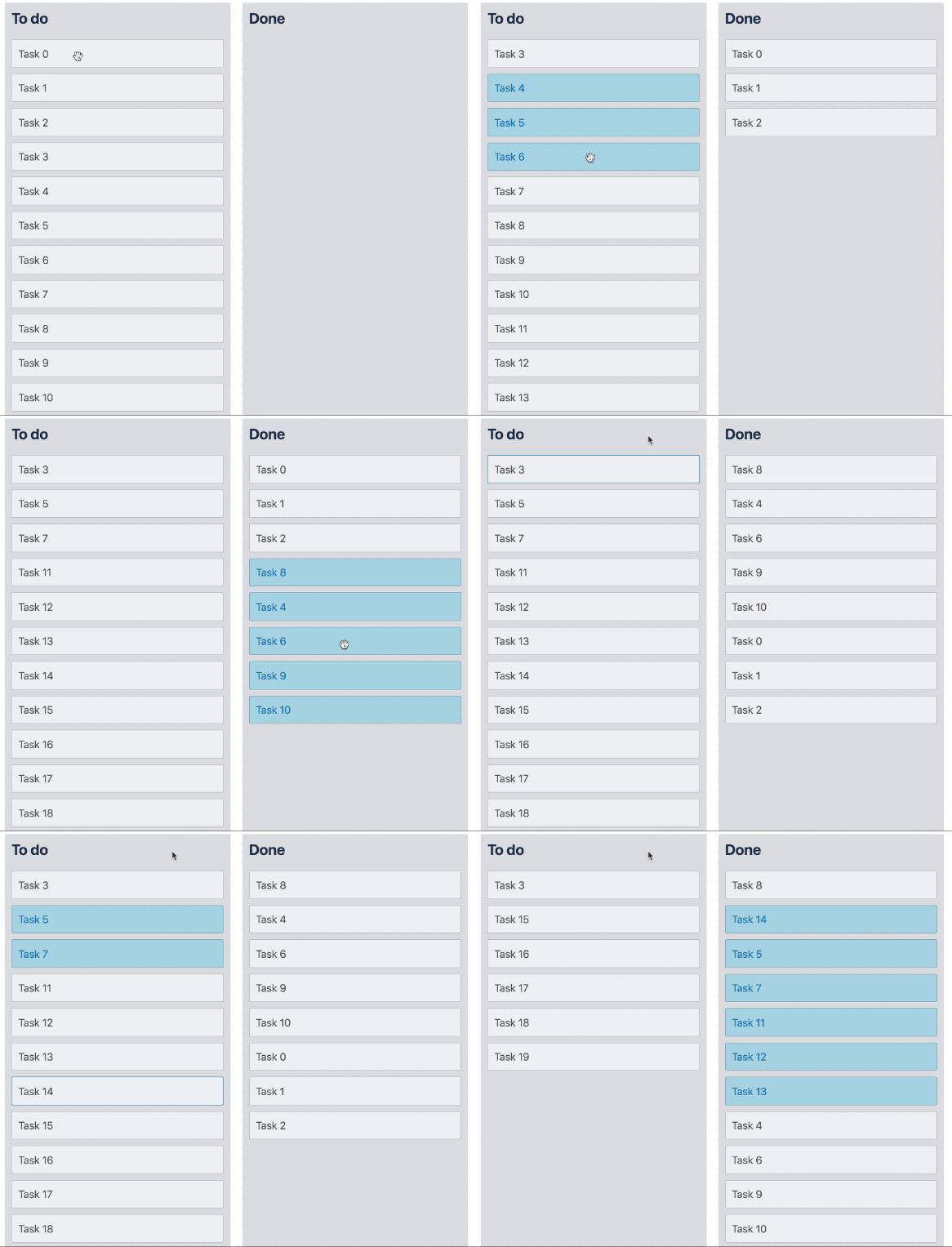
## Multi drag
We have created a [multi drag pattern](/docs/patterns/multi-drag.md) that you can build on top of `react-beautiful-dnd` in order to support dragging multiple `Draggable` items at once.
## Preset styles
We apply a number of non-visible styles to facilitate the dragging experience. We do this using combination of styling targets and techniques. It is a goal of the library to provide unopinioned styling. However, we do apply some reasonable `cursor` styling on drag handles by default. This is designed to make the library work as simply as possible out of the box. If you want to use your own cursors you are more than welcome to. All you need to do is override our cursor style rules by using a rule with [higher specificity](https://css-tricks.com/specifics-on-css-specificity/).
Here are the styles that are applied at various points in the drag lifecycle:
### In every phase
#### Always: drag handle
Styles applied to: **drag handle element** using the `data-react-beautiful-dnd-drag-handle` attribute.
A long press on anchors usually pops a content menu that has options for the link such as 'Open in new tab'. Because long press is used to start a drag we need to opt out of this behavior
```css
-webkit-touch-callout: none;
```
Webkit based browsers add a grey overlay to anchors when they are active. We remove this tap overlay as it is confusing for users. [more information](https://css-tricks.com/snippets/css/remove-gray-highlight-when-tapping-links-in-mobile-safari/).
```css
-webkit-tap-highlight-color: rgba(0, 0, 0, 0);
```
Avoid the _pull to refresh action_ and _delayed anchor focus_ on Android Chrome
```css
touch-action: manipulation;
```
#### Always: Droppable
Styles applied to: **droppable element** using the `data-react-beautiful-dnd-droppable` attribute.
Opting out of the browser feature which tries to maintain the scroll position when the DOM changes above the fold. We already correctly maintain the scroll position. The automatic `overflow-anchor` behavior leads to incorrect scroll positioning post drop.
```css
overflow-anchor: none;
```
### Phase: resting
#### (Phase: resting): drag handle
Styles applied to: **drag handle element** using the `data-react-beautiful-dnd-drag-handle` attribute.
Adding a cursor style to let the user know this element is draggable. You are welcome to override this.
```css
cursor: grab;
```
### Phase: dragging
#### (Phase: dragging): drag handle element
**Styles applied using the `data-react-beautiful-dnd-drag-handle` attribute**
An optimisation to avoid processing `pointer-events` while dragging. Also used to allow scrolling through a drag handle with a track pad or mouse wheel.
```css
pointer-events: none;
```
#### (Phase: dragging): Draggable element
**Styles applied using the `data-react-beautiful-dnd-draggable` attribute**
This is what we use to control `Draggable`s that need to move out of the way of a dragging `Draggable`.
```css
transition: ${string};
```
**Styles applied using inline styles**
This is described by the type [`DraggableStyle`](https://github.com/atlassian/react-beautiful-dnd#type-information-1).
#### (Phase: dragging): body element
We apply a cursor while dragging to give user feedback that a drag is occurring. You are welcome to override this. A good point to do this is the `onDragStart` event.
```css
cursor: grabbing;
```
To prevent the user selecting text as they drag apply this style
```css
user-select: none;
```
### Phase: dropping
#### (Phase: dropping): drag handle element
**Styles applied using the `data-react-beautiful-dnd-drag-handle` attribute**
We apply the grab cursor to all drag handles except the drag handle for the dropping `Draggable`. At this point the user is able to drag other `Draggable`'s if they like.
```css
cursor: grab;
```
#### (Phase: dropping): draggable
Same as dragging phase
### Phase: user cancel
> When a user explicitly cancels a drag
This is the same as `Phase: dropping`. However we do not apply a `cursor: grab` to the drag handle. During a user initiated cancel we do not allow the dragging of other items until the drop animation is complete.
### Preset styles are vendor prefixed
All styles applied are vendor prefixed correctly to meet the requirements of our [supported browser matrix](https://confluence.atlassian.com/cloud/supported-browsers-744721663.html). This is done by hand to avoid adding to react-beautiful-dnd's size by including a css-in-js library
## Installation
### Package manager
```bash
# yarn
yarn add react-beautiful-dnd
# npm
npm install react-beautiful-dnd --save
```
### Distribution bundle
A [universal module definition](https://github.com/umdjs/umd) bundle is published on `npm` under the `/dist` folder for consumption . We publish the following files:
- `dist/react-beautiful-dnd.js`
- `dist/react-beautiful-dnd.min.js` (minified bundle)
These bundles list `react` as an external which needs to be provided. This is done to reduce the size of the bundle and prevent consumers from loading `react` multiple times. You can provide `react` through your module system or simply by having `react` on the `window`.
You can use the UMD to run `react-beautiful-dnd` directly in the browser.
```html
```
There is also an [example codepen](https://codepen.io/alexreardon/project/editor/ZyNMPo) you can use to play with this installation method.
## [`ClojureScript`](https://clojurescript.org/)
You can consume `react-beautiful-dnd` from within `ClojureScript` using [CLJSJS](https://cljsjs.github.io/)!
## API
Okay, into the fun stuff - so how do you use the library?
## `DragDropContext`
In order to use drag and drop, you need to have the part of your `React` tree that you want to be able to use drag and drop in wrapped in a `DragDropContext`. It is advised to just wrap your entire application in a `DragDropContext`. Having nested `DragDropContext`'s is _not_ supported. You will be able to achieve your desired conditional dragging and dropping using the props of `Droppable` and `Draggable`. You can think of `DragDropContext` as having a similar purpose to the [react-redux Provider component](https://github.com/reactjs/react-redux/blob/master/docs/api.md#provider-store)
### Props
```js
type Hooks = {|
// optional
onDragBeforeStart?: OnDragBeforeStartHook,
onDragStart?: OnDragStartHook,
onDragUpdate?: OnDragUpdateHook,
// required
onDragEnd: OnDragEndHook,
|};
type OnBeforeDragStartHook = (start: DragStart) => mixed;
type OnDragStartHook = (start: DragStart, provided: HookProvided) => mixed;
type OnDragUpdateHook = (update: DragUpdate, provided: HookProvided) => mixed;
type OnDragEndHook = (result: DropResult, provided: HookProvided) => mixed;
type Props = {|
...Hooks,
children: ?Node,
|};
```
### Basic usage
```js
import { DragDropContext } from 'react-beautiful-dnd';
class App extends React.Component {
onDragStart = () => {
/*...*/
};
onDragUpdate = () => {
/*...*/
};
onDragEnd = () => {
// the only one that is required
};
render() {
return (
Hello world
);
}
}
```
### `Hook`s
Hooks are top level application events that you can use to perform your own state updates, style updates, as well as to make screen reader announcements.
[Please see our Hooks guide](docs/guides/hooks.md) for detailed information about hooks ❤️
## `Droppable`
`Droppable` components can be **dropped on by a `Draggable`**. They also **contain** `Draggable`s. A `Draggable` must be contained within a `Droppable`.
```js
import { Droppable } from 'react-beautiful-dnd';
{(provided, snapshot) => (
I am a droppable!
{provided.placeholder}
)}
;
```
### Droppable props
- `droppableId`: A _required_ `DroppableId(string)` that uniquely identifies the droppable for the application. Please do not change this prop - especially during a drag.
- `type`: An _optional_ `TypeId(string)` that can be used to simply accept a class of `Draggable`. For example, if you use the type `PERSON` then it will only allow `Draggable`s of type `PERSON` to be dropped on itself. `Draggable`s of type `TASK` would not be able to be dropped on a `Droppable` with type `PERSON`. If no `type` is provided, it will be set to `'DEFAULT'`. Currently the `type` of the `Draggable`s within a `Droppable` **must be** the same. This restriction might be loosened in the future if there is a valid use case.
- `isDropDisabled`: An _optional_ flag to control whether or not dropping is currently allowed on the `Droppable`. You can use this to implement your own conditional dropping logic. It will default to `false`.
- `direction`: The direction in which items flow in this droppable. Options are `vertical` (default) and `horizontal`.
- `ignoreContainerClipping`: When a `Droppable` is inside a scrollable container its area is constrained so that you can only drop on the part of the `Droppable` that you can see. Setting this prop opts out of this behavior, allowing you to drop anywhere on a `Droppable` even if it's visually hidden by a scrollable parent. The default behavior is suitable for most cases so odds are you'll never need to use this prop, but it can be useful if you've got very long `Draggable`s inside a short scroll container. Keep in mind that it might cause some unexpected behavior if you have multiple `Droppable`s inside scroll containers on the same page.
### Children function
The `React` children of a `Droppable` must be a function that returns a [`ReactElement`](https://tylermcginnis.com/react-elements-vs-react-components/).
```js
{(provided, snapshot) => ({
/*...*/
})}
```
The function is provided with two arguments:
#### 1. provided: (DroppableProvided)
```js
type DroppableProvided = {|
innerRef: (?HTMLElement) => void,
droppableProps: DroppableProps,
placeholder: ?ReactElement,
|};
type DroppableProps = {|
// used for shared global styles
'data-react-beautiful-dnd-droppable': string,
|};
```
- `provided.innerRef`: In order for the droppable to function correctly, **you must** bind the `provided.innerRef` to the highest possible DOM node in the `ReactElement`. We do this in order to avoid needing to use `ReactDOM` to look up your DOM node.
> For more information on using `innerRef` see our [using `innerRef` guide](/docs/guides/using-inner-ref.md)
- `provided.placeholder`: This is used to create space in the `Droppable` as needed during a drag. This space is needed when a user is dragging over a list that is not the home list. Please be sure to put the placeholder inside of the component for which you have provided the ref. We need to increase the size of the `Droppable` itself.
- `provided.droppableProps (DroppableProps)`: This is an Object that contains properties that need to be applied to a Droppable element. It needs to be applied to the same element that you apply `provided.innerRef` to. It currently contains a `data` attribute that we use to control some non-visible css.
```js
{(provided, snapshot) => (
Good to go
{provided.placeholder}
)}
```
#### 2. snapshot: (DroppableStateSnapshot)
```js
type DroppableStateSnapshot = {|
// Is the Droppable being dragged over?
isDraggingOver: boolean,
// What is the id of the draggable that is dragging over the Droppable?
draggingOverWith: ?DraggableId,
|};
```
The `children` function is also provided with a small amount of state relating to the current drag state. This can be optionally used to enhance your component. A common use case is changing the appearance of a `Droppable` while it is being dragged over.
```js
{(provided, snapshot) => (
I am a droppable!
{provided.placeholder}
)}
```
### Conditionally dropping
- `Droppable`s can only be dropped on by `Draggable`s who share the same `type`. This is a simple way of allowing conditional dropping. If you do not provide a `type` for the `Droppable`, then it will only accept `Draggable`s which also have the default type. `Draggable`s and `Droppable`s both will have their `types` set to `'DEFAULT'` when none is provided. There is currently no way to set multiple `types`, or a `type` wildcard that will accept `Draggable`s of multiple any types. This could be added if there is a valid use case.
- Using the `isDropDisabled` prop you can conditionally allow dropping. This allows you to do arbitrarily complex conditional transitions. This will only be considered if the `type` of the `Droppable` matches the `type` of the currently dragging `Draggable`.
- You can disable dropping on a `Droppable` altogether by always setting `isDropDisabled` to `true`. You can do this to create a list that is never able to be dropped on, but contains `Draggable`s.
- Technically you do not need to use `type` and do all of your conditional drop logic with the `isDropDisabled` function. The `type` parameter is a convenient shortcut for a common use case.
### Scroll containers
This library supports dragging within scroll containers (DOM elements that have `overflow: auto;` or `overflow: scroll;`). The **only** supported use cases are:
1. The `Droppable` can itself be a scroll container with **no scrollable parents**
2. The `Droppable` has **one scrollable parent**
where a _scrollable parent_ refers to a scroll container that is not the window itself.
### Empty `Droppable`s
It is recommended that you put a `min-height` on a vertical `Droppable` or a `min-width` on a horizontal `Droppable`. Otherwise when the `Droppable` is empty there may not be enough of a target for `Draggable` being dragged with touch or mouse inputs to be _over_ the `Droppable`.
### Recommended `Droppable` performance optimisation
When a user drags over, or stops dragging over, a `Droppable` we re-render the `Droppable` with an updated `DroppableStateSnapshot > isDraggingOver` value. This is useful for styling the `Droppable`. However, by default this will cause a render of all of the children of the `Droppable` - which might be 100's of `Draggable`s! This can result in a noticeable frame rate drop. To avoid this problem we recommend that you create a component that is the child of a `Droppable` who's responsibility it is to avoid rendering children if it is not required.
Here is an example of how you could do this:
```js
import React, { Component } from 'react';
class Student extends Component<{ student: Person }> {
render() {
// Renders out a draggable student
}
}
class InnerList extends Component<{ students: Person[] }> {
// do not re-render if the students list has not changed
shouldComponentUpdate(nextProps: Props) {
if (this.props.students === nextProps.students) {
return false;
}
return true;
}
// You could also not do your own shouldComponentUpdate check and just
// extend from React.PureComponent
render() {
return this.props.students.map((student: Person) => (
));
}
}
class Students extends Component {
render() {
return (
{(provided: DroppableProvided, snapshot: DroppableStateSnapshot) => (
{provided.placeholder}
)}
);
}
}
```
By using the approach you are able to make style changes to a `Droppable` when it is being dragged over, but you avoid re-rendering all of the children unnecessarily. Keep in mind that if you are using `React.PureComponent` that your component will [not respond to changes in the context](https://github.com/facebook/react/issues/2517).
When moving into a new list, the visible `Draggables` will have their `render` function called directly even with this optimisation. This is because we need to move those `Draggables` out of the way. The `InnerList` optimisation will prevent the `Droppable` from calling `render` on the whole list from the top down. This optimisation will prevent the non-visible `Draggables` from having their render function called.
Unfortunately we are [unable to apply this optimisation for you](https://medium.com/merrickchristensen/function-as-child-components-5f3920a9ace9). It is a byproduct of using the render-props pattern.
## `Draggable`
`Draggable` components can be dragged around and dropped onto `Droppable`s. A `Draggable` must always be contained within a `Droppable`. It is **possible** to reorder a `Draggable` within its home `Droppable` or move to another `Droppable`. It is **possible** because a `Droppable` is free to control what it allows to be dropped on it.
Every `Draggable` has a _drag handle_. A _drag handle_ is the element that the user interacts with in order to drag a `Draggable`. A _drag handle_ can be a the `Draggable` element itself, or a child of the `Draggable`. Note that by default a _drag handle_ cannot be an interactive element, since [event handlers are blocked on nested interactive elements](#interactive-child-elements-within-a-draggable). Proper semantics for accessibility are added to the _drag handle_ element. If you wish to use an interactive element, `disableInteractiveElementBlocking` must be set.
```js
import { Draggable } from 'react-beautiful-dnd';
{(provided, snapshot) => (
My draggable
)}
;
```
### Draggable Props
- `draggableId`: A _required_ `DraggableId(string)` that uniquely identifies the `Draggable` for the application. Please do not change this prop - especially during a drag.
- `index`: A _required_ `number` that matches the order of the `Draggable` in the `Droppable`. It is simply the index of the `Draggable` in the list. The `index` needs to be unique within a `Droppable` but does not need to be unique between `Droppables`. Typically the `index` value will simply be the `index` provided by a `Array.prototype.map` function:
```js
{
this.props.items.map((item, index) => (
{(provided, snapshot) => (
{item.content}
)}
));
}
```
- `isDragDisabled`: An _optional_ flag to control whether or not the `Draggable` is permitted to drag. You can use this to implement your own conditional drag logic. It will default to `false`.
- `disableInteractiveElementBlocking`: An _optional_ flag to opt out of blocking a drag from interactive elements. For more information refer to the section _Interactive child elements within a `Draggable`_
### Children function (render props)
The `React` children of a `Draggable` must be a function that returns a `ReactElement`.
```js
{(provided, snapshot) => (
Drag me!
)}
```
The function is provided with two arguments:
#### 1. provided: (DraggableProvided)
```js
type DraggableProvided = {|
innerRef: HTMLElement => void,
draggableProps: DraggableProps,
// will be null if the draggable is disabled
dragHandleProps: ?DragHandleProps,
|};
```
Everything within the _provided_ object must be applied for the `Draggable` to function correctly.
- `provided.innerRef (innerRef: (HTMLElement) => void)`: In order for the `Droppable` to function correctly, **you must** bind the `innerRef` function to the `ReactElement` that you want to be considered the `Draggable` node. We do this in order to avoid needing to use `ReactDOM` to look up your DOM node.
> For more information on using `innerRef` see our [using `innerRef` guide](/docs/guides/using-inner-ref.md)
##### `innerRef` Example
```js
{(provided, snapshot) => Drag me!
}
```
- `provided.draggableProps (DraggableProps)`: This is an Object that contains a `data` attribute and an inline `style`. This Object needs to be applied to the same node that you apply `provided.innerRef` to. This controls the movement of the draggable when it is dragging and not dragging. You are welcome to add your own styles to `DraggableProps.style` – but please do not remove or replace any of the properties.
##### `draggableProps` Type information
```js
// Props that can be spread onto the element directly
export type DraggableProps = {|
// inline style
style: ?DraggableStyle,
// used for shared global styles
'data-react-beautiful-dnd-draggable': string,
|};
type DraggableStyle = DraggingStyle | NotDraggingStyle;
type DraggingStyle = {|
position: 'fixed',
width: number,
height: number,
boxSizing: 'border-box',
pointerEvents: 'none',
top: number,
left: number,
transition: 'none',
transform: ?string,
zIndex: ZIndex,
|};
type NotDraggingStyle = {|
transform: ?string,
transition: null | 'none',
|};
```
##### `draggableProps` Example
```js
{(provided, snapshot) => (
Drag me!
)}
```
##### Positioning ownership
It is a contract of this library that it owns the positioning logic of the dragging element. This includes properties such as `top`, `right`, `bottom`, `left` and `transform`. The library may change how it positions things and which properties it uses without performing a major version bump. It is also recommended that you do not apply your own `transition` property to the dragging element.
##### Warning: `position: fixed`
`react-beautiful-dnd` uses `position: fixed` to position the dragging element. This is quite robust and allows for you to have `position: relative | absolute | fixed` parents. However, unfortunately `position:fixed` is [impacted by `transform`](http://meyerweb.com/eric/thoughts/2011/09/12/un-fixing-fixed-elements-with-css-transforms/) (such as `transform: rotate(10deg);`). This means that if you have a `transform: *` on one of the parents of a `Draggable` then the positioning logic will be incorrect while dragging. Lame! For most consumers this will not be an issue.
To get around this you can use [`React.Portal`](https://reactjs.org/docs/portals.html). We do not enable this functionality by default as it has performance problems. We have a [using a portal guide](/docs/patterns/using-a-portal.md) explaining the performance problem in more detail and how you can set up your own `React.Portal` if you want to.
##### Focus retention when moving between lists
When moving a `Draggable` from one list to another the default browser behaviour is for the _drag handle_ element to loose focus. This is because the old element is being destroyed and a new one is being created. The loss of focus is not good when dragging with a keyboard as the user is then unable to continue to interact with the element. To improve this user experience we automatically give a _drag handle_ focus when:
- It was unmounted at the end of a drag
- It had focus
- It is enabled when mounted
- No other elements have gained browser focus before the drag handle has mounted
##### Extending `DraggableProps.style`
If you are using inline styles you are welcome to extend the `DraggableProps.style` object. You are also welcome to apply the `DraggableProps.style` object using inline styles and use your own styling solution for the component itself - such as [styled-components](https://github.com/styled-components/styled-components).
If you are overriding inline styles be sure to do it after you spread the `provided.draggableProps` or the spread will override your inline style.
```js
{(provided, snapshot) => {
// extending the DraggableStyle with our own inline styles
const style = {
backgroundColor: snapshot.isDragging ? 'blue' : 'white',
fontSize: 18,
...provided.draggableProps.style,
};
return (
Drag me!
);
}}
```
##### Avoid margin collapsing between `Draggable`s
[margin collapsing](https://developer.mozilla.org/en-US/docs/Web/CSS/CSS_Box_Model/Mastering_margin_collapsing) is one of those really hard parts of CSS. For our purposes, if you have one `Draggable` with a `margin-bottom: 10px` and the next `Draggable` has a `margin-top: 12px` these margins will _collapse_ and the resulting margin will be the greater of the two: `12px`. When we do our calculations we are currently not accounting for margin collapsing. If you do want to have a margin on the siblings, wrap them both in a `div` and apply the margin to the inner `div` so they are not direct siblings.
##### `Draggable`s should be visible siblings
It is an assumption that `Draggable`s are _visible siblings_ of one another. There can be other elements in between, but these elements should not take up any additional space. You probably will not do this anyway, but just calling it out to be super clear.
```js
// Direct siblings ✅
{() => {}}
{() => {}}
// Not direct siblings, but are visible siblings ✅
{() => {}}
{() => {}}
// Spacer elements ❌
{() => {}}
I will break things!
{() => {}}
// Spacing on non sibling wrappers ❌
{() => {}}
{() => {}}
```
- `provided.dragHandleProps (?DragHandleProps)` every `Draggable` has a _drag handle_. This is what is used to drag the whole `Draggable`. Often this will be the same node as the `Draggable`, but sometimes it can be a child of the `Draggable`. `DragHandleProps` need to be applied to the node that you want to be the drag handle. This is a number of props that need to be applied to the `Draggable` node. The simplest approach is to spread the props onto the draggable node (`{...provided.dragHandleProps}`). However, you are also welcome to [monkey patch](https://davidwalsh.name/monkey-patching) these props if you also need to respond to them. DragHandleProps will be `null` when `isDragDisabled` is set to `true`.
##### `dragHandleProps` Type information
```js
type DragHandleProps = {|
onFocus: () => void,
onBlur: () => void,
onMouseDown: (event: MouseEvent) => void,
onKeyDown: (event: KeyboardEvent) => void,
onTouchStart: (event: TouchEvent) => void,
'data-react-beautiful-dnd-drag-handle': string,
'aria-roledescription': string,
tabIndex: number,
draggable: boolean,
onDragStart: (event: DragEvent) => void,
|};
```
##### `dragHandleProps` Example: standard
```js
{(provided, snapshot) => (
Drag me!
)}
```
##### `dragHandleProps` Example: custom drag handle
Controlling a whole draggable by just a part of it
```js
{(provided, snapshot) => (
)}
```
##### `dragHandleProps` monkey patching
You can override some of the `dragHandleProps` props with your own behavior if you need to.
```js
const myOnMouseDown = event => console.log('mouse down on', event.target);
{(provided, snapshot) => {
const onMouseDown = (() => {
// dragHandleProps might be null
if (!provided.dragHandleProps) {
return onMouseDown;
}
// creating a new onMouseDown function that calls myOnMouseDown as well as the drag handle one.
return event => {
provided.dragHandleProps.onMouseDown(event);
myOnMouseDown(event);
};
})();
return (
Drag me!
);
}}
;
```
#### 2. Snapshot: (DraggableStateSnapshot)
```js
type DraggableStateSnapshot = {|
// Set to true if a Draggable is being actively dragged, or if it is drop animating
// Both active dragging and the drop animation are considered part of the drag
isDragging: boolean,
// Set to true if a Draggable is drop animating. Not every drag and drop interaction
// as a drop animation. There is no drop animation when a Draggable is already in its final
// position when dropped. This is commonly the case when dragging with a keyboard
isDropAnimating: boolean,
// What Droppable (if any) the Draggable is currently over
draggingOver: ?DroppableId,
|};
```
The `children` function is also provided with a small amount of state relating to the current drag state. This can be optionally used to enhance your component. A common use case is changing the appearance of a `Draggable` while it is being dragged. Note: if you want to change the cursor to something like `grab` you will need to add the style to the draggable. (See [Extending `DraggableProps.style`](#extending-draggableprops-style) above)
```js
{(provided, snapshot) => {
const style = {
backgroundColor: snapshot.isDragging ? 'blue' : 'grey',
...provided.draggableProps.style,
};
return (
Drag me!
);
}}
```
### `Draggable` placeholder
When dragging a `Draggable` we leave behind a _placeholder_ `React.Element` to maintain space in the `Droppable` in order to prevent it from collapsing. The placeholder mimics the styling and layout (including `width`, `height`, `margin`, `tagName` and `display`) to ensure the list dimensions remain unaffected while dragging. It will be inserted by `react-beautiful-dnd` as a direct sibling to the `React.Node` returned by the `Draggable` children function.
### Adding an `onClick` handler to a `Draggable` or a _drag handle_
You are welcome to add your own `onClick` handler to a `Draggable` or a _drag handle_ (which might be the same element). `onClick` events handlers will always be called if a click occurred. If we are preventing the click then we the `event.defaultPrevented` property will be set to `true`. We prevent click events from occurring when the user was dragging an item. See [#sloppy-clicks-and-click-prevention-](sloppy clicks and click prevention) for more information.
### Interactive child elements within a `Draggable`
It is possible for your `Draggable` to contain interactive elements. By default we block dragging on these elements. By doing this we allow those elements to function in the usual way. Here is the list of interactive elements that we block dragging from by default:
- `input`
- `button`
- `textarea`
- `select`
- `option`
- `optgroup`
- `video`
- `audio`
- [`contenteditable`](https://developer.mozilla.org/en-US/docs/Web/HTML/Global_attributes/contenteditable) (any elements that are `contenteditable` or are within a `contenteditable` container)
You can opt out of this behavior by adding the `disableInteractiveElementBlocking` prop to a `Draggable`. However, it is questionable as to whether you should be doing so because it will render the interactive element unusable. If you need to _conditionally_ block dragging from interactive elements you can add the `disableInteractiveElementBlocking` prop to opt out of the default blocking and monkey patch the `dragHandleProps (DragHandleProps)` event handlers to disable dragging as required.
## `resetServerContext`
The `resetServerContext` function should be used when server side rendering (SSR). It ensures context state does not persist across multiple renders on the server which would result in client/server markup mismatches after multiple requests are rendered on the server.
Use it before calling the server side render method:
```js
import { resetServerContext } from 'react-beautiful-dnd';
import { renderToString } from 'react-dom/server';
...
resetServerContext();
renderToString(...);
```
## Flow usage
`react-beautiful-dnd` is typed using [`flowtype`](https://flow.org). This greatly improves internal consistency within the codebase. We also expose a number of public types which will allow you to type your javascript if you would like to. If you are not using `flowtype` this will not inhibit you from using the library. It is just extra safety for those who want it.
### Public flow types
```js
// id's
type Id = string;
type TypeId = Id;
type DroppableId = Id;
type DraggableId = Id;
// hooks
type DragStart = {|
draggableId: DraggableId,
type: TypeId,
source: DraggableLocation,
|};
type DragUpdate = {|
...DragStart,
// may not have any destination (drag to nowhere)
destination: ?DraggableLocation,
|};
type DropResult = {|
...DragUpdate,
reason: DropReason,
|};
type DropReason = 'DROP' | 'CANCEL';
type DraggableLocation = {|
droppableId: DroppableId,
// the position of the droppable within a droppable
index: number,
|};
// Droppable
type DroppableProvided = {|
innerRef: (?HTMLElement) => void,
placeholder: ?ReactElement,
|};
type DroppableStateSnapshot = {|
isDraggingOver: boolean,
draggingOverWith: ?DraggableId,
|};
// Draggable
type DraggableProvided = {|
innerRef: (?HTMLElement) => void,
draggableProps: DraggableProps,
dragHandleProps: ?DragHandleProps,
|};
type DraggableStateSnapshot = {|
isDragging: boolean,
isDropAnimating: boolean,
draggingOver: ?DroppableId,
|};
export type DraggableProps = {|
style: ?DraggableStyle,
'data-react-beautiful-dnd-draggable': string,
|};
type DraggableStyle = DraggingStyle | NotDraggingStyle;
type DraggingStyle = {|
position: 'fixed',
width: number,
height: number,
boxSizing: 'border-box',
pointerEvents: 'none',
top: number,
left: number,
transition: 'none',
transform: ?string,
zIndex: ZIndex,
|};
type NotDraggingStyle = {|
transition: ?string,
transition: null | 'none',
|};
type DragHandleProps = {|
onFocus: () => void,
onBlur: () => void,
onMouseDown: (event: MouseEvent) => void,
onKeyDown: (event: KeyboardEvent) => void,
onTouchStart: (event: TouchEvent) => void,
'data-react-beautiful-dnd-drag-handle': string,
'aria-roledescription': string,
tabIndex: number,
draggable: boolean,
onDragStart: (event: DragEvent) => void,
|};
```
### Using the flow types
The types are exported as part of the module so using them is as simple as:
```js
import type { DroppableProvided } from 'react-beautiful-dnd';
```
## Typescript
If you are using [TypeScript](https://www.typescriptlang.org/) you can use the community maintained [DefinitelyTyped type definitions](https://www.npmjs.com/package/@types/react-beautiful-dnd). [Installation instructions](http://definitelytyped.org/).
Here is an [example written in typescript](https://github.com/abeaudoin2013/react-beautiful-dnd-multi-list-typescript-example).
### Sample application with flow types
We have created a [sample application](https://github.com/alexreardon/react-beautiful-dnd-flow-example) which exercises the flowtypes. It is a super simple `React` project based on [`react-create-app`](https://github.com/facebookincubator/create-react-app). You can use this as a reference to see how to set things up correctly.
## Engineering health
### Typed
This codebase is typed with [flowtype](https://flow.org) to promote greater internal consistency and more resilient code.
### Tested
This code base employs a number of different testing strategies including unit, performance and integration tests. Testing various aspects of the system helps to promote its quality and stability.
While code coverage is [not a guarantee of code health](https://stackoverflow.com/a/90021/1374236), it is a good indicator. This code base currently sits at **~90% coverage**.
### Performance
This codebase is designed to be **extremely performant** - it is part of its DNA. It is designed to perform the smallest amount of updates possible. You can have a read about performance work done for `react-beautiful-dnd` here:
- [Rethinking drag and drop](https://medium.com/@alexandereardon/rethinking-drag-and-drop-d9f5770b4e6b)
- [Dragging React performance forward](https://medium.com/@alexandereardon/dragging-react-performance-forward-688b30d40a33)
## Size
Great care has been taken to keep the library as light as possible. It is currently **~38kb (gzip)** in size. There could be a smaller net cost if you where already using one of the underlying dependencies.
## Supported browsers
This library supports the standard [Atlassian supported browsers](https://confluence.atlassian.com/cloud/supported-browsers-744721663.html) for desktop:
| Desktop | Version |
| ------------------------------------ | ---------------------------------------------------- |
| Microsoft Internet Explorer(Windows) | Version 11 |
| Microsoft Edge | Latest stable version supported |
| Mozilla Firefox (all platforms) | Latest stable version supported |
| Google Chrome (Windows and Mac) | Latest stable version supported |
| Safari (Mac) | Latest stable version on latest OS release supported |
| Mobile | Version |
| ------------------------ | --------------------------------------------------------- |
| Chrome (Android and iOS) | Latest stable version supported |
| Mobile Safari (iOS) | Latest stable version supported |
| Android (Android) | The default browser on Android 4.0.3 (Ice Cream Sandwich) |
## Author
Alex Reardon - [@alexandereardon](https://twitter.com/alexandereardon)
## Maintainers
Jared Crowe - [@jaredjcrowe](https://twitter.com/jaredjcrowe)
## Collaborators
Bogdan Chadkin - [@IAmTrySound](https://twitter.com/IAmTrySound)
Luke Batchelor - [@alukebatchelor](https://twitter.com/alukebatchelor)
Many other [@Atlassian](https://twitter.com/Atlassian)'s!