# gitagu
**Repository Path**: mirrors_microsoft/gitagu
## Basic Information
- **Project Name**: gitagu
- **Description**: GitAGU (Git Agent Unblock) - A centralized platform for discovering, configuring, and integrating AI agents into your development workflow. Simplifies AI adoption across the entire Software Development Life Cycle
- **Primary Language**: Unknown
- **License**: MIT
- **Default Branch**: main
- **Homepage**: None
- **GVP Project**: No
## Statistics
- **Stars**: 0
- **Forks**: 0
- **Created**: 2025-05-31
- **Last Updated**: 2026-02-28
## Categories & Tags
**Categories**: Uncategorized
**Tags**: None
## README

Setup Utility to Unlock AI Agents for Your Development Workflow
gitagu is an open-source utility that helps developers leverage AI agents for their Software Development Life Cycle (SDLC) through Azure. This platform provides a centralized hub for discovering, configuring, and integrating various AI coding agents into your development workflow, with a focus on setting up and connecting different AI agents to Azure services. It streamlines the process of getting started with AI-powered development tools by providing automated setup assistance and Azure integration guidance.
> [!CAUTION]
> gitagu is currently under active development. Features and documentation are being added regularly. Feel free to star and watch the repository for updates!
> [!TIP]
> **Try GitAgu now!** Visit [gitagu.com](https://gitagu.com) to explore the platform and analyze your repositories with AI agents. For comprehensive documentation about how this project works, check out the detailed guide at [deepwiki.com/microsoft/gitagu](https://deepwiki.com/microsoft/gitagu).
## 🤖 Featured AI Agents
gitagu currently supports the following AI agents:
- [**GitHub Copilot (Code Completions)**](https://github.com/features/copilot) - AI pair programmer that provides code suggestions directly in your editor as you type, with features like Next Edit Suggestions, Agent Mode for autonomous multi-file editing, and comment-to-code generation
- [**GitHub Copilot Coding Agent**](https://github.blog/news-insights/product-news/github-copilot-meet-the-new-coding-agent/) - Asynchronous agent that autonomously completes GitHub Issues by creating pull requests, running CI/CD, and iterating on feedback. Assign issues to the agent to automate feature additions, bug fixes, refactoring, and more.
- [**Devin**](https://aka.ms/devin) - An autonomous AI software engineer, available Azure marketplace, that can plan and execute complex tasks.
- [**Codex CLI**](https://github.com/openai/codex?tab=readme-ov-file#environment-variables-setup) - Command-line interface for code generation using natural language, compatible with both OpenAI and Azure OpenAI endpoints.
- [**SREAgent**](https://learn.microsoft.com/en-us/azure/app-service/sre-agent-overview) - Microsoft's AI agent for Site Reliability Engineering tasks, integrated with Azure App Service.
## ✨ Features
- **Agent Discovery** - Explore different AI agents categorized by their capabilities
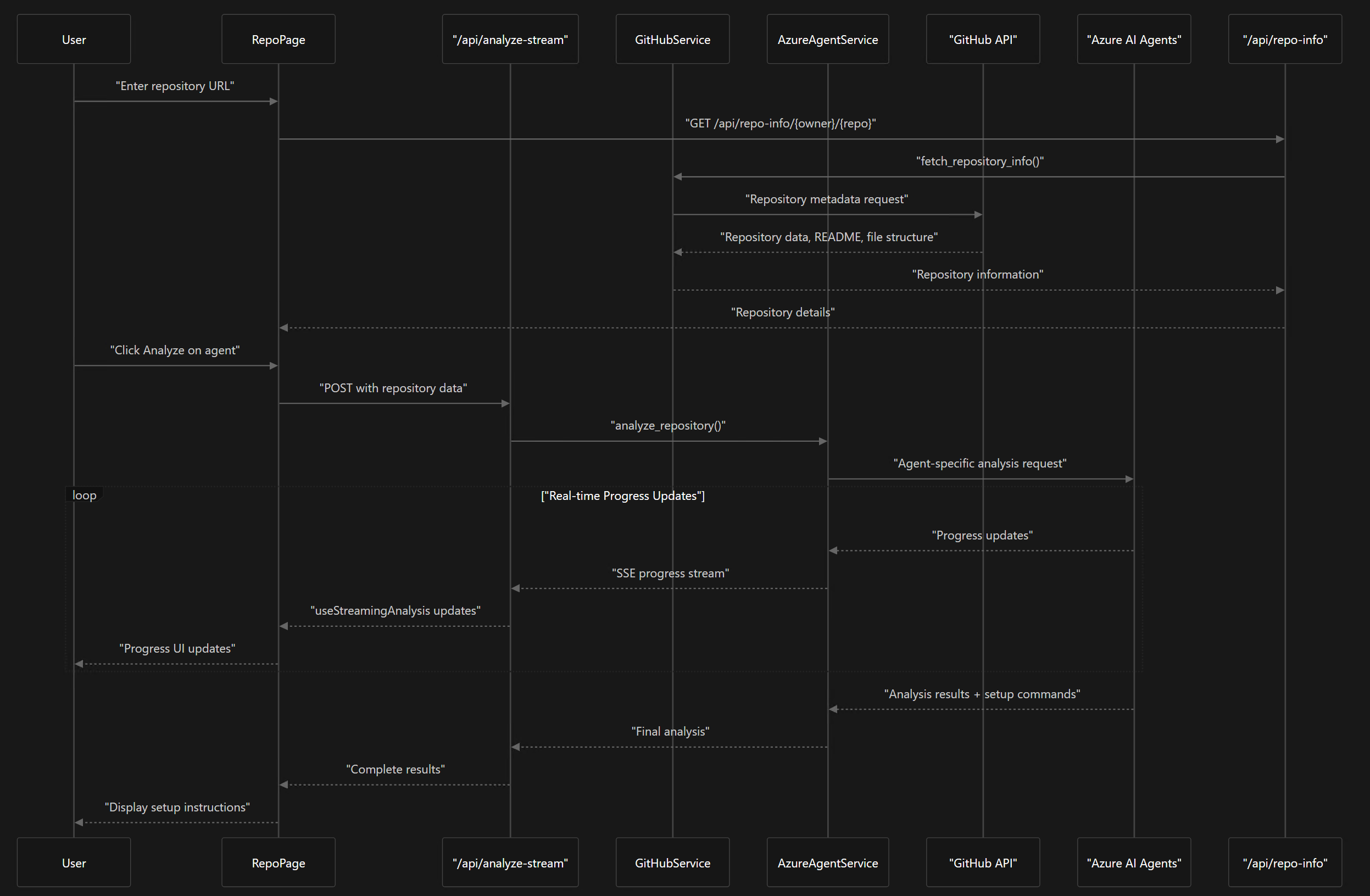
- **Repository Analysis** - Get tailored setup instructions for using AI agents with specific GitHub repositories
- **Integration Guides** - Step-by-step instructions for integrating each agent into your workflow
- **Microsoft Ecosystem Integration** - Seamless integration with Azure, GitHub, and DevOps pipelines
## 🚀 Getting Started
Visit [gitagu.com](https://gitagu.com) to explore the platform. You can:
1. Browse the homepage to learn about different AI agents and their capabilities
2. Enter your GitHub repository URL (e.g., `github.com/username/repo`) in the search bar
3. Alternatively, navigate directly to `gitagu.com/username/repo` to see agent recommendations for your repository
4. Click "Analyze Repository" for any agent to get tailored setup instructions
## 🔍 Try It With Your Repository
The real power of GitAgu is seeing how these AI agents can work with your specific codebase. Visit [gitagu.com](https://gitagu.com) and enter your GitHub repository to:
- Discover which AI agents are best suited for your project
- Get repository-specific setup instructions
- Learn productivity tips tailored to your codebase
- Find the optimal integration points for each agent
Simply replace `hub` with `agu` in your GitHub URL (github.com → gitagu.com) to see how AI agents can enhance your development workflow!
## 🛠️ Local Development
### Prerequisites
- Node.js (v16+)
- Python (v3.8+)
- Git
- pnpm (install globally with `npm install -g pnpm`)
- uv ([install instructions](https://github.com/astral-sh/uv#installation))
### Frontend Setup
```bash
# Clone the repository
git clone https://github.com/microsoft/gitagu.git
cd gitagu/frontend
# Install dependencies
pnpm install
# Start development server
pnpm run dev
```
### Backend Setup
```bash
# Navigate to backend directory
cd ../backend
# Create and activate virtual environment
uv venv venv
source venv/bin/activate # On Windows: venv\Scripts\activate
# Install dependencies
uv pip install -r requirements.txt
# Set up environment variables
cp .env.example .env
# Edit .env with your Azure AI Agents and GitHub credentials
# Start development server
uvicorn app.main:app --reload
```
## 📋 Known Limitations & Roadmap
### Current Limitations
- **GitHub API Authentication**: Currently uses Personal Access Tokens (PAT) for GitHub API access, which has limitations including:
- Rate limiting constraints
- Token management complexity
- Security considerations for token storage and rotation
- Limited scope control compared to GitHub Apps
### Coming Soon
- **🔧 GitHub App Integration**: Replace PAT-based authentication with a proper GitHub App to provide:
- Better rate limiting
- Fine-grained permissions
- Improved security model
- No need for users to manage personal tokens
- **📊 Enhanced Repository Analysis**: More comprehensive codebase analysis for better AI agent recommendations
- **🔗 Additional AI Agent Integrations**: Support for more AI coding assistants and development tools
- **📈 Usage Analytics**: Insights into AI agent effectiveness and usage patterns
## 🤝 Contributing
We welcome contributions to gitagu! Please see our [CONTRIBUTING.md](CONTRIBUTING.md) for details on how to get started.
## 📄 License
gitagu is licensed under the MIT License - see the [LICENSE](LICENSE) file for details.
## 🔗 Related Projects
- [GitHub Copilot](https://github.com/features/copilot)
- [Azure OpenAI Service](https://azure.microsoft.com/en-us/products/cognitive-services/openai-service/)
- [Azure AI Agents](https://github.com/Azure/azure-sdk-for-python/tree/main/sdk/ai/azure-ai-agents)
---
© 2025 Microsoft Corporation. gitagu is an open source project.