# AgentCPM-GUI
**Repository Path**: mirrors_trending/AgentCPM-GUI
## Basic Information
- **Project Name**: AgentCPM-GUI
- **Description**: AgentCPM-GUI: An on-device GUI agent for operating Android apps, enhancing reasoning ability with reinforcement fine-tuning for efficient task execution.
- **Primary Language**: Unknown
- **License**: Apache-2.0
- **Default Branch**: main
- **Homepage**: None
- **GVP Project**: No
## Statistics
- **Stars**: 0
- **Forks**: 0
- **Created**: 2025-06-08
- **Last Updated**: 2026-02-07
## Categories & Tags
**Categories**: Uncategorized
**Tags**: None
## README
【English | 中文】
概述 •
快速开始 •
模型 •
评测数据 •
技术报告
## 更新日志
* [2025-06-03] 📄📄📄 我们发布了AgentCPM-GUI的**技术报告**!点击[这里](https://arxiv.org/abs/2506.01391)查看。
* [2025-05-13] 🚀🚀🚀 我们开源了AgentCPM-GUI,面向端侧的GUI Agent,拥有中英文APP操作能力,并基于RFT优化思考能力。
## 概述
**AgentCPM-GUI**是由[清华大学THUNLP实验室](https://nlp.csai.tsinghua.edu.cn)、中国人民大学与[面壁智能](https://modelbest.cn/en)团队联合开发的开源端侧智能体大模型,基于[MiniCPM-V](https://github.com/OpenBMB/MiniCPM-V)构建,总参数量8B,接受手机屏幕图像作为输入,自动执行用户提出的任务。AgentCPM-GUI的主要特性包括:
- **高质量GUI Grounding**:通过在大规模中英文Android数据集上进行预训练,有效提升了对常见GUI控件(如按钮、输入框、标签、图标等)的定位与理解能力;
- **中文APP操作能力**:首个针对中文APP精细优化的开源GUI Agent,覆盖高德地图、大众点评、哔哩哔哩、小红书等30余个主流中文APP;
- **增强的规划推理能力**:通过强化微调技术(RFT),让模型输出动作前进行推理思考,有效提升复杂任务执行的成功率;
- **紧凑的动作空间设计**:采用优化的动作空间和紧凑的JSON格式,平均动作长度压缩至9.7个token,提升端侧推理的效率。
任务示例(1倍速):
https://github.com/user-attachments/assets/694d3c2c-12ce-4084-8feb-4937ca9ad247
## 快速开始
### 安装依赖
```bash
git clone https://github.com/OpenBMB/AgentCPM-GUI
cd AgentCPM-GUI
conda create -n gui_agent python=3.11
conda activate gui_agent
pip install -r requirements.txt
```
### 模型下载
从Hugging face下载模型[AgentCPM-GUI](https://huggingface.co/openbmb/AgentCPM-GUI),将模型保存于目录 ``model/AgentCPM-GUI``
#### Huggingface推理
```python
import torch
from transformers import AutoTokenizer, AutoModelForCausalLM
from PIL import Image
import json
# 1. 加载模型和分词器
model_path = "model/AgentCPM-GUI" # 模型路径
tokenizer = AutoTokenizer.from_pretrained(model_path, trust_remote_code=True)
model = AutoModelForCausalLM.from_pretrained(model_path, trust_remote_code=True, torch_dtype=torch.bfloat16)
model = model.to("cuda:0")
# 2. 构造输入
instruction = "请点击屏幕上的‘会员’按钮" # 示例指令
image_path = "assets/test.jpeg" # 你的图片路径
image = Image.open(image_path).convert("RGB")
# 3. 将图片长边缩放至1120以降低计算和显存压力
def __resize__(origin_img):
resolution = origin_img.size
w,h = resolution
max_line_res = 1120
if max_line_res is not None:
max_line = max_line_res
if h > max_line:
w = int(w * max_line / h)
h = max_line
if w > max_line:
h = int(h * max_line / w)
w = max_line
img = origin_img.resize((w,h),resample=Image.Resampling.LANCZOS)
return img
image = __resize__(image)
# 4. 构造消息格式
messages = [{
"role": "user",
"content": [
f"{instruction}\n当前屏幕截图:",
image
]
}]
# 5. 推理
ACTION_SCHEMA = json.load(open('eval/utils/schema/schema.json', encoding="utf-8"))
items = list(ACTION_SCHEMA.items())
insert_index = 3
items.insert(insert_index, ("required", ["thought"])) # enable/disable thought by setting it to "required"/"optional"
ACTION_SCHEMA = dict(items)
SYSTEM_PROMPT = f'''# Role
你是一名熟悉安卓系统触屏GUI操作的智能体,将根据用户的问题,分析当前界面的GUI元素和布局,生成相应的操作。
# Task
针对用户问题,根据输入的当前屏幕截图,输出下一步的操作。
# Rule
- 以紧凑JSON格式输出
- 输出操作必须遵循Schema约束
# Schema
{json.dumps(ACTION_SCHEMA, indent=None, ensure_ascii=False, separators=(',', ':'))}'''
outputs = model.chat(
image=None,
msgs=messages,
system_prompt=SYSTEM_PROMPT,
tokenizer=tokenizer,
temperature=0.1,
top_p=0.3,
n=1,
)
# 6. 输出结果
print(outputs)
```
预期输出:
```JSON
{"thought":"任务目标是点击屏幕上的‘会员’按钮。当前界面显示了应用的推荐页面,顶部有一个导航栏。点击‘会员’按钮可以访问应用的会员相关内容。","POINT":[729,69]}
```
注意: AgentCPM-GUI输出范围0-1000的相对坐标,绝对坐标和相对坐标的转换关系如下:
```python
rel_x, rel_y = [int(abs_x / width * 1000), int(abs_y / height * 1000)]
abs_x, abs_y = [int(rel_x / 1000 * width), int(rel_y / 1000 * height)]
```
其中,“width”和“height”分别指图像的原始宽度和高度。
#### vLLM推理
```bash
# 启动vLLM服务
# 如果显存不足,可以尝试参数 --max_model_len 2048
vllm serve model/AgentCPM-GUI --served-model-name AgentCPM-GUI --tensor_parallel_size 1 --trust-remote-code --limit-mm-per-prompt image=10
```
```python
import base64
import io
import json
import requests
from PIL import Image
# vLLM服务启动的地址和端口
END_POINT = "http://localhost:8000/v1/chat/completions" # Replace with actual endpoint
# system prompt
ACTION_SCHEMA = json.load(open('eval/utils/schema/schema.json', encoding="utf-8"))
items = list(ACTION_SCHEMA.items())
insert_index = 3
items.insert(insert_index, ("required", ["thought"])) # enable/disable thought by setting it to "required"/"optional"
ACTION_SCHEMA = dict(items)
SYSTEM_PROMPT = f'''# Role
你是一名熟悉安卓系统触屏GUI操作的智能体,将根据用户的问题,分析当前界面的GUI元素和布局,生成相应的操作。
# Task
针对用户问题,根据输入的当前屏幕截图,输出下一步的操作。
# Rule
- 以紧凑JSON格式输出
- 输出操作必须遵循Schema约束
# Schema
{json.dumps(ACTION_SCHEMA, indent=None, ensure_ascii=False, separators=(',', ':'))}'''
def encode_image(image: Image.Image) -> str:
"""Convert PIL Image to base64-encoded string."""
with io.BytesIO() as in_mem_file:
image.save(in_mem_file, format="JPEG")
in_mem_file.seek(0)
return base64.b64encode(in_mem_file.read()).decode("utf-8")
def __resize__(origin_img):
resolution = origin_img.size
w,h = resolution
max_line_res = 1120
if max_line_res is not None:
max_line = max_line_res
if h > max_line:
w = int(w * max_line / h)
h = max_line
if w > max_line:
h = int(h * max_line / w)
w = max_line
img = origin_img.resize((w,h),resample=Image.Resampling.LANCZOS)
return img
def predict(text_prompt: str, image: Image.Image):
messages = [
{"role": "system", "content": SYSTEM_PROMPT},
{"role": "user", "content": [
{"type": "text", "text": f"{text_prompt}\n当前屏幕截图:(./)"},
{"type": "image_url", "image_url": {"url": f"data:image/jpeg;base64,{encode_image(image)}"}}
]}
]
payload = {
"model": "AgentCPM-GUI", # Your model name
"temperature": 0.1,
"messages": messages,
"max_tokens": 2048,
}
headers = {
"Content-Type": "application/json",
}
response = requests.post(END_POINT, headers=headers, json=payload)
assistant_msg = response.json()["choices"][0]["message"]["content"]
return assistant_msg
image = __resize__(Image.open("assets/test.jpeg"))
instruction = "请点击屏幕上的‘会员’按钮"
response = predict(instruction, image)
print(response)
```
### 动作空间
在每一步中,智能体都会输出一个 **JSON** 对象,其中包含:
* **唯一**的原子动作(需从下表中选择);
* 可选修饰符(`duration`, `thought`)和/或任务级标志位(`STATUS`)。
请注意,所有关键字均 **区分大小写**,并且我们使用 **紧凑 JSON**(即无多余空格),这会影响 tokenizer 的行为。
| Action | 必填字段 | 可选字段 | 功能说明 | 例子 |
| --------------------- | ----------------------------------------------------------------------------------------------------------- | ----------------------------- | ------------------------------------- | -------------------------------------- |
| **Click** | `POINT:[x,y]` | `duration`,`thought`,`STATUS` | 在归一化坐标系 (0–1000,原点位于左上角) 执行一次轻触。 | `{"POINT":[480,320]}` |
| **Long Press** | `POINT:[x,y]`
`duration:1000` | `duration`,`thought`,`STATUS` | 在指定坐标执行长按操作(需设置较长持续时间,例如 > 200 ms)。 | `{"POINT":[480,320]","duration":1000}` |
| **Swipe** | `POINT:[x,y]`
`to:"up" \| "down" \| "left" \| "right"` **或** `to:[x,y]` | `duration`,`thought`,`STATUS` | 从起始点滑向指定方向 **或** 另一坐标。 | `{"POINT":[500,200],"to":"down"}` |
| **Press key** | `PRESS:"HOME" \| "BACK" \| "ENTER"` | `duration`,`thought`,`STATUS` | 触发硬件 / 导航按键。 | `{"PRESS":"HOME"}` |
| **Type text** | `TYPE:""` | `duration`,`thought`,`STATUS` | 在当前输入焦点处输入给定文本。 | `{"TYPE":"Hello, world!"}` |
| **Wait** | `duration` | `thought`,`STATUS` | 在指定时长内保持空闲,不执行任何其他动作。 | `{"duration":500}` |
| **Task-level status** | `STATUS:"start" \| "continue" \| "finish" \| "satisfied" \| "impossible" \| "interrupt" \| "need_feedback"` | `duration`,`thought` | 上报任务进度;可 **单独** 出现,也可与原子动作 **同时** 出现。 | `{"STATUS":"finish"}` |
## 模型微调
我们开源了训练模型的SFT和RFT代码,参考文档[SFT](sft/readme.md)和[RFT](rft/readme.md)。
## 性能评估
### Grounding Benchmark
| Model | Fun2Point | Text2Point | Bbox2text | Average |
|-------------------------|-----------|------------|-----------|--------|
| **AgentCPM-GUI-8B** | **79.1** | **76.5** | **58.2** |**71.3**|
| Qwen2.5-VL-7B | 59.8 | 59.3 | 50.0 | 56.4 |
| Intern2.5-VL-8B | 17.2 | 24.2 | 45.9 | 29.1 |
| Intern2.5-VL-26B | 14.8 | 16.6 | 36.3 | 22.6 |
| OS-Genesis-7B | 8.3 | 5.8 | 4.0 | 6.0 |
| UI-TARS-7B | 56.8 | 66.7 | 1.4 | 41.6 |
| OS-Atlas-7B | 53.6 | 60.7 | 0.4 | 38.2 |
| Aguvis-7B | 60.8 | **76.5** | 0.2 | 45.8 |
| GPT-4o | 22.1 | 19.9 | 14.3 | 18.8 |
| GPT-4o with Grounding | 44.3 | 44.0 | 14.3 | 44.2 |
### Agent Benchmark
| Dataset | Android Control-Low TM | Android Control-Low EM | Android Control-High TM | Android Control-High EM | GUI-Odyssey TM | GUI-Odyssey EM | AITZ TM | AITZ EM | Chinese APP (CAGUI) TM | Chinese APP (CAGUI) EM |
| ------------------------- | ---------------------- | ---------------------- | ----------------------- | ----------------------- | --------------- | --------------- | --------------- | --------------- | --------------- | --------------- |
| **AgentCPM-GUI-8B** | 94.39 | 90.20 | 77.70 | 69.17 | **90.85** | **74.96** | **85.71** | **76.38** | **96.86** | **91.28** |
| Qwen2.5-VL-7B | 94.14 | 84.96 | 75.10 | 62.90 | 59.54 | 46.28 | 78.41 | 54.61 | 74.18 | 55.16 |
| UI-TARS-7B | **95.24** | **91.79** | **81.63** | **74.43** | 86.06 | 67.90 | 80.42 | 65.77 | 88.62 | 70.26 |
| OS-Genesis-7B | 90.74 | 74.22 | 65.92 | 44.43 | 11.67 | 3.63 | 19.98 | 8.45 | 38.10 | 14.50 |
| OS-Atlas-7B | 73.03 | 67.25 | 70.36 | 56.53 | 91.83* | 76.76* | 74.13 | 58.45 | 81.53 | 55.89 |
| Aguvis-7B | 93.85 | 89.40 | 65.56 | 54.18 | 26.71 | 13.54 | 35.71 | 18.99 | 67.43 | 38.20 |
| OdysseyAgent-7B | 65.10 | 39.16 | 58.80 | 32.74 | 90.83 | 73.67 | 59.17 | 31.60 | 67.56 | 25.44 |
| GPT-4o | - | 19.49 | - | 20.80 | - | 20.39 | 70.00 | 35.30 | 3.67 | 3.67 |
| Gemini 2.0 | - | 28.50 | - | 60.20 | - | 3.27 | - | - | - | - |
| Claude | - | 19.40 | - | 12.50 | 60.90 | - | - | - | - | - |
> *不一致的训练/测试集划分
TM和EM分别代表**类型匹配(Type Match)**和**完全匹配(Exact Match)**。我们开源了评测所用的数据和代码,更多信息请参见[这里](eval)。
## 评测数据
我们开源了面向中文APP场景的评测数据集CAGUI,涵盖**grounding**和**agent**两类任务,详情见[Huggingface](https://huggingface.co/datasets/openbmb/CAGUI)。
## FAQs
点击查看 [FAQs](https://github.com/OpenBMB/AgentCPM-GUI/blob/main/eval/README.md#faqs)。
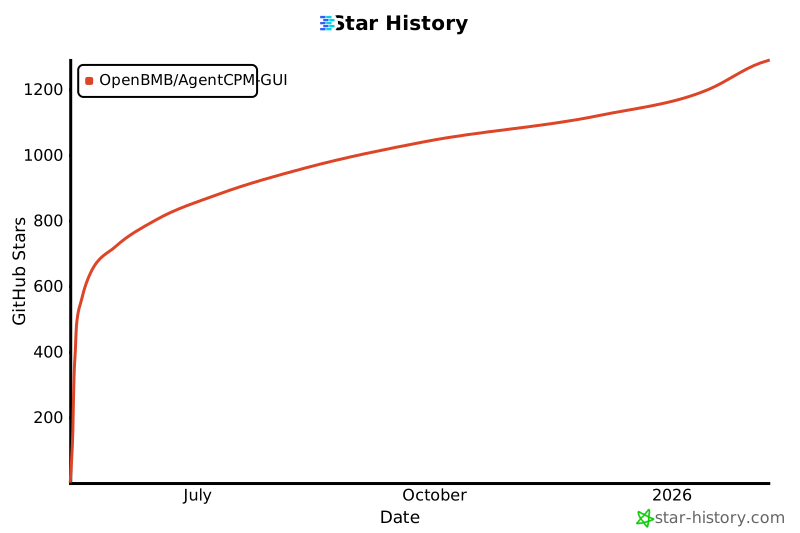
## 趋势
 ## 模型协议
* 本仓库中代码依照 [Apache-2.0](./LICENSE) 协议开源。
## 更多项目
## 模型协议
* 本仓库中代码依照 [Apache-2.0](./LICENSE) 协议开源。
## 更多项目


 ## 引用
如果你认为该项目对你的研究有帮助,请考虑引用:
```bibtex
@inproceedings{zhang-etal-2025-agentcpm,
title={Agent{CPM}-{GUI}: Building Mobile-Use Agents with Reinforcement Fine-Tuning},
author={Zhong Zhang and Yaxi Lu and Yikun Fu and Yupeng Huo and Shenzhi Yang and Yesai Wu and Han Si and Xin Cong and Haotian Chen and Yankai Lin and Jie Xie and Wei Zhou and Wang Xu and Yuanheng Zhang and Zhou Su and Zhongwu Zhai and Xiaoming Liu and Yudong Mei and Jianming Xu and Hongyan Tian and Chongyi Wang and Chi Chen and Yuan Yao and Zhiyuan Liu and Maosong Sun},
year={2025},
booktitle = "Proceedings of the 2025 Conference on Empirical Methods in Natural Language Processing: System Demonstrations",
}
```
## 引用
如果你认为该项目对你的研究有帮助,请考虑引用:
```bibtex
@inproceedings{zhang-etal-2025-agentcpm,
title={Agent{CPM}-{GUI}: Building Mobile-Use Agents with Reinforcement Fine-Tuning},
author={Zhong Zhang and Yaxi Lu and Yikun Fu and Yupeng Huo and Shenzhi Yang and Yesai Wu and Han Si and Xin Cong and Haotian Chen and Yankai Lin and Jie Xie and Wei Zhou and Wang Xu and Yuanheng Zhang and Zhou Su and Zhongwu Zhai and Xiaoming Liu and Yudong Mei and Jianming Xu and Hongyan Tian and Chongyi Wang and Chi Chen and Yuan Yao and Zhiyuan Liu and Maosong Sun},
year={2025},
booktitle = "Proceedings of the 2025 Conference on Empirical Methods in Natural Language Processing: System Demonstrations",
}
``` 