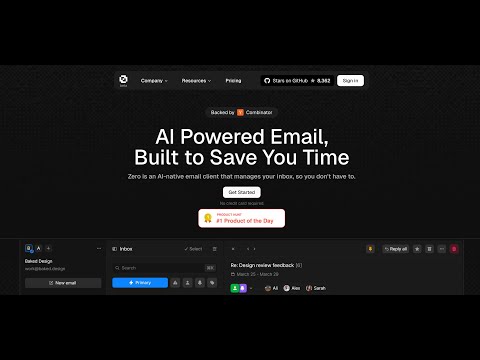
# Mail0
**Repository Path**: mirrors_trending/Mail0
## Basic Information
- **Project Name**: Mail0
- **Description**: Experience email the way you want with Mail0 – the first open source email app that puts your privacy and safety first. Join the discord: https://mail0.link/discord
- **Primary Language**: Unknown
- **License**: MIT
- **Default Branch**: staging
- **Homepage**: None
- **GVP Project**: No
## Statistics
- **Stars**: 0
- **Forks**: 0
- **Created**: 2025-02-16
- **Last Updated**: 2026-01-31
## Categories & Tags
**Categories**: Uncategorized
**Tags**: None
## README
# Zero
An Open-Source Gmail Alternative for the Future of Email
## What is Zero?
Zero is an open-source AI email solution that gives users the power to **self-host** their own email app while also integrating external services like Gmail and other email providers. Our goal is to modernize and improve emails through AI agents to truly modernize emails.
## Why Zero?
Most email services today are either **closed-source**, **data-hungry**, or **too complex to self-host**.
0.email is different:
- ✅ **Open-Source** – No hidden agendas, fully transparent.
- 🦾 **AI Driven** - Enhance your emails with Agents & LLMs.
- 🔒 **Data Privacy First** – Your emails, your data. Zero does not track, collect, or sell your data in any way. Please note: while we integrate with external services, the data passed through them is not under our control and falls under their respective privacy policies and terms of service.
- ⚙️ **Self-Hosting Freedom** – Run your own email app with ease.
- 📬 **Unified Inbox** – Connect multiple email providers like Gmail, Outlook, and more.
- 🎨 **Customizable UI & Features** – Tailor your email experience the way you want it.
- 🚀 **Developer-Friendly** – Built with extensibility and integrations in mind.
## Tech Stack
Zero is built with modern and reliable technologies:
- **Frontend**: Next.js, React, TypeScript, TailwindCSS, Shadcn UI
- **Backend**: Node.js, Drizzle ORM
- **Database**: PostgreSQL
- **Authentication**: Better Auth, Google OAuth
## Getting Started
### Video Tutorial
Watch this helpful video tutorial on how to set up Zero locally:
### Prerequisites
**Required Versions:**
- [Node.js](https://nodejs.org/en/download) (v18 or higher)
- [pnpm](https://pnpm.io) (v10 or higher)
- [Docker](https://docs.docker.com/engine/install/) (v20 or higher)
Before running the application, you'll need to set up services and configure environment variables. For more details on environment variables, see the [Environment Variables](#environment-variables) section.
### Setup Options
You can set up Zero in two ways:
Standard Setup (Recommended)
#### Quick Start Guide
1. **Clone and Install**
```bash
# Clone the repository
git clone https://github.com/Mail-0/Zero.git
cd Zero
# Install dependencies
pnpm install
# Start database locally
pnpm docker:db:up
```
2. **Set Up Environment**
- Run `pnpm nizzy env` to setup your environment variables
- Run `pnpm nizzy sync` to sync your environment variables and types
- Start the database with the provided docker compose setup: `pnpm docker:db:up`
- Initialize the database: `pnpm db:push`
3. **Start the App**
```bash
pnpm dev
```
4. **Open in Browser**
Visit [http://localhost:3000](http://localhost:3000)
Devcontainer Setup
#### Quick Start guide
1. **Clone and Install**
```bash
# Clone the repository
git clone https://github.com/Mail-0/Zero.git
cd Zero
```
Then open the code in devcontainer and install the dependencies:
```
pnpm install
# Start the database locally
pnpm docker:db:up
```
2. **Set Up Environment**
- Run `pnpm nizzy env` to setup your environment variables
- Run `pnpm nizzy sync` to sync your environment variables and types
- Start the database with the provided docker compose setup: `pnpm docker:db:up`
- Initialize the database: `pnpm db:push`
3. **Start The App**
```bash
pnpm dev
```
Visit [http://localhost:3000](http://localhost:3000)
### Environment Setup
1. **Better Auth Setup**
- Open the `.env` file and change the BETTER_AUTH_SECRET to a random string. (Use `openssl rand -hex 32` to generate a 32 character string)
```env
BETTER_AUTH_SECRET=your_secret_key
```
2. **Google OAuth Setup** (Required for Gmail integration)
- Go to [Google Cloud Console](https://console.cloud.google.com)
- Create a new project
- Add the following APIs in your Google Cloud Project: [People API](https://console.cloud.google.com/apis/library/people.googleapis.com), [Gmail API](https://console.cloud.google.com/apis/library/gmail.googleapis.com)
- Use the links above and click 'Enable' or
- Go to 'APIs and Services' > 'Enable APIs and Services' > Search for 'Google People API' and click 'Enable'
- Go to 'APIs and Services' > 'Enable APIs and Services' > Search for 'Gmail API' and click 'Enable'
- Enable the Google OAuth2 API
- Create OAuth 2.0 credentials (Web application type)
- Add authorized redirect URIs:
- Development:
- `http://localhost:8787/api/auth/callback/google`
- Production:
- `https://your-production-url/api/auth/callback/google`
- Add to `.env`:
```env
GOOGLE_CLIENT_ID=your_client_id
GOOGLE_CLIENT_SECRET=your_client_secret
```
- Add yourself as a test user:
- Go to [`Audience`](https://console.cloud.google.com/auth/audience)
- Under 'Test users' click 'Add Users'
- Add your email and click 'Save'
> [!WARNING]
> The authorized redirect URIs in Google Cloud Console must match **exactly** what you configure in the `.env`, including the protocol (http/https), domain, and path - these are provided above.
3. **Autumn Setup** (Required for some encryption)
- Go to [Autumn](https://useautumn.com/)
- For Local Use, click [onboarding](https://app.useautumn.com/sandbox/onboarding) button and generate an Autumn Secret Key
- For production, select the production mode from upper left corner and generate and fill the other fields. After that, generate an Autumn Secret Key
- Add to `.env`:
```env
AUTUMN_SECRET_KEY=your_autumn_secret
```
4. **Twilio Setup** (Required for SMS Integration)
- Go to the [Twilio](https://www.twilio.com/)
- Create a Twilio account if you don’t already have one
- From the dashboard, locate your:
- Account SID
- Auth Token
- Phone Number
- Add to your `.env` file:
```env
TWILIO_ACCOUNT_SID=your_account_sid
TWILIO_AUTH_TOKEN=your_auth_token
TWILIO_PHONE_NUMBER=your_twilio_phone_number
```
### Environment Variables
Run `pnpm nizzy env` to setup your environment variables. It will copy the `.env.example` file to `.env` and fill in the variables for you.
For local development a connection string example is provided in the `.env.example` file located in the same folder as the database.
### Database Setup
Zero uses PostgreSQL for storing data. Here's how to set it up:
1. **Start the Database**
Run this command to start a local PostgreSQL instance:
```bash
pnpm docker:db:up
```
This creates a database with:
- Name: `zerodotemail`
- Username: `postgres`
- Password: `postgres`
- Port: `5432`
2. **Set Up Database Connection**
Make sure your database connection string is in `.env` file. And you have ran `pnpm nizzy sync` to sync the latest env.
For local development use:
```
DATABASE_URL="postgresql://postgres:postgres@localhost:5432/zerodotemail"
```
3. **Database Commands**
- **Set up database tables**:
```bash
pnpm db:push
```
- **Create migration files** (after schema changes):
```bash
pnpm db:generate
```
- **Apply migrations**:
```bash
pnpm db:migrate
```
- **View database content**:
```bash
pnpm db:studio
```
> If you run `pnpm dev` in your terminal, the studio command should be automatically running with the app.
### Sync
Background: https://x.com/cmdhaus/status/1940886269950902362
We're now storing the user's emails in their Durable Object & an R2 bucket. This allow us to speed things up, a lot.
This also introduces 3 environment variables, `DROP_AGENT_TABLES`,`THREAD_SYNC_MAX_COUNT`, `THREAD_SYNC_LOOP`.
`DROP_AGENT_TABLES`: should the durable object drop the threads table before starting a sync
`THREAD_SYNC_MAX_COUNT`: how many threads should we sync? max `500` because it's using the same number for the maxResults number from the driver. i.e 500 results per page.
`THREAD_SYNC_LOOP`: should make sure to sync all of the items inside a folder? i.e if THREAD_SYNC_MAX_COUNT=500 it will sync 500 threads per request until the folder is fully synced. (should be true in production)
## Contribute
Please refer to the [contributing guide](.github/CONTRIBUTING.md).
If you'd like to help with translating Zero to other languages, check out our [translation guide](.github/TRANSLATION.md).
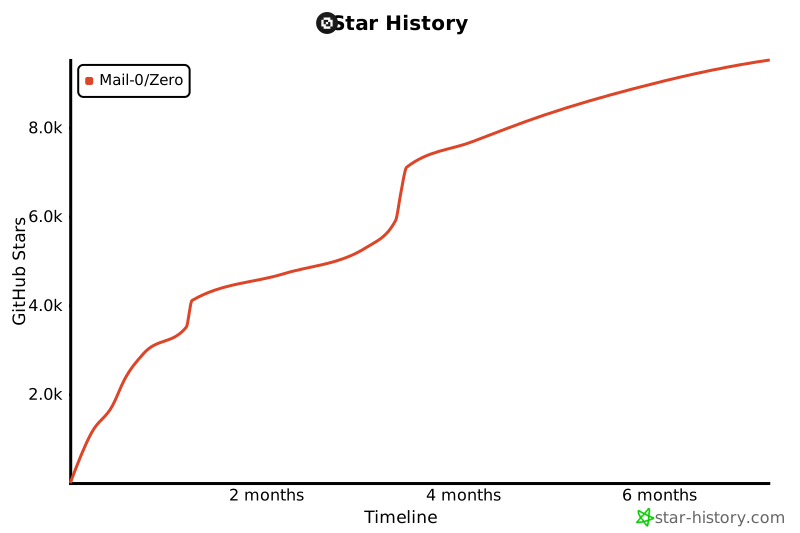
## Star History
[](https://www.star-history.com/#Mail-0/Zero&Timeline)
## This project wouldn't be possible without these awesome companies
## 🤍 The team
Curious who makes Zero? Here are our [contributors and maintainers](https://0.email/contributors)