# ccusage
**Repository Path**: mirrors_trending/ccusage
## Basic Information
- **Project Name**: ccusage
- **Description**: A CLI tool for analyzing Claude Code usage from local JSONL files.
- **Primary Language**: Unknown
- **License**: Not specified
- **Default Branch**: main
- **Homepage**: None
- **GVP Project**: No
## Statistics
- **Stars**: 0
- **Forks**: 0
- **Created**: 2025-06-16
- **Last Updated**: 2026-01-17
## Categories & Tags
**Categories**: Uncategorized
**Tags**: None
## README
ccusage
> Analyze your Claude Code token usage and costs from local JSONL files — incredibly fast and informative!
## ccusage Family
### 📊 [ccusage](https://www.npmjs.com/package/ccusage) - Claude Code Usage Analyzer
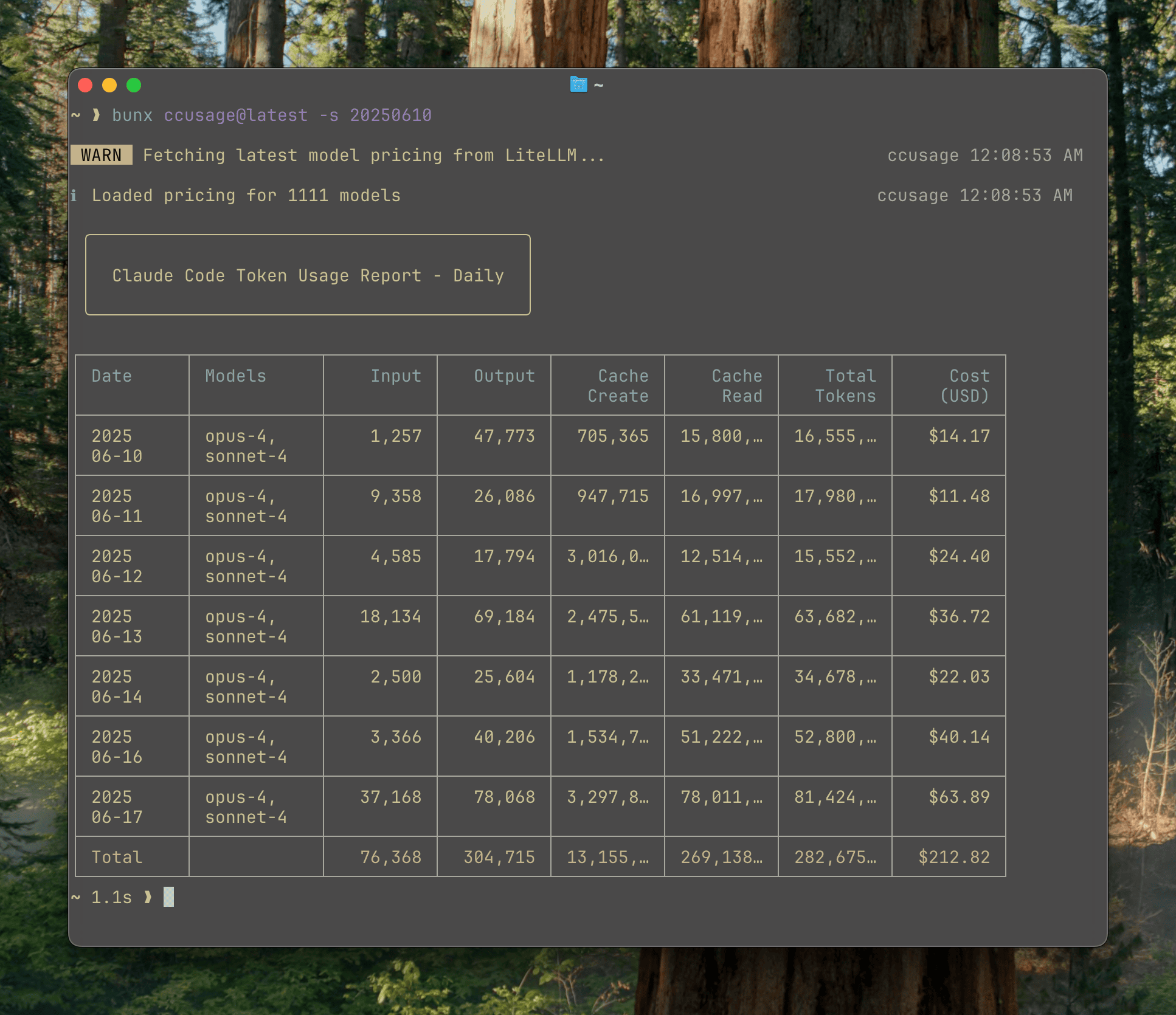
The main CLI tool for analyzing Claude Code usage from local JSONL files. Track daily, monthly, and session-based usage with beautiful tables.
### 🤖 [@ccusage/codex](https://www.npmjs.com/package/@ccusage/codex) - OpenAI Codex Usage Analyzer
Companion tool for analyzing OpenAI Codex usage. Same powerful features as ccusage but tailored for Codex users, including GPT-5 support and 1M token context windows.
### 🚀 [@ccusage/opencode](https://www.npmjs.com/package/@ccusage/opencode) - OpenCode Usage Analyzer
Companion tool for analyzing [OpenCode](https://github.com/opencode-ai/opencode) usage. Track token usage and costs from OpenCode sessions with the same reporting capabilities as ccusage.
### 🥧 [@ccusage/pi](https://www.npmjs.com/package/@ccusage/pi) - Pi-agent Usage Analyzer
Companion tool for analyzing [pi-agent](https://github.com/nicobailon/pi-agent) session usage. Track token usage and costs from your pi-agent sessions with daily, monthly, and session-based reports.
### ⚡ [@ccusage/amp](https://www.npmjs.com/package/@ccusage/amp) - Amp Usage Analyzer
Companion tool for analyzing [Amp](https://ampcode.com/) session usage. Track token usage, costs, and credits from your Amp CLI sessions with daily, monthly, and session-based reports.
### 🔌 [@ccusage/mcp](https://www.npmjs.com/package/@ccusage/mcp) - MCP Server Integration
Model Context Protocol server that exposes ccusage data to Claude Desktop and other MCP-compatible tools. Enable real-time usage tracking directly in your AI workflows.
## Installation
### Quick Start (Recommended)
Thanks to ccusage's incredibly small bundle size ([](https://packagephobia.com/result?p=ccusage)), you can run it directly without installation:
```bash
# Recommended - always include @latest to ensure you get the newest version
npx ccusage@latest
bunx ccusage
# Alternative package runners
pnpm dlx ccusage
pnpx ccusage
# Using deno (with security flags)
deno run -E -R=$HOME/.claude/projects/ -S=homedir -N='raw.githubusercontent.com:443' npm:ccusage@latest
```
> 💡 **Important**: We strongly recommend using `@latest` suffix with npx (e.g., `npx ccusage@latest`) to ensure you're running the most recent version with the latest features and bug fixes.
### Related Tools
```bash
npx @ccusage/codex@latest # OpenAI Codex usage tracking
npx @ccusage/opencode@latest # OpenCode usage tracking
npx @ccusage/pi@latest # Pi-agent usage tracking
npx @ccusage/amp@latest # Amp usage tracking
npx @ccusage/mcp@latest # MCP Server
```
## Usage
```bash
# Basic usage
npx ccusage # Show daily report (default)
npx ccusage daily # Daily token usage and costs
npx ccusage monthly # Monthly aggregated report
npx ccusage session # Usage by conversation session
npx ccusage blocks # 5-hour billing windows
npx ccusage statusline # Compact status line for hooks (Beta)
# Filters and options
npx ccusage daily --since 20250525 --until 20250530
npx ccusage daily --json # JSON output
npx ccusage daily --breakdown # Per-model cost breakdown
npx ccusage daily --timezone UTC # Use UTC timezone
npx ccusage daily --locale ja-JP # Use Japanese locale for date/time formatting
# Project analysis
npx ccusage daily --instances # Group by project/instance
npx ccusage daily --project myproject # Filter to specific project
npx ccusage daily --instances --project myproject --json # Combined usage
# Compact mode for screenshots/sharing
npx ccusage --compact # Force compact table mode
npx ccusage monthly --compact # Compact monthly report
```
## Features
- 📊 **Daily Report**: View token usage and costs aggregated by date
- 📅 **Monthly Report**: View token usage and costs aggregated by month
- 💬 **Session Report**: View usage grouped by conversation sessions
- ⏰ **5-Hour Blocks Report**: Track usage within Claude's billing windows with active block monitoring
- 🚀 **Statusline Integration**: Compact usage display for Claude Code status bar hooks (Beta)
- 🤖 **Model Tracking**: See which Claude models you're using (Opus, Sonnet, etc.)
- 📊 **Model Breakdown**: View per-model cost breakdown with `--breakdown` flag
- 📅 **Date Filtering**: Filter reports by date range using `--since` and `--until`
- 📁 **Custom Path**: Support for custom Claude data directory locations
- 🎨 **Beautiful Output**: Colorful table-formatted display with automatic responsive layout
- 📱 **Smart Tables**: Automatic compact mode for narrow terminals (< 100 characters) with essential columns
- 📸 **Compact Mode**: Use `--compact` flag to force compact table layout, perfect for screenshots and sharing
- 📋 **Enhanced Model Display**: Model names shown as bulleted lists for better readability
- 📄 **JSON Output**: Export data in structured JSON format with `--json`
- 💰 **Cost Tracking**: Shows costs in USD for each day/month/session
- 🔄 **Cache Token Support**: Tracks and displays cache creation and cache read tokens separately
- 🌐 **Offline Mode**: Use pre-cached pricing data without network connectivity with `--offline` (Claude models only)
- 🔌 **MCP Integration**: Built-in Model Context Protocol server for integration with other tools
- 🏗️ **Multi-Instance Support**: Group usage by project with `--instances` flag and filter by specific projects
- 🌍 **Timezone Support**: Configure timezone for date grouping with `--timezone` option
- 🌐 **Locale Support**: Customize date/time formatting with `--locale` option (e.g., en-US, ja-JP, de-DE)
- ⚙️ **Configuration Files**: Set defaults with JSON configuration files, complete with IDE autocomplete and validation
- 🚀 **Ultra-Small Bundle**: Unlike other CLI tools, we pay extreme attention to bundle size - incredibly small even without minification!
## Documentation
Full documentation is available at **[ccusage.com](https://ccusage.com/)**
## Development Setup
### Using Nix (Recommended for Contributors)
For contributors and developers working on ccusage, we provide a Nix flake-based development environment:
```bash
# Clone the repository
git clone https://github.com/ryoppippi/ccusage.git
cd ccusage
# Allow direnv (automatically loads Nix environment)
direnv allow
# Or manually enter the development shell
nix develop
```
This ensures consistent tooling versions across all contributors and CI systems. The development environment is defined in `flake.nix` and automatically activated via direnv when entering the project directory.
## Sponsors
### Featured Sponsor
Check out [ccusage: The Claude Code cost scorecard that went viral](https://www.youtube.com/watch?v=Ak6qpQ5qdgk)