# overtype
**Repository Path**: mirrors_trending/overtype
## Basic Information
- **Project Name**: overtype
- **Description**: The markdown editor that's just a textarea https://overtype.dev
- **Primary Language**: Unknown
- **License**: MIT
- **Default Branch**: main
- **Homepage**: None
- **GVP Project**: No
## Statistics
- **Stars**: 0
- **Forks**: 0
- **Created**: 2025-08-23
- **Last Updated**: 2026-03-21
## Categories & Tags
**Categories**: Uncategorized
**Tags**: None
## README
# OverType
A lightweight markdown editor library with perfect WYSIWYG alignment using an invisible textarea overlay technique. Includes optional toolbar. ~118KB minified with all features.
## Live Examples
🎮 **Try it out**: [Interactive demos on overtype.dev](https://overtype.dev)
- [Basic Editor](https://overtype.dev/#basic-editor) - Minimal setup with live preview
- [With Toolbar](https://overtype.dev/#toolbar) - Full formatting toolbar
- [Multiple Instances](https://overtype.dev/demo.html#multiple-instances) - Several editors on one page
- [View Modes](https://overtype.dev/demo.html#view-modes) - Preview synchronization
- [Themes](https://overtype.dev/demo.html#themes) - Light/dark theme switching
- [All Features](https://overtype.dev/demo.html#markdown-features) - Complete markdown showcase
## Features
- 👻 **Invisible textarea overlay** - Transparent input layer overlaid on styled preview for seamless editing
- 🎨 **Global theming** - Solar (light) and Cave (dark) themes that apply to all instances
- ⌨️ **Keyboard shortcuts** - Common markdown shortcuts (Cmd/Ctrl+B for bold, etc.)
- 📱 **Mobile optimized** - Responsive design with mobile-specific styles
- 🔄 **DOM persistence aware** - Recovers from existing DOM (perfect for HyperClay and similar platforms)
- 🚀 **Lightweight** - ~118KB minified
- 🎯 **Optional toolbar** - Clean, minimal toolbar with all essential formatting
- ✨ **Smart shortcuts** - Keyboard shortcuts with selection preservation
- 📝 **Smart list continuation** - GitHub-style automatic list continuation on Enter
- 🔧 **Framework agnostic** - Works with React, Vue, vanilla JS, and more
## How it works
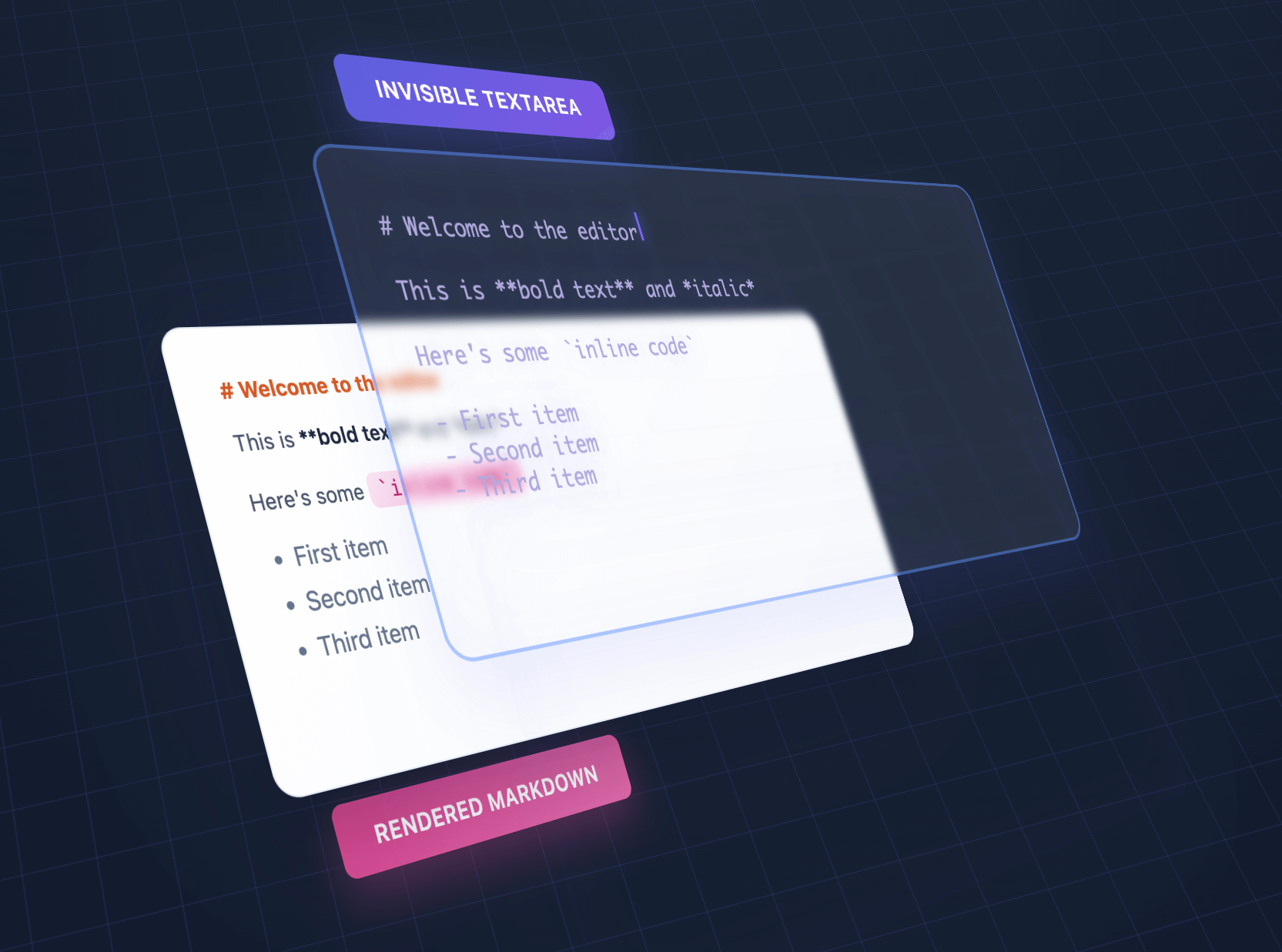
We overlap an invisible textarea on top of styled output, giving the illusion of editing styled text using a plain textarea.
## Comparisons
| Feature | OverType | HyperMD | Milkdown | TUI Editor | EasyMDE |
|---------|----------|---------|----------|------------|---------|
| **Size** | ~118KB | 364.02 KB | 344.51 KB | 560.99 KB | 323.69 KB |
| **Dependencies** | Bundled | CodeMirror | ProseMirror + plugins | Multiple libs | CodeMirror |
| **Setup** | Single file | Complex config | Build step required | Complex config | Moderate |
| **Approach** | Invisible textarea | ContentEditable | ContentEditable | ContentEditable | CodeMirror |
| **Mobile** | Perfect native | Issues common | Issues common | Issues common | Limited |
| **Markdown syntax** | Visible | Hidden | Hidden | Toggle | Visible |
| **Advanced features** | Basic | Full | Full | Full | Moderate |
| **Best for** | Simple, fast, mobile | Full WYSIWYG | Modern frameworks | Enterprise apps | Classic editing |
**Choose OverType when you need:**
- Tiny bundle size (10x smaller than alternatives)
- Zero dependencies - single file that works immediately
- Perfect native browser features (undo/redo, mobile keyboards, optional spellcheck)
- Dead-simple integration without build tools
- Easy to understand, modify, and extend
- Excellent mobile support with visible markdown syntax
**Choose other editors when you need:**
- Full WYSIWYG with hidden markdown syntax
- Advanced features like tables, diagrams, or collaborative editing
- Rich plugin ecosystems
- Enterprise features and extensive customization
- Framework-specific integration (React, Vue, etc.)
- Complex multi-layered architecture for deep customization
## Installation
### NPM
```bash
npm install overtype
```
### CDN
```html
```
## Quick Start
```javascript
// Create a single editor
const [editor] = new OverType('#editor', {
value: '# Hello World',
theme: 'solar'
});
// Get/set content
editor.getValue();
editor.setValue('# New Content');
// Change theme for this instance
editor.setTheme('cave');
```
## Usage
### Basic Editor
```html
```
### Toolbar
```javascript
// Enable default toolbar with all formatting buttons
const [editor] = new OverType('#editor', {
toolbar: true,
value: '# Document\n\nSelect text and use the toolbar!'
});
// Default toolbar: Bold, Italic, Code | Link | H1, H2, H3 | Lists, Tasks | Quote | View Mode
```
**Custom Toolbar (v2.0):**
```javascript
import OverType, { toolbarButtons } from 'overtype';
const [editor] = new OverType('#editor', {
toolbar: true,
toolbarButtons: [
toolbarButtons.bold,
toolbarButtons.italic,
toolbarButtons.separator,
{
name: 'save',
icon: '',
title: 'Save',
action: ({ editor, getValue }) => {
localStorage.setItem('draft', getValue());
}
}
]
});
// Available: bold, italic, code, link, h1, h2, h3, bulletList,
// orderedList, taskList, quote, separator, viewMode
```
See [examples/custom-toolbar.html](examples/custom-toolbar.html) for complete examples.
### View Modes
Three modes available via toolbar dropdown or programmatically:
```javascript
editor.showNormalEditMode(); // Default WYSIWYG editing
editor.showPlainTextarea(); // Raw markdown, no preview
editor.showPreviewMode(); // Read-only preview with clickable links
```
### Task Lists
GitHub-style checkboxes render in preview mode:
```javascript
const [editor] = new OverType('#editor', {
value: '- [ ] Todo\n- [x] Done',
toolbar: true // Use view mode dropdown to see checkboxes
});
// Edit mode: Shows `- [ ]` and `- [x]` syntax (preserves alignment)
// Preview mode: Renders actual checkbox inputs
```
### Syntax Highlighting
```javascript
import { codeToHtml } from 'shiki';
// Global highlighter (all instances)
OverType.setCodeHighlighter((code, lang) =>
codeToHtml(code, { lang, theme: 'nord' })
);
// Per-instance override
const [editor] = new OverType('#editor', {
codeHighlighter: (code, lang) => myHighlighter(code, lang)
});
```
See [docs/SYNTAX_HIGHLIGHTING.md](docs/SYNTAX_HIGHLIGHTING.md) for complete guide.
### Keyboard Shortcuts
The toolbar and keyboard shortcuts work together seamlessly:
- **Cmd/Ctrl + B** - Bold
- **Cmd/Ctrl + I** - Italic
- **Cmd/Ctrl + K** - Insert link
- **Cmd/Ctrl + Shift + 7** - Numbered list
- **Cmd/Ctrl + Shift + 8** - Bullet list
All shortcuts preserve text selection, allowing you to apply multiple formats quickly.
### Multiple Editors
```javascript
// Initialize multiple editors at once
const editors = OverType.init('.markdown-editor', {
theme: 'cave',
fontSize: '16px'
});
// Each editor is independent
editors.forEach((editor, index) => {
editor.setValue(`# Editor ${index + 1}`);
});
```
### Form Integration
```javascript
// Use with form validation
const [editor] = new OverType('#message', {
placeholder: 'Your message...',
textareaProps: {
required: true,
maxLength: 500,
name: 'message'
}
});
// The textarea will work with native form validation
document.querySelector('form').addEventListener('submit', (e) => {
const content = editor.getValue();
// Form will automatically validate required field
});
```
### Custom Theme
```javascript
const [editor] = new OverType('#editor', {
theme: {
name: 'my-theme',
colors: {
bgPrimary: '#faf0ca',
bgSecondary: '#ffffff',
text: '#0d3b66',
h1: '#f95738',
h2: '#ee964b',
h3: '#3d8a51',
strong: '#ee964b',
em: '#f95738',
link: '#0d3b66',
code: '#0d3b66',
codeBg: 'rgba(244, 211, 94, 0.2)',
blockquote: '#5a7a9b',
hr: '#5a7a9b',
syntaxMarker: 'rgba(13, 59, 102, 0.52)',
cursor: '#f95738',
selection: 'rgba(244, 211, 94, 0.4)'
}
}
});
```
### Preview & HTML Export
Generate HTML previews or export the rendered content:
```javascript
const [editor] = new OverType('#editor', {
value: '# Title\n\n**Bold** text with [links](https://example.com)'
});
// Get the raw markdown
const markdown = editor.getValue();
// Returns: "# Title\n\n**Bold** text with [links](https://example.com)"
// Get rendered HTML with syntax markers (for debugging/inspection)
const html = editor.getRenderedHTML();
// Returns HTML with elements visible
// Get clean HTML for export (no OverType-specific markup)
const cleanHTML = editor.getRenderedHTML({ cleanHTML: true });
// Returns clean HTML suitable for saving/exporting
// Convenience method for clean HTML
const exportHTML = editor.getCleanHTML();
// Same as getRenderedHTML({ cleanHTML: true })
// Get the current preview element's HTML (actual DOM content)
const previewHTML = editor.getPreviewHTML();
// Returns exactly what's shown in the editor's preview layer
// Example: Export clean HTML to server
const htmlToSave = editor.getCleanHTML(); // No syntax markers
// Example: Clone exact preview appearance
document.getElementById('clone').innerHTML = editor.getPreviewHTML();
```
### Stats Bar
Enable a built-in stats bar that shows character, word, and line counts:
```javascript
// Enable stats bar on initialization
const [editor] = new OverType('#editor', {
showStats: true
});
// Show or hide stats bar dynamically
editor.showStats(true); // Show
editor.showStats(false); // Hide
// Custom stats format
const [editor] = new OverType('#editor', {
showStats: true,
statsFormatter: (stats) => {
// stats object contains: { chars, words, lines, line, column }
return `${stats.chars} characters${stats.words} words${stats.lines} linesLine ${stats.line}, Col ${stats.column}`;
}
});
```
The stats bar automatically adapts to your theme colors using CSS variables.
### React Component
```jsx
function MarkdownEditor({ value, onChange }) {
const ref = useRef();
const editorRef = useRef();
useEffect(() => {
const [instance] = OverType.init(ref.current, {
value,
onChange
});
editorRef.current = instance;
return () => editorRef.current?.destroy();
}, []);
useEffect(() => {
if (editorRef.current && value !== editorRef.current.getValue()) {
editorRef.current.setValue(value);
}
}, [value]);
return ;
}
```
### Standalone Parser
Import and use the markdown parser without the full editor for server-side rendering, static site generation, or browser extensions:
```javascript
// Import just the parser
import { MarkdownParser } from 'overtype/parser';
// Parse markdown to HTML
const html = MarkdownParser.parse('# Hello World\n\nThis is **bold** text.');
// Use in Node.js for SSR
app.get('/preview', (req, res) => {
const markdown = req.body.content;
const html = MarkdownParser.parse(markdown);
res.json({ html });
});
// Use in static site generator
const posts = markdownFiles.map(file => ({
content: MarkdownParser.parse(file.content),
metadata: file.metadata
}));
// Use in browser extension
chrome.runtime.onMessage.addListener((request, sender, sendResponse) => {
if (request.markdown) {
const html = MarkdownParser.parse(request.markdown);
sendResponse({ html });
}
});
```
**Benefits:**
- No DOM dependencies required
- Smaller bundle when you only need parsing
- Same markdown rendering as the editor
- Perfect for headless/server-side use cases
## API
### Constructor
```javascript
new OverType(target, options)
```
**Parameters:**
- `target` - Selector string, Element, NodeList, or Array of elements
- `options` - Configuration object (see below)
**Returns:** Array of OverType instances (always an array, even for single element)
### Options
```javascript
{
// Typography
fontSize: '14px',
lineHeight: 1.6,
fontFamily: 'monospace',
padding: '16px',
// Theme - 'solar', 'cave', or custom theme object
theme: 'solar',
// Custom colors (override theme colors)
colors: {
h1: '#e63946',
h2: '#457b9d',
// ... any color variable
},
// Mobile styles (applied at <= 640px)
mobile: {
fontSize: '16px',
padding: '12px',
lineHeight: 1.5
},
// Behavior
autofocus: false,
placeholder: 'Start typing...',
value: '',
// Auto-resize
autoResize: false, // Auto-expand height with content
minHeight: '100px', // Minimum height when autoResize is enabled
maxHeight: null, // Maximum height (null = unlimited)
// Native textarea properties
textareaProps: {
required: true,
maxLength: 500,
name: 'content',
// Any HTML textarea attribute
},
// Toolbar
toolbar: false, // Enable/disable toolbar
toolbarButtons: [], // Custom button array (v2.0)
// Defaults to all built-in buttons when toolbar: true
// Syntax highlighting
codeHighlighter: null, // Function: (code, lang) => html
// Overrides global OverType.setCodeHighlighter()
// Smart lists
smartLists: true, // Enable GitHub-style list continuation on Enter
// Spellcheck
spellcheck: false, // Enable browser spellcheck (disabled by default)
// Stats bar
showStats: false, // Enable/disable stats bar
statsFormatter: (stats) => { // Custom stats format
return `${stats.chars} chars | ${stats.words} words`;
},
// Callbacks
onChange: (value, instance) => {},
onKeydown: (event, instance) => {}
}
```
### Instance Methods
```javascript
// Get current markdown content
editor.getValue()
// Set markdown content
editor.setValue(markdown)
// Get rendered HTML of the current content
editor.getRenderedHTML() // With syntax markers (for debugging)
editor.getRenderedHTML({ cleanHTML: true }) // Clean HTML without OverType markup
editor.getCleanHTML() // Alias for getRenderedHTML({ cleanHTML: true })
// Get the current preview element's HTML
editor.getPreviewHTML() // Actual DOM content from preview layer
// Change theme (instance-specific, overrides global theme)
editor.setTheme('cave') // Built-in theme name
editor.setTheme(customThemeObject) // Custom theme
// Set code highlighter (instance-specific)
editor.setCodeHighlighter((code, lang) => highlightedHTML)
editor.setCodeHighlighter(null) // Disable for this instance
// View modes
editor.showNormalEditMode() // Switch to normal edit mode (default)
editor.showPlainTextarea() // Switch to plain textarea mode
editor.showPreviewMode() // Switch to preview mode
// Focus/blur
editor.focus()
editor.blur()
// Show or hide stats bar
editor.showStats(true) // Show stats
editor.showStats(false) // Hide stats
// Check if initialized
editor.isInitialized()
// Re-initialize with new options
editor.reinit(options)
// Destroy the editor
editor.destroy()
```
### Static Methods
```javascript
// Set global theme (affects all instances without instance themes)
OverType.setTheme('cave') // Built-in theme
OverType.setTheme(customTheme) // Custom theme object
OverType.setTheme('solar', { h1: '#custom' }) // Override specific colors
// Set global code highlighter (affects all instances without instance highlighter)
OverType.setCodeHighlighter((code, lang) => highlightedHTML)
OverType.setCodeHighlighter(null) // Disable global highlighting
// Extend parsing with custom syntax (footnotes, directives, etc.)
// IMPORTANT: You must maintain 1-to-1 character alignment - wrap text, don't change it
// See: https://panphora.github.io/overtype/examples/custom-syntax.html
OverType.setCustomSyntax((html) => {
return html.replace(/\[\^(\w+)\]/g, '$&');
})
// Note: Instance methods override global settings
// Initialize multiple editors (same as constructor)
OverType.init(target, options)
// Initialize with per-element config via data-ot-* attributes
// Uses kebab-case: data-ot-show-stats="true" → showStats: true
OverType.initFromData('.editor', { /* defaults */ })
// Get instance from element
OverType.getInstance(element)
// Destroy all instances
OverType.destroyAll()
// Access themes
OverType.themes.solar
OverType.themes.cave
```
## Keyboard Shortcuts
| Shortcut | Action |
|----------|--------|
| Cmd/Ctrl + B | Toggle bold |
| Cmd/Ctrl + I | Toggle italic |
| Cmd/Ctrl + K | Wrap in code |
| Cmd/Ctrl + Shift + K | Insert link |
| Cmd/Ctrl + Shift + 7 | Toggle numbered list |
| Cmd/Ctrl + Shift + 8 | Toggle bullet list |
## Supported Markdown
- **Headers** - `# H1`, `## H2`, `### H3`
- **Bold** - `**text**` or `__text__`
- **Italic** - `*text*` or `_text_`
- **Strikethrough** - `~~text~~` or `~text~` (GFM)
- **Code** - `` `inline code` ``
- **Code blocks** - ` ```language `
- **Links** - `[text](url)`
- **Lists** - `- item`, `* item`, `1. item`
- **Task lists** - `- [ ] todo`, `- [x] done` (GFM, renders in preview mode)
- **Blockquotes** - `> quote`
- **Horizontal rule** - `---`, `***`, or `___`
**Note:** Syntax remains visible in edit mode (e.g., `**bold**` shows markers). Use preview mode for full rendering.
## Web Component
OverType provides a fully-featured native Web Component `` with Shadow DOM encapsulation and a declarative HTML API.
**Quick example:**
```html
```
📖 **[Complete Web Component Documentation](docs/WEB-COMPONENT.md)**
Features include:
- Complete style isolation with Shadow DOM
- 15 reactive HTML attributes
- Framework-agnostic (React, Vue, Angular)
- Built-in themes (Solar, Cave)
- Custom events API
- Zero configuration required
## Migration from v1.x
### Breaking Change: Toolbar API (v2.0)
**Old options removed:**
```javascript
// ❌ No longer supported
{
customToolbarButtons: [...],
hideButtons: [...],
buttonOrder: [...]
}
```
**New approach:**
```javascript
// ✅ v2.0: Single explicit array
import { toolbarButtons } from 'overtype';
{
toolbar: true,
toolbarButtons: [
toolbarButtons.bold,
toolbarButtons.italic,
{ name: 'custom', icon: '...', action: ({ editor, getValue }) => {} }
]
}
```
**If using default toolbar** (`toolbar: true` with no customization), no changes needed.
See [examples/custom-toolbar.html](examples/custom-toolbar.html) for migration examples.
## DOM Persistence & Re-initialization
OverType is designed to work with platforms that persist DOM across page loads (like HyperClay):
```javascript
// Safe to call multiple times - will recover existing editors
OverType.init('.editor');
// The library will:
// 1. Check for existing OverType DOM structure
// 2. Recover content from existing textarea if found
// 3. Re-establish event bindings
// 4. Or create fresh editor if no existing DOM
```
## Examples
Check the `examples` folder for complete examples:
- `basic.html` - Simple single editor
- `multiple.html` - Multiple independent editors
- `custom-theme.html` - Theme customization
- `custom-toolbar.html` - Custom toolbar buttons (v2.0)
- `dynamic.html` - Dynamic creation/destruction
## Limitations
Due to the transparent textarea overlay approach, OverType has some intentional design limitations:
### Images Not Supported
Images (``) are not rendered. Variable-height images would break the character alignment between textarea and preview.
### Monospace Font Required
All text must use a monospace font to maintain alignment. Variable-width fonts would cause the textarea cursor position to drift from the visual text position.
### Fixed Font Size
All content must use the same font size. Different sizes for headers or other elements would break vertical alignment.
### Visible Markdown Syntax
All markdown formatting characters remain visible (e.g., `**bold**` shows the asterisks). This is intentional - hiding them would break the 1:1 character mapping.
### Links Require Modifier Key
Links are clickable with Cmd/Ctrl+Click only. Direct clicking would interfere with text editing since clicks need to position the cursor in the textarea.
These limitations are what enable OverType's core benefits: perfect native textarea behavior, tiny size, and zero complexity.
## Development
```bash
# Install dependencies
npm install
# Development build with watch
npm run dev
# Production build
npm run build
# Run tests
npm test
# Check bundle size
npm run size
```
## Browser Support
- Chrome 62+
- Firefox 78+
- Safari 16+
- Edge (Chromium)
Requires support for:
- CSS Custom Properties
- ES6 features
- Lookbehind assertions in RegExp (for italic parsing)
## Architecture
OverType uses a unique invisible textarea overlay approach:
1. **Two perfectly aligned layers:**
- Invisible textarea (top) - handles input and cursor
- Styled preview div (bottom) - shows formatted markdown
2. **Character-perfect alignment:**
- Monospace font required
- No size changes in styling
- Syntax markers remain visible
3. **Single source of truth:**
- Textarea content drives everything
- One-way data flow: textarea → parser → preview
## Data Attribute Configuration
Use `OverType.initFromData()` to configure multiple editors via HTML data attributes:
```html
```
Uses kebab-case attributes that convert to camelCase options (e.g., `data-ot-show-stats` → `showStats`).
**Supported:** `toolbar`, `theme`, `value`, `placeholder`, `autofocus`, `auto-resize`, `min-height`, `max-height`, `font-size`, `line-height`, `show-stats`, `smart-lists`, `show-active-line-raw`
**Not supported (use JS):** `toolbarButtons`, `textareaProps`, `onChange`, `onKeydown`, `statsFormatter`, `codeHighlighter`, `colors`, `mobile`
## Contributors
Special thanks to:
### Core Features & Fixes
- [Josh Doman](https://github.com/joshdoman) - Fixed inline code formatting preservation ([#6](https://github.com/panphora/overtype/pull/6)), improved code fence detection ([#19](https://github.com/panphora/overtype/pull/19))
- [kbhomes](https://github.com/kbhomes) - Fixed text selection desync during overscroll ([#17](https://github.com/panphora/overtype/pull/17))
- [Kristián Kostecký](https://github.com/kristiankostecky) - Fixed toolbar option being ignored in reinit() ([#62](https://github.com/panphora/overtype/pull/62))
- [Lyric Wai](https://github.com/lyricat) - Fixed double-escaping of links ([#64](https://github.com/panphora/overtype/pull/64)), shared code block alignment fix ([#65](https://github.com/panphora/overtype/issues/65))
- [kozi](https://github.com/kozi) - Reported Firefox link tooltip bug ([#68](https://github.com/panphora/overtype/issues/68)), toolbar positioning ([#69](https://github.com/panphora/overtype/issues/69)), theme CSS variable issues ([#70](https://github.com/panphora/overtype/issues/70), [#71](https://github.com/panphora/overtype/issues/71))
- [1951FDG](https://github.com/1951FDG) - Reported unordered list rendering bug ([#74](https://github.com/panphora/overtype/issues/74)), suggested showStats() API improvement ([#77](https://github.com/panphora/overtype/issues/77))
- [nodesocket](https://github.com/nodesocket) - Reported toolbarButtons export issues ([#73](https://github.com/panphora/overtype/issues/73), [#78](https://github.com/panphora/overtype/issues/78)), suggested image toolbar button ([#89](https://github.com/panphora/overtype/issues/89))
- [Travis Bell](https://github.com/travisbell) - Reported keyboard shortcuts bug in ESM build ([#80](https://github.com/panphora/overtype/issues/80))
- [fab2713](https://github.com/fab2713) - Reported italic rendering in lists ([#81](https://github.com/panphora/overtype/issues/81)), reinit maxHeight ([#82](https://github.com/panphora/overtype/issues/82)), placeholder visibility ([#83](https://github.com/panphora/overtype/issues/83)), suggested auto theme ([#84](https://github.com/panphora/overtype/issues/84)), relative URL prefix ([#85](https://github.com/panphora/overtype/issues/85)), minification improvements ([#94](https://github.com/panphora/overtype/issues/94))
- [oooo-ps](https://github.com/oooo-ps) - Reported remote script loading issue ([#86](https://github.com/panphora/overtype/issues/86))
- [ddarfantasy](https://github.com/ddarfantasy), [ThaUnknown](https://github.com/ThaUnknown) - Reported and debugged text misalignment caused by CSS framework font resets ([#91](https://github.com/panphora/overtype/issues/91))
- [milen-yordanov](https://github.com/milen-yordanov) - Reported code block colors ignoring theme in preview mode ([#97](https://github.com/panphora/overtype/issues/97))
- [asalimian](https://github.com/asalimian) - Reported spellcheck being disabled ([#98](https://github.com/panphora/overtype/issues/98))
### TypeScript & Framework Support
- [merlinz01](https://github.com/merlinz01) - Contributed TypeScript declaration file ([#20](https://github.com/panphora/overtype/pull/20))
- [ChasLui](https://github.com/ChasLui) - Web component implementation ([#40](https://github.com/panphora/overtype/pull/40))
- [pscanf](https://github.com/pscanf) - Added performAction type definition ([#99](https://github.com/panphora/overtype/pull/99))
### New Features & Enhancements
- [davidlazar](https://github.com/davidlazar) - Suggested view mode feature ([#24](https://github.com/panphora/overtype/issues/24))
- [Yukai Huang](https://github.com/Yukaii) - Contributed syntax highlighting implementation ([#35](https://github.com/panphora/overtype/pull/35))
- [Rognoni](https://github.com/rognoni) - Suggested custom toolbar button API ([#61](https://github.com/panphora/overtype/issues/61))
- [Deyan Gigov](https://github.com/dido739) - Reported checkbox rendering bug in preview mode ([#60](https://github.com/panphora/overtype/issues/60)), contributed auto theme implementation ([#100](https://github.com/panphora/overtype/pull/100))
- [GregJohnStewart](https://github.com/GregJohnStewart) - Suggested data attribute configuration ([#76](https://github.com/panphora/overtype/issues/76)), reported initFromData array nesting bug ([#93](https://github.com/panphora/overtype/issues/93)), suggested DOM element init ([#92](https://github.com/panphora/overtype/issues/92))
- [boris-glumpler](https://github.com/boris-glumpler) - Suggested custom syntax highlighting API ([#79](https://github.com/panphora/overtype/issues/79))
- [sorokya](https://github.com/sorokya) - Contributed file upload support ([#87](https://github.com/panphora/overtype/pull/87))
- [aaronmyatt](https://github.com/aaronmyatt) - Contributed show/hide toolbar methods ([#95](https://github.com/panphora/overtype/pull/95))
- [rouilj](https://github.com/rouilj) - Suggested progressive textarea enhancement ([#90](https://github.com/panphora/overtype/issues/90))
- [inklesspen](https://github.com/inklesspen) - Suggested autocompletion popups ([#96](https://github.com/panphora/overtype/issues/96))
### Developer Experience
- [Ned Twigg](https://github.com/nedtwigg) - Built gitcasso browser extension using OverType ([#59](https://github.com/panphora/overtype/issues/59))
- [Victor](https://github.com/ViggieM) - Suggested exportable MarkdownParser ([#58](https://github.com/panphora/overtype/issues/58))
- [Bernhard Weichel](https://github.com/bwl21) - Reported preview/edit mode sync bug ([#52](https://github.com/panphora/overtype/issues/52))
- [Colin Devroe](https://github.com/cdevroe) - Reported setTheme() API bug ([#54](https://github.com/panphora/overtype/issues/54))
- [Max Bernstein](https://github.com/tekknolagi) - Fixed typo on website ([#11](https://github.com/panphora/overtype/pull/11))
## License
MIT
## Contributing
Contributions are welcome! Please feel free to submit a Pull Request.
---
Built with the radical idea that sometimes dumb ideas work.
**Ready for another radical idea?**
Let's remove every layer of the web application stack.
### Hyperclay
[Hyperclay](https://hyperclay.com) by @panphora allows you to make a web app in a single, portable, self-updating, vanilla HTML file. No frameworks, no build steps, no deployment pipelines. Just a single HTML file that persists its own state and can be edited live.
Think of it as a Google Document for interactive code, where the UI, logic, and data all live in one self-modifying file. Share apps instantly, edit them directly, use them offline.