# pan
**Repository Path**: mirrors_trending/pan
## Basic Information
- **Project Name**: pan
- **Description**: A simple, lightweight, and privacy-focused product analytics php package
- **Primary Language**: Unknown
- **License**: MIT
- **Default Branch**: main
- **Homepage**: None
- **GVP Project**: No
## Statistics
- **Stars**: 0
- **Forks**: 0
- **Created**: 2024-10-17
- **Last Updated**: 2026-02-07
## Categories & Tags
**Categories**: Uncategorized
**Tags**: None
## README
---
**Pan is a lightweight and privacy-focused PHP product analytics library**. It’s designed as a very simple package that you can install via `composer require` and start tracking your pages or components with **a simple `data-pan` attribute**.
At the time of writing, Pan tracks only the following events: impressions, hovers, and clicks. It does not collect any personal information, such as IP addresses, user agents, or any data that could be used to identify a user.
**Use cases:**
- you have **different tabs** within a page with the same URL, and you want to know **which one is the most viewed**. By adding the `data-pan` attribute to your tabs, you can track this information.
- you have **different register buttons** in your application, and you want to know **which one is the most clicked**. By adding the `data-pan` attribute to your buttons, you can track this information.
- you have different "help" pop-hovers in your application, and you want to know **which one is the most hovered**. By adding the `data-pan` attribute to your pop-hovers, you can track this information.
- and so on...
It works out-of-the-box with your favorite Laravel stack; updating a button color in your "react" won't trigger a new impression, but seeing that same button in a different [Inertia](https://inertiajs.com) page will. Using [Livewire](https://livewire.laravel.com)? No problem, Pan works seamlessly with it too.
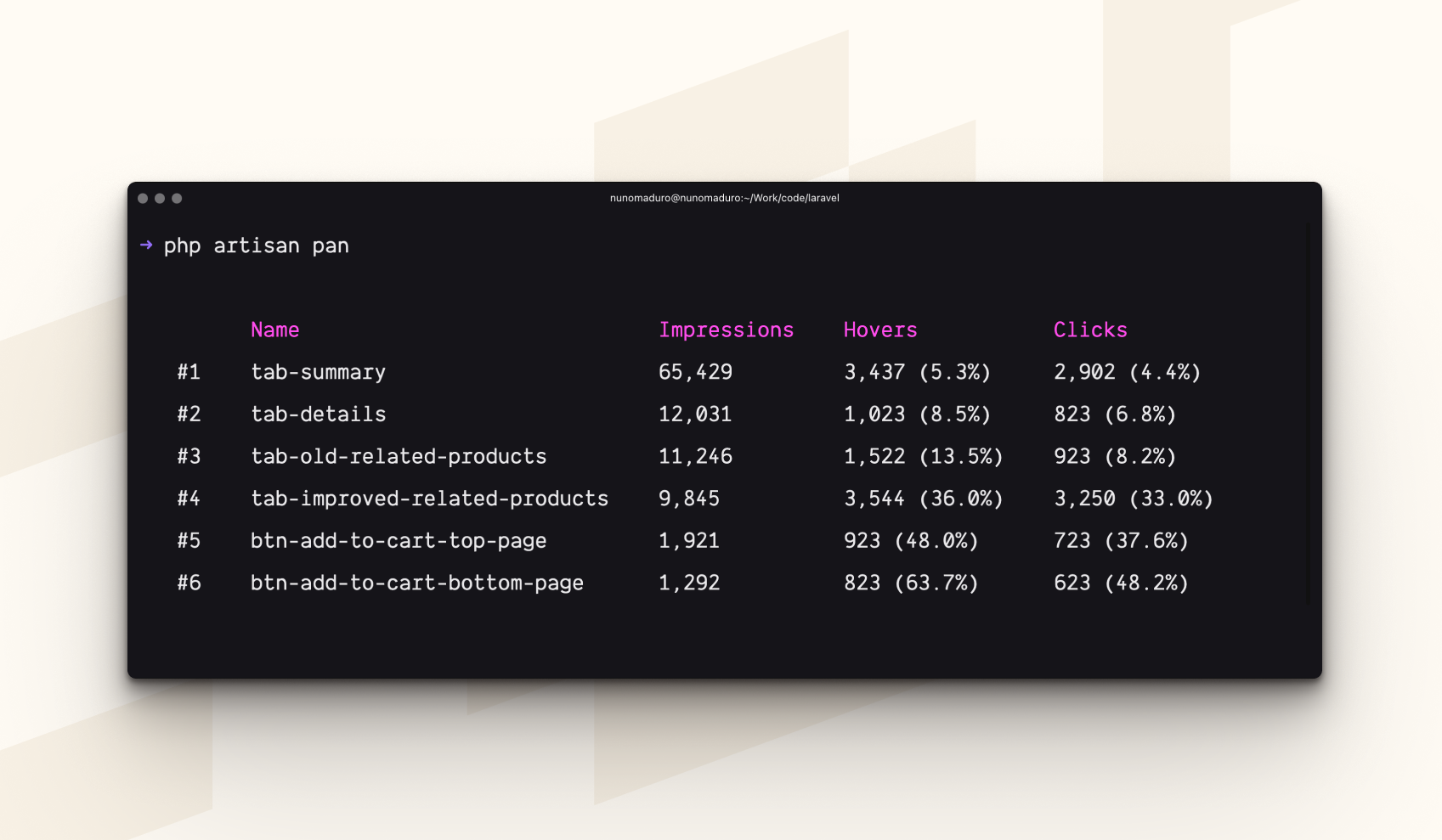
Visualize your analytics is as simple as typing `php artisan pan` in your terminal. This command will show you a table with the different analytics you've been tracking, and hopefully, you can use this information to improve your application.
## Get Started
> **Requires [PHP 8.3+](https://php.net/releases/), and [Laravel 11.0+](https://laravel.com)**.
You may use [Composer](https://getcomposer.org) to require Pan into your PHP project:
```bash
composer require panphp/pan
```
After, you may install Pan into your Laravel project using the following command:
```bash
php artisan install:pan
```
Finally, you may start tracking your pages or components adding the `data-pan` attribute to your HTML elements:
```diff
-
+
-
+
```
> [!IMPORTANT]
> Event names must only contain letters, numbers, dashes, and underscores.
## Visualize your product analytics
To visualize your product analytics, you may use the `pan` Artisan command:
```bash
php artisan pan
php artisan pan --filter=tab-profile
```
## Whitelist your product analytics
By default, Pan tracks all the HTML elements with the `data-pan` attribute, so bad actors could alter your HTML and create unwanted analytics records in your database. To mitigate this, by default, Pan only allows 50 analytics records to be created.
For extra protection, you may use the `PanConfiguration::allowedAnalytics` method to whitelist the analytics you want to track. This way, only the analytics you've whitelisted will be stored in your database.
```php
use Pan\PanConfiguration;
public function register(): void
{
PanConfiguration::allowedAnalytics([
'tab-profile',
'tab-settings',
]);
}
```
Alternatively, if you want to allow dynamic analytics, you may use the `PanConfiguration::maxAnalytics` method and this way at least limit the number of analytics records created:
```php
PanConfiguration::maxAnalytics(10000);
```
If you want to have unlimited analytics records, you may use the `Pan::unlimitedAnalytics` method:
```php
PanConfiguration::unlimitedAnalytics();
```
## Configure the route prefix
By default, Pan's route prefix is `/pan`, but you may change it by using the `PanConfiguration::routePrefix` method:
```php
PanConfiguration::routePrefix('internal-analytics');
```
With that set the url to track the analytics will be `/internal-analytics/events`.
## Flush your product analytics
To flush your product analytics, you may use the `pan:flush` Artisan command:
```bash
php artisan pan:flush
```
## How does it work?
Via middleware, Pan injects a simple JavaScript library into your HTML pages. This library listens to events like `viewed`, `clicked`, or `hovered` and sends the data to your Laravel application. Note that this library does not collect any personal information; such as IP addresses, user agents, or any information that could be used to identify a user.
Also on the client-side, these events are collected in a very performant way and batched together to reduce the number of requests to your server.
On the server-side, Pan only stores: the analytic name, and a counter of how many times the different events were triggered. Via the `pan` Artisan command, you may visualize this data, and hopefully use this information to improve your application.
## License
Pan is open-sourced software licensed under the [MIT license](LICENSE.md).