# SlideAndDragListView
**Repository Path**: nkniujun/SlideAndDragListView
## Basic Information
- **Project Name**: SlideAndDragListView
- **Description**: 继承于Android的ListView的可拖动和滑动item的ListView---SlideAndDragListView。
- **Primary Language**: Unknown
- **License**: Apache-2.0
- **Default Branch**: master
- **Homepage**: http://www.cnblogs.com/yydcdut/p/4737552.html
- **GVP Project**: No
## Statistics
- **Stars**: 0
- **Forks**: 24
- **Created**: 2016-01-10
- **Last Updated**: 2020-12-19
## Categories & Tags
**Categories**: Uncategorized
**Tags**: None
## README
# SlideAndDragListView
[  ](https://bintray.com/yydcdut/maven/sdlv/_latestVersion) [](LICENSE.txt) [](https://travis-ci.org/yydcdut/SlideAndDragListView) [](https://android-arsenal.com/api?level=11) 
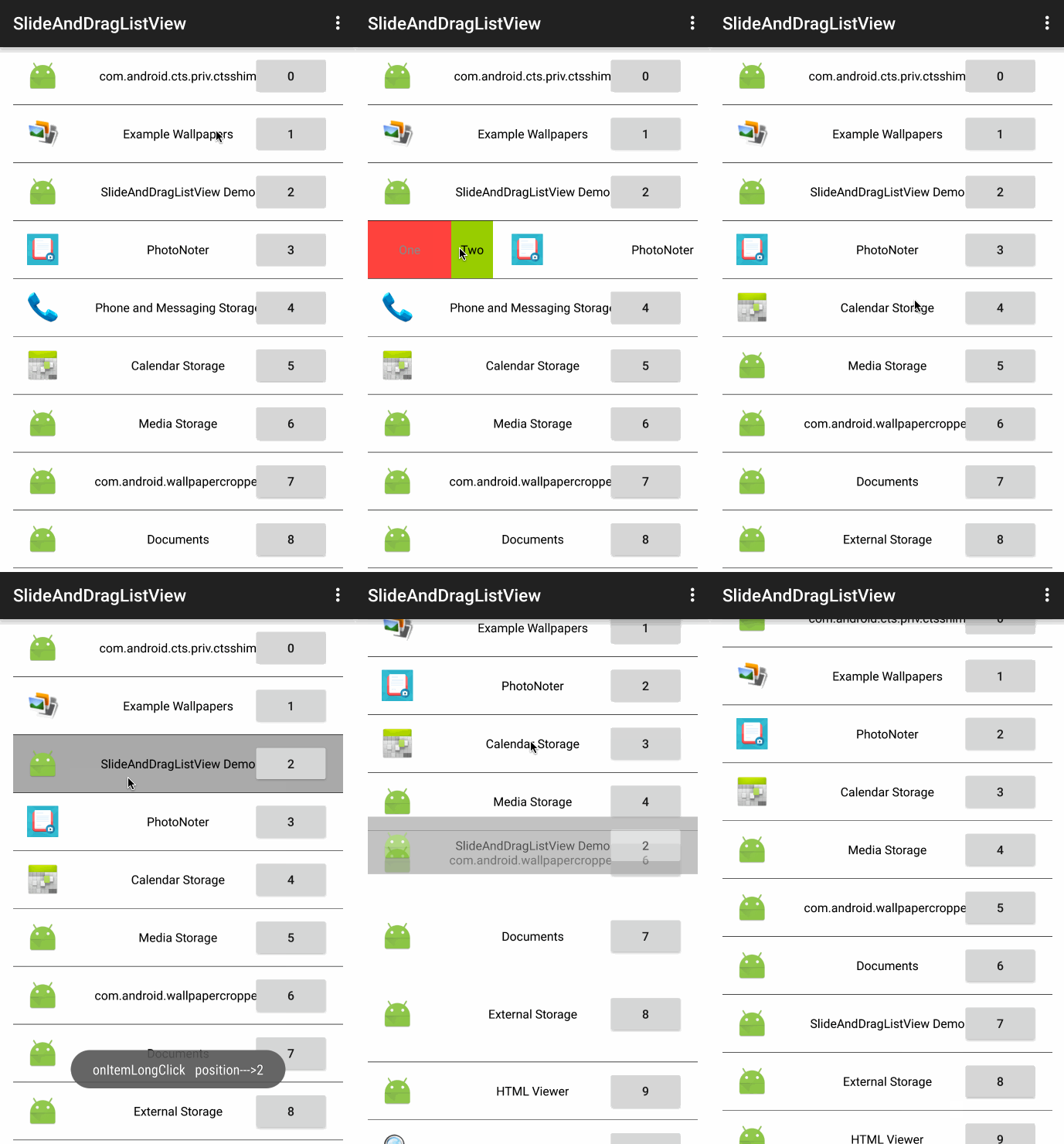
 A ListView that you can slide(or swipe) the item, drag the item and drop it to another position.
 中文:CHINESE.md
Demo: DOWNLOAD
# Overview
SlideAndDragListView (SDLV) is an extension of the Android ListView that enables slide and drag-and-drop reordering of list items.
Some key features are:
1. Clean drag and drop.
2. Intuitive and smooth scrolling while dragging or sliding.
3. Support onItemClick and onItemLongClick listener.
4. Public callback methods.
5. Two side of item can slide.
6. so on...
SlideAndDragListView is useful for all kinds of prioritized lists: favorites, playlists, checklists, etc. Would love to hear about your use case or app by email. I hope you find it useful; and please, help me improve the thing!
# Binaries
## Gradle
``` groovy
compile 'com.yydcdut.sdlv:sdlv:0.3.2@aar'
```
## aar
DOWNLOAD
## Jar
DOWNLOAD
# Widget Usage
## Menu Item Click & Slide Directions
### Step 1
- Add SlideAndDragListView in layout xml
``` xml
```
### Step 2
- Create a `Menu` and add `MenuItem`
``` java
Menu menu = new Menu((int) getResources().getDimension(R.dimen.slv_item_height), new ColorDrawable(Color.WHITE), true);//the third parameter is whether can slide over
menu.addItem(new MenuItem.Builder().setWidth(90)//set Width
.setBackground(new ColorDrawable(Color.RED))// set background
.setText("One")//set text string
.setTextColor(Color.GRAY)//set text color
.setTextSize(20)//set text color
.build());
menu.addItem(new MenuItem.Builder().setWidth(120)
.setBackground(new ColorDrawable(Color.BLACK))
.setDirection(MenuItem.DIRECTION_RIGHT)//set direction (default DIRECTION_LEFT)
.setIcon(getResources().getDrawable(R.drawable.ic_launcher))// set icon
.build());
//set in sdlv
slideAndDragListView.setMenu(menu);
```
The class `Menu`, the construct function `Menu(int itemHeight, Drawable itemBackGroundDrawable, boolean wannaOver)`, the third parameter means whether can slide over.
If it’s `true`:
中文:CHINESE.md
Demo: DOWNLOAD
# Overview
SlideAndDragListView (SDLV) is an extension of the Android ListView that enables slide and drag-and-drop reordering of list items.
Some key features are:
1. Clean drag and drop.
2. Intuitive and smooth scrolling while dragging or sliding.
3. Support onItemClick and onItemLongClick listener.
4. Public callback methods.
5. Two side of item can slide.
6. so on...
SlideAndDragListView is useful for all kinds of prioritized lists: favorites, playlists, checklists, etc. Would love to hear about your use case or app by email. I hope you find it useful; and please, help me improve the thing!
# Binaries
## Gradle
``` groovy
compile 'com.yydcdut.sdlv:sdlv:0.3.2@aar'
```
## aar
DOWNLOAD
## Jar
DOWNLOAD
# Widget Usage
## Menu Item Click & Slide Directions
### Step 1
- Add SlideAndDragListView in layout xml
``` xml
```
### Step 2
- Create a `Menu` and add `MenuItem`
``` java
Menu menu = new Menu((int) getResources().getDimension(R.dimen.slv_item_height), new ColorDrawable(Color.WHITE), true);//the third parameter is whether can slide over
menu.addItem(new MenuItem.Builder().setWidth(90)//set Width
.setBackground(new ColorDrawable(Color.RED))// set background
.setText("One")//set text string
.setTextColor(Color.GRAY)//set text color
.setTextSize(20)//set text color
.build());
menu.addItem(new MenuItem.Builder().setWidth(120)
.setBackground(new ColorDrawable(Color.BLACK))
.setDirection(MenuItem.DIRECTION_RIGHT)//set direction (default DIRECTION_LEFT)
.setIcon(getResources().getDrawable(R.drawable.ic_launcher))// set icon
.build());
//set in sdlv
slideAndDragListView.setMenu(menu);
```
The class `Menu`, the construct function `Menu(int itemHeight, Drawable itemBackGroundDrawable, boolean wannaOver)`, the third parameter means whether can slide over.
If it’s `true`:
 If it’s `false`:
 ### Step 3
- Implement menu item click listener
``` java
slideAndDragListView.setOnSlideListener(new SlideAndDragListView.OnSlideListener() {
@Override
public void onSlideOpen(View view, View parentView, int position, int direction) {
}
@Override
public void onSlideClose(View view, View parentView, int position, int direction) {
}
});
slideAndDragListView.setOnMenuItemClickListener(new SlideAndDragListView.OnMenuItemClickListener() {
@Override
public int onMenuItemClick(View v, int itemPosition, int buttonPosition, int direction) {
switch (direction) {
case MenuItem.DIRECTION_LEFT:
switch (buttonPosition) {
case 0://One
return Menu.ITEM_SCROLL_BACK;
}
break;
case MenuItem.DIRECTION_RIGHT:
switch (buttonPosition) {
case 0://icon
return Menu.ITEM_DELETE_FROM_BOTTOM_TO_TOP;
}
break;
default :
return Menu.ITEM_NOTHING;
}
}
});
```
Have to set `OnSlideListener`!!!!!!
`Menu.ITEM_NOTHING`:
### Step 3
- Implement menu item click listener
``` java
slideAndDragListView.setOnSlideListener(new SlideAndDragListView.OnSlideListener() {
@Override
public void onSlideOpen(View view, View parentView, int position, int direction) {
}
@Override
public void onSlideClose(View view, View parentView, int position, int direction) {
}
});
slideAndDragListView.setOnMenuItemClickListener(new SlideAndDragListView.OnMenuItemClickListener() {
@Override
public int onMenuItemClick(View v, int itemPosition, int buttonPosition, int direction) {
switch (direction) {
case MenuItem.DIRECTION_LEFT:
switch (buttonPosition) {
case 0://One
return Menu.ITEM_SCROLL_BACK;
}
break;
case MenuItem.DIRECTION_RIGHT:
switch (buttonPosition) {
case 0://icon
return Menu.ITEM_DELETE_FROM_BOTTOM_TO_TOP;
}
break;
default :
return Menu.ITEM_NOTHING;
}
}
});
```
Have to set `OnSlideListener`!!!!!!
`Menu.ITEM_NOTHING`:
 `Menu.ITEM_SCROLL_BACK`:
 `Menu.ITEM_DELETE_FROM_BOTTOM_TO_TOP`:
 ## Drag
``` java
slideAndDragListView.setOnDragListener(new SlideAndDragListView.OnDragListener() {
@Override
public void onDragViewStart(int position) {
}
@Override
public void onDragViewMoving(int position) {
}
@Override
public void onDragViewDown(int position) {
}
}, mDataList);
```
`public void onDragViewStart(int position)`.The parameter `position` is the position in ListView where dragged from.
`public void onDragViewMoving(int position)` .The parameter `position` is the position in ListView where dragged from, and this method will be called while the dragged item moving, as the same time, the position is changing.
`public void onDragViewDown(int position)` . The parameter `position` is the position in ListView where dropped down.
## Others
### ListView Item Click Listener
``` java
slideAndDragListView.setOnListItemClickListener(new SlideAndDragListView.OnListItemClickListener() {
@Override
public void onListItemClick(View v, int position) {
}
});
```
`public void onListItemClick(View view, int position)` . The parameter `view` is the ListView item that is clicked, and the parameter `position` is the position of the view in the list.
### ListView Item Long Click Listener
``` java
slideAndDragListView.setOnListItemLongClickListener(new SlideAndDragListView.OnListItemLongClickListener() {
@Override
public void onListItemLongClick(View view, int position) {
}
});
```
`public void onListItemLongClick(View view, int position)` . The parameter `view` is the ListView item which is long clicked, and the parameter `position` is the position of the view in the list.
### Item Slide Listener
``` java
slideAndDragListView.OnSlideListener() {
@Override
public void onSlideOpen(View view, View parentView, int position, int direction) {
}
@Override
public void onSlideClose(View view, View parentView, int position, int direction) {
}
});
```
`public void onSlideOpen(View view, View parentView, int position, int direction)`. The parameter `view` is the ListView item that is slide open, `parentView` here is SDLV, `position` is the position of the view in the list, and the parameter `direction` is the item slided direction.
`public void onSlideClose(View view, View parentView, int position, int direction)`. The parameter `view` is the ListView item that is slide close,`parentView` here is SDLV, `position` is the position of the view in the list, and the parameter `direction` is the item slided direction.
### Item Delete Listener
``` java
slideAndDragListView.setOnItemDeleteListener(new SlideAndDragListView.OnItemDeleteListener() {
@Override
public void onItemDelete(View view, int position) {
}
});
```
`public void onItemDelete(View view, int position)` will invoked after `int onMenuItemClick(View v, int itemPosition, int buttonPosition, int direction)` return `Menu.ITEM_DELETE_FROM_BOTTOM_TO_TOP`.
# Permission
``` xml
```
# License
Copyright 2015 yydcdut
Licensed under the Apache License, Version 2.0 (the "License"); you may not use this file except in compliance with the License. You may obtain a copy of the License at
[http://www.apache.org/licenses/LICENSE-2.0](http://www.apache.org/licenses/LICENSE-2.0)
Unless required by applicable law or agreed to in writing, software distributed under the License is distributed on an "AS IS" BASIS, WITHOUT WARRANTIES OR CONDITIONS OF ANY KIND, either express or implied. See the License for the specific language governing permissions and limitations under the License.
## Drag
``` java
slideAndDragListView.setOnDragListener(new SlideAndDragListView.OnDragListener() {
@Override
public void onDragViewStart(int position) {
}
@Override
public void onDragViewMoving(int position) {
}
@Override
public void onDragViewDown(int position) {
}
}, mDataList);
```
`public void onDragViewStart(int position)`.The parameter `position` is the position in ListView where dragged from.
`public void onDragViewMoving(int position)` .The parameter `position` is the position in ListView where dragged from, and this method will be called while the dragged item moving, as the same time, the position is changing.
`public void onDragViewDown(int position)` . The parameter `position` is the position in ListView where dropped down.
## Others
### ListView Item Click Listener
``` java
slideAndDragListView.setOnListItemClickListener(new SlideAndDragListView.OnListItemClickListener() {
@Override
public void onListItemClick(View v, int position) {
}
});
```
`public void onListItemClick(View view, int position)` . The parameter `view` is the ListView item that is clicked, and the parameter `position` is the position of the view in the list.
### ListView Item Long Click Listener
``` java
slideAndDragListView.setOnListItemLongClickListener(new SlideAndDragListView.OnListItemLongClickListener() {
@Override
public void onListItemLongClick(View view, int position) {
}
});
```
`public void onListItemLongClick(View view, int position)` . The parameter `view` is the ListView item which is long clicked, and the parameter `position` is the position of the view in the list.
### Item Slide Listener
``` java
slideAndDragListView.OnSlideListener() {
@Override
public void onSlideOpen(View view, View parentView, int position, int direction) {
}
@Override
public void onSlideClose(View view, View parentView, int position, int direction) {
}
});
```
`public void onSlideOpen(View view, View parentView, int position, int direction)`. The parameter `view` is the ListView item that is slide open, `parentView` here is SDLV, `position` is the position of the view in the list, and the parameter `direction` is the item slided direction.
`public void onSlideClose(View view, View parentView, int position, int direction)`. The parameter `view` is the ListView item that is slide close,`parentView` here is SDLV, `position` is the position of the view in the list, and the parameter `direction` is the item slided direction.
### Item Delete Listener
``` java
slideAndDragListView.setOnItemDeleteListener(new SlideAndDragListView.OnItemDeleteListener() {
@Override
public void onItemDelete(View view, int position) {
}
});
```
`public void onItemDelete(View view, int position)` will invoked after `int onMenuItemClick(View v, int itemPosition, int buttonPosition, int direction)` return `Menu.ITEM_DELETE_FROM_BOTTOM_TO_TOP`.
# Permission
``` xml
```
# License
Copyright 2015 yydcdut
Licensed under the Apache License, Version 2.0 (the "License"); you may not use this file except in compliance with the License. You may obtain a copy of the License at
[http://www.apache.org/licenses/LICENSE-2.0](http://www.apache.org/licenses/LICENSE-2.0)
Unless required by applicable law or agreed to in writing, software distributed under the License is distributed on an "AS IS" BASIS, WITHOUT WARRANTIES OR CONDITIONS OF ANY KIND, either express or implied. See the License for the specific language governing permissions and limitations under the License.