# jd2204-middle-platform
**Repository Path**: sdwl_git/jd2204-middle-platform
## Basic Information
- **Project Name**: jd2204-middle-platform
- **Description**: jd2204的中台管理项目
- **Primary Language**: Java
- **License**: Not specified
- **Default Branch**: master
- **Homepage**: https://gitee.com/wangsidandan/jd2204-middle-platform/settings#index
- **GVP Project**: No
## Statistics
- **Stars**: 0
- **Forks**: 1
- **Created**: 2023-03-17
- **Last Updated**: 2023-03-17
## Categories & Tags
**Categories**: Uncategorized
**Tags**: None
## README
---
title: jd2204-cms
date: 2022-10-31 14:01:17
tags: vanse_public
---
# 前言
- 📩 cms (Content Management System) 信息咨询管理系统
- :school: jd2204 广西科技
- :man_teacher: 整理人 vanse
- 📆 2022/10/28
- :books: idea+mysql+git+maven+springboot+ssm
# 项目环境
## 表
## 父项目
```xml
pom
1.8
UTF-8
UTF-8
${java.version}
${java.version}
2.2.2.RELEASE
0.0.1-SNAPSHOT
2.1.3
1.3.7
1.3.7
1.2.12
5.1.47
1.27.2
1.2.68
3.11.0
2.6
org.springframework.boot
spring-boot-dependencies
${spring.boot.dependencies.version}
pom
import
org.mybatis.spring.boot
mybatis-spring-boot-starter
${mybatis-spring-boot-starter.version}
com.github.pagehelper
pagehelper-spring-boot-starter
${pagehelper-spring-boot-starter.version}
com.vanse
mybatis-generator-core
1.4.0
commons-io
commons-io
${commons-io.version}
com.github.tobato
fastdfs-client
${fastdfs-client}
com.auth0
java-jwt
${java-jwt}
io.springfox
springfox-swagger2
2.7.0
io.springfox
springfox-swagger-ui
2.7.0
org.projectlombok
lombok
1.18.24
org.springframework.boot
spring-boot-maven-plugin
${spring.boot.dependencies.version}
repackage
build-info
```
## 模块
### briup-code
> 逆向工程
**依赖**
```xml
${project.artifactId}
org.mybatis.generator
mybatis-generator-maven-plugin
${mybatis-generator-maven-plugin.version}
src/main/resources/generatorConfig-system-vanse.xml
true
true
org.mybatis.generator
mybatis-generator-core
${mybatis-generator-maven-plugin.version}
mysql
mysql-connector-java
${mysql-connector-java.version}
org.springframework.boot
spring-boot-maven-plugin
true
```
**配置文件**
> 逆向工程的规则
```xml
```
**数据源文件**
```properties
driverClass=com.mysql.jdbc.Driver
# 注意,如果直接写到generatorConfig.xml文件中,需要将 &符号改为 &
connectionURL=jdbc:mysql://localhost:3306/jd2204-cms?characterEncoding=utf8&useUnicode=true&useSSL=false&serverTimezone=GMT%2B8&nullCatalogMeansCurrent=true
userId=root
password=root
```
### briup-user
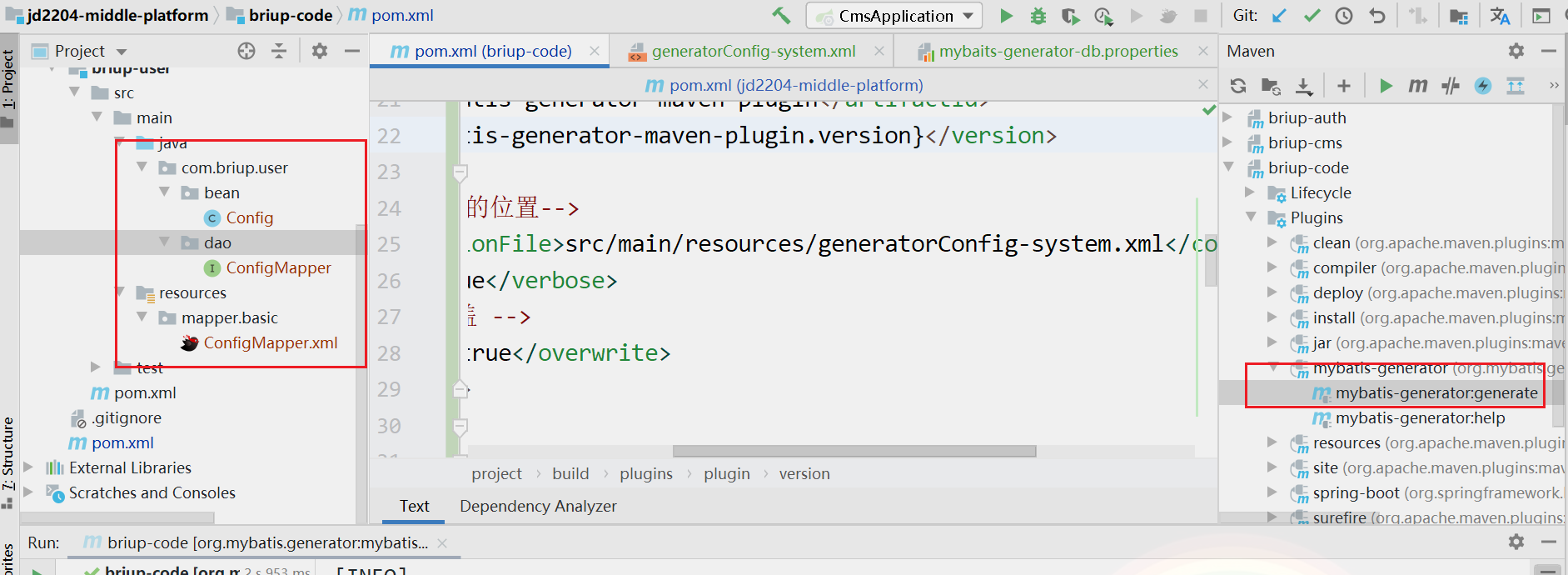
> 逆向工程 生成的位置
### briup-cms
> 业务模块
### briup-common
> 公共模块
## 整合ssm
- 依赖
- 配置文件
```properties
server:
port: 8989
# 激活环境
spring:
profiles:
active: dev
# 映射文件位置
mybatis:
mapper-locations: classpath:mapper/**/*.xml
# windows的环境
spring:
datasource:
driver-class-name: com.mysql.jdbc.Driver
url: jdbc:mysql://localhost:3306/jd2204-middleplatform?characterEncoding=utf8&useUnicode=true&useSSL=false&serverTimezone=GMT%2B8
username: root
password: root
logging:
level:
com.briup: debug
```
- 主函数
```java
package com.briup.cms;
import org.apache.ibatis.annotations.Mapper;
import org.mybatis.spring.annotation.MapperScan;
import org.springframework.boot.SpringApplication;
import org.springframework.boot.autoconfigure.SpringBootApplication;
/**
* @Auther: vanse(lc))
* @Date: 2022/10/28-10-28-17:24
* @Description:启动器
*/
@SpringBootApplication
@MapperScan(CmsApplication.MAPPERBASEPACKAGE)
public class CmsApplication {
public static final String MAPPERBASEPACKAGE = "com.briup.user.dao";
public static void main(String[] args) {
SpringApplication.run(CmsApplication.class,args);
}
}
```
## 统一响应
- 状态码
- 消息
- 数据
```java
package com.briup.common.web.response;
/**
* 统一并自定义返回状态码,如有需求可以另外增加
*/
public enum ResultCode {
/* 成功状态码(默认) */
SUCCESS(1, "success"),
/* 失败状态码(默认) */
ERROR(2, "error"),
/* 参数错误:10001-19999 */
PARAM_IS_INVALID(10001, "参数无效"),
PARAM_IS_BLANK(10002, "参数为空"),
PARAM_TYPE_BIND_ERROR(10003, "参数类型错误"),
PARAM_NOT_COMPLETE(10004, "参数缺失"),
/* 用户错误:20001-29999*/
USER_NOT_LOGIN(20001, "用户未登录"),
USER_LOGIN_ERROR(20002, "账号不存在或密码错误"),
USER_ACCOUNT_FORBIDDEN(20003, "账号已被禁用"),
USER_NOT_EXIST(20004, "用户不存在"),
USER_HAS_EXISTED(20005, "用户已存在"),
/* 业务错误:30001-39999 */
SPECIFIED_QUESTIONED_USER_NOT_EXIST(30001, "业务逻辑出现问题"),
/* 系统错误:40001-49999 */
SYSTEM_INNER_ERROR(40001, "系统内部错误,请稍后重试"),
/* 数据错误:50001-599999 */
DATA_NONE(50001, "数据未找到"),
DATA_WRONG(50002, "数据错误"),
DATA_EXISTED(50003, "数据已存在"),
DATA_USEING(50004,"该数据正在被引用"),
/* 接口错误:60001-69999 */
INTERFACE_INNER_INVOKE_ERROR(60001, "内部系统接口调用异常"),
INTERFACE_OUTTER_INVOKE_ERROR(60002, "外部系统接口调用异常"),
INTERFACE_FORBID_VISIT(60003, "该接口禁止访问"),
INTERFACE_ADDRESS_INVALID(60004, "接口地址无效"),
INTERFACE_REQUEST_TIMEOUT(60005, "接口请求超时"),
/* 权限错误:70001-79999 */
PERMISSION_NO_ACCESS(70001, "无访问权限");
private Integer code;
private String message;
ResultCode(Integer code, String message) {
this.code = code;
this.message = message;
}
public Integer code() {
return this.code;
}
public String message() {
return this.message;
}
}
```
```java
package com.briup.common.web.response;
import lombok.Data;
import java.io.Serializable;
/**
* 统一Controller中RESTFul风格接口返回的结果
*/
@Data
public class Result implements Serializable {
private static final long serialVersionUID = 1L;
private Integer code;
private String msg;
private T data;
private Result() {}
private Result(Integer code, String msg) {
this.code = code;
this.msg = msg;
}
private void setResultCode(ResultCode code) {
// 左边是result的code属性
// 右边是枚举对象的code()方法
this.code = code.code();
this.msg = code.message();
}
/**
* 操作失败,自定义code和msg
*/
public static Result failure(Integer code, String msg) {
Result result = new Result(code,msg);
return result;
}
/**
* 操作成功,没有返回的数据
*/
public static Result success() {
Result result = new Result();
result.setResultCode(ResultCode.SUCCESS); // 1 s
return result;
}
/**
* 操作成功,有返回的数据
*/
public static Result success(T data) {
Result result = new Result();
// ResultCode.SUCCESS 枚举对象
result.setResultCode(ResultCode.SUCCESS);
result.setData(data);
return result;
}
/**
* 操作成功,有返回的数据
*/
public static Result success(String message) {
return new Result(ResultCode.SUCCESS.code(),message);
}
/**
* 操作失败,没有返回的数据
*/
public static Result failure(ResultCode resultCode) {
Result result = new Result();
result.setResultCode(resultCode);
return result;
}
/**
* 操作失败,没有返回的数据
*/
public static Result failure(String message) {
return new Result(ResultCode.ERROR.code(),message);
}
/**
* 操作失败,有返回的数据
*/
public static Result failure(ResultCode resultCode, T data) {
Result result = new Result();
result.setResultCode(resultCode);
result.setData(data);
return result;
}
}
```
## 全局异常
**定制异常**
```java
package com.briup.common.web.exception;
import com.briup.common.web.response.ResultCode;
import lombok.Data;
/**
* @Auther: vanse(lc))
* @Date: 2022/10/31-10-31-15:07
* @Description:自定义异常
*/
@Data
public class CustomerException extends RuntimeException{
private String message;
private ResultCode resultCode; // 抛出的枚举对象
public CustomerException(String message){
super(message);
this.message = message;
}
// throw new CustomerException(ResultCode.PARAM_IS_BLANK);
public CustomerException(ResultCode resultCode){
this.resultCode = resultCode;
}
}
```
**抛出异常**
```java
package com.briup.cms.web.controller;
import com.briup.cms.service.IConfigService;
import com.briup.common.web.exception.CustomerException;
import com.briup.common.web.response.Result;
import com.briup.common.web.response.ResultCode;
import com.briup.user.bean.Config;
import com.briup.user.dao.ConfigMapper;
import org.springframework.beans.factory.annotation.Autowired;
import org.springframework.web.bind.annotation.*;
import java.util.List;
/**
* @Auther: vanse(lc))
* @Date: 2022/10/31-10-31-11:11
* @Description:com.briup.cms.web.controller
*/
@RestController // @Controller 跳转页面
@RequestMapping("/config") // 一级路径
public class ConfigController {
@Autowired // 从容器中取出实现类
private IConfigService configService;
@GetMapping("/") // 二级路径
public Result selectConfigStatusWithOn() throws RuntimeException {
List data = configService.selectList();
int i = 0;
if (i == 0){
// throw new CustomerException("参数有误");
throw new CustomerException(ResultCode.PARAM_IS_BLANK);
}
return Result.success(data);
}
}
```
**捕获异常**
```java
package com.briup.common.web.exception;
import com.briup.common.web.response.Result;
import com.briup.common.web.response.ResultCode;
import org.springframework.web.bind.annotation.ControllerAdvice;
import org.springframework.web.bind.annotation.ExceptionHandler;
import org.springframework.web.bind.annotation.RestControllerAdvice;
/**
* @Auther: vanse(lc))
* @Date: 2022/10/31-10-31-15:03
* @Description:全局异常处理
*/
//@ControllerAdvice 页面
@RestControllerAdvice // @RestController + @Advice
public class GlobalExceptionHandler {
/**
* 所有异常都会被捕获 返回统一格式
*
* @param ex 所有异常的父类 (多态接收可能抛出的异常)
* @return 统一响应
*/
@ExceptionHandler(Exception.class)
public Result handler(Exception ex) {
System.out.println("GlobalExceptionHandler.handler");
// 第三方类的异常
// 自定义的异常
if (ex instanceof CustomerException) {
// String message = ex.getMessage();
CustomerException ce = (CustomerException) ex;
// throw ReusltCode 此时能取出来
//ResultCode resultCode = ce.getResultCode(); // 参数枚举对象
return Result.failure(ce.getResultCode());
}
return Result.failure(ResultCode.SYSTEM_INNER_ERROR);
}
}
```
## 参数校验
**实体校验**
```java
package com.briup.user.bean;
import javax.validation.constraints.NotNull;
public class Config {
// 不用设置 mysql自增增长
private Integer configId;
@NotNull(message = "配置名称不能为空")
private String configName;
@NotNull(message = "配置信息不能为空")
private String configInfo;
@NotNull(message = "配置图标不能为空")
private String configIcon;
@NotNull(message = "配置状态不能为空")
private Integer configStatus;
public Integer getConfigId() {
return configId;
}
public void setConfigId(Integer configId) {
this.configId = configId;
}
public String getConfigName() {
return configName;
}
public void setConfigName(String configName) {
this.configName = configName;
}
public String getConfigInfo() {
return configInfo;
}
public void setConfigInfo(String configInfo) {
this.configInfo = configInfo;
}
public String getConfigIcon() {
return configIcon;
}
public void setConfigIcon(String configIcon) {
this.configIcon = configIcon;
}
public Integer getConfigStatus() {
return configStatus;
}
public void setConfigStatus(Integer configStatus) {
this.configStatus = configStatus;
}
}
```
**控制器校验**
```java
// @RequestBody 获取json格式的请求体
// 不加就是接收普通请求体
// @ReponseBody 返回json格式
@PostMapping("/")
public Result addConfig(@RequestBody @Valid Config config){
System.out.println("config = " + config);
configService.addConfig(config);
return Result.success("添加成功");
}
```
**异常捕获**
```java
package com.briup.common.web.exception;
import com.briup.common.web.response.Result;
import com.briup.common.web.response.ResultCode;
import org.springframework.validation.BindingResult;
import org.springframework.web.bind.MethodArgumentNotValidException;
import org.springframework.web.bind.annotation.ControllerAdvice;
import org.springframework.web.bind.annotation.ExceptionHandler;
import org.springframework.web.bind.annotation.RestControllerAdvice;
/**
* @Auther: vanse(lc))
* @Date: 2022/10/31-10-31-15:03
* @Description:全局异常处理
*/
//@ControllerAdvice 页面
@RestControllerAdvice // @RestController + @Advice
public class GlobalExceptionHandler {
/**
* 所有异常都会被捕获 返回统一格式
*
* @param ex 所有异常的父类 (多态接收可能抛出的异常)
* @return 统一响应
*/
@ExceptionHandler(Exception.class)
public Result handler(Exception ex) {
System.out.println("ex.getClass() = " + ex.getClass());
ex.printStackTrace(); // 查看错误
// 第三方类的异常
// 自定义的异常
if (ex instanceof CustomerException) {
// String message = ex.getMessage();
CustomerException ce = (CustomerException) ex;
// throw ReusltCode 此时能取出来
//ResultCode resultCode = ce.getResultCode(); // 参数枚举对象
return Result.failure(ce.getResultCode());
}else if (ex instanceof MethodArgumentNotValidException){
// 取出MethodArgumentNotValidException中的错误数据
MethodArgumentNotValidException mane= (MethodArgumentNotValidException) ex;
// 绑定的错误字段结果
BindingResult bindingResult = mane.getBindingResult();
if (bindingResult.hasFieldErrors()) {
// @NotNull(message = "配置名称不能为空")
String errorMessage = bindingResult.getFieldErrors().get(0).getDefaultMessage();
return Result.failure(errorMessage);
}
}
// 其他异常
return Result.failure(ResultCode.SYSTEM_INNER_ERROR);
}
}
```
## swagger
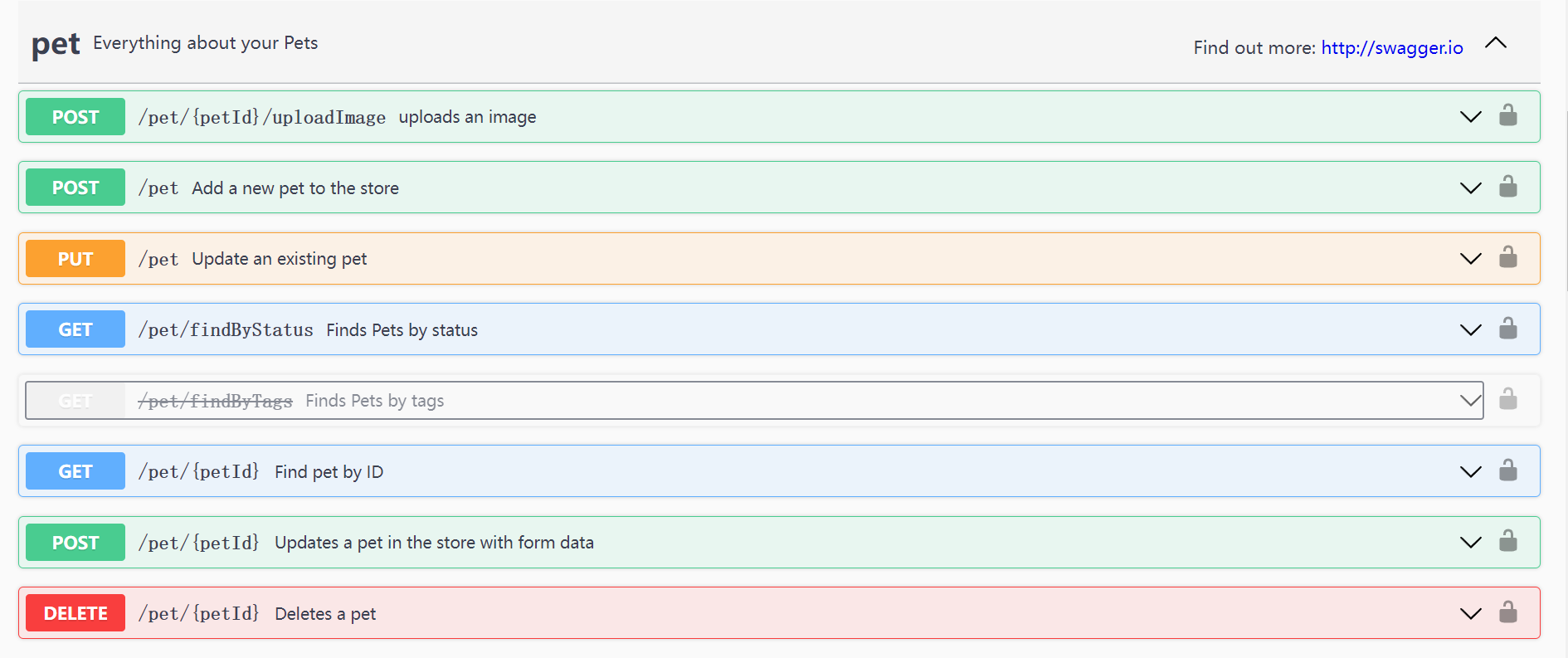
> 项目采用前后台分离的架构进行开发,后台可以使用Swagger,生成在线API文档,方便前端人员对接使用
[配置生成的在线API文档样例:](https://petstore.swagger.io/?_ga=2.236238660.419502645.1636559508-49422942.1636559508)
**依赖**
```xml
io.springfox
springfox-swagger2
io.springfox
springfox-swagger-ui
```
`springfox `,是一个开源的API Doc的框架, 它的前身是swagger-springmvc,可以将我们的Controller中的方法以文档的形式展现。
**配置**
```java
package com.briup.common.config;
import org.springframework.context.annotation.Bean;
import org.springframework.context.annotation.Configuration;
import springfox.documentation.builders.ApiInfoBuilder;
import springfox.documentation.service.ApiInfo;
import springfox.documentation.spi.DocumentationType;
import springfox.documentation.spring.web.plugins.Docket;
import springfox.documentation.swagger2.annotations.EnableSwagger2;
/**
* @Auther: vanse(lc))
* @Date: 2022/10/31-10-31-17:20
* @Description:swagger配置类
* 默认ui页面 localhost:8989/swagger-ui.html
*/
@Configuration
@EnableSwagger2
public class Swagger2Config {
// 配置页面信息 Docket 放入容器中
@Bean
public Docket docket(){
return new Docket(DocumentationType.SWAGGER_2)
.apiInfo(apiInfo());
}
private ApiInfo apiInfo() {
return new ApiInfoBuilder()
.title("中台管理系统")
.description("jd2204全体开发")
.build();
}
// apiInfo swagger前置说明
// 配置指定扫描包
}
```
**使用**
- @Api(tags="") 模块注释
- @ApiOperation(value = "",notes = "") 方法注释
- value 方法含义
- notes 方法提示
- @ApiModel 模型注释 json
- name
- value 注释
- example
- required
- hidden
- @ApiModelProperty 模型的属性注释 json
- @ApiParam 参数注释 === @ApiImplicitParams()
- @ApiImplicitParams() 非json格式的参数提示
- @ApiImplicitParam
- name 属性值
- value 属性注释
- dataType 属性类型
- paramType 请求格式
- query 查询字符串
- path resulful模板映射
- body json
- head 头
- form 普通表单
- required 必填
- defalutValue 默认值
## jwt
### 概述
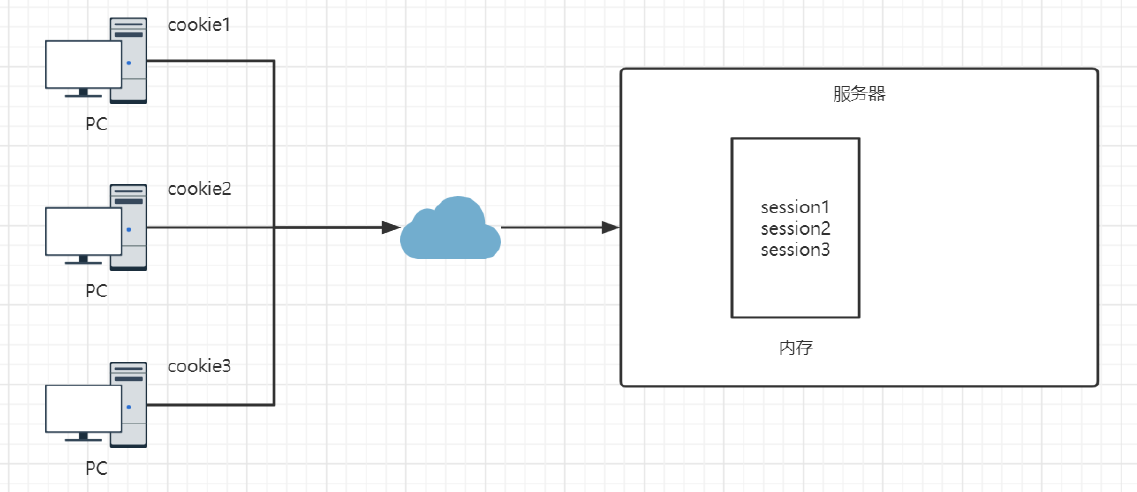
传统的Web应用中,使用session来存在用户的信息,每次用户认证通过以后,服务器需要创建一条记录保存用户信息,通常是在内存中。
- 随着认证通过的用户越来越多,服务器的在这里的开销就会越来越大,
- 由于Session是在内存中的,这就带来一些扩展性的问题
- servlet依赖于web容器
> JSON Web Token (JWT,token的一种),是一个开放标准(RFC 7519),它定义了一种紧凑的、自包含的方式,用于作为JSON对象在各方之间安全地传输信息。该信息可以被验证和信任,因为它是数字签名的。
- JWT存放在客户端(前端),每次请求的请求头中,携带此JWT发送给服务器,服务器端负责接收
和验证
- 服务器端可以不用存储JWT,这样可以降低服务器的内存的开销
- JWT和语言无关,扩展起来非常方便,无论是PC端还是移动端,都可以很容易的使用
- 不受cookie的限制
如图:
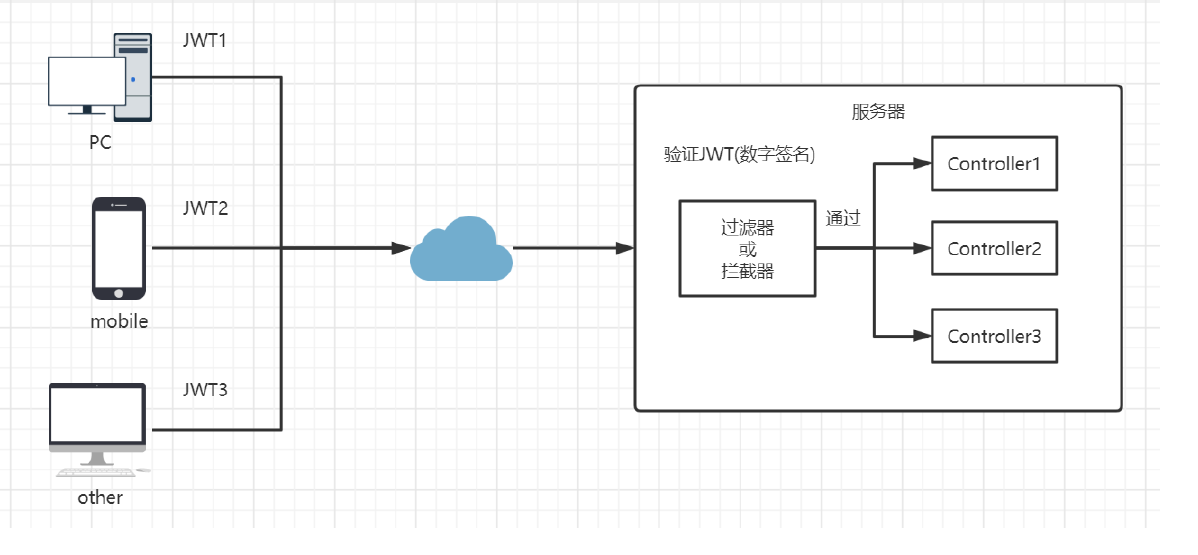
>注意,session和JWT的主要区别就是保存的位置,session是保存在服务端的,而JWT是保存在客户
>端的
>注意,JWT就是一个固定格式的字符串
[JWT官网](https://jwt.io/)
### 结构
#### 头部
> header一般的由两部分组成:token的类型(“JWT”)和算法名称(比如:HMAC SHA256或者RSA等等)。
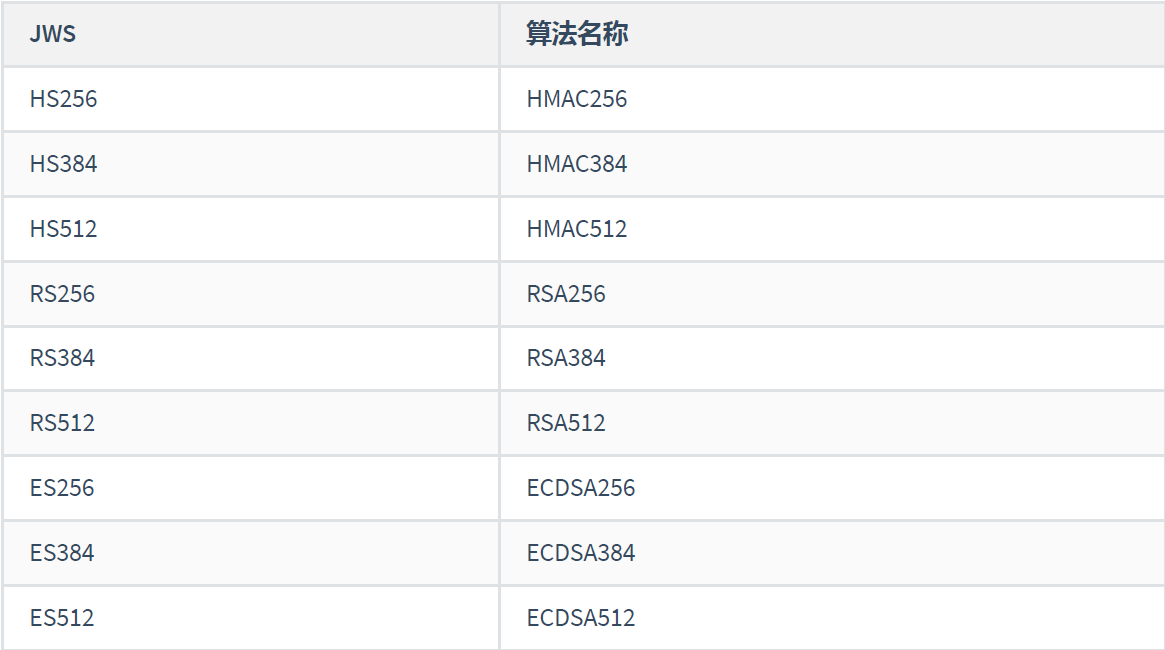
JWT里验证和签名使用的算法列表如下:
例如,
```json
{
"alg": "HS256",
"typ": "JWT"
}
```
#### 载荷
>payload主要用来包含声明(claims ),这个声明一般是关于实体(通常是用户)和其他数据的声明。
声明有三种类型:
- registered
- public
- private
具体如下:
Registered claims : 这里有一组预定义的声明,它们不是强制的,但是推荐。
- iss: jwt签发者
- sub: jwt所面向的用户
- aud: 接收jwt的一方
- exp: jwt的过期时间,这个过期时间必须要大于签发时间
- nbf: 定义在什么时间之前,该jwt都是不可用的
- iat: jwt的签发时间
- jti: jwt的唯一身份标识,主要用来作为一次性token,从而回避重放攻击
Public claims : 可以随意定义
- 自定义数据:存放在token中存放的key-value值
Private claims : 用于在同意使用它们的各方之间共享信息,并且不是注册的或公开的声明
例如,
```json
{
"iss": "briup",
"iat": 1446593502,
"exp": 1446594722,
"aud": "www.briup.com",
"sub": "briup@briup.com",
"username": "tom"
}
```
>注意,不要在JWT的payload或header中放置敏感信息,除非它们是加密的
把头部和载荷分别进行Base64编码之后得到两个字符串,然后再将这两个编码后的字符串用英文句号.
连接在一起(头部在前),形成新的字符串:
`eyJ0eXAiOiJKV1QiLCJhbGciOiJIUzI1NiJ9.eyJhdWQiOiI2MmI2OWNlZC02YWNlLTRmYzAtOTk5MS00YWUwMjIxODQ0OTciLCJleHAiOjE2MDYwNTQzNjl9`
[测试编码](http://tool.chinaz.com/tools/base64.aspx)
#### 签名
最后,将上面拼接完的字符串用HS256算法进行加密,在加密的时候,还需要提供一个密钥(secret)。加密后的内容也是一个字符串,这个字符串就是签名。
把这个签名拼接在刚才的字符串后面就能得到完整的JWT字符串。
header部分和payload部分如果被篡改,由于篡改者不知道密钥是什么,也无法生成新的signature部分,
服务端也就无法通过。
> 在JWT中,消息体是透明的,使用签名可以保证消息不被篡改。
> 确保密钥不会泄露,否则会被篡改
例如,使用HMACSHA256加密算法,配合秘钥,将前俩部进行加密,生成签名
`HMACSHA256(base64UrlEncode(header) + "." + base64UrlEncode(payload), secret)`
例如,将Header、Payload、Signature三部分使用点(.)连接起来
`eyJ0eXAiOiJKV1QiLCJhbGciOiJIUzI1NiJ9.eyJhdWQiOiI2MmI2OWNlZC02YWNlLTRmYzAtOTk5MS00Y
WUwMjIxODQ0OTciLCJleHAiOjE2MDYwNTQzNjl9.DNVhr36j66JpQBfcYoo64IRp84dKiQeaq7axHTBcP9
E`
例如,使用官网提供的工具,可以对该JWT进行验证和解析(不要放敏感信息)
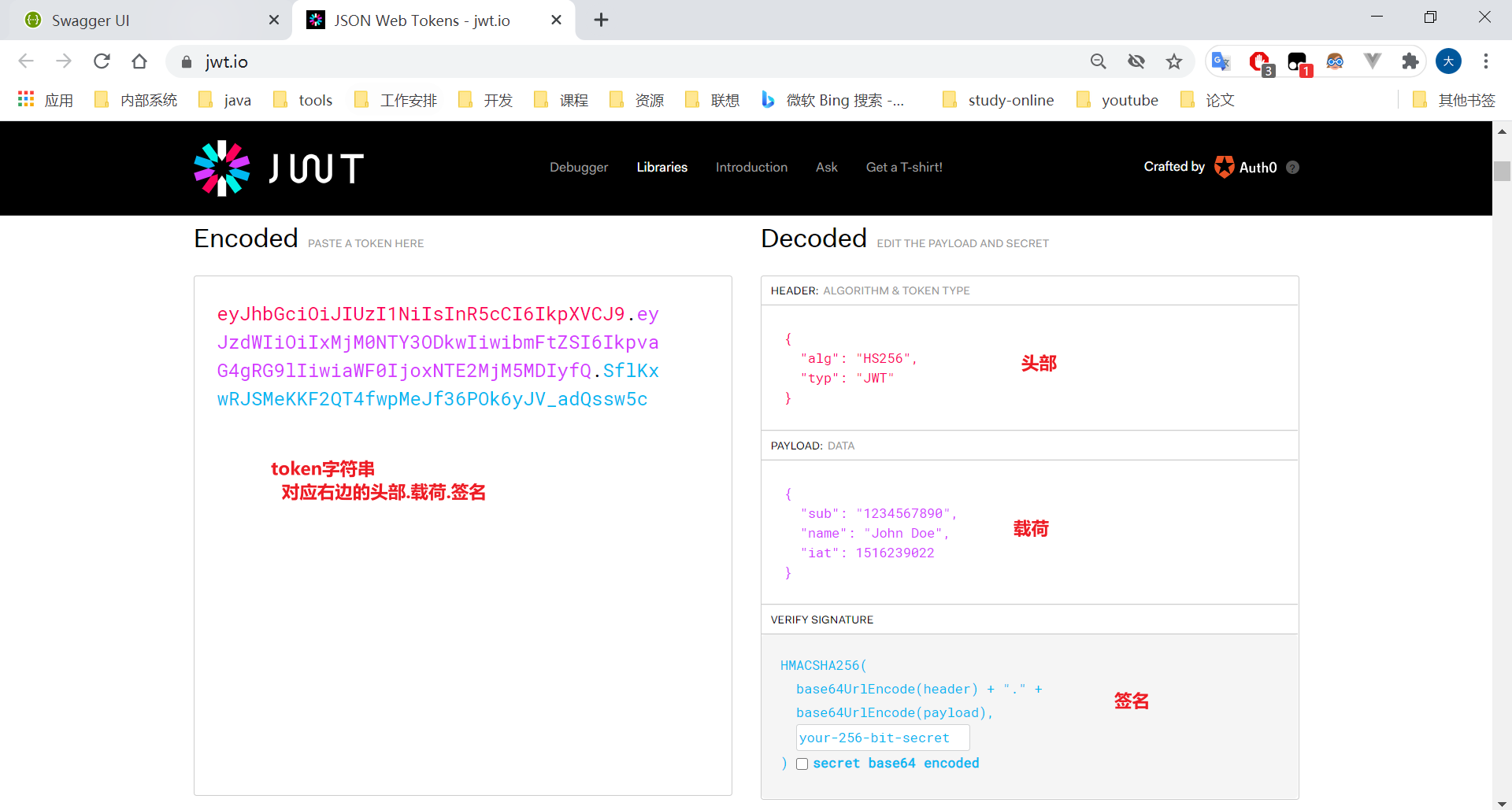
>注意,在代码中,我们使用JWT封装的工具类,也可以完成此操作 sso
### 整合
**依赖**
```xml
com.auth0
java-jwt
```
**工具类**
```java
package com.briup.cms.utils;
import java.util.Date;
import java.util.Map;
import com.auth0.jwt.JWT;
import com.auth0.jwt.JWTVerifier;
import com.auth0.jwt.algorithms.Algorithm;
import com.auth0.jwt.exceptions.JWTDecodeException;
import com.auth0.jwt.exceptions.JWTVerificationException;
public class JwtUtil {
/**
* 过期时间5分钟
*/
private static final long EXPIRE_TIME = 5 * 60 * 1000;
/**
* jwt 密钥
*/
private static final String SECRET = "jwt_secret";
/**
* 生成签名,五分钟后过期
* @param userId
* @param info,Map的value只能存放的值的类型为:Map, List, Boolean, Integer, Long, Double, String and Date
* @return
*/
public static String sign(String userId,Map info) {
try {
Date date = new Date(System.currentTimeMillis() + EXPIRE_TIME);
Algorithm algorithm = Algorithm.HMAC256(SECRET);
return JWT.create()
// 将 user id 保存到 token 里面
.withAudience(userId)
// 存放自定义数据
.withClaim("info", info)
// 五分钟后token过期
.withExpiresAt(date)
// token 的密钥
.sign(algorithm);
} catch (Exception e) {
e.printStackTrace();
return null;
}
}
/**
* 根据token获取userId
* @param token
* @return
*/
public static String getUserId(String token) {
try {
String userId = JWT.decode(token).getAudience().get(0);
return userId;
} catch (JWTDecodeException e) {
return null;
}
}
/**
* 根据token获取自定义数据info
* @param token
* @return
*/
public static Map getInfo(String token) {
try {
return JWT.decode(token).getClaim("info").asMap();
} catch (JWTDecodeException e) {
return null;
}
}
/**
* 校验token
* @param token
* @return
*/
public static boolean checkSign(String token) {
try {
Algorithm algorithm = Algorithm.HMAC256(SECRET);
JWTVerifier verifier = JWT.require(algorithm)
// .withClaim("username", username)
.build();
verifier.verify(token);
return true;
} catch (JWTVerificationException exception) {
throw new RuntimeException("token 无效,请重新获取");
}
}
}
```
**登录**
```java
package com.briup.cms.service.impl;
import com.briup.cms.dto.UserDto;
import com.briup.cms.service.IUserService;
import com.briup.common.util.JwtUtil;
import com.briup.common.web.exception.CustomerException;
import com.briup.common.web.response.ResultCode;
import com.briup.user.bean.User;
import com.briup.user.dao.extend.UserExtendMapper;
import org.springframework.beans.factory.annotation.Autowired;
import org.springframework.stereotype.Service;
import org.springframework.util.ObjectUtils;
import java.util.HashMap;
import java.util.Map;
/**
* @Auther: vanse(lc))
* @Date: 2022/11/2-11-02-9:57
* @Description:用户业务
*/
@Service
public class UserServiceImpl implements IUserService {
@Autowired
private UserExtendMapper userExtendMapper;
/**
* 登录后返回token
* @param userDto
* @return
*/
@Override
public String login(UserDto userDto) {
// 1.校验用户名密码
User userFromDB = userExtendMapper.findByName(userDto.getUsername());
if (ObjectUtils.isEmpty(userFromDB) || !userFromDB.getPassword().equals(userDto.getPassword())){
throw new CustomerException(ResultCode.USER_LOGIN_ERROR);
}
// 账户禁用
if(userFromDB.getStatus() == 1){
throw new CustomerException(ResultCode.USER_ACCOUNT_FORBIDDEN);
}
// 2.准备token中的信息 简单数据 (用户名 头像)
Map info = new HashMap<>();
info.put("username",userFromDB.getUsername());
info.put("realname",userFromDB.getRealname());
// 3.通过工具类产生token并返回
String token = JwtUtil.sign(String.valueOf(userFromDB.getUserId()), info);
return token;
}
}
```
**拦截器**
```java
package com.briup.common.web.interceptor;
import com.briup.common.util.JwtUtil;
import com.briup.common.web.exception.CustomerException;
import com.briup.common.web.response.ResultCode;
import jdk.nashorn.internal.ir.ReturnNode;
import org.springframework.util.StringUtils;
import org.springframework.web.servlet.HandlerInterceptor;
import javax.servlet.http.HttpServletRequest;
import javax.servlet.http.HttpServletResponse;
import java.lang.invoke.MethodHandle;
import java.util.Map;
/**
* @Auther: vanse(lc))
* @Date: 2022/11/2-11-02-10:51
* @Description:Jwt拦截器
*/
public class JwtInterceptor implements HandlerInterceptor {
/**
* 如果未携带token 或者 token有误, 抛出异常
* @return
* @throws Exception
*/
@Override
public boolean preHandle(HttpServletRequest request, HttpServletResponse response, Object handler) throws Exception {
// 认证资源才需要走该过滤器 (跨域的options放行) TODO
// if(!(handler instanceof MethodHandle)){
// // 不需要拦截的资源
// return true;
// }
// 1.获取请求头中的中token 规范: Authorization
String token = request.getHeader("Authorization");
// 2.如果为空 未登录
if(!StringUtils.hasText(token)){
throw new CustomerException(ResultCode.USER_NOT_LOGIN);
}
// 3.token过期 token篡改 token是否合法
JwtUtil.checkSign(token);
// 4.解析token的信息 业务操作
Map info = JwtUtil.getInfo(token);
info.forEach((k,v)-> System.out.println(k+"="+v));
// 判断权限 role user
return true;
}
}
```
```java
package com.briup.common.config;
import com.briup.common.web.interceptor.JwtInterceptor;
import org.springframework.context.annotation.Configuration;
import org.springframework.web.servlet.config.annotation.EnableWebMvc;
import org.springframework.web.servlet.config.annotation.InterceptorRegistry;
import org.springframework.web.servlet.config.annotation.WebMvcConfigurer;
/**
* @Auther: vanse(lc))
* @Date: 2022/11/2-11-02-11:03
* @Description:WebMvcConfigurer === SpringMvc.xml(拦截器 控制器 映射器)
*/
@Configuration
//@EnableWebMvc
public class MvcConfig implements WebMvcConfigurer {
/**
* 添加拦截器
* @param registry 拦截器注册器
*/
@Override
public void addInterceptors(InterceptorRegistry registry) {
registry.addInterceptor(new JwtInterceptor())
.addPathPatterns("/config/**");
}
}
```
### swagger
```java
package com.briup.common.config;
import com.google.common.base.Predicate;
import com.google.common.base.Predicates;
import io.swagger.annotations.Api;
import org.springframework.context.annotation.Bean;
import org.springframework.context.annotation.Configuration;
import springfox.documentation.builders.ApiInfoBuilder;
import springfox.documentation.builders.PathSelectors;
import springfox.documentation.builders.RequestHandlerSelectors;
import springfox.documentation.service.ApiInfo;
import springfox.documentation.service.ApiKey;
import springfox.documentation.service.AuthorizationScope;
import springfox.documentation.service.SecurityReference;
import springfox.documentation.spi.DocumentationType;
import springfox.documentation.spi.service.contexts.SecurityContext;
import springfox.documentation.spring.web.plugins.Docket;
import springfox.documentation.swagger2.annotations.EnableSwagger2;
import java.util.ArrayList;
import java.util.Arrays;
import java.util.Collections;
import java.util.List;
/**
* @Auther: vanse(lc))
* @Date: 2022/10/31-10-31-17:20
* @Description:swagger配置类
* 默认ui页面 localhost:8989/swagger-ui.html
*/
@Configuration
@EnableSwagger2
public class Swagger2Config {
// 定制swagger-ui页面信息 Docket 放入容器中
@Bean
public Docket docket(){
return new Docket(DocumentationType.SWAGGER_2)
.select() // ApiSelectorBuilder 哪些api需要扫描 Predicate test
// .apis(RequestHandlerSelectors.basePackage("com.briup.cms.web.controller")) // 哪个controller
.apis(RequestHandlerSelectors.withClassAnnotation(Api.class)) // 带Api注解的就会扫描
.paths(PathSelectors.ant("/**")) // 哪些方法
.build()
.securityContexts(securityContexts())
.securitySchemes(security())
.apiInfo(apiInfo()); // ApiInfo 文档描述信息
}
private ApiInfo apiInfo() {
return new ApiInfoBuilder()
.title("中台管理系统")
.description("jd2204全体开发")
.build();
}
// swagger 集成 token
private List securityContexts() {
// 例如,/auth/** 和jwt保持一致
List antPaths = new ArrayList<>(Arrays.asList("/config/**"));
return Collections.singletonList(
SecurityContext.builder()
.securityReferences(defaultAuth())
.forPaths(antPathsCondition(antPaths))
.build()
);
}
private List defaultAuth() {
AuthorizationScope authorizationScope = new AuthorizationScope("global", "accessEverything");
AuthorizationScope[] authorizationScopes = new AuthorizationScope[1];
authorizationScopes[0] = authorizationScope;
return Collections.singletonList(
new SecurityReference("Authorization", authorizationScopes));
}
private Predicate antPathsCondition(List antPaths){
// if(antPaths==null||antPaths.size()==0) {
// antPaths = new ArrayList<>();
// antPaths.add("/**");
// }
List> list = new ArrayList<>();
antPaths.forEach(path->list.add(PathSelectors.ant(path)));
return Predicates.or(list);
}
private List security() {
return Collections.singletonList(
new ApiKey("Authorization", "Authorization", "header")
);
}
}
```
## cors
### 概述
跨域访问,是指从一个域名的网页去请求另一个域名的资源。比如从www.baidu.com 页面去请求 www.google.com 的资源。但是一般情况下不能这么做跨域访问,因为有浏览器的“**同源策略**”存在,这是浏览器对JavaScript施加的安全限制。
>跨域,指的是浏览器不能执行其他网站的脚本。它是由浏览器的同源策略造成的,是浏览器对JavaScript施加的安全限制。

**“同源策略”**简单的说,就是A网站页面访问B网站的资源受限(跨域访问),除非A和B是“同源”。
**“同源”**是指三个相同,协议相同、域名相同、端口相同,只有有任何一个地方不同,就认为是跨域。
例如,
网页A的地址为, http://www.example.com/dir/page.html
假设,网页A要访问的网页B地址为:
- http://www.example.com/dir2/other.html : 同源(正常访问)
- https://www.example.com/dir/other.html :不同源(协议不同,跨域)
- http://vip.www.example.com/dir/other.html :不同源(域名不同,跨域)
- http://www.example.com:81/dir/other.html :不同源(端口不同,跨域)
随着互联网的发展,“同源政策”越来越严格,目前,如果非同源(跨域),共有三种行为受到限制:
- Cookie 、LocalStorage、IndexDB 无法访问
- DOM 无法获取
- AJAX请求不能发送
浏览器的用“同源策略”来限制跨域访问的目的是为了安全,例如,假设没有跨域访问的限制
- 用户访问www.mybank.com ,登陆并进行网银操作,这时cookie、token等数据信息存放在浏览器中
- 用户访问www.abc.com
- 这时www.abc.com 网站就可以在拿到银行的cookie或token等,然后发起对www.mybank.com 的操作
我们在项目中,需要设置对跨域访问的支持,是因为项目的架构需要,例如
- 公司内部有多个不同的子系统,例如A和B,分别部署在不同的服务器上,其域名也不相同
- 由于公司内部的数据需要,现在A系统中,跨域访问B系统,从而获取内部的一些信息资源
>注意,在前后端分离的项目中,前端页面部署在一个服务器上,后端项目部署在另一个服务器上,从前端页面上发送ajax请求到后端系统中,这种情况,就属于跨域访问
### 案例
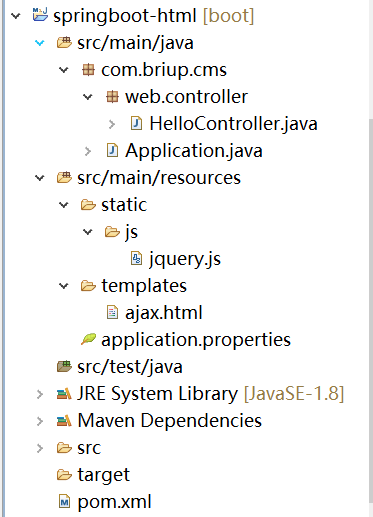
1、新建项目,springboot-html
 2、页面代码:ajax.html
```html
test
2、页面代码:ajax.html
```html
test
```
3、pom文件
```xml
org.springframework.boot
spring-boot-starter-web
org.springframework.boot
spring-boot-starter-thymeleaf
```
4、配置文件application.properties
```properties
server.port=9999
```
5、Controller
```java
package com.briup.cms.web.controller;
import org.springframework.stereotype.Controller;
import org.springframework.web.bind.annotation.GetMapping;
@Controller
public class HelloController {
@GetMapping("/ajax")
public String hello() {
return "ajax";
}
}
```
6、运行访问
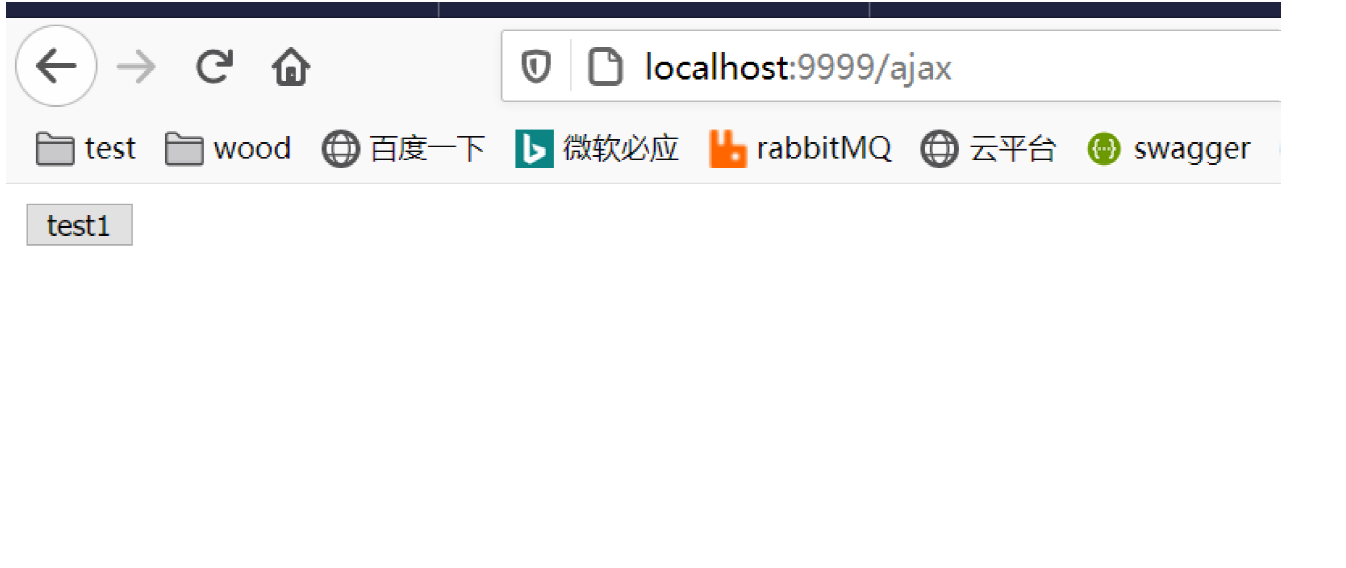
**再构建提供接口访问的后端项目**
1、新建项目,springboot-cors
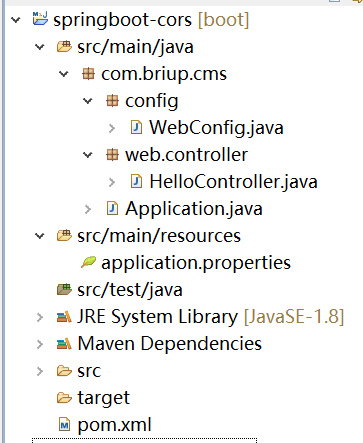 2、pom文件
```xml
org.springframework.boot
spring-boot-starter-web
```
3、配置文件,application.properties
```properties
server.port=8989
```
4、Controller
```java
package com.briup.cms.web.controller;
import org.springframework.web.bind.annotation.GetMapping;
import org.springframework.web.bind.annotation.RestController;
@RestController
public class HelloController {
@GetMapping("/hi")
public String hello() {
return "hello world";
}
}
```
5、启动,访问
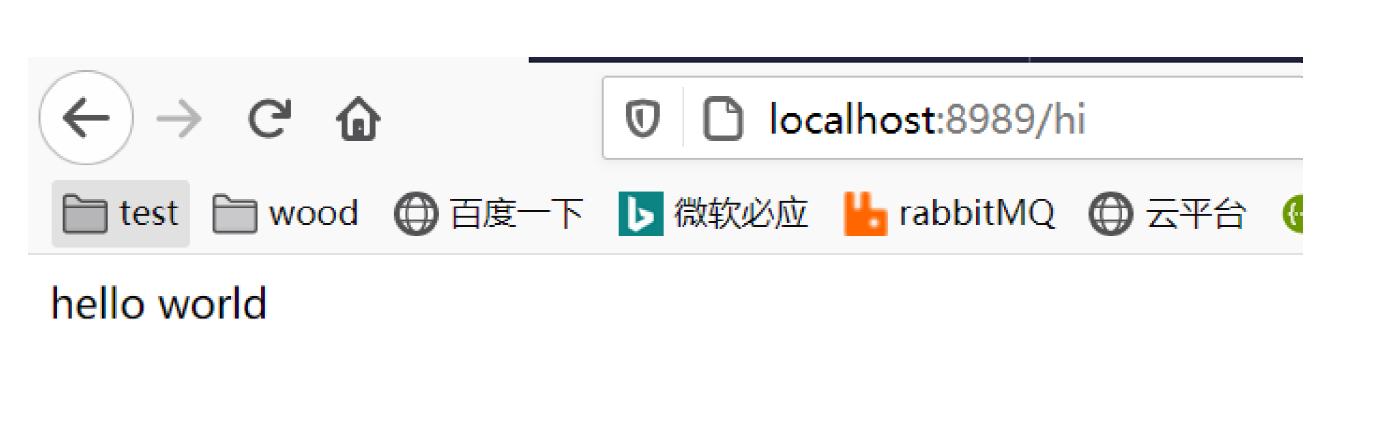
最后,访问springboot-html项目中的ajax.html页面,点击页面中的按钮,发送ajax请求,访问springbootcors
项目中的接口:
当前页面的访问地址: http://localhost:9999/ajax
点击按钮后请求地址: http://localhost:8989/hi
可以看出,此时这俩个地址,属于“非同源”,本次访问属于跨域访问。
点击后,控制台上输出的错误信息:
已拦截跨源请求:同源策略禁止读取位于 http://localhost:8989/hi 的远程资源。
(原因:CORS 头缺少 'Access-Control-Allow-Origin')。
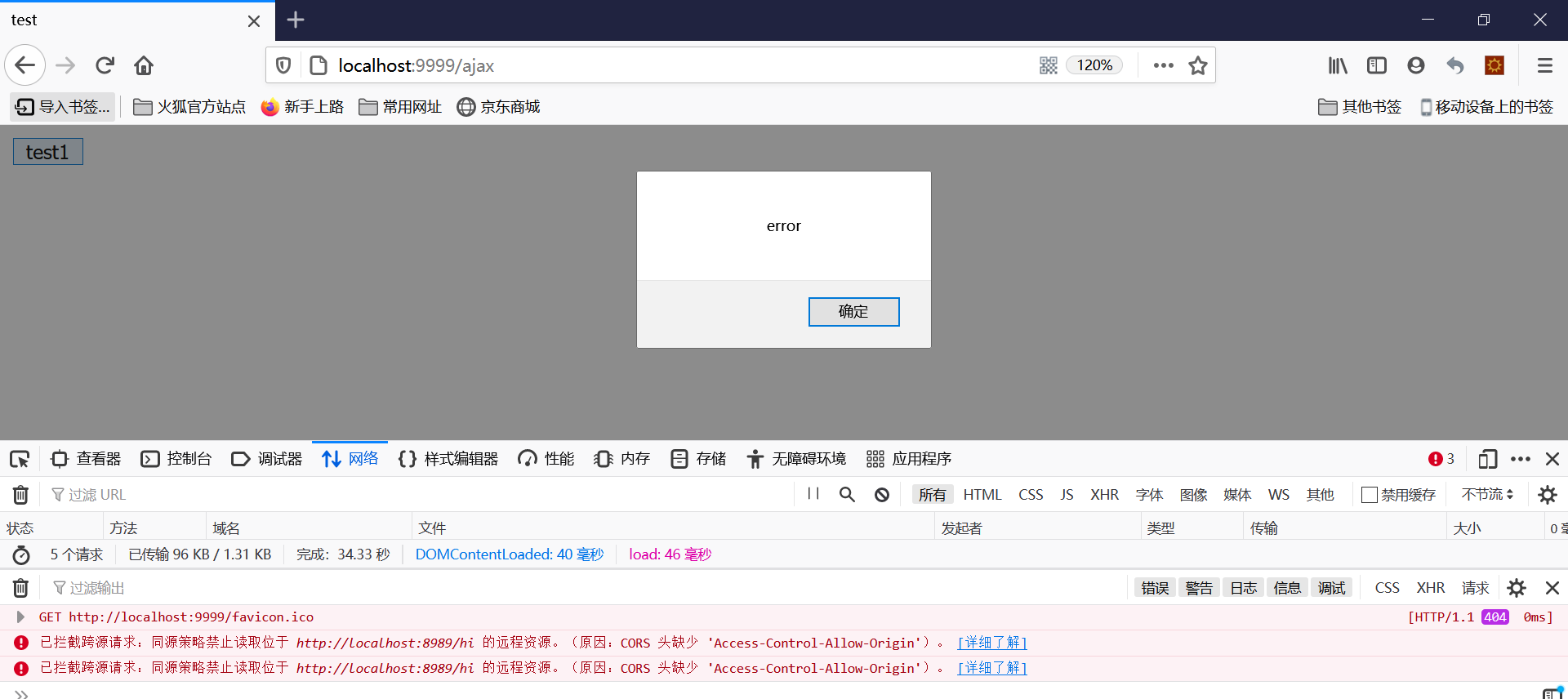
点开网络模块,查看具体的请求信息:
请求头中,自动添加了信息 Origin: http://localhost:9999 ,通知服务器本次是跨域访问
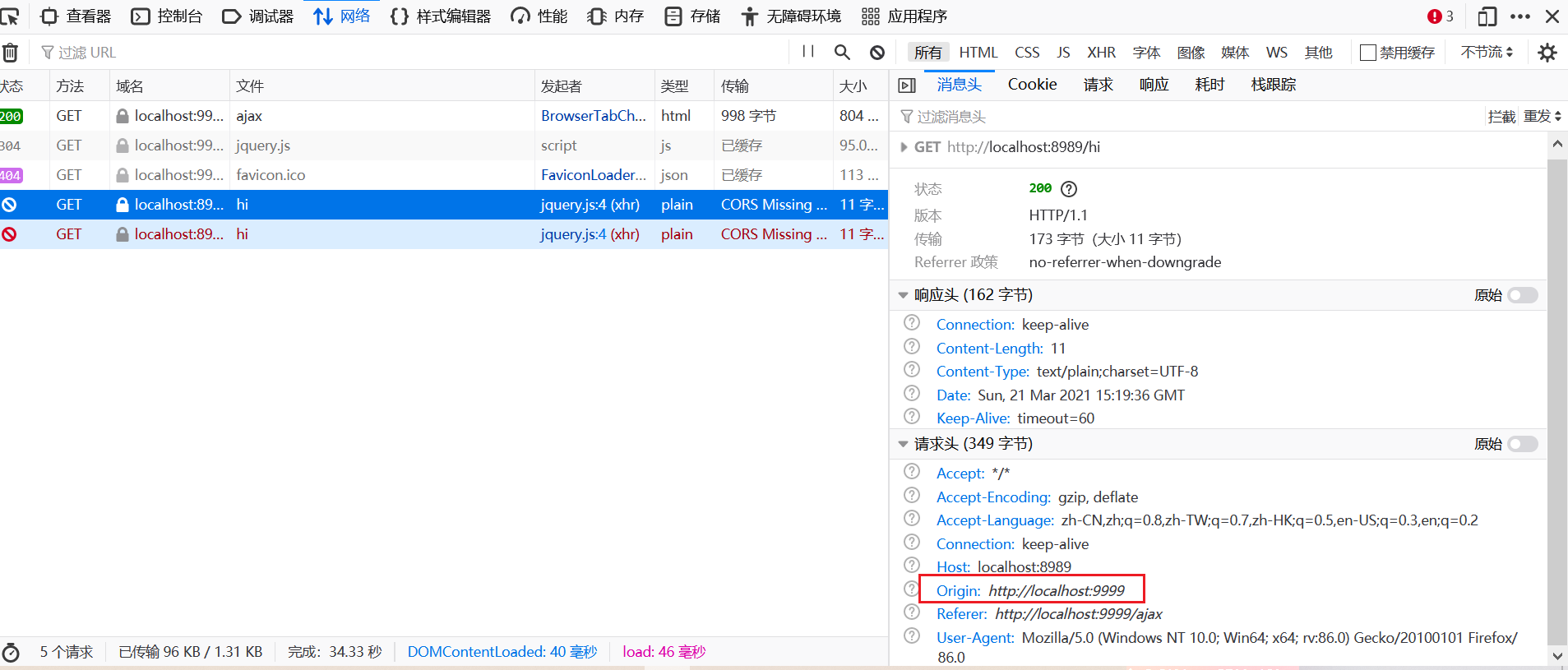
从本次响应的内容中,可以看到,其实响应的内容已经成功返回了,但是由于浏览器的同源政策,把这些结果都给舍弃了。并且执行了Ajax中的回调函数error

### cors
#### 概念
CORS(Cross-origin resource sharing),是一个W3C标准,全称是"跨域资源共享"。
- 整个CORS通信过程,都是浏览器自动完成,不需要用户参与。
- 对于开发者来说,CORS通信与同源的AJAX通信没有差别,代码完全一样。
- 浏览器一旦发现AJAX请求跨源,就会自动添加一些附加的头信息。(Origin)
- 有时还会多出一次附加的请求,但用户不会有感觉。(options方式的请求)
#### 分类
浏览器将CORS请求分成两类:
- 简单请求(simple request)
- 非简单请求(not-so-simple request)
只要同时满足以下两大条件,就属于简单请求:
请求方法是以下三种方法之一
GET
POST
HEAD
HTTP的头信息不超出以下几种字段
Accept
Accept-Language
Content-Language
Last-Event-ID
Content-Type,该字段的值只能是以下三种
application/x-www-form-urlencoded
multipart/form-data
text/plain
>注意,只要不能同时满足上面两个条件,就属于非简单请求。
#### 简单请求
对于简单请求,浏览器直接发出CORS请求,同时在请求头中增加一个Origin字段。
该字段表示,本次请求来自哪个源(协议 + 域名 + 端口),服务器根据这个值,决定是否同意这次请
求。
Origin指定的源,即使不在服务器许可范围内,服务器还是会返回一个正常的HTTP响应,但是响应头中
不含指定Access-Control-Allow-Origin字段,浏览器这时候就知道本次跨域访问失败。
但是这个时候,响应状态可能是200,同时在一些工具中还能看到正确的返回值。
例如,
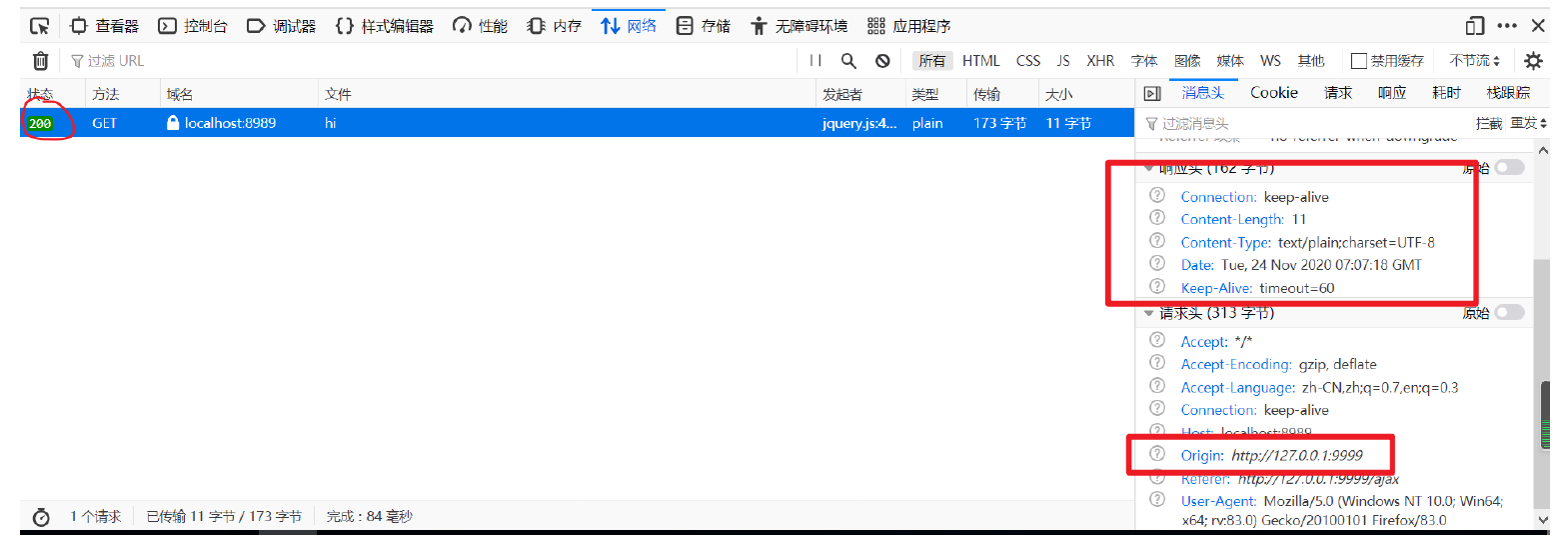
其中,
1. 浏览器在请求头中自动添加了Origin 字段
2. 服务器在响应中没有添加Access-Control-Allow-Origin 字段(说明服务器不支持此请求跨域访
问)
3. 响应的状态码是200,并且从响应内容中可以看到正确的返回内容
4. 同时,浏览器会抛出一个错误,被ajax的核心对象XMLHttpRequest的onerror 回调函数捕获
如果Origin指定的域名在服务器的许可范围内,服务器返回的响应,会多出几个头信息字段:
1. Access-Control-Allow-Origin
该字段是必须的。
它的值要么是请求时Origin字段的值,要么是一个*,表示接受任意域名的跨域请求。
2. Access-Control-Allow-Credentials
该字段可选
表示是否允许发送Cookie。
设为true,即表示服务器已经允许了,跨域请求中可以携带Cookie。
但是这需要AJAX中设置withCredentials=true进行配合。
如果服务器不要浏览器发送Cookie,删除该字段即可。
`3. Access-Control-Expose-Headers`
该字段可选
列出了哪些首部可以作为响应的一部分暴露给外部。
默认情况下,只有七种可以暴露给外部
Cache-Control
Content-Language
Content-Length
Content-Type
Expires
Last-Modified
Pragma
如果想要让客户端可以访问到其他的首部信息,可以将它们在Access-Control-Expose-Headers里面指定
#### 非简单请求
非简单请求是那种对服务器有特殊要求的请求,比如请求方法是PUT或DELETE,或者Content-Type字段的类型是application/json。
非简单请求的CORS请求,会在正式通信之前,增加一次HTTP查询请求,称为"预检"请求(preflight)。
浏览器先询问服务器,当前网页所在的域名是否在服务器的许可名单之中,以及可以使用哪些HTTP动词
和头信息字段。只有得到肯定答复,浏览器才会发出正式的XMLHttpRequest请求,否则就报错。
例如,
```javascript
$(".btn1").on("click",function(){
$.ajax({
type: "GET",
url : "http://localhost:8989/hi",
contentType: "application/json",
success: function(msg){
console.log(msg);
},
error: function(){
alert('error');
}
});
});
```
>注意,在请求头中,指定contentType为application/json
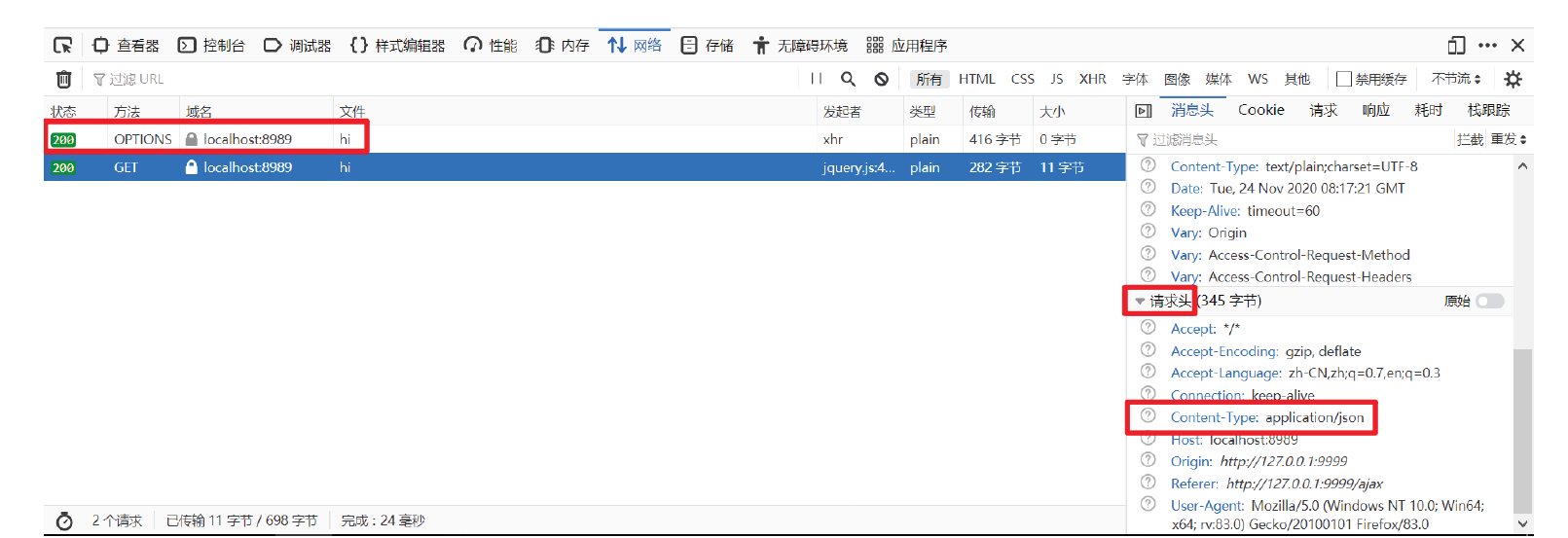
>可以看出,请求头中有Content-Type:application/json 字段,属于非简单请求,浏览器会提前发送一个option方式的“预检请求”(预检请求会缓存)
在这个“预检请求”的响应中,服务器会返回一些数据来通知浏览器,服务器对跨域请求的要求
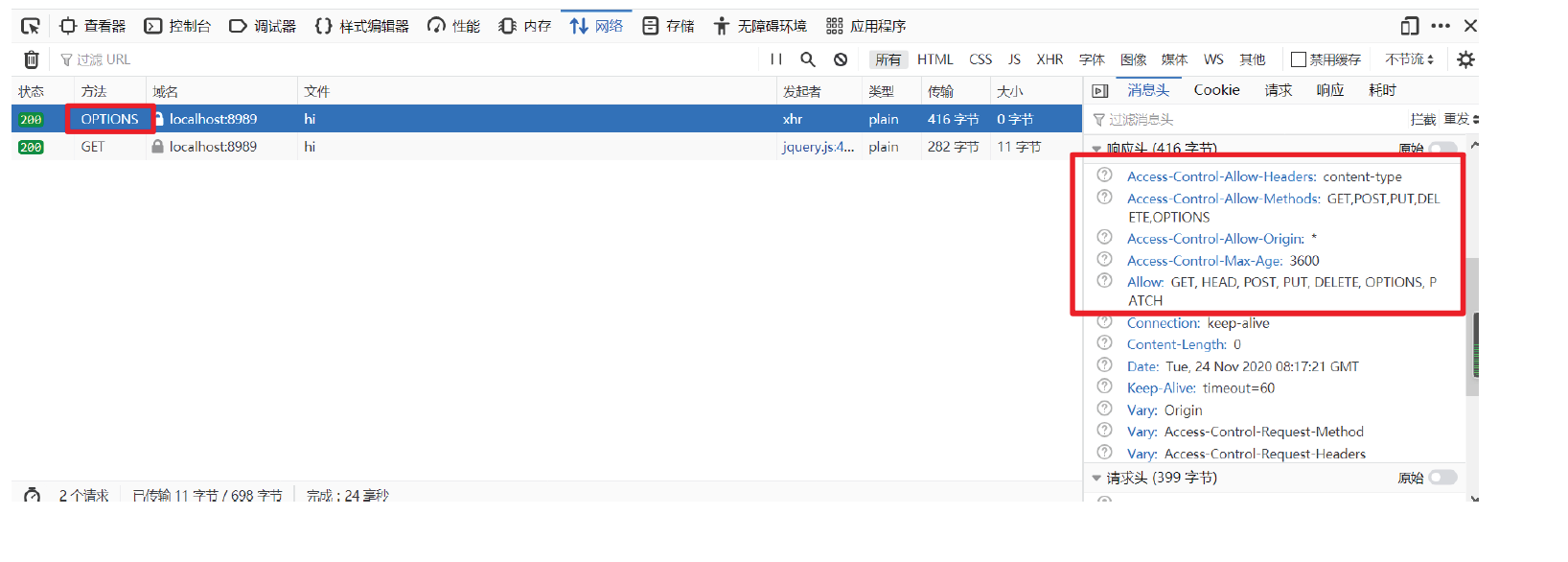
如果浏览器否定了“预检”请求,也会返回一个正常的HTTP回应,但是没有任何CORS相关的头信息字段。
这时,浏览器就会认定,服务器不同意预检请求,因此触发一个错误,被XMLHttpRequest对象的onerror
回调函数捕获。
> 测试简单请求和非简单请求
==“预检”成功的常见响应头部字段有:==
- Access-Control-Allow-Origin 配置ip
- Access-Control-Allow-Methods 配置请求方式
- Access-Control-Allow-Headers 配置请求头
- Access-Control-Allow-Credentials 配置是否信任cookie
标签允许客户端携带验证信息,例如 cookie
Access-Control-Max-Age
表示预检请求的返回结果(即Access-Control-Allow-Methods 和Access-Control-Allow-Headers提供的信息) 可以被缓存多久。
注意,ajax跨域访问的时候,如果需要在请求中携带cookie,需要有以下设置
1. 前端ajax请求中,指定withCredentials属性为ture
```javascript
$.ajax({
type: "GET",
url : "http://localhost:8989/hi",
xhrFields:{
withCredentials: true
},
success: function(msg){
console.log(msg);
},
error: function(){
alert('error');
}
});
```
2. 后端响应头中,设置Access-Control-Allow-Credentials属性为true
```java
//允许跨域携带cookie
response.setHeader("Access-Control-Allow-Credentials", "true");
```
3. 后端响应头中,设置Access-Control-Allow-Origin属性为具体的值,而不是能通配符*
```java
//response.setHeader("Access-Control-Allow-Origin", "*");
response.setHeader("Access-Control-Allow-Origin", "http://127.0.0.1:9999");
```
```java
@RestController
public class HelloController {
// 允许cookie的情况下 前端配置 后台配置
@GetMapping("/hi")
public String hello(HttpServletResponse response) {
response.setHeader("Access-Control-Allow-Credentials", "true");
response.setHeader("Access-Control-Allow-Origin", "http://localhost:9999");
return "hello world";
}
// 不允许cookie的情况下
@GetMapping("/hi")
public String hello(HttpServletResponse response) {
response.setHeader("Access-Control-Allow-Origin", "*");
return "hello world";
}
}
```
> 前端访问 http://localhost:9999/ajax 后台就配 localhost
>
> 此时无法处理预检查请求
#### 使用
springboot-html项目中的ajax.html页面:
```html
test
2、pom文件
```xml
org.springframework.boot
spring-boot-starter-web
```
3、配置文件,application.properties
```properties
server.port=8989
```
4、Controller
```java
package com.briup.cms.web.controller;
import org.springframework.web.bind.annotation.GetMapping;
import org.springframework.web.bind.annotation.RestController;
@RestController
public class HelloController {
@GetMapping("/hi")
public String hello() {
return "hello world";
}
}
```
5、启动,访问

最后,访问springboot-html项目中的ajax.html页面,点击页面中的按钮,发送ajax请求,访问springbootcors
项目中的接口:
当前页面的访问地址: http://localhost:9999/ajax
点击按钮后请求地址: http://localhost:8989/hi
可以看出,此时这俩个地址,属于“非同源”,本次访问属于跨域访问。
点击后,控制台上输出的错误信息:
已拦截跨源请求:同源策略禁止读取位于 http://localhost:8989/hi 的远程资源。
(原因:CORS 头缺少 'Access-Control-Allow-Origin')。

点开网络模块,查看具体的请求信息:
请求头中,自动添加了信息 Origin: http://localhost:9999 ,通知服务器本次是跨域访问

从本次响应的内容中,可以看到,其实响应的内容已经成功返回了,但是由于浏览器的同源政策,把这些结果都给舍弃了。并且执行了Ajax中的回调函数error

### cors
#### 概念
CORS(Cross-origin resource sharing),是一个W3C标准,全称是"跨域资源共享"。
- 整个CORS通信过程,都是浏览器自动完成,不需要用户参与。
- 对于开发者来说,CORS通信与同源的AJAX通信没有差别,代码完全一样。
- 浏览器一旦发现AJAX请求跨源,就会自动添加一些附加的头信息。(Origin)
- 有时还会多出一次附加的请求,但用户不会有感觉。(options方式的请求)
#### 分类
浏览器将CORS请求分成两类:
- 简单请求(simple request)
- 非简单请求(not-so-simple request)
只要同时满足以下两大条件,就属于简单请求:
请求方法是以下三种方法之一
GET
POST
HEAD
HTTP的头信息不超出以下几种字段
Accept
Accept-Language
Content-Language
Last-Event-ID
Content-Type,该字段的值只能是以下三种
application/x-www-form-urlencoded
multipart/form-data
text/plain
>注意,只要不能同时满足上面两个条件,就属于非简单请求。
#### 简单请求
对于简单请求,浏览器直接发出CORS请求,同时在请求头中增加一个Origin字段。
该字段表示,本次请求来自哪个源(协议 + 域名 + 端口),服务器根据这个值,决定是否同意这次请
求。
Origin指定的源,即使不在服务器许可范围内,服务器还是会返回一个正常的HTTP响应,但是响应头中
不含指定Access-Control-Allow-Origin字段,浏览器这时候就知道本次跨域访问失败。
但是这个时候,响应状态可能是200,同时在一些工具中还能看到正确的返回值。
例如,

其中,
1. 浏览器在请求头中自动添加了Origin 字段
2. 服务器在响应中没有添加Access-Control-Allow-Origin 字段(说明服务器不支持此请求跨域访
问)
3. 响应的状态码是200,并且从响应内容中可以看到正确的返回内容
4. 同时,浏览器会抛出一个错误,被ajax的核心对象XMLHttpRequest的onerror 回调函数捕获
如果Origin指定的域名在服务器的许可范围内,服务器返回的响应,会多出几个头信息字段:
1. Access-Control-Allow-Origin
该字段是必须的。
它的值要么是请求时Origin字段的值,要么是一个*,表示接受任意域名的跨域请求。
2. Access-Control-Allow-Credentials
该字段可选
表示是否允许发送Cookie。
设为true,即表示服务器已经允许了,跨域请求中可以携带Cookie。
但是这需要AJAX中设置withCredentials=true进行配合。
如果服务器不要浏览器发送Cookie,删除该字段即可。
`3. Access-Control-Expose-Headers`
该字段可选
列出了哪些首部可以作为响应的一部分暴露给外部。
默认情况下,只有七种可以暴露给外部
Cache-Control
Content-Language
Content-Length
Content-Type
Expires
Last-Modified
Pragma
如果想要让客户端可以访问到其他的首部信息,可以将它们在Access-Control-Expose-Headers里面指定
#### 非简单请求
非简单请求是那种对服务器有特殊要求的请求,比如请求方法是PUT或DELETE,或者Content-Type字段的类型是application/json。
非简单请求的CORS请求,会在正式通信之前,增加一次HTTP查询请求,称为"预检"请求(preflight)。
浏览器先询问服务器,当前网页所在的域名是否在服务器的许可名单之中,以及可以使用哪些HTTP动词
和头信息字段。只有得到肯定答复,浏览器才会发出正式的XMLHttpRequest请求,否则就报错。
例如,
```javascript
$(".btn1").on("click",function(){
$.ajax({
type: "GET",
url : "http://localhost:8989/hi",
contentType: "application/json",
success: function(msg){
console.log(msg);
},
error: function(){
alert('error');
}
});
});
```
>注意,在请求头中,指定contentType为application/json

>可以看出,请求头中有Content-Type:application/json 字段,属于非简单请求,浏览器会提前发送一个option方式的“预检请求”(预检请求会缓存)
在这个“预检请求”的响应中,服务器会返回一些数据来通知浏览器,服务器对跨域请求的要求

如果浏览器否定了“预检”请求,也会返回一个正常的HTTP回应,但是没有任何CORS相关的头信息字段。
这时,浏览器就会认定,服务器不同意预检请求,因此触发一个错误,被XMLHttpRequest对象的onerror
回调函数捕获。
> 测试简单请求和非简单请求
==“预检”成功的常见响应头部字段有:==
- Access-Control-Allow-Origin 配置ip
- Access-Control-Allow-Methods 配置请求方式
- Access-Control-Allow-Headers 配置请求头
- Access-Control-Allow-Credentials 配置是否信任cookie
标签允许客户端携带验证信息,例如 cookie
Access-Control-Max-Age
表示预检请求的返回结果(即Access-Control-Allow-Methods 和Access-Control-Allow-Headers提供的信息) 可以被缓存多久。
注意,ajax跨域访问的时候,如果需要在请求中携带cookie,需要有以下设置
1. 前端ajax请求中,指定withCredentials属性为ture
```javascript
$.ajax({
type: "GET",
url : "http://localhost:8989/hi",
xhrFields:{
withCredentials: true
},
success: function(msg){
console.log(msg);
},
error: function(){
alert('error');
}
});
```
2. 后端响应头中,设置Access-Control-Allow-Credentials属性为true
```java
//允许跨域携带cookie
response.setHeader("Access-Control-Allow-Credentials", "true");
```
3. 后端响应头中,设置Access-Control-Allow-Origin属性为具体的值,而不是能通配符*
```java
//response.setHeader("Access-Control-Allow-Origin", "*");
response.setHeader("Access-Control-Allow-Origin", "http://127.0.0.1:9999");
```
```java
@RestController
public class HelloController {
// 允许cookie的情况下 前端配置 后台配置
@GetMapping("/hi")
public String hello(HttpServletResponse response) {
response.setHeader("Access-Control-Allow-Credentials", "true");
response.setHeader("Access-Control-Allow-Origin", "http://localhost:9999");
return "hello world";
}
// 不允许cookie的情况下
@GetMapping("/hi")
public String hello(HttpServletResponse response) {
response.setHeader("Access-Control-Allow-Origin", "*");
return "hello world";
}
}
```
> 前端访问 http://localhost:9999/ajax 后台就配 localhost
>
> 此时无法处理预检查请求
#### 使用
springboot-html项目中的ajax.html页面:
```html
test
```
>注意,这里主要测试的是test3按钮
springboot-cors项目中的Controller:
```java
package com.briup.cms.web.controller;
import org.springframework.web.bind.annotation.GetMapping;
import org.springframework.web.bind.annotation.RestController;
@RestController
public class HelloController {
@GetMapping("/hi")
public String hello() {
return "hello world";
}
}
```
springboot-cors项目中的配置类:
```java
package com.briup.cms.config;
import org.springframework.context.annotation.Configuration;
import org.springframework.web.servlet.config.annotation.CorsRegistry;
import org.springframework.web.servlet.config.annotation.WebMvcConfigurer;
@Configuration
public class WebConfig implements WebMvcConfigurer{
@Override
public void addCorsMappings(CorsRegistry registry) {
registry.addMapping("/**")//映射所有路径
.allowedOrigins("*")//运行所有客户端访问
.allowCredentials(false)//不允许携带cookie
.allowedMethods("GET", "POST", "PUT", "DELETE", "OPTIONS")//
支持的方法
.allowedHeaders("*")//运行所有请求头字段
.maxAge(3600);//允许客户端缓存“预检请求”中获取的信息,3600秒
}
}
```
>注意,这里主要配置了跨域访问的属性
启动俩个项目,访问页面,点击按钮,测试ajax跨域访问:
>可以看出,此时ajax请求进行跨域访问,已经成功
>注意,此时可以尝试在ajax请求中,设置contentType: application/json ,观察是否会发出“预检”请求
同时,也可以修改ajax请求,让其写的cookie和指定字段的头部:
```javascript
$(".btn3").on("click",function(){
$.ajax({
type: "GET",
url : "http://localhost:8989/hi",
xhrFields:{
withCredentials: true
},
headers:{
token:"aaa.bbb.ccc"
},
contentType: "application/json",
success: function(msg){
console.log(msg);
},
error: function(msg){
alert('error');
}
});
});
```
此时,对应的后端跨域设置为:
```java
@Configuration
public class WebConfig implements WebMvcConfigurer{
@Override
public void addCorsMappings(CorsRegistry registry) {
registry.addMapping("/**")
.allowedOrigins("http://localhost:9999")
.allowCredentials(true)
.allowedMethods("GET", "POST", "PUT", "DELETE", "OPTIONS")
.allowedHeaders("*")
.maxAge(3600);
}
}
```
#### 其他
```java
@Override
public void addCorsMappings(CorsRegistry registry) {
registry.addMapping("/**")//映射所有路径
.allowedOrigins("*")//运行所有客户端访问
.allowCredentials(false)//不允许携带cookie
.allowedMethods("GET", "POST", "PUT", "DELETE", "OPTIONS")//支持的方法
.allowedHeaders("*")//运行所有请求头字段
.maxAge(3600);//允许客户端缓存“预检请求”中获取的信息,3600秒
}
```
在此配置中,如果设置allowCredentials(true) ,那么allowedOrigins("*") 这里就不能使用通
配符了,必须要写一个或者多个(可变参数)客户端的地址
例如, allowedOrigins("http://127.0.0.1:9999")
另外,如果只是想让Controller中的某一个方法或者几个方法被跨域访问,那么可以在方法上使用
@CrossOrigin 注解,例如
```java
@RestController
public class HelloController {
@CrossOrigin(origins = {"http://127.0.0.1:9999"})
@GetMapping("/hi")
public String hello() {
return "hello world";
}
}
```
>注意,此时就不需要在配置类中做其他配置了,直接一个注解就可以让该方法被跨域访问了
## 文件
**控制器**
```java
package com.vanse.cms.web.controller;
import com.briup.upload.service.IUploadService;
import com.github.tobato.fastdfs.domain.fdfs.StorePath;
import com.github.tobato.fastdfs.service.FastFileStorageClient;
import com.vanse.common.web.response.Result;
import io.swagger.annotations.Api;
import io.swagger.annotations.ApiImplicitParam;
import io.swagger.annotations.ApiImplicitParams;
import org.springframework.beans.factory.annotation.Autowired;
import org.springframework.web.bind.annotation.GetMapping;
import org.springframework.web.bind.annotation.PostMapping;
import org.springframework.web.bind.annotation.RequestParam;
import org.springframework.web.bind.annotation.RestController;
import org.springframework.web.multipart.MultipartFile;
import java.io.File;
import java.io.FileInputStream;
import java.io.FileNotFoundException;
import java.util.List;
/**
* @Auther: vanse(lc))
* @Date: 2022/11/2-11-02-16:03
* @Description:com.vanse.cms.web.controller
*/
@Api(tags = "上传模块")
@RestController
public class UploadController {
@Autowired
private IUploadService uploadService;
@ApiImplicitParams({
@ApiImplicitParam(name = "files",value = "文件",dataType = "__file",paramType = "form",allowMultiple = true)
})
@PostMapping(value = "/upload",consumes = "multipart/form-data")
public Result upload(@RequestParam("files") MultipartFile[] files) throws FileNotFoundException {
List paths = uploadService.uploadFile(files);
return Result.success(paths);
}
}
```
**service**
```java
package com.briup.upload.service.impl;
import com.briup.upload.properties.UploadProperty;
import com.briup.upload.service.IUploadService;
import com.github.tobato.fastdfs.domain.fdfs.StorePath;
import com.github.tobato.fastdfs.service.FastFileStorageClient;
import com.vanse.common.web.exception.CustomerException;
import com.vanse.common.web.response.ResultCode;
import org.springframework.beans.factory.annotation.Autowired;
import org.springframework.web.multipart.MultipartFile;
import java.io.IOException;
import java.util.ArrayList;
import java.util.Arrays;
import java.util.List;
import java.util.Objects;
/**
* @Auther: vanse(lc))
* @Date: 2022/11/2-11-02-21:49
* @Description:文件上传实现
*/
public class FastdfsUploadImpl implements IUploadService {
@Autowired
private FastFileStorageClient storageClient;
@Autowired
private UploadProperty uploadProperty;
@Override
public List uploadFile(MultipartFile[] files) {
//上传后得到的文件地址
List list = new ArrayList<>();
if (Objects.isNull(files) || files.length == 0) {
throw new CustomerException(ResultCode.PARAM_IS_BLANK);
}
//循环获取files数组中的文件
Arrays.stream(files).forEach(file -> {
list.add(uploadFile(file));
});
return list;
}
private String uploadFile(MultipartFile file) {
try {
if (file.isEmpty()) {
throw new CustomerException(ResultCode.UPLOAD_FILE_EMPTY);
}
StorePath storePath = storageClient.uploadFile("group1", file.getInputStream(), file.getSize(), getSuffix(file));
return uploadProperty.getUploadBasePath() + storePath.getFullPath();
} catch (IOException e) {
throw new CustomerException(ResultCode.UPLOAD_FILE_ERROR);
}
}
private String getSuffix(MultipartFile file) {
// hello.jpg
String filename = file.getOriginalFilename();
return Objects.requireNonNull(filename).substring(filename.lastIndexOf(".") + 1);
}
}
```
**配置**
```properties
fdfs:
# 连接超时时间
connect-timeout: 600
# 读取时间
so-timeout: 1500
tracker-list:
- 192.168.23.160:22122
# 缩略图配置
thumb-image:
width: 100
height: 100
```
# 业务
## 配置模块
### controller
```java
package com.briup.cms.web.controller;
import com.briup.cms.service.IConfigService;
import com.briup.common.util.PageUtil;
import com.briup.common.web.exception.CustomerException;
import com.briup.common.web.response.Result;
import com.briup.common.web.response.ResultCode;
import com.briup.user.bean.Config;
import com.briup.user.dao.ConfigMapper;
import com.github.pagehelper.PageInfo;
import io.swagger.annotations.Api;
import io.swagger.annotations.ApiImplicitParam;
import io.swagger.annotations.ApiImplicitParams;
import io.swagger.annotations.ApiOperation;
import org.springframework.beans.factory.annotation.Autowired;
import org.springframework.web.bind.annotation.*;
import javax.validation.Valid;
import java.util.List;
//@ComponentScan // 默认就是扫描当前类所在的包
/**
* @Auther: vanse(lc))
* @Date: 2022/10/31-10-31-11:11
* @Description:com.briup.cms.web.controller
*/
@RestController // @Controller 跳转页面 @Controller+@ReponseBody
@RequestMapping("/config") // 一级路径
@Api(tags = "配置模块") // swagger-模块中文
public class ConfigController {
@Autowired // 从容器中取出实现类
private IConfigService configService;
@ApiOperation(value = "查询启动配置", notes = "不分页")
@GetMapping("/") // 二级路径
public Result selectConfigStatusWithOn() throws RuntimeException {
List data = configService.selectList();
return Result.success(data);
}
// @RequestBody 获取json格式的请求体
// 不加就是接收普通请求体
// @ReponseBody 返回json格式
@ApiOperation(value = "添加配置", notes = "不需要id和状态")
@PostMapping("/")
public Result addConfig(@RequestBody @Valid Config config) {
configService.addConfig(config);
return Result.success("添加成功");
}
@ApiOperation(value = "更新配置", notes = "不更新状态和名称")
@PutMapping("/")
public Result updateConfig(@RequestBody Config config) {
configService.updateConfig(config);
return Result.success("更新成功");
}
@ApiOperation(value = "更新配置", notes = "不更新状态和名称")
@ApiImplicitParams({
@ApiImplicitParam(name = "id", value = "编号", dataType = "int", paramType = "path", required = true, defaultValue = "1"),
@ApiImplicitParam(name = "status", value = "状态", dataType = "int", paramType = "path", required = true, defaultValue = "1")
})
@PutMapping("/{id}/{status}")
public Result updateStatus(@PathVariable Integer id, @PathVariable Integer status) {
configService.updateStatus(id, status);
return Result.success("状态更新成功");
}
@ApiOperation(value = "删除配置", notes = "目前是物理删除")
@ApiImplicitParams({
@ApiImplicitParam(name = "id", value = "编号", dataType = "int", paramType = "path", required = true, defaultValue = "1")
})
@DeleteMapping("/{id}")
public Result deleteById(@PathVariable Integer id) {
configService.deleteById(id);
return Result.success("删除成功");
}
@ApiOperation(value = "分页查询所有配置", notes = "提供分页参数")
@ApiImplicitParams({
@ApiImplicitParam(name = "pageNumber", value = "当前页", dataType = "int", paramType = "path", defaultValue = "0"),
@ApiImplicitParam(name = "pageSize", value = "每页条数", dataType = "int", paramType = "path", defaultValue = "5")
})
@GetMapping("/{pageNumber}/{pageSize}")
public Result selectByPage(@PathVariable Integer pageNumber, @PathVariable Integer pageSize) {
PageInfo pageInfo = configService.selectListByPage(pageNumber, pageSize);
return Result.success(pageInfo);
}
@ApiOperation("带条件的简洁分页")
@PostMapping("/selectByPageWithMe")
public Result selectByPageWithMe(@RequestBody PageUtil pageUtil) {
pageUtil = configService.selectListByPage(pageUtil);
return Result.success(pageUtil);
}
}
```
### service
```java
package com.briup.cms.service.impl;
import com.briup.cms.service.IConfigService;
import com.briup.common.util.PageUtil;
import com.briup.common.web.exception.CustomerException;
import com.briup.common.web.response.ResultCode;
import com.briup.user.bean.Config;
import com.briup.user.dao.ConfigMapper;
import com.briup.user.dao.extend.ConfigExtendMapper;
import com.github.pagehelper.Page;
import com.github.pagehelper.PageHelper;
import com.github.pagehelper.PageInfo;
import org.springframework.beans.factory.annotation.Autowired;
import org.springframework.stereotype.Service;
import org.springframework.transaction.annotation.Transactional;
import org.springframework.util.ObjectUtils;
import org.springframework.util.StringUtils;
import java.util.List;
/**
* @Auther: vanse(lc))
* @Date: 2022/10/31-10-31-14:23
* @Description:com.briup.cms.service.impl
*/
@Service // 放到容器中
public class ConfigServiceImpl implements IConfigService {
@Autowired
private ConfigMapper configMapper;
@Autowired
private ConfigExtendMapper configExtendMapper;
@Override
public List selectList() {
return configExtendMapper.selectList();
}
// 添加配置
@Transactional // springboot默认集成事务
@Override
public void addConfig(Config config) {
// 名字不能重复 只能连接数据库 (实现一下)
// StringUtils.hasText() // 不能为空 不能为空字符串
Config configFromdb = configExtendMapper.findByName(config.getConfigName());
// configFromdb是不是空 代表sql是不是查出
// System.out.println("configFromdb = " + configFromdb);
if (!ObjectUtils.isEmpty(configFromdb)) {
throw new CustomerException(ResultCode.SPECIFIED_CONFIG_NAME_UNIQUE);
}
// 添加
config.setConfigStatus(0); // 默认配置是禁用状态
configMapper.insert(config);
}
/**
* 修改配置 (不改状态 null)
* 正常: 不可以修改名称
* 如果改名称 不能重复/可以保持一致 杨尘(数据库)
*
* @param config
*/
@Override
public void updateConfig(Config config) {
// ajax/axios请求 js填充数据 status可能存在
// 单线程操作: id一定存在 修改的就是指定配置
// 多线程操作: 判断更新条数 如果>0 更新成功 <0 更新失败
int rows = configExtendMapper.updateConfigWithNoStatus(config);
if (rows < 1) {
// 此处不要捕获异常
throw new CustomerException(ResultCode.SPECIFIED_OPERATE_ERROR);
}
}
/**
* 更新配置状态
*
* @param id 配置的id
* @param status 0/1 前端传递值即可 后端接收
*/
@Override
public void updateStatus(Integer id, Integer status) {
// 两条sql
// 先根据id查出配置
// 修改状态
// 再更新配置
Config config = Config.builder().configId(id).configStatus(status).build();
int row = configMapper.updateByPrimaryKeySelective(config);
if (row < 1) {
throw new CustomerException(ResultCode.SPECIFIED_OPERATE_ERROR);
}
}
/**
* 根据id删除配置
* 删除:
* 物理删除 数据库删除该数据
* 逻辑删除 字段isDelete true
* @param id
*/
@Override
public void deleteById(Integer id) {
int row = configMapper.deleteByPrimaryKey(id);
if (row < 1) {
throw new CustomerException(ResultCode.SPECIFIED_OPERATE_ERROR);
}
}
@Override
public PageInfo selectListByPage(int pageNumber, int pageSize) {
// 插件 构建limit条件
PageHelper.startPage(pageNumber,pageSize);
List configList = configExtendMapper.selectListByPage();
System.out.println("configList = " + configList);
// 以上是基于分页查询的结果
// 以下是基于结果 构建出的分页信息
return new PageInfo(configList);
}
@Override
public PageUtil selectListByPage(PageUtil pageUtil) {
// 插件 构建limit条件
PageHelper.startPage(pageUtil.getPageNumber(),pageUtil.getPageSize());
// 带条件查询 类似于PageInfo
Page page = configExtendMapper.selectListByPage(null);
pageUtil.setList(page.getResult());
pageUtil.setTotal(page.getTotal());
return pageUtil;
}
}
```
### dao
```java
package com.briup.user.dao.extend;
import com.briup.user.bean.Config;
import com.github.pagehelper.Page;
import java.util.List;
import java.util.Map;
/**
* @Auther: vanse(lc))
* @Date: 2022/10/31-10-31-14:26
* @Description:com.briup.user.dao.extend
*/
public interface ConfigExtendMapper {
List selectList();
Config findByName(String configName);
int updateConfigWithNoStatus(Config config);
List selectListByPage();
Page selectListByPage(Map map);
}
```
```java
update base_config
config_info = #{configInfo,jdbcType=VARCHAR},
config_icon = #{configIcon,jdbcType=VARCHAR},
where config_id = #{configId,jdbcType=INTEGER}
```
## 用户模块
### controller
```java
package com.briup.cms.web.controller;
import com.briup.cms.service.IUserService;
import com.briup.common.util.PageUtil;
import com.briup.common.web.response.Result;
import io.swagger.annotations.Api;
import io.swagger.annotations.ApiOperation;
import io.swagger.annotations.ApiParam;
import org.springframework.beans.factory.annotation.Autowired;
import org.springframework.web.bind.annotation.*;
import java.util.List;
/**
* @Auther: vanse(lc))
* @Date: 2022/11/2-11-02-15:16
* @Description:用户模块
*/
@Api(tags = "用户模块")
@RequestMapping("/user")
@RestController
public class UserController {
@Autowired
private IUserService userService;
@ApiOperation(value = "分页条件查询",notes = "条件为username和role")
@PostMapping("/findByPage")
public Result findByPage(@RequestBody PageUtil pageUtil){
PageUtil data = userService.findByPage(pageUtil);
return Result.success(data);
}
@ApiOperation(value = "批量删除")
// ?id=1&id=2
// /1/2/3/4/5/7
@DeleteMapping("/deleteBatch")
public Result deleteBatch(@ApiParam("批量id") @RequestBody List ids){
userService.deleteBatch(ids);
return Result.success("批量删除成功");
}
}
```
### service
```java
package com.briup.cms.service.impl;
import com.briup.cms.dto.UserDto;
import com.briup.cms.service.IUserService;
import com.briup.common.util.JwtUtil;
import com.briup.common.util.PageUtil;
import com.briup.common.web.exception.CustomerException;
import com.briup.common.web.response.ResultCode;
import com.briup.user.bean.User;
import com.briup.user.dao.UserMapper;
import com.briup.user.dao.extend.UserExtendMapper;
import com.github.pagehelper.Page;
import com.github.pagehelper.PageHelper;
import org.springframework.beans.factory.annotation.Autowired;
import org.springframework.stereotype.Service;
import org.springframework.transaction.annotation.Transactional;
import org.springframework.util.ObjectUtils;
import java.util.HashMap;
import java.util.List;
import java.util.Map;
/**
* @Auther: vanse(lc))
* @Date: 2022/11/2-11-02-9:57
* @Description:用户业务
*/
@Service
public class UserServiceImpl implements IUserService {
@Autowired
private UserExtendMapper userExtendMapper;
@Autowired
private UserMapper userMapper;
/**
* 登录后返回token
*
* @param userDto
* @return
*/
@Override
public String login(UserDto userDto) {
// 1.校验用户名密码
User userFromDB = userExtendMapper.findByName(userDto.getUsername());
if (ObjectUtils.isEmpty(userFromDB) || !userFromDB.getPassword().equals(userDto.getPassword())) {
throw new CustomerException(ResultCode.USER_LOGIN_ERROR);
}
// 账户禁用
if (userFromDB.getStatus() == 1) {
throw new CustomerException(ResultCode.USER_ACCOUNT_FORBIDDEN);
}
// 2.准备token中的信息 简单数据 (用户名 头像)
Map info = new HashMap<>();
info.put("username", userFromDB.getUsername());
info.put("realname", userFromDB.getRealname());
// 3.通过工具类产生token并返回
String token = JwtUtil.sign(String.valueOf(userFromDB.getUserId()), info);
return token;
}
/**
* 分页条件查询 此处条件为用户名称和角色名称
*
* @param pageUtil
* @return
*/
@Override
public PageUtil findByPage(PageUtil pageUtil) {
PageHelper.startPage(pageUtil.getPageNumber(), pageUtil.getPageSize());
Page page = userExtendMapper.findByPage(pageUtil.getParams());
pageUtil.setTotal(page.getTotal());
pageUtil.setList(page.getResult());
return pageUtil;
}
@Override
public User findById(Integer id) {
return userMapper.selectByPrimaryKey(id);
}
@Override
public void deleteById(Integer id) {
}
@Transactional
@Override
public void deleteBatch(List ids) {
// 循环调用 deleteById(id);
userExtendMapper.deleteBatch(ids);
}
@Override
public User currentInfo(String token) {
// Input "" 空值 -> int
String userId = JwtUtil.getUserId(token);
User user = findById(Integer.parseInt(userId));
// 不需要查密码
user.setPassword(null);
return user;
}
}
```
### dao
```java
delete from base_user
where user_id in
#{id}
```