` with your actual host machine IP address.
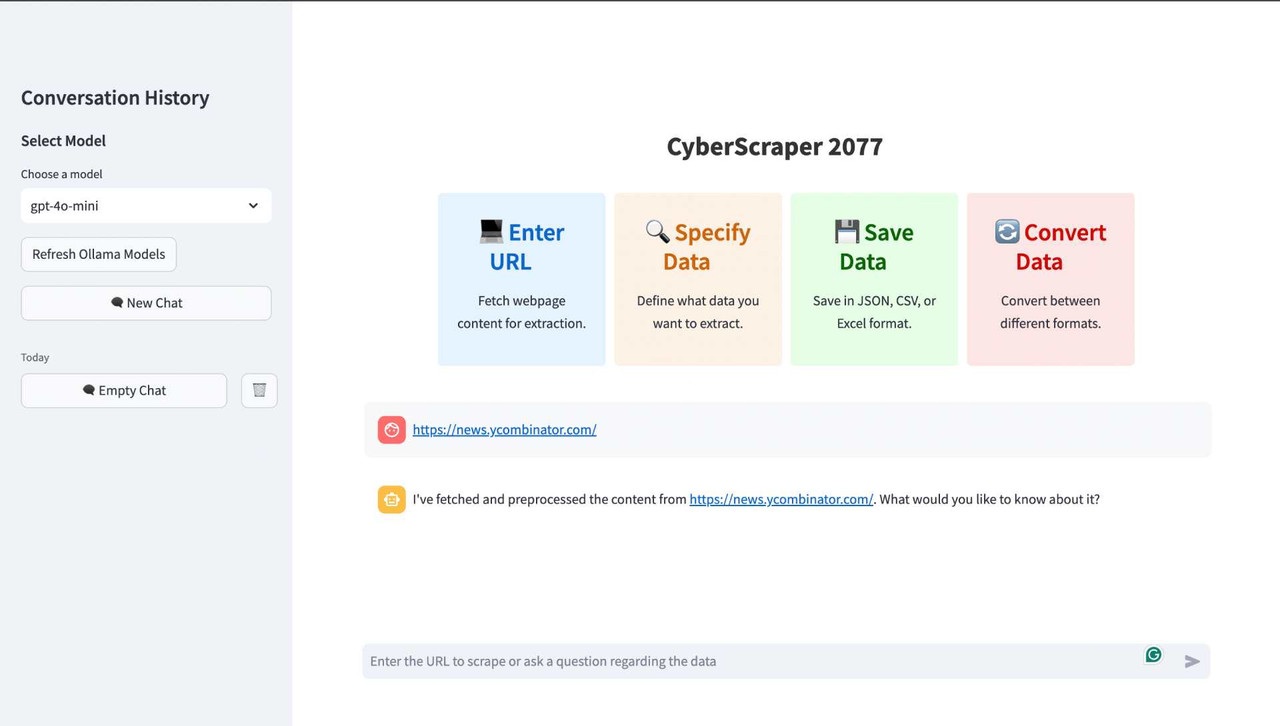
5. In the Streamlit interface, select the Ollama model you want to use (e.g., "ollama:llama3.1").
Note: Ensure that your firewall allows connections to port 11434 for Ollama.
## 🚀 Usage
### Main Branch Usage
1. Fire up the Streamlit app:
```bash
streamlit run main.py
```
2. Open your browser and navigate to `http://localhost:8501`.
3. Enter the URL of the site you want to scrape or ask a question about the data you need.
4. Ask the chatbot to extract the data in any format. Select whatever data you want to export or even everything from the webpage.
5. Watch as CyberScraper 2077 tears through the net, extracting your data faster than you can say "flatline"!
### Scrapeless Branch Usage
The Scrapeless integration branch offers the same user interface with enhanced capabilities:
1. **Enterprise Scraping**: Automatically bypasses advanced anti-bot systems like Cloudflare, Akamai, and DataDome
2. **CAPTCHA-Free**: No manual CAPTCHA solving required - handled automatically
3. **Global Access**: Choose proxy countries for geo-restricted content
4. **Higher Success Rate**: Achieve ~95% success rate on protected sites
Example usage with page ranges (both branches):
```
https://example.com/products 1-5
https://example.com/search?q=cyberpunk&page={page} 1-10
```
## 🌐 Multi-Page Scraping (BETA)
> **Note**: The multi-page scraping feature is currently in beta. While functional, you may encounter occasional issues or unexpected behavior. We appreciate your feedback and patience as we continue to improve this feature.
CyberScraper 2077 now supports multi-page scraping, allowing you to extract data from multiple pages of a website in one go. This feature is perfect for scraping paginated content, search results, or any site with data spread across multiple pages.
### How to Use Multi-Page Scraping
I suggest you enter the URL structure every time if you want to scrape multiple pages so it can detect the URL structure easily. It detects nearly all URL types.
1. **Basic Usage**:
To scrape multiple pages, use the following format when entering the URL:
```
https://example.com/page 1-5
https://example.com/p/ 1-6
https://example.com/xample/something-something-1279?p=1 1-3
```
This will scrape pages 1 through 5 of the website.
2. **Custom Page Ranges**:
You can specify custom page ranges:
```
https://example.com/p/ 1-5,7,9-12
https://example.com/xample/something-something-1279?p=1 1,7,8,9
```
This will scrape pages 1 to 5, page 7, and pages 9 to 12.
3. **URL Patterns**:
For websites with different URL structures, you can specify a pattern:
```
https://example.com/search?q=cyberpunk&page={page} 1-5
```
Replace `{page}` with where the page number should be in the URL.
4. **Automatic Pattern Detection**:
If you don't specify a pattern, CyberScraper 2077 will attempt to detect the URL pattern automatically. However, for best results, specifying the pattern is recommended.
### Enhanced Multi-Page with Scrapeless
The [Scrapeless integration branch](https://github.com/itsOwen/CyberScraper-2077/tree/CyberScrapeless-2077) provides enhanced multi-page scraping with:
- **Automatic retry logic** for failed pages
- **Global proxy rotation** for different pages
- **CAPTCHA auto-solving** across all pages
- **Higher success rates** on protected paginated sites
### Tips for Effective Multi-Page Scraping
- Start with a small range of pages to test before scraping a large number.
- Be mindful of the website's load and your scraping speed to avoid overloading servers.
- Use the `simulate_human` option for more natural scraping behavior on sites with anti-bot measures.
- Consider using the [Scrapeless branch](https://github.com/itsOwen/CyberScraper-2077/tree/CyberScrapeless-2077) for heavily protected sites.
- Regularly check the website's `robots.txt` file and terms of service to ensure compliance.
### Example
```bash
URL Example : "https://news.ycombinator.com/?p=1 1-3 or 1,2,3,4"
```
If you want to scrape a specific page, just enter the query "please scrape page number 1 or 2". If you want to scrape all pages, simply give a query like "scrape all pages in csv" or whatever format you want.
## 🧅 Tor Network Scraping
> **Note**: The Tor network scraping feature allows you to access and scrape .onion sites. This feature requires additional setup and should be used responsibly and legally.
CyberScraper 2077 now supports scraping .onion sites through the Tor network, allowing you to access and extract data from the dark web safely and anonymously. This feature is perfect for researchers, security analysts, and investigators who need to gather information from Tor hidden services.
### Prerequisites
1. Install Tor on your system:
```bash
# Ubuntu/Debian
sudo apt install tor
# macOS (using Homebrew)
brew install tor
# Start the Tor service
sudo service tor start # on Linux
brew services start tor # on macOS
```
2. Install additional Python packages:
```bash
pip install PySocks requests[socks]
```
### Using Tor Scraping
1. **Basic Usage**:
Simply enter an .onion URL, and CyberScraper will automatically detect and route it through the Tor network:
```
http://example123abc.onion
```
2. **Safety Features**:
- Automatic .onion URL detection
- Built-in connection verification
- Tor Browser-like request headers
- Automatic circuit isolation
### Configuration Options
You can customize the Tor scraping behavior by adjusting the following settings:
```python
tor_config = TorConfig(
socks_port=9050, # Default Tor SOCKS port
circuit_timeout=10, # Timeout for circuit creation
auto_renew_circuit=True, # Automatically renew Tor circuit
verify_connection=True # Verify Tor connection before scraping
)
```
### Security Considerations
- Always ensure you're complying with local laws and regulations
- Use a VPN in addition to Tor for extra security
- Be patient as Tor connections can be slower than regular web scraping
- Avoid sending personal or identifying information through Tor
- Some .onion sites may be offline or unreachable
### Docker Support
For Docker users, add these additional flags to enable Tor support:
```bash
docker run -p 8501:8501 \
--network="host" \
-e OPENAI_API_KEY="your-api-key" \
cyberscraper-2077
```
### Example Usage

## Setup Google Sheets Authentication:
1. Go to the Google Cloud Console (https://console.cloud.google.com/).
2. Select your project.
3. Navigate to "APIs & Services" > "Credentials".
4. Find your existing OAuth 2.0 Client ID and delete it.
5. Click "Create Credentials" > "OAuth client ID".
6. Choose "Web application" as the application type.
7. Name your client (e.g., "CyberScraper 2077 Web Client").
8. Under "Authorized JavaScript origins", add:
- http://localhost:8501
- http://localhost:8502
- http://127.0.0.1:8501
- http://127.0.0.1:8502
9. Under "Authorized redirect URIs", add:
- http://localhost:8501/
- http://127.0.0.1:8501/
- http://localhost:8502/
- http://127.0.0.1:8502/
10. Click "Create" to generate the new client ID.
11. Download the new client configuration JSON file and rename it to `client_secret.json`.
## 🔧 Branch Selection Guide
### Choose Main Branch If:
- You need Tor network support for .onion sites
- You prefer local browser control
- You want to use your current browser session
- You're doing research or educational projects
- Budget is a primary concern (free tier friendly)
### Choose [Scrapeless Integration Branch](https://github.com/itsOwen/CyberScraper-2077/tree/CyberScrapeless-2077) If:
- You're scraping heavily protected sites (Cloudflare, Akamai, DataDome)
- You need enterprise-grade success rates (~95%)
- CAPTCHAs are blocking your scraping
- You want automatic proxy rotation
- You need reliable, scalable scraping for business use
- You value time over manual configuration
## Adjusting PlaywrightScraper Settings (optional)
Customize the `PlaywrightScraper` settings to fit your scraping needs. If some websites are giving you issues, you might want to check the behavior of the website:
```bash
use_stealth: bool = True,
simulate_human: bool = False,
use_custom_headers: bool = True,
hide_webdriver: bool = True,
bypass_cloudflare: bool = True:
```
Adjust these settings based on your target website and environment for optimal results.
You can also bypass the captcha using the ```-captcha``` parameter at the end of the URL. The browser window will pop up, complete the captcha, and go back to your terminal window. Press enter and the bot will complete its task.
## 🛠️ Advanced Features
### Scrapeless SDK Integration
For users of the [Scrapeless integration branch](https://github.com/itsOwen/CyberScraper-2077/tree/CyberScrapeless-2077), here are the core capabilities:
#### Web Unlocker API
```python
# Automatic anti-bot bypass
result = scrapeless.unlocker(
actor="unlocker.webunlocker",
input={
"url": "https://protected-website.com",
"proxy_country": "US",
"js_render": True
}
)
```
#### CAPTCHA Solver API
```python
# Automatic CAPTCHA solving
result = scrapeless.solver_captcha(
actor="captcha.recaptcha",
input={
"version": "v2",
"pageURL": "https://example.com",
"siteKey": "your-site-key"
}
)
```
#### Pre-built Scrapers
```python
# E-commerce scrapers
result = scrapeless.scraper(
actor="scraper.shopee",
input={"url": "https://shopee.com/product"}
)
```
## 🤝 Contributing
We welcome all cyberpunks, netrunners, and code samurais to contribute to CyberScraper 2077! Whether you're enhancing the main branch, improving the Scrapeless integration, or adding new features, your contributions are valued.
1. Fork the repository (choose your preferred branch)
2. Create your feature branch (`git checkout -b feature/amazing-feature`)
3. Commit your changes (`git commit -m 'Add some amazing feature'`)
4. Push to the branch (`git push origin feature/amazing-feature`)
5. Open a Pull Request
## 🔧 Troubleshooting
### Main Branch Issues
Ran into a glitch in the matrix? Let me know by adding the issue to this repo so that we can fix it together.
### Scrapeless Integration Issues
If you encounter issues with the [Scrapeless branch](https://github.com/itsOwen/CyberScraper-2077/tree/CyberScrapeless-2077):
1. **API Key Issues**: Verify your Scrapeless API key is valid
2. **High Success Rate Expected**: Scrapeless should achieve ~95% success on protected sites
3. **CAPTCHA Auto-Solve**: Should work automatically without manual intervention
4. **Proxy Network**: Test with different country codes if content is geo-restricted
## ❓ FAQ
**Q: Which branch should I use?**
A: Use the main branch for general scraping and Tor support. Use the [Scrapeless integration branch](https://github.com/itsOwen/CyberScraper-2077/tree/CyberScrapeless-2077) for enterprise-grade scraping with automatic CAPTCHA solving and anti-bot bypassing.
**Q: Is CyberScraper 2077 legal to use?**
A: CyberScraper 2077 is designed for ethical web scraping. Always ensure you have the right to scrape a website and respect their robots.txt file.
**Q: Can I use this for commercial purposes?**
A: Yes, under the terms of the MIT License. The Scrapeless integration branch is particularly well-suited for commercial use with its enterprise-grade features.
**Q: What's the success rate difference?**
A: Main branch: ~60-70% on protected sites. Scrapeless branch: ~95% on even heavily protected sites.
**Q: Do I need to pay for Scrapeless?**
A: Scrapeless offers various pricing tiers. Check their [pricing page](https://www.scrapeless.com?utm_source=owen) for current rates. The main branch remains free to use.
## 📄 License
This project is licensed under the MIT License - see the [LICENSE](LICENSE) file for details. Use it, mod it, sell it – just don't blame us if you end up flatlined.
## 📞 Contact
Got questions? Need support? Want to hire me for a gig?
- 📧 Email: owensingh72@proton.me
- 🐦 Twitter: [@owensingh_](https://x.com/owensingh_)
- 💬 Website: [Portfolio](https://www.owensingh.com)
## 🚀 Get Started With Scrapeless
### 🆓 Free Trial
1. **📝 [Sign Up](https://app.scrapeless.com/signup?utm_source=owen)** - No credit card required
2. **🔑 Get API Key** - Instant access to all features
3. **📦 Install SDK** - Choose your preferred language
4. **📖 Follow Quick Start** - Working in 5 minutes
5. **📈 Scale Up** - Upgrade when ready
### 🏢 Enterprise Contact
- **💰 Custom Pricing** - Volume discounts available
- **👨💼 Dedicated Support** - Named customer success manager
- **📋 SLA Guarantees** - 99.99% uptime commitment
- **🏗️ On-premise Options** - Private cloud deployment
- **📧 Email**: market@scrapeless.com
### 🌐 Connect With Scrapeless Devs
- **🌐 Website**: [scrapeless.com](https://www.scrapeless.com?utm_source=owen)
- **📚 Documentation**: [docs.scrapeless.com](https://docs.scrapeless.com)
- **💬 Discord**: [Discord Community](https://discord.com/invite/xBcTfGPjCQ)
- **💼 LinkedIn**: [Follow Us](https://www.linkedin.com/company/scrapeless/posts/?feedView=all)
- **🐦 Twitter**: [Follow Us](https://x.com/Scrapelessteam)
- **📧 Email**: market@scrapeless.com

## 🚨 Disclaimer
Listen up, choombas! Before you jack into this code, you better understand the risks:
1. This software is provided "as is", without warranty of any kind, express or implied.
2. The authors are not liable for any damages or losses resulting from the use of this software.
3. This tool is intended for educational and research purposes only. Any illegal use is strictly prohibited.
4. We do not guarantee the accuracy, completeness, or reliability of any data obtained through this tool.
5. By using this software, you acknowledge that you are doing so at your own risk.
6. You are responsible for complying with all applicable laws and regulations in your use of this software.
7. We reserve the right to modify or discontinue the software at any time without notice.
Remember, samurai: In the dark future of the NET, knowledge is power, but it's also a double-edged sword. Use this tool wisely, and may your connection always be strong and your firewalls impenetrable. Stay frosty out there in the digital frontier.
---
CyberScraper 2077 – Because in 2077, what makes someone a criminal? Getting caught.
Built with ❤️ and chrome by the streets of Night City | © 2077 Owen Singh