# BottomSheet
**Repository Path**: uyghurjava/BottomSheet
## Basic Information
- **Project Name**: BottomSheet
- **Description**: No description available
- **Primary Language**: Android
- **License**: Not specified
- **Default Branch**: master
- **Homepage**: None
- **GVP Project**: No
## Statistics
- **Stars**: 0
- **Forks**: 0
- **Created**: 2018-02-23
- **Last Updated**: 2024-11-27
## Categories & Tags
**Categories**: Uncategorized
**Tags**: None
## README
BottomSheet
=======
[](https://travis-ci.org/soarcn/BottomSheet) [](https://android-arsenal.com/details/1/1044)
**_Google introduced official bottomsheets implementation in Support library 23.2.0,thus this library is no longer activly being developed. I will continuely fix defects been found and accept good PR but No more new feature will be developed. Thanks for your support!_**
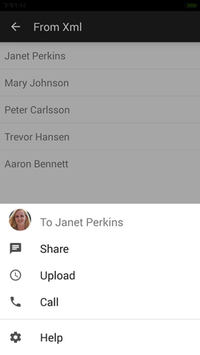
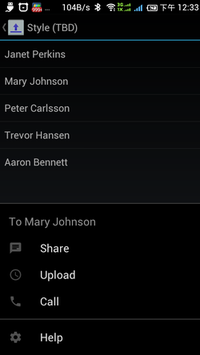
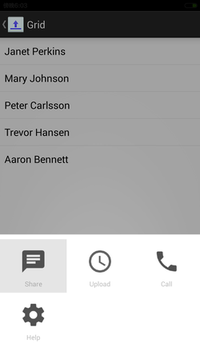
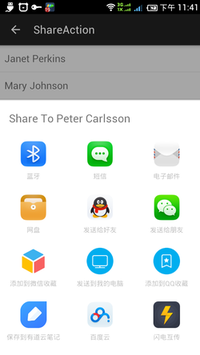
One way to present a set of actions to a user is with bottom sheets, a sheet of paper that slides up from the bottom edge of the screen. Bottom sheets offer flexibility in the display of clear and simple actions that do not need explanation.
https://www.google.com/design/spec/components/bottom-sheets.html
This library works on android 2.1+


How to use this library
=======
- Download this library, import to your IDE (eclipse...) as a library project.
- Using Gradle
```groovy
compile 'com.cocosw:bottomsheet:1.+@aar'
```
- Using Maven
```xml
com.cocosw
bottomsheet
1.x
apklib
```
- Compile you project with android sdk v21+
API
=======
- Define actions in menu xml (Tip: divider tag has been replaced by group tag from 1.1.0)
```xml
```
- Show it just like showing a dialog.
```java
new BottomSheet.Builder(this).title("title").sheet(R.menu.list).listener(new DialogInterface.OnClickListener() {
@Override
public void onClick(DialogInterface dialog, int which) {
switch (which) {
case R.id.help:
q.toast("Help me!");
break;
}
}
}).show();
```
- You can also add action items in builder.
Action items manipulate
========
You can get a menu object from bottomsheet instance from 1.1.0, and change it as you want, exactly like you're manipulating an android menu or actionbar actionitems.
Please be aware that if you change the menu after showing the bottomsheet, you must call invalidate(), or no changes will be applied and your app might crash.
Please check example application for more info.
Style
========
- Invoke darkTheme() to show the built-in dark theme
- Or define your style in your application, and call bottomsheet by using new BottomSheet.Builder(this,R.style.BottomSheet_StyleDialog)....
```xml
```
- Or set bottomesheet style in your activity theme
```xml
```
Contribute
=======
- Feel free to fork it
About me
=======
I'm Kai, an 32 years old android developer based in Sydney.
License
=======
Copyright 2011, 2015 Kai Liao
Licensed under the Apache License, Version 2.0 (the "License");
you may not use this file except in compliance with the License.
You may obtain a copy of the License at
http://www.apache.org/licenses/LICENSE-2.0
Unless required by applicable law or agreed to in writing, software
distributed under the License is distributed on an "AS IS" BASIS,
WITHOUT WARRANTIES OR CONDITIONS OF ANY KIND, either express or implied.
See the License for the specific language governing permissions and
limitations under the License.