# delay-redisson-spring-boot-starter
**Repository Path**: wangkunpeng/delay-redisson-spring-boot-starter
## Basic Information
- **Project Name**: delay-redisson-spring-boot-starter
- **Description**: 基于 redisson 和 kafka 实现一个延时队列
- **Primary Language**: Java
- **License**: Not specified
- **Default Branch**: master
- **Homepage**: None
- **GVP Project**: No
## Statistics
- **Stars**: 0
- **Forks**: 18
- **Created**: 2023-02-21
- **Last Updated**: 2023-02-21
## Categories & Tags
**Categories**: Uncategorized
**Tags**: None
## README
我报名参加金石计划1期挑战——瓜分10万奖池,这是我的第2篇文章,[点击查看活动详情](https://s.juejin.cn/ds/jooSN7t "https://s.juejin.cn/ds/jooSN7t")
## 背景
其实在工作中延迟任务的场景还是比较常见的,比如电商场景中:
- 用户下单30分钟未支付自动取消订单;
- 订单申请退款7天内未处理自动完成退款;
- 订单完成7天内自动结算;
- ....
我们最近业务中需要大量使用这种延时任务,因此不得不寻找延时任务的方案,虽然说网上延时任务的方案很多,但我感觉真正落地的而且比较简单的方案并不多见。
java延迟任务方案一般包括以下:
1. JDK 线程池或者Timer定时器;
2. DelayQueue,JDK 自带的延时队列;
3. 基于netty时间轮算法实现;
4. 基于 redis 的 zset 数据结构实现;
5. 基于消息队列 RabbitMQ 实现方案;
6. ....
### 延迟任务方案选择
在选择延迟任务方案时,排除了JDK 自带的方案,这些都是基于应用内存的,如果你的应用发个版本啥的,延迟消息就丢失,另外,对于消息队列是可以优先选择的,但是我们使用的消息队列是 Kafka ,而 Kafka本身是不具备延迟任务功能的,而且我们也不可能因为一个延迟任务而引入新的 RabbitMQ 消息中间件,因此,我把目光放在 redis 上面。
## 网上 kafka 延迟队列方案
其实在使用 redis 做延迟任务方案之前,在网上找到一个使用 kafka 设计延迟任务的方案
> 网上kafka实现延迟任务方案地址:https://github.com/Dewey-Ding/spring-learn
先来说说为啥我放弃了这种方案:
其实主要是这种方案满足不了我们现在的业务场景,先看以下代码:
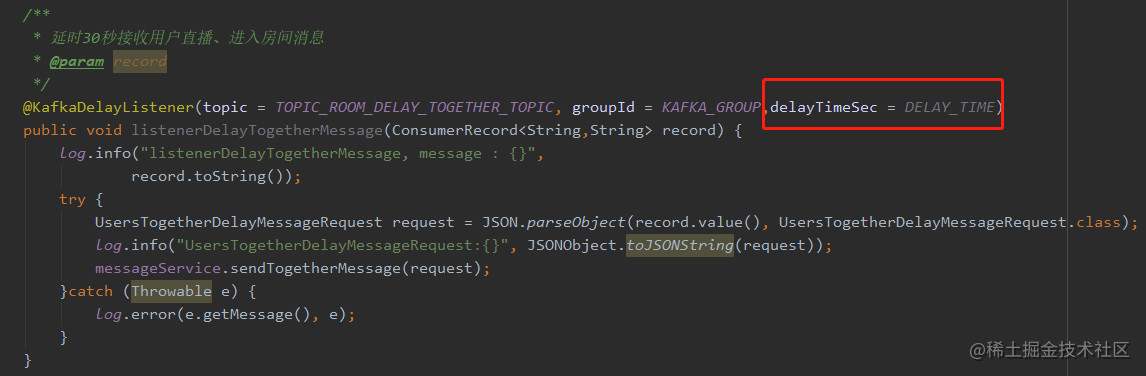
如图,对于使用 kafka 延迟方案,发送消息时和普通发 kafka 消息一样,只是在接收kafka消息时,使用了自定义注解,该注解有个属性:`delayTimeSec`(延迟多少时间),那就是说,这种延迟是固定的(固定在代码写死的),而我们的需求是延迟是可变化。(比如订单下单超时可以是30分钟,运营也可以调整为一个小时)
如果只是这点问题的话,那我在这个方案的基础上改一改源码,因为也能实现延迟可以变化,但是看了他的实现逻辑之后,我发现即使能实现延迟可以变化也不适合我这种场景。
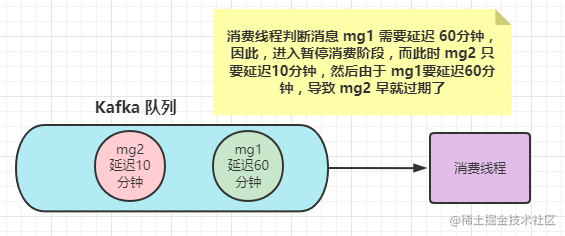
这个方式中,kafka 延迟消息是通过 `KafkaDelayConsumerThread`消费者线程来实现的。具体逻辑是:
1. 线程启动时订阅指定 topic,然后开始消费消息;
2. 当 kafka 队列中无可消费的延迟消息时,消费者进入 pause 状态,不再拉取指定队列的消息;
3. 等到 pauseTime 之后再回复消费。消息的延迟时间以及 pause 时间则是从注解参数中获取。
所以,我觉得这种方案会出现以下问题(具体我没验证过,只是看代码猜测会出现这样的问题)
## 基于 Redisson 和 kafka 的延迟队列设计方案
既然网上 kafka 延迟队列方案不满足我们业务场景,那只能自己搞一个延迟任务了。
由于 redis 基本上是每个项目必备的技术方案了,所以我把 延迟任务方案放在 redis上,其实 redis 有两种方案可以实现延迟任务:
- 基于 redis 键过期事件通知方案:
简单来说就是 redis 如果一个键过期了是可以通知到我们的(当然需要在redis上配置一下),我们接收到过期事件后处理自己的延时业务,比如:我创建一个订单时,把订单号作为键和值并设置过期时间是30分钟写入 redis ,那么这个key过期时会有回调通知我们服务,我们就可以拿到订单号(注意过期时只能拿到键)去检查是否支付了.....
但是这种方案也有缺点,就是它的过期通知是不稳定的(也就是说有可能我们不会收到redis的回调),而且如果redis的key很多时,会有延迟。
- 基于 redis 的 zset 数据结构
这种方案的原理网上也有很多就不啰嗦了
其实 redis 的客户端 Redisson 就实现了延时队列的方案,而且 API 很简单,不过我在 Redisson 的基础上,增加了 Kafka 组件,先来看看我的设计方案:
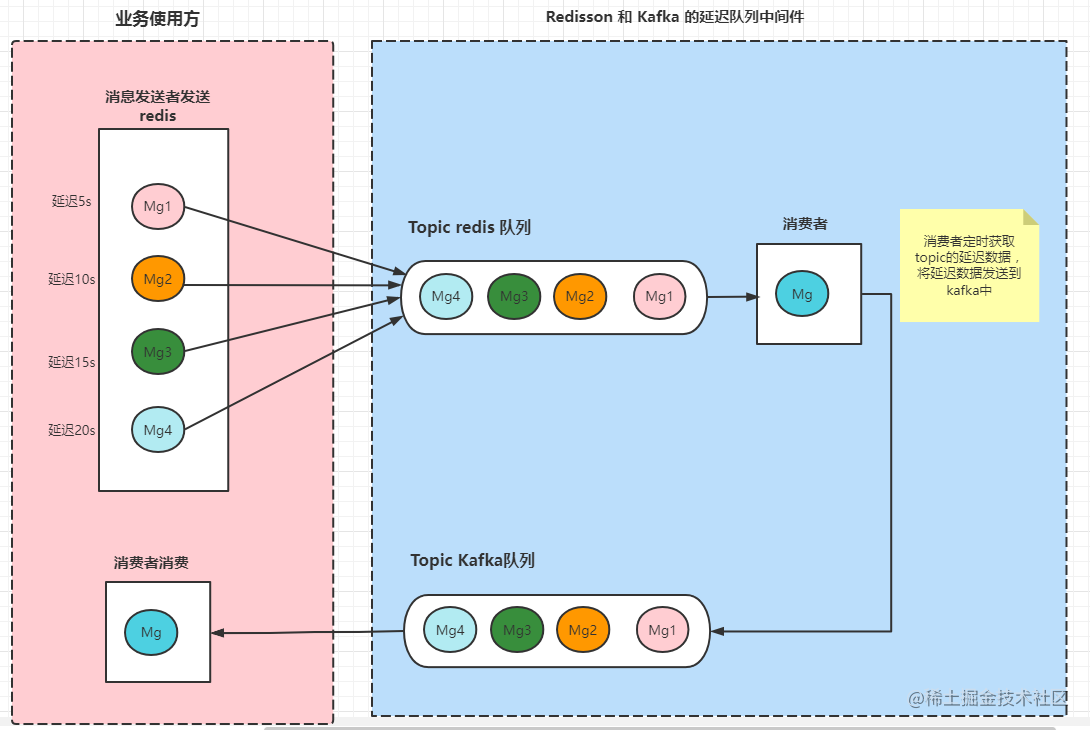
流程大概就是:业务使用方的消息发送者(比如订单创建后发送一个消息,订单超时30分钟未支付),消息发送者发送一个延迟消息到redis中,我们的延迟队列中间件启动消费者去redis消费过期消息,然后将消息重新投递到 kafka中,业务方消费者通过 Kafka 消费延迟消息。
疑问:
1. 为什么要接入 Kafka ? 延迟队列中间件的消费者消费到的消息就是延迟消息了直接给业务方消费不就行了?
对于这个问题,我后面再结合代码解答。
## 延迟队列落地代码
### 工程目录结构
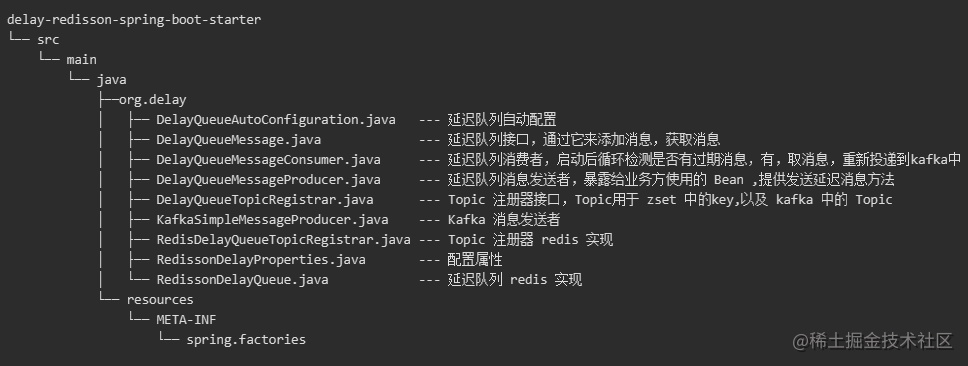
### 整体概论
延迟消息发送接收流程:
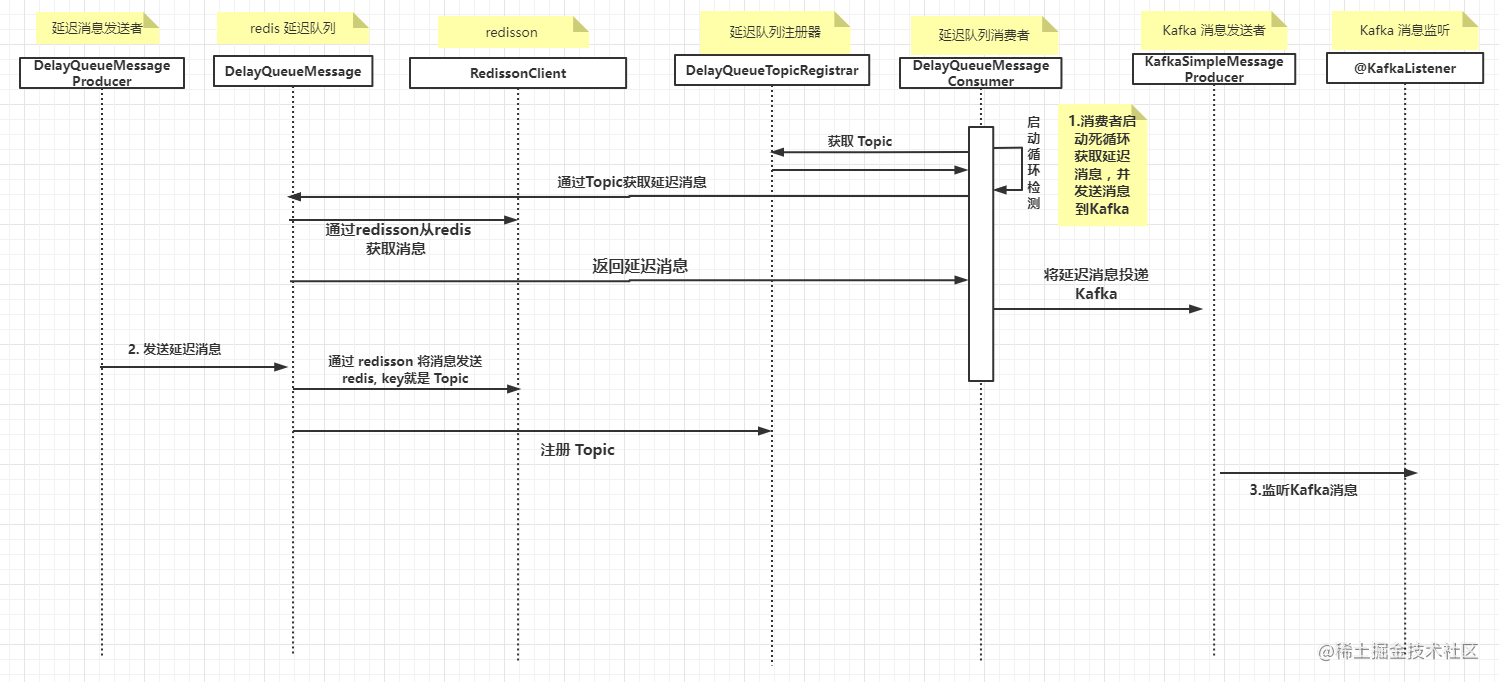
如上图流程:
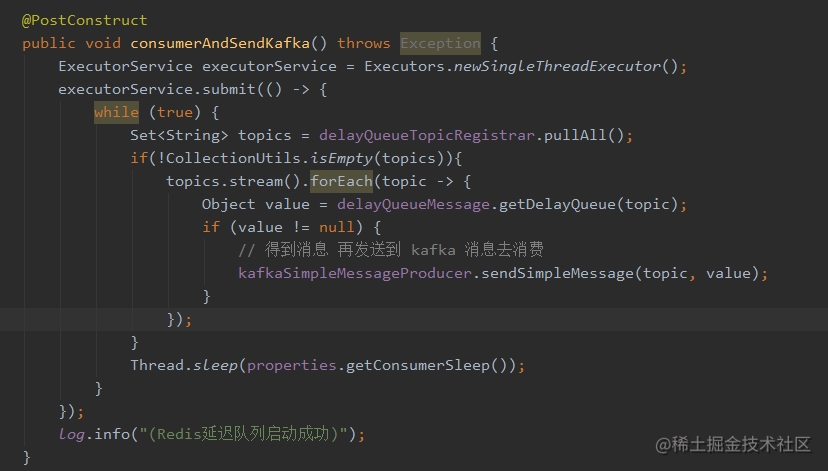
第一步:`DelayQueueMessageConsumer` 是一个Bean,在这个Bean创建后会执行下图方法,该方法就是启动一个线程轮询检测延迟队列里是否有消息,有消息的话就取出来发送到 Kafka 中;
第二步:使用 `DelayQueueMessageProducer` 这个Bean发送延迟消息,最终会借助 RedissonClient 发送到 redis 延迟队列中;
第三步:使用 Kafka 注解 `@KafkaListener` 监听消息;
### 如何使用
那怎么使用这个延迟队列呢?我将这个工具封装成一个 starter ,总结一下使用步骤:
1. 引入依赖(项目使用 Maven 构建)
```
org.delay.redisson
delay-redisson-spring-boot-starter
1.0.0-SNAPSHOT
```
2. 配置文件增加配置:
```yaml
delay:
redisson:
enable: true --- 打开延迟功能
registerService: order --- 注册服务,默认 other ,topic 存储在redis时分服务存储
consumerSleep: 500 --- 消费者轮询时睡眠时长,默认 500毫秒
```
3. 使用 `DelayQueueMessageProducer` 发延迟消息


4. 使用 Kafka 注解消费消息
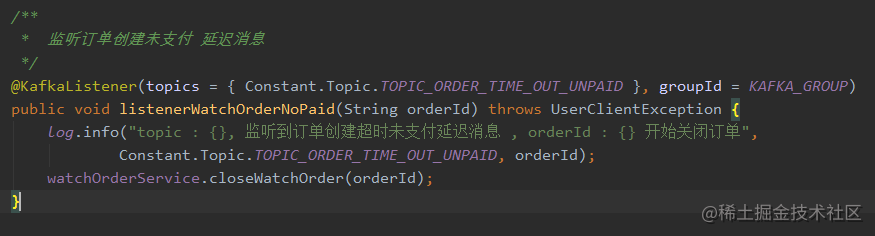
以上4步就可以啦
> 要注意的地方是,你需要有 redis 和 kafka的环境,也就是说你 spring 环境里需要有 `StringRedisTemplate`、`RedissonClient`、`KafkaTemplate` 这几个Bean
### 详细分析
首先来回答一下我上面的问题,也就是为啥要加 Kafka , 原因是首先我们系统接入了 Kafka(如果你们没有接入,我建议不要因为这个而接入 Kafka),其次就是使用 Kafka 消费消息,基本上完全屏蔽了延迟消息内在的东西,用户可以和使用 Kafka 一样的消费消息方式去消费延迟消息,屏蔽了消费者的复杂性;
另外,如果我的系统没有接入 Kafka 该如何使用这个延迟队列组件呢? 这个问题先看一下源码在分析。
#### DelayQueueAutoConfiguration
```java
/**
* @Classname DelayQueueAutoConfig
* @Description
* @Date 2022/9/14 10:20
* @Created by wangchangjiu
*/
@Configuration
@ConditionalOnProperty(name = "delay.redisson.enable", havingValue = "true")
public class DelayQueueAutoConfiguration {
@Bean
@ConditionalOnMissingBean(StringRedisTemplate.class)
@ConditionalOnBean({ RedisConnectionFactory.class })
public StringRedisTemplate stringRedisTemplate(@Autowired RedisConnectionFactory redisConnectionFactory) {
StringRedisTemplate template = new StringRedisTemplate();
template.setConnectionFactory(redisConnectionFactory);
return template;
}
@Bean
@ConditionalOnMissingBean(RedisConnectionFactory.class)
@ConditionalOnBean({ RedissonClient.class })
public RedissonConnectionFactory redissonConnectionFactory(@Autowired RedissonClient redisson) {
return new RedissonConnectionFactory(redisson);
}
@Bean
@ConditionalOnMissingBean(DelayQueueTopicRegistrar.class)
@ConditionalOnBean({ StringRedisTemplate.class, RedissonDelayProperties.class })
public DelayQueueTopicRegistrar delayQueueTopicRegistrar(@Autowired StringRedisTemplate stringRedisTemplate,
@Autowired RedissonDelayProperties properties){
return new RedisDelayQueueTopicRegistrar(stringRedisTemplate, properties.getRegisterService());
}
@Bean
@ConditionalOnMissingBean(DelayQueueMessage.class)
@ConditionalOnBean({ RedissonClient.class })
public DelayQueueMessage delayQueueMessage(@Autowired RedissonClient redisson){
return new RedissonDelayQueue(redisson);
}
@Bean
@ConditionalOnMissingBean(DelayQueueMessageProducer.class)
@ConditionalOnBean({ DelayQueueMessage.class, DelayQueueTopicRegistrar.class })
public DelayQueueMessageProducer delayQueueMessageProducer(@Autowired DelayQueueMessage delayQueueMessage,
@Autowired DelayQueueTopicRegistrar delayQueueTopicRegistrar){
return new DelayQueueMessageProducer(delayQueueMessage, delayQueueTopicRegistrar);
}
@Bean
@ConditionalOnMissingBean(KafkaSimpleMessageProducer.class)
@ConditionalOnBean({ KafkaTemplate.class })
public KafkaSimpleMessageProducer kafkaSimpleMessageProducer(@Autowired KafkaTemplate kafkaTemplate){
return new KafkaSimpleMessageProducer(kafkaTemplate);
}
@Bean
@ConditionalOnMissingBean(DelayQueueMessageConsumer.class)
@ConditionalOnBean({ DelayQueueMessage.class, DelayQueueTopicRegistrar.class, KafkaSimpleMessageProducer.class })
public DelayQueueMessageConsumer delayQueueMessageConsumer(@Autowired DelayQueueMessage delayQueueMessage,
@Autowired DelayQueueTopicRegistrar delayQueueTopicRegistrar,
@Autowired KafkaSimpleMessageProducer kafkaSimpleMessageProducer,
@Autowired RedissonDelayProperties properties){
return new KafkaDelayQueueMessageConsumer(delayQueueMessage, delayQueueTopicRegistrar, kafkaSimpleMessageProducer, properties);
}
}
```
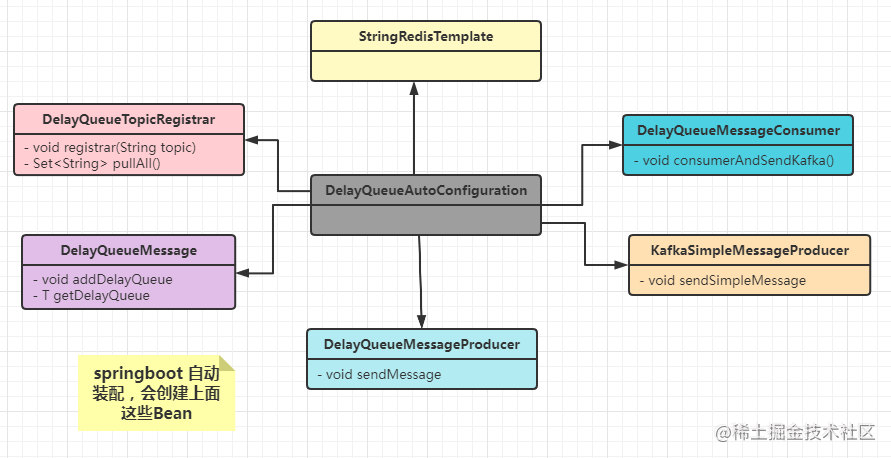
自动装配这个 Bean 中创建了延迟队列工作的各个 Bean,由于springboot 自动装配特性,这个配置类会在启动容器的时候加载。
#### 自己的项目不接入 Kafka 如何使用?
对于这个问题,如果我的项目中没有接入 Kafka ,我怎么使用这个延迟队列呢? 这就是一个扩展性的问题了,我这里都是面向接口编程,所以说,可以很方便替换掉实现的Bean,实现自己的逻辑。
由于spring的按条件创建 Bean 规则,如下图,你可以自己定义一个消费者 Bean;

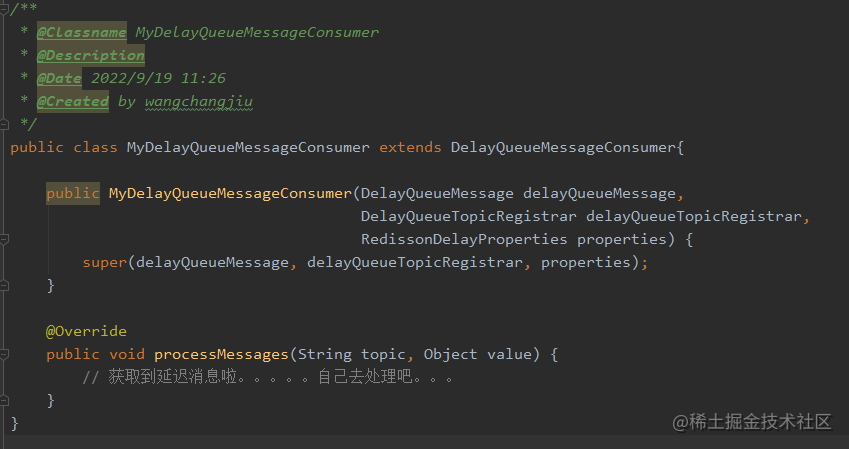
那就需要自己实现一个消费者了,也就是说自己创建一个类去继承 `DelayQueueMessageConsumer` 抽象类,实现 `processMessages` 方法,然后把这个类注入到 spring 容器中,就可以通过 `processMessages` 方法获取到延迟的消息了。

#### DelayQueueMessageProducer
`DelayQueueMessageProducer`是暴露给用户使用的延迟消息发送者 Bean,这个类其实也没什么具体功能,它其实是调用 `DelayQueueMessage` 去添加延迟任务的,通过 `DelayQueueTopicRegistrar` 去注册 topic ;
所以这个Bean一般不需要自定义实现,因为它不涉及具体逻辑
```java
/**
* @Classname DelayQueueMessageProducer
* @Description 延迟队列生产者
* @Date 2022/9/14 10:12
* @Created by wangchangjiu
*/
@Slf4j
public class DelayQueueMessageProducer {
private DelayQueueMessage delayQueueMessage;
private DelayQueueTopicRegistrar delayQueueTopicRegistrar;
public DelayQueueMessageProducer(DelayQueueMessage delayQueueMessage, DelayQueueTopicRegistrar delayQueueTopicRegistrar){
this.delayQueueMessage = delayQueueMessage;
this.delayQueueTopicRegistrar = delayQueueTopicRegistrar;
}
public void sendMessage(String topic, T jsonSerializableObject, long delay, TimeUnit timeUnit) {
delayQueueMessage.addDelayQueue(jsonSerializableObject, delay, timeUnit, topic);
log.info("添加消息:{} 进入 topic :{} 延迟队列,delay:{} ,timeUnit:{}", JSON.toJSONString(jsonSerializableObject), topic, delay, timeUnit);
delayQueueTopicRegistrar.registrar(topic);
}
}
```
#### DelayQueueMessage
`DelayQueueMessage` 是一个接口,定义添加任务到延迟队列和获取任务到延迟队列方法
```java
/**
* @Classname DelayQueueMessage
* @Description
* @Date 2022/9/14 10:15
* @Created by wangchangjiu
*/
public interface DelayQueueMessage {
void addDelayQueue(T value, long delay, TimeUnit timeUnit, String queueCode);
T getDelayQueue(String queueCode);
}
```
默认实现是 `RedissonDelayQueue`,也就是通过 Redisson 方案来实现的延迟队列
```java
/**
* @Classname RedissonDelayQueue
* @Description Redisson 延迟队列
* @Date 2022/9/14 10:00
* @Created by wangchangjiu
*/
@Slf4j
public class RedissonDelayQueue implements DelayQueueMessage {
private RedissonClient redissonClient;
public RedissonDelayQueue(RedissonClient redissonClient) {
this.redissonClient = redissonClient;
}
/**
* 添加延迟队列
*
* @param value 队列值
* @param delay 延迟时间
* @param timeUnit 时间单位
* @param queueCode 队列键
* @param
*/
@Override
public void addDelayQueue(T value, long delay, TimeUnit timeUnit, String queueCode) {
try {
RBlockingDeque