# Intervo
**Repository Path**: wfj404/Intervo
## Basic Information
- **Project Name**: Intervo
- **Description**: No description available
- **Primary Language**: Unknown
- **License**: MIT
- **Default Branch**: main
- **Homepage**: None
- **GVP Project**: No
## Statistics
- **Stars**: 0
- **Forks**: 0
- **Created**: 2026-04-08
- **Last Updated**: 2026-04-08
## Categories & Tags
**Categories**: Uncategorized
**Tags**: None
## README

Open-Source Conversational AI Platform
Build, deploy, and manage advanced, goal-oriented AI agents for both voice and chat.
Website ·
Documentation ·
Join our Discord Community ·
Report a Bug
---
**Intervo.ai** is an open-source platform for creating sophisticated AI-powered voice and chat agents. Move beyond simple Q&A bots and design complex, multi-step conversational workflows that can understand user intent, perform tasks, and integrate with your existing systems.
This repository contains the full source code for the Intervo.ai platform, allowing you to self-host, customize, and extend its capabilities. Whether you're building a 24/7 customer support line, a proactive lead qualification agent, or an intelligent website assistant, Intervo.ai provides the tools to do it.
Intervo.ai is proudly developed by the team at [**Codedesign.ai**](https://codedesign.ai).
## ✨ Core Features
- 📞 **Multimodal AI Agents**: Create intelligent agents that can seamlessly handle both real-time **voice calls** and text-based **web chat**.
- 🎛️ **Advanced Workflow Canvas**: Visually design complex conversation flows using a node-based editor. Route users based on intent, and orchestrate a team of specialized "sub-agents" to handle different tasks (e.g., greetings, data collection, support).
- 🧠 **Goal-Oriented Dialogues**: Define specific goals for your sub-agents (e.g., "collect user's email") and make them required, ensuring the agent completes its task before moving on.
- 📚 **Powerful RAG Knowledge Base**: Train agents on your private data. Ingest content by uploading **files** (`pdf`, `docx`, `txt`), crawling **websites**, adding raw **text**, or creating structured **FAQs**. Powered by vector search with ChromaDB.
- 🔌 **Native Telephony & API**: Deep integration with **Twilio** for inbound/outbound calls and a **REST API** to programmatically trigger outbound calls.
- 🎙️ **Multi-Provider Speech Services**: Freedom to choose the best-in-class services, with support for Google Speech-to-Text, Deepgram, and AssemblyAI.
- 🗣️ **Advanced Text-to-Speech**: Integrated with high-quality voices from Google TTS, AWS Polly, Microsoft Speech, and ElevenLabs.
- 🔗 **Flexible LLM Integration**: Powered by LangChain, allowing you to connect to OpenAI, Groq, Google Gemini, Anthropic, and other LLM providers.
- 🎨 **Embeddable Web Widget**: A customizable React-based widget for easy integration into any website.
- 💳 **Stripe Integration**: Built-in billing and subscription management for commercial deployments.
## 🚀 Quick Start (Docker)
Get up and running in minutes using Docker.
### Prerequisites
- [Docker](https://docker.com) & Docker Compose
- [Git](https://git-scm.com)
- [FFmpeg](https://ffmpeg.org) (for audio processing)
### Installation
1. **Clone the Repository**
```bash
git clone [https://github.com/Intervo/Intervo.git](https://github.com/Intervo/Intervo.git)
cd Intervo
```
2. **Configure Environment Variables**
Before starting, you must create a `.env` file in the `packages/intervo-backend/` directory. You can copy the example file to get started:
```bash
cp packages/intervo-backend/.env.example packages/intervo-backend/.env
```
Now, edit `packages/intervo-backend/.env` and add your necessary API keys (at a minimum, you'll need `MONGO_URI` and `JWT_SECRET`). See the full Configuration section below for all options.
3. **Start with Docker Compose**
```bash
# Start all services in the background
docker-compose up -d
# To view live logs from all services
docker-compose logs -f
```
4. **Access the Application**
- **Frontend**: `http://localhost:3000`
- **Backend API**: `http://localhost:3001`
- **RAG API**: `http://localhost:4003`
---
## 🛠️ Local Development Setup (Without Docker)
For more direct control during development.
1. **Install Dependencies**
```bash
npm install --legacy-peer-deps
```
2. **Setup Environment**
Create and fill out your `.env` file in `packages/intervo-backend/` as described in the Docker setup.
3. **Start Development Servers**
```bash
# Terminal 1: Start the backend
npm run dev --workspace=intervo-backend
# Terminal 2: Start the frontend
npm run dev --workspace=intervo-frontend
```
> Note: For this setup, you will need to run your own instance of MongoDB and configure the `MONGO_URI` accordingly.
---
## 🔧 Configuration (`packages/intervo-backend/.env`)
Configure your services by setting these environment variables.
```env
# General
MONGO_URI=mongodb://admin:password123@mongodb:27017/intervo?authSource=admin
JWT_SECRET=your-super-secret-jwt-key-that-is-long
# AI Providers (add keys for the ones you use)
OPENAI_API_KEY=
GROQ_API_KEY=
GOOGLE_API_KEY=
# Speech-to-Text Services
DEEPGRAM_API_KEY=
ASSEMBLYAI_API_KEY=
# For Google STT, provide credentials via a JSON file
# GOOGLE_APPLICATION_CREDENTIALS=path/to/google-credentials.json
# Text-to-Speech Services
AWS_ACCESS_KEY_ID=
AWS_SECRET_ACCESS_KEY=
AZURE_SPEECH_KEY=
AZURE_SPEECH_REGION=
# Twilio (required for all phone functionality)
TWILIO_ACCOUNT_SID=
TWILIO_AUTH_TOKEN=
# Stripe (for billing features)
STRIPE_SECRET_KEY=
STRIPE_WEBHOOK_SECRET=
# Object Storage (e.g., for call recordings)
# Example using a Hetzner S3-compatible bucket
HETZNER_STORAGE_ACCESS_KEY_ID=
HETZNER_STORAGE_SECRET_ACCESS_KEY=
HETZNER_STORAGE_ENDPOINT=
HETZNER_STORAGE_BUCKET=
```
## 🗺️ Roadmap
We have an ambitious vision for Intervo.ai. Here’s what we're focused on next:
### Phase 1: Foundation & Stability (Current Focus)
- [ ] **Comprehensive Documentation**: Creating detailed guides for every feature at [docs.intervo.ai](https://docs.intervo.ai).
- [ ] **Simplified Setup**: Improving the Docker and local setup experience with better scripts and error handling.
- [ ] **Test Coverage**: Increasing unit and integration test coverage across the backend and frontend.
### Phase 2: Agent & Communication Upgrade
- [ ] **Agentic Tools & Functions**: Allowing agents in the workflow to use external APIs (e.g., check weather, book appointments, search databases).
- [ ] **WebRTC Integration**: Introducing direct browser-to-browser voice calls via the web widget, reducing reliance on Twilio for web channels.
- [ ] **Enhanced Webhook System**: Expanding the number of trigger events and providing richer data payloads for deeper integrations.
- [ ] **Mobile SDKs (iOS/Android)**: Releasing native SDKs to embed Intervo.ai agents into mobile applications.
### Phase 3: Intelligence & Expansion
- [ ] **Advanced Analytics Dashboard**: Providing deep insights into conversation funnels, intent recognition accuracy, and user engagement.
- [ ] **Multi-language Support**: Full i18n for the dashboard and improved handling of multiple languages by agents.
- [ ] **Plugin & Integration Marketplace**: Creating a formal architecture for community and third-party plugins.
### Phase 4: Scale & Enterprise
- [ ] **Kubernetes & Helm Charts**: Providing official support for production-ready, scalable deployments.
- [ ] **Performance Optimization**: Deep-diving into response times and resource utilization for large-scale use.
- [ ] **Enterprise-Grade Security**: Adding features like SSO, advanced role-based access control (RBAC), and audit logs.
---
## 🤝 Contributing
We welcome contributions of all kinds! Please see our [Contributing Guide](CONTRIBUTING.md) and our development process. We use a feature-branch workflow.
## 👥 Core Contributors
A huge thank you to the core team driving this project forward:

|
Manjunath M
Project Lead & Backend
|

|
Hakhil Nizeem
Frontend & UI/UX
|

|
Rahul
Frontend Dev
|

|
Amar
Community
|

|
Geethu Sebastian
Backend Dev
|

|
Vasanth
Frontend & Backend
|
## 📄 License
This project is licensed under the MIT License. See the [LICENSE](LICENSE) file for details.
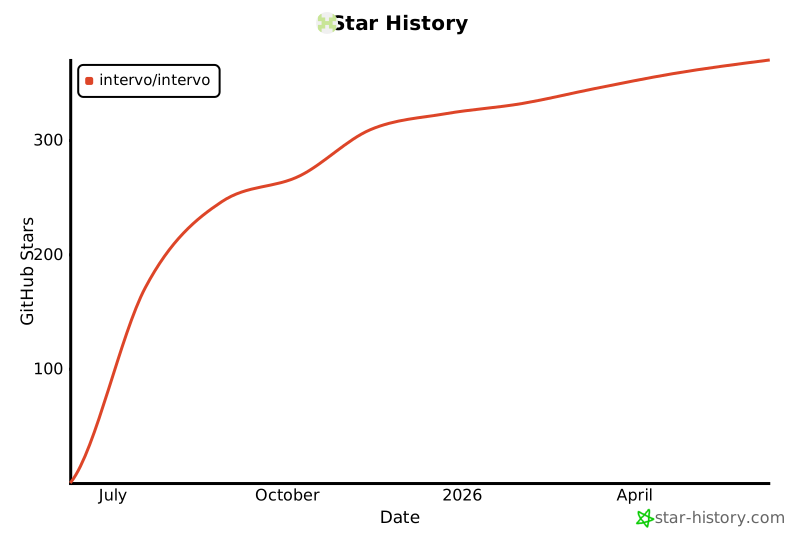
## 🌟 Star History
[](https://star-history.com/#Intervo/Intervo&Date)