# stripe-android
**Repository Path**: zowork_admin/stripe-android
## Basic Information
- **Project Name**: stripe-android
- **Description**: mirror
- **Primary Language**: Unknown
- **License**: MIT
- **Default Branch**: master
- **Homepage**: None
- **GVP Project**: No
## Statistics
- **Stars**: 0
- **Forks**: 0
- **Created**: 2019-10-12
- **Last Updated**: 2020-12-19
## Categories & Tags
**Categories**: Uncategorized
**Tags**: None
## README
[ ](https://stripe.com/docs/mobile/android)
# Stripe Android SDK
[](https://travis-ci.org/stripe/stripe-android)
[](https://github.com/stripe/stripe-android/releases)
The Stripe Android SDK makes it quick and easy to build an excellent payment experience in your Android app. We provide powerful and customizable UI elements that can be used out-of-the-box to collect your users' payment details. We also expose the low-level APIs that power those UIs so that you can build fully custom experiences. See our [Android Integration Guide](https://stripe.com/docs/mobile/android) to get started!
> If you are building an Android application that charges a credit card, you should use the Stripe Android SDK to make sure you don't pass credit card information to your server (and, so, are PCI compliant).
## Installation
### Requirements
* Android 4.4 (API level 19) and above
* [Android Gradle Plugin](https://developer.android.com/studio/releases/gradle-plugin) 3.5.1
* [Gradle](https://gradle.org/releases/) 5.4.1+
* [AndroidX](https://developer.android.com/jetpack/androidx/) (as of v11.0.0)
### Configuration
Add `stripe-android` to your `build.gradle` dependencies.
```
dependencies {
implementation 'com.stripe:stripe-android:11.2.2'
}
```
### Releases
* The [changelog](CHANGELOG.md) provides a summary of changes in each release.
* The [migration guide](MIGRATING.md) provides instructions on upgrading from older versions.
### Proguard
The Stripe Android SDK will configure your app's Proguard rules using [proguard-rules.txt](stripe/proguard-rules.txt).
## Usage
### Getting Started
The `Stripe` class is the entry-point to the Stripe SDK. It must be instantiated with a [Stripe publishable key](https://stripe.com/docs/keys).
When testing, you can use a test publishable key. Remember to replace the test key with your live key in production. You can view your API keys in the [Stripe Dashboard](https://dashboard.stripe.com/apikeys).
```java
new Stripe(context, "pk_test_yourkey");
```
### Using CardInputWidget
](https://stripe.com/docs/mobile/android)
# Stripe Android SDK
[](https://travis-ci.org/stripe/stripe-android)
[](https://github.com/stripe/stripe-android/releases)
The Stripe Android SDK makes it quick and easy to build an excellent payment experience in your Android app. We provide powerful and customizable UI elements that can be used out-of-the-box to collect your users' payment details. We also expose the low-level APIs that power those UIs so that you can build fully custom experiences. See our [Android Integration Guide](https://stripe.com/docs/mobile/android) to get started!
> If you are building an Android application that charges a credit card, you should use the Stripe Android SDK to make sure you don't pass credit card information to your server (and, so, are PCI compliant).
## Installation
### Requirements
* Android 4.4 (API level 19) and above
* [Android Gradle Plugin](https://developer.android.com/studio/releases/gradle-plugin) 3.5.1
* [Gradle](https://gradle.org/releases/) 5.4.1+
* [AndroidX](https://developer.android.com/jetpack/androidx/) (as of v11.0.0)
### Configuration
Add `stripe-android` to your `build.gradle` dependencies.
```
dependencies {
implementation 'com.stripe:stripe-android:11.2.2'
}
```
### Releases
* The [changelog](CHANGELOG.md) provides a summary of changes in each release.
* The [migration guide](MIGRATING.md) provides instructions on upgrading from older versions.
### Proguard
The Stripe Android SDK will configure your app's Proguard rules using [proguard-rules.txt](stripe/proguard-rules.txt).
## Usage
### Getting Started
The `Stripe` class is the entry-point to the Stripe SDK. It must be instantiated with a [Stripe publishable key](https://stripe.com/docs/keys).
When testing, you can use a test publishable key. Remember to replace the test key with your live key in production. You can view your API keys in the [Stripe Dashboard](https://dashboard.stripe.com/apikeys).
```java
new Stripe(context, "pk_test_yourkey");
```
### Using CardInputWidget
 You can add a single-line widget to your apps that easily handles the UI states for collecting card data.
First, add the `CardInputWidget` to your layout.
```xml
```
Note: The minimum width for this widget is 320dp. The widget also requires an ID to ensure proper layout on rotation, so if you don't do this, an ID is assigned when the object is instantiated.
If the customer's input is valid, [CardInputWidget#getCard()](https://stripe.dev/stripe-android/com/stripe/android/view/CardInputWidget.html#getCard--) will return a [Card](https://stripe.dev/stripe-android/com/stripe/android/model/Card.html) instance; otherwise, it will return `null`.
```java
final Card cardToSave = cardInputWidget.getCard();
if (cardToSave == null) {
mErrorDialogHandler.showError("Invalid Card Data");
return;
}
```
### Using CardMultilineWidget
You can add a single-line widget to your apps that easily handles the UI states for collecting card data.
First, add the `CardInputWidget` to your layout.
```xml
```
Note: The minimum width for this widget is 320dp. The widget also requires an ID to ensure proper layout on rotation, so if you don't do this, an ID is assigned when the object is instantiated.
If the customer's input is valid, [CardInputWidget#getCard()](https://stripe.dev/stripe-android/com/stripe/android/view/CardInputWidget.html#getCard--) will return a [Card](https://stripe.dev/stripe-android/com/stripe/android/model/Card.html) instance; otherwise, it will return `null`.
```java
final Card cardToSave = cardInputWidget.getCard();
if (cardToSave == null) {
mErrorDialogHandler.showError("Invalid Card Data");
return;
}
```
### Using CardMultilineWidget
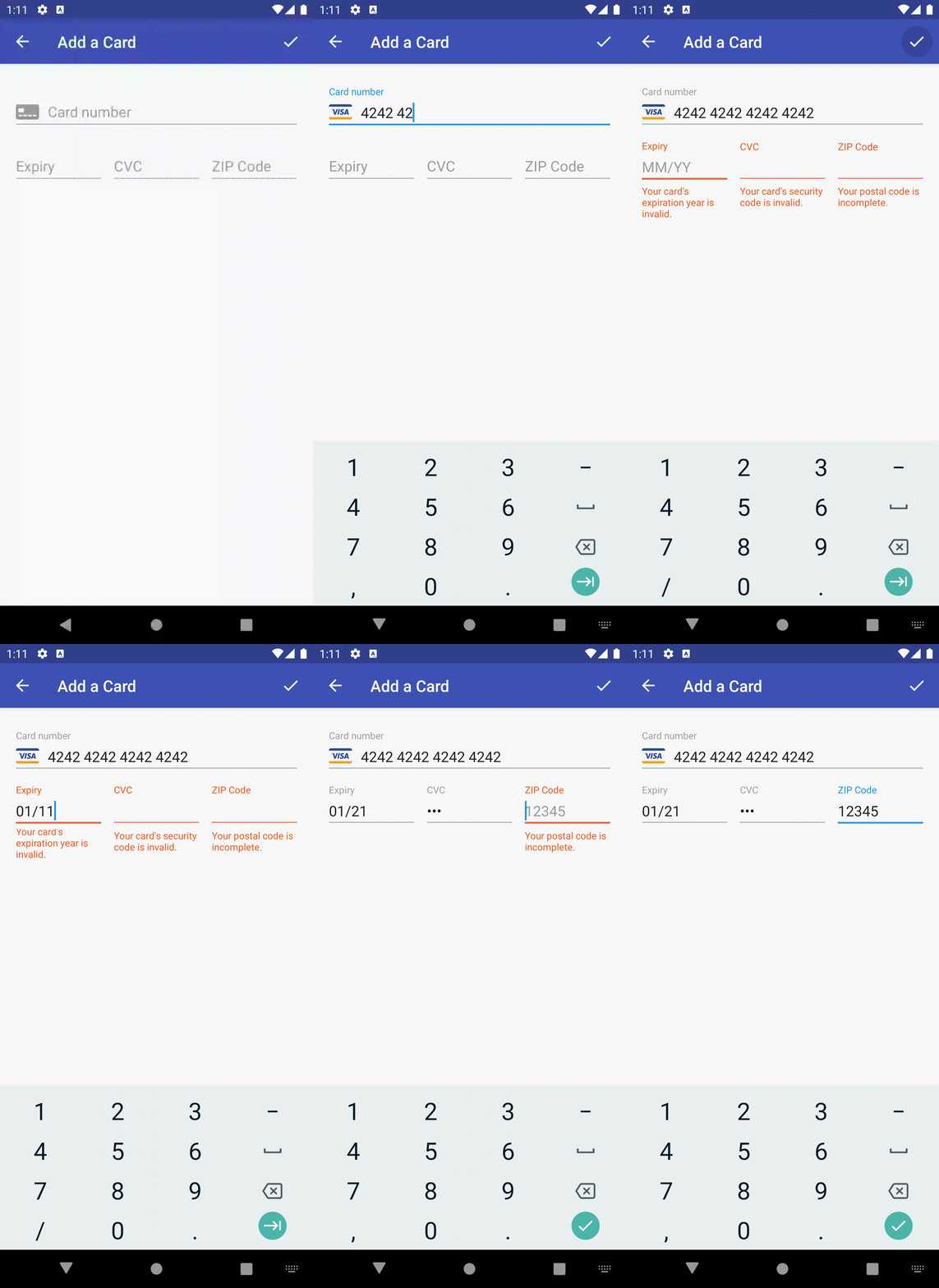 You can add a Material-style multiline widget to your apps that handles card data collection as well. This can be added in a layout similar to the `CardInputWidget`.
```xml
```
Note: A `CardMultilineWidget` can only be added in the view of an `Activity` whose `Theme` descends from an `AppCompat` theme.
In order to use the `app:shouldShowPostalCode` tag, you'll need to enable the app XML namespace somewhere in the layout.
Note: We currently only support US ZIP in the postal code field.
```xml
xmlns:app="http://schemas.android.com/apk/res-auto"
```
If the customer's input is valid, [CardMultilineWidget#getCard()](https://stripe.dev/stripe-android/com/stripe/android/view/CardMultilineWidget.html#getCard--) will return a [Card](https://stripe.dev/stripe-android/com/stripe/android/model/Card.html) instance; otherwise, it will return `null`.
```java
final Card cardToSave = cardMultilineWidget.getCard();
if (cardToSave == null) {
mErrorDialogHandler.showError("Invalid Card Data");
return;
}
```
If the returned `Card` is `null`, error states will show on the fields that need to be fixed.
Once you have a non-null `Card` object from either widget, you can call [Stripe#createToken()](#using-createtoken).
### Creating Card Tokens
[Stripe#createToken()](https://stripe.dev/stripe-android/com/stripe/android/Stripe.html#createToken-com.stripe.android.model.Card-com.stripe.android.TokenCallback-) makes an asynchronous call to Stripe's [Tokens API](https://stripe.com/docs/api/tokens/create_card) that converts sensitive card data into a single-use token which you can safely pass to your server to charge the user. The [Collecting Card Details on Android](https://stripe.com/docs/payments/cards/collecting/android) explains this flow in more detail.
```java
stripe.createToken(
new Card("4242424242424242", 12, 2013, "123"),
tokenCallback
);
```
The first argument to `createToken()` is a `Card` object. A `Card` contains the following fields:
+ `number`: Card number as a string without any separators, e.g. `4242424242424242`.
+ `expMonth`: Integer representing the card's expiration month, e.g. `12`.
+ `expYear`: Integer representing the card's expiration year, e.g. `2013`.
The following field is optional but recommended to help prevent fraud:
+ `cvc`: Card security code as a string, e.g. `123`.
The following fields are entirely optional — they cannot result in a token creation failing:
+ `name`: Cardholder name.
+ `addressLine1`: Billing address line 1.
+ `addressLine2`: Billing address line 2.
+ `addressCity`: Billing address city.
+ `addressState`: Billing address state.
+ `addressZip`: Billing zip as a string, e.g. `94301`.
+ `addressCountry`: Billing address country.
The second argument `tokenCallback` is a callback you provide to handle responses from Stripe.
It should send the token to your server for processing `onSuccess()`, and notify the user `onError()`.
Here's a sample implementation of the token callback:
```java
stripe.createToken(
card,
new ApiResultCallback() {
public void onSuccess(Token token) {
// Send token to your own web service
MyServer.chargeToken(token);
}
public void onError(Exception error) {
Toast.makeText(getContext(),
error.getLocalizedMessage(),
Toast.LENGTH_LONG).show();
}
}
);
```
### Creating Card Tokens synchronously
[Stripe#createTokenSynchronous()](https://stripe.dev/stripe-android/com/stripe/android/Stripe.html#createTokenSynchronous-com.stripe.android.model.Card-) allows you to handle threading on your own, using any IO framework you choose.
Note: Do not call this method on the main thread or your app will crash.
#### RxJava Example
```kotlin
val tokenObservable = Observable.fromCallable {
mStripe.createTokenSynchronous(cardToSave)!!
}
tokenObservable
.subscribeOn(Schedulers.io())
.observeOn(AndroidSchedulers.mainThread())
.subscribe(
{ token -> ... },
{ throwable -> ... }
)
```
### Client-side Card Validation
The [Card](https://stripe.dev/stripe-android/com/stripe/android/model/Card.html) object allows you to validate user input before you send the information to the Stripe API.
- [Card#validateNumber()](https://stripe.dev/stripe-android/com/stripe/android/model/Card.html#validateNumber--) - Checks that the number is formatted correctly and passes the [Luhn check](http://en.wikipedia.org/wiki/Luhn_algorithm).
- [Card#validateExpiryDate()](https://stripe.dev/stripe-android/com/stripe/android/model/Card.html#validateExpiryDate--) - Checks whether or not the expiration date represents an actual month in the future.
- [Card#validateCVC()](https://stripe.dev/stripe-android/com/stripe/android/model/Card.html#validateCVC--) - Checks whether or not the supplied number could be a valid verification code.
- [Card#validateCard()](https://stripe.dev/stripe-android/com/stripe/android/model/Card.html#validateCard--) - Convenience method to validate card number, expiry date and CVC.
## Apps
- The [stripe-samples/sample-store-android](https://github.com/stripe-samples/sample-store-android) repo demonstrates a complete integration with the Stripe Android SDK.
- The [example project](https://github.com/stripe/stripe-android/tree/master/example) demonstrates using our API bindings and UI components, including how to create Tokens, Sources, and Payment Methods; how to use the Stripe class's synchronous and asynchronous methods; and how to use the CardInputWidget.
You can add a Material-style multiline widget to your apps that handles card data collection as well. This can be added in a layout similar to the `CardInputWidget`.
```xml
```
Note: A `CardMultilineWidget` can only be added in the view of an `Activity` whose `Theme` descends from an `AppCompat` theme.
In order to use the `app:shouldShowPostalCode` tag, you'll need to enable the app XML namespace somewhere in the layout.
Note: We currently only support US ZIP in the postal code field.
```xml
xmlns:app="http://schemas.android.com/apk/res-auto"
```
If the customer's input is valid, [CardMultilineWidget#getCard()](https://stripe.dev/stripe-android/com/stripe/android/view/CardMultilineWidget.html#getCard--) will return a [Card](https://stripe.dev/stripe-android/com/stripe/android/model/Card.html) instance; otherwise, it will return `null`.
```java
final Card cardToSave = cardMultilineWidget.getCard();
if (cardToSave == null) {
mErrorDialogHandler.showError("Invalid Card Data");
return;
}
```
If the returned `Card` is `null`, error states will show on the fields that need to be fixed.
Once you have a non-null `Card` object from either widget, you can call [Stripe#createToken()](#using-createtoken).
### Creating Card Tokens
[Stripe#createToken()](https://stripe.dev/stripe-android/com/stripe/android/Stripe.html#createToken-com.stripe.android.model.Card-com.stripe.android.TokenCallback-) makes an asynchronous call to Stripe's [Tokens API](https://stripe.com/docs/api/tokens/create_card) that converts sensitive card data into a single-use token which you can safely pass to your server to charge the user. The [Collecting Card Details on Android](https://stripe.com/docs/payments/cards/collecting/android) explains this flow in more detail.
```java
stripe.createToken(
new Card("4242424242424242", 12, 2013, "123"),
tokenCallback
);
```
The first argument to `createToken()` is a `Card` object. A `Card` contains the following fields:
+ `number`: Card number as a string without any separators, e.g. `4242424242424242`.
+ `expMonth`: Integer representing the card's expiration month, e.g. `12`.
+ `expYear`: Integer representing the card's expiration year, e.g. `2013`.
The following field is optional but recommended to help prevent fraud:
+ `cvc`: Card security code as a string, e.g. `123`.
The following fields are entirely optional — they cannot result in a token creation failing:
+ `name`: Cardholder name.
+ `addressLine1`: Billing address line 1.
+ `addressLine2`: Billing address line 2.
+ `addressCity`: Billing address city.
+ `addressState`: Billing address state.
+ `addressZip`: Billing zip as a string, e.g. `94301`.
+ `addressCountry`: Billing address country.
The second argument `tokenCallback` is a callback you provide to handle responses from Stripe.
It should send the token to your server for processing `onSuccess()`, and notify the user `onError()`.
Here's a sample implementation of the token callback:
```java
stripe.createToken(
card,
new ApiResultCallback() {
public void onSuccess(Token token) {
// Send token to your own web service
MyServer.chargeToken(token);
}
public void onError(Exception error) {
Toast.makeText(getContext(),
error.getLocalizedMessage(),
Toast.LENGTH_LONG).show();
}
}
);
```
### Creating Card Tokens synchronously
[Stripe#createTokenSynchronous()](https://stripe.dev/stripe-android/com/stripe/android/Stripe.html#createTokenSynchronous-com.stripe.android.model.Card-) allows you to handle threading on your own, using any IO framework you choose.
Note: Do not call this method on the main thread or your app will crash.
#### RxJava Example
```kotlin
val tokenObservable = Observable.fromCallable {
mStripe.createTokenSynchronous(cardToSave)!!
}
tokenObservable
.subscribeOn(Schedulers.io())
.observeOn(AndroidSchedulers.mainThread())
.subscribe(
{ token -> ... },
{ throwable -> ... }
)
```
### Client-side Card Validation
The [Card](https://stripe.dev/stripe-android/com/stripe/android/model/Card.html) object allows you to validate user input before you send the information to the Stripe API.
- [Card#validateNumber()](https://stripe.dev/stripe-android/com/stripe/android/model/Card.html#validateNumber--) - Checks that the number is formatted correctly and passes the [Luhn check](http://en.wikipedia.org/wiki/Luhn_algorithm).
- [Card#validateExpiryDate()](https://stripe.dev/stripe-android/com/stripe/android/model/Card.html#validateExpiryDate--) - Checks whether or not the expiration date represents an actual month in the future.
- [Card#validateCVC()](https://stripe.dev/stripe-android/com/stripe/android/model/Card.html#validateCVC--) - Checks whether or not the supplied number could be a valid verification code.
- [Card#validateCard()](https://stripe.dev/stripe-android/com/stripe/android/model/Card.html#validateCard--) - Convenience method to validate card number, expiry date and CVC.
## Apps
- The [stripe-samples/sample-store-android](https://github.com/stripe-samples/sample-store-android) repo demonstrates a complete integration with the Stripe Android SDK.
- The [example project](https://github.com/stripe/stripe-android/tree/master/example) demonstrates using our API bindings and UI components, including how to create Tokens, Sources, and Payment Methods; how to use the Stripe class's synchronous and asynchronous methods; and how to use the CardInputWidget.